whisper.net: one core package, seven runtime variants, a macOS row marked TBD
Whisper.net. Speech to text made simple using Whisper Models
At a glance
- What is it?
- whisper.net wraps whisper.cpp in .NET bindings and splits the native library across seven runtime packages, one per instruction set or accelerator, plus a second five-package family for Parakeet. Two of the documented prerequisites are unfinished, and the packaging build produces a runtime the README never describes.
- Who is it for?
- whisper.net suits a .NET team that wants local speech to text without leaving the runtime, and the CPU package plus the AVX check is the shortest path to a working build. Three things to settle before you commit.
- Can I use it commercially?
- Yes. MIT is a permissive licence: you can use, modify and sell software built on it, as long as you keep its copyright and licence notices.
- Is it still maintained?
- Yes. The repository received new commits within the last day.
- What is it written in?
- Mainly C#, according to GitHub's language statistics.
Answers come from the project's GitHub data, last synced on November 15, 2026, and from our analysis. They are not legal advice.
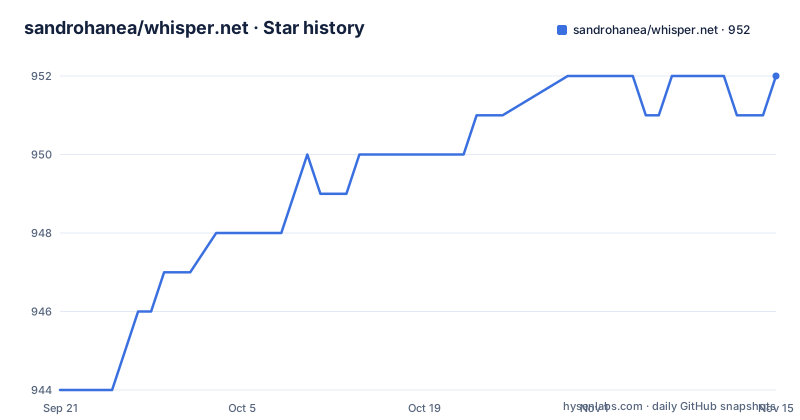
Star history
- sandrohanea/whisper.net952 ★ · +8
| Repository | 2026-09-21 | 2026-11-15 |
|---|---|---|
| sandrohanea/whisper.net | 944 | 952 |
8 Stars in the last 55 days, measured from the daily GitHub snapshot. Compare with other projects
Editorial analysis
The core package deliberately contains no runtime
The first thing to understand about this library is that the main package is empty of native code. `Whisper.net` carries the managed API and nothing else, so an install of that package alone gives you a project that compiles and cannot transcribe anything. The runtime arrives separately:
PM> Install-Package Whisper.net.AllRuntimesOr as a reference in the project file, which is also how a single runtime is pinned:
<PackageReference Include="Whisper.net.Runtime" Version="1.9.1" />The combined package is described as containing all available Whisper and Parakeet runtimes, including CUDA 13 and CUDA 12 GPU builds, so it is the broad hammer. The targeted version is the library package plus the one runtime you need:
<PackageReference Include="Whisper.net" Version="1.9.1" />Windows adds two requirements that are easy to miss: the Microsoft Visual C++ Redistributable for at least Visual Studio 2022 on x64, and Windows 11 or Windows Server 2022 or newer. Linux wants `libstdc++6` and `glibc 2.31`. Neither of those is checked for you at install time.
macOS prerequisites are written as TBD while the platform list promises Apple Silicon
Two of the runtime sections end their prerequisite list with the same unfinished line. For `Whisper.net.Runtime` it reads `macOS: TBD`, and the `Whisper.net.Runtime.NoAvx` section repeats it. Everything above that line is filled in, with Windows and Linux both spelled out, which makes the macOS entry read as an unfinished slot rather than a deliberate omission.
That matters because the supported platform list directly beneath it advertises `macOS x64, ARM64 (Apple Silicon)`, alongside Android, iOS, MacCatalyst, tvOS and WebAssembly. The library is documented as running on Apple hardware and as not having documented prerequisites for it. Anyone starting on a Mac is reading the supported list and getting no instruction from the prerequisite list.
The `Whisper.net.Runtime.CoreML` section is looser still. It has a description, an example link and a supported platform list of macOS x64, ARM64, iOS and MacCatalyst, with no prerequisite section at all. Every other accelerated runtime states that it needs everything from `Whisper.net.Runtime` plus its own toolkit, so the Apple hardware path is the one place where the requirement chain is simply absent rather than marked as pending.
The Apple route is also the only one without a version floor to check, which is exactly why the CoreML example directory is worth reading before you pick it.
The Vulkan runtime is Windows only and its toolkit link is malformed
The `Whisper.net.Runtime.Vulkan` section is the narrowest of the accelerated runtimes. Its supported platforms list contains one entry, `Windows x64`, where CUDA, CUDA 12 and OpenVino each list two. There is no Linux Vulkan build documented even though the other Linux-capable accelerated runtimes exist.
The toolkit requirement is where the section has a defect. The link is written as:
[Vulkan Toolkit (>= 1.4.321.1)](https://vulkan.lunarg.com/sdk/home)]A closing square bracket sits after the closing parenthesis, so the label and the target do not line up. The version floor is stated as 1.4.321.1, which is the useful part, and the URL inside the parentheses is the SDK download page. A reader following the rendered link, or a tool scraping these prerequisite lists to build a checklist, gets a malformed target either way.
Set against the other runtimes, the pattern is consistent everywhere else: CUDA needs a toolkit at or above 13.0.1, CUDA 12 needs at least 12.4.1, OpenVino needs at least 2024.4, and Vulkan asks for 1.4.321.1. Only the Vulkan entry is single-platform and only the Vulkan entry has a broken reference, so a Linux team looking for a non-NVIDIA accelerated path will find OpenVino as the documented option instead.
Four CPU instruction sets decide which package you can load
On x86 and x64 the requirement is spelled out as four separate instruction sets: AVX, AVX2, FMA and F16C. A CPU missing any of them cannot use the default runtime, and the documented answer is a second package, `Whisper.net.Runtime.NoAvx`. That is a compile-time choice made when you write the package reference, not a runtime fallback, so getting it wrong shows up as a failed load rather than a slow one.
The NoAvx variant is also the narrower of the two. Its supported platforms are Windows x86, x64 and ARM64, plus Linux x64, ARM64 and ARM, with no macOS entry and none of Android, iOS, MacCatalyst, tvOS or WebAssembly. The default runtime carries all of those. So the fallback package costs you the entire mobile and browser surface, which matters if your deployment target was one of those in the first place.
The build system treats the same four flags as a single switch, which is where the pairing is easiest to confirm:
AVX_SUPPORT=-DGGML_AVX=ON -DGGML_AVX2=ON -DGGML_FMA=ON -DGGML_F16C=ON
NOAVX_SUPPORT=-DGGML_AVX=OFF -DGGML_AVX2=OFF -DGGML_FMA=OFF -DGGML_F16C=OFF
The four documented instruction sets and the four build flags line up exactly, so there is no hidden fifth feature gating the choice.
CUDA 13 and CUDA 12 are separate packages and the combined install takes both
There are two NVIDIA runtimes, not one. `Whisper.net.Runtime.Cuda` contains the native library built with the CUDA 13 toolchain and requires the CUDA Toolkit at 13.0.1 or newer. `Whisper.net.Runtime.Cuda12` is the same library built against CUDA 12, for systems that only have 12.x drivers, and requires the toolkit at 12.4.1 or newer.
Both list Windows x64 and Linux x64 as their supported platforms. There is no CUDA build for ARM64 and none for macOS, which is the gap the CoreML runtime exists to fill on Apple hardware.
The consequence shows up in the combined package. `Whisper.net.AllRuntimes` is described as including both CUDA 13 and CUDA 12 GPU builds, so a workstation with a 12.x driver and no 13 toolchain ends up with the CUDA 13 package on disk alongside the one it can use. Nothing in the documentation describes a runtime probe or a selection step; the runtime choice is the package choice.
OpenVino is the third accelerated path, requiring the OpenVino Toolkit at 2024.4 or newer on Windows x64 and Linux x64. That is the documented option when you want hardware acceleration without an NVIDIA toolchain on the machine.
Parakeet is a second engine behind the same API and a separate five-package family
Parakeet is described as using a separate native engine and a standalone package family, so it is not a Whisper runtime with a different model file. It ships five backends of its own: `Whisper.net.Runtime.Parakeet` for CPU, `.NoAvx`, `.Cuda`, `.Cuda12` and `.Vulkan`, mirroring the Whisper naming scheme without the Whisper prefix.
The API does not change. You use the normal factory, builder and processor workflow and select the model family explicitly:
using var factory = WhisperFactory.FromPath(modelPath, new()
{
    ModelFamily = WhisperModelFamily.Parakeet,
});
Two limits are stated plainly. Parakeet covers the same Windows, Linux, macOS, Android, Apple mobile and WebAssembly platforms as the corresponding Whisper backend, and CoreML and OpenVINO are Whisper-only. So the Parakeet family has no CoreML and no OpenVino package, which on Apple silicon leaves the plain CPU package as the documented route.
The Vulkan entry also appears in the Parakeet table even though the Whisper Vulkan runtime is Windows x64 only, so the platform reach of each engine's Vulkan backend is not the same as the Whisper one and is worth confirming before you plan a deployment around it.
The packaging build produces a Metal runtime the documentation never describes
The nuget target in the Makefile packs a Metal runtime alongside the CoreML one:
ENGINE=whisper
RUNTIME_SUFFIX=$(if $(filter parakeet,$(ENGINE)),.Parakeet,)
RUNTIME_PACKAGE=Whisper.net.Runtime$(RUNTIME_SUFFIX)
ENGINE_PARAMETERS=-DWHISPER_NET_RUNTIME_NAME=$(ENGINE)
The package name is derived from a single engine variable, so setting `ENGINE=parakeet` changes `Whisper.net.Runtime` into `Whisper.net.Runtime.Parakeet` and passes the engine name into the native build. That is the mechanism behind the two package families, and it is visible in four lines of make.
The same target then runs `nuget pack` against `runtimes/Whisper.net.Runtime.Metal.nuspec` and, later, `runtimes/Whisper.net.Runtime.CoreML.nuspec`. The runtime documentation covers CoreML for macOS, iOS and MacCatalyst and never mentions a Metal runtime, so the build ships a package the reader-facing description does not account for. That is either an undocumented alternative or a leftover, and the documentation does not say which.
Android detection has its own wrinkle. The NDK variable falls back to the legacy Xamarin path `$HOME/Library/Developer/Xamarin/android-sdk-macosx/ndk-bundle` when `NDK_PATH` is unset, so a machine with only a current Android NDK installed has to set that variable explicitly.
The documented version is 1.9.1 while the recent releases are dated native library previews
Every package reference in the documentation pins `Version="1.9.1"`. The three most recent releases are named after what they contain rather than after a version: `preview-nativelibs-eacbd82` with the display name `Preview NativeLibs 20260906-0944 (eacbd82)`, `preview-nativelibs-371b5a7` and `preview-nativelibs-23ee035`. Each embeds a date, a time and a short commit hash, so the release feed is tracking native library rebuilds rather than a version ladder. The last push to the repository is dated 2026-10-01, which is recent, so this is not a dormant project; it is one where the packaged binaries move on a different schedule from the managed package version.
Support is routed in an unusual direction too. The documentation points at a custom GPT built inside ChatGPT that can answer from the code, previous issues and releases, and asks readers to try it before publishing a new issue.
The tree has the expected shape for a wrapper with a native dependency: `whisper.cpp` is present as its own entry alongside a `.gitmodules` file, and there are CMake files, a `runtimes/` directory of nuspec definitions, a `tools/` directory and three solution files covering the main build, a Windows x64 build and the MAUI tests. One entry does not belong to any of that, a `dump.txt` sitting at the repository root next to the license and the readme.
Editorial conclusion
whisper.net suits a .NET team that wants local speech to text without leaving the runtime, and the CPU package plus the AVX check is the shortest path to a working build. Three things to settle before you commit. Decide your runtime from the accelerator you actually have, because CUDA 13 and CUDA 12 are separate packages with different toolkit floors and the combined package installs both. Read the macOS prerequisites yourself, since the documented line is TBD while the platform list still advertises Apple Silicon. And check which version you are pinning, because the package references in the documentation say 1.9.1 while the recent releases are dated preview builds of the native libraries. It is a wrapper with a real build system behind it, and the gaps are documentation gaps rather than missing pieces, but you will be the one filling them in.
Frequently asked questions
What does the Whisper.net core package actually contain?
It holds the managed API and no runtime at all. You have to add `Whisper.net.Runtime` for CPU inference, or `Whisper.net.AllRuntimes` for every Whisper and Parakeet runtime including the CUDA 13 and CUDA 12 builds.
What are the prerequisites for whisper.net on Windows and Linux?
Windows needs the Microsoft Visual C++ Redistributable for at least Visual Studio 2022 on x64, plus Windows 11 or Windows Server 2022 or newer. Linux needs `libstdc++6` and `glibc 2.31`. The macOS line in the same list reads TBD.
How do I choose between the CUDA 12 and CUDA 13 whisper.net runtimes?
By your driver. `Whisper.net.Runtime.Cuda` is built with the CUDA 13 toolchain and needs the toolkit at 13.0.1 or newer, while `Whisper.net.Runtime.Cuda12` is for systems with only 12.x drivers and needs 12.4.1 or newer. Both list Windows x64 and Linux x64.
Does whisper.net support Parakeet on Apple hardware?
Parakeet has its own engine and five packages, including CPU, NoAvx, Cuda, Cuda12 and Vulkan, and covers the same platforms as the matching Whisper backend. CoreML and OpenVINO are Whisper-only, so there is no Parakeet CoreML package.
What happens if my CPU does not support AVX?
The x86 and x64 path requires AVX, AVX2, FMA and F16C. Without them you install `Whisper.net.Runtime.NoAvx`, which drops to Windows x86, x64 and ARM64 plus Linux x64, ARM64 and ARM, with no macOS, mobile or WebAssembly entry.
Official sources
Add this badge to your README
If you maintain this project, the badge below links readers to this analysis and shows its maintenance status from the daily GitHub snapshot. Paste the markdown into your README; add ?metric=license or ?metric=stars to the image URL for a different field.

[](https://hysenlabs.com/projects/sandrohanea-whisper-net)Star history chart for your README
[](https://hysenlabs.com/projects/sandrohanea-whisper-net)Was this useful?