sanity-io/sanity: the Studio half of a headless CMS
Sanity Studio – Rapidly configure content workspaces powered by structured content
At a glance
- What is it?
- A React and TypeScript content workspace with 6,327 stars and an MIT license, published as one npm package out of a Turbo and pnpm monorepo, and carrying a data-loss bug in its own release history.
- Who is it for?
- The practical read on this repository is narrower than the star count suggests. Sanity Studio is the editing application, MIT licensed and self-hosted by the team that runs it, while Content Lake is a separate hosted service that the MIT license does not cover.
- Can I use it commercially?
- Yes. MIT is a permissive licence: you can use, modify and sell software built on it, as long as you keep its copyright and licence notices.
- Is it still maintained?
- Yes. The repository received new commits within the last day.
- What is it written in?
- Mainly TypeScript, according to GitHub's language statistics.
Answers come from the project's GitHub data, last synced on October 23, 2026, and from our analysis. They are not legal advice.
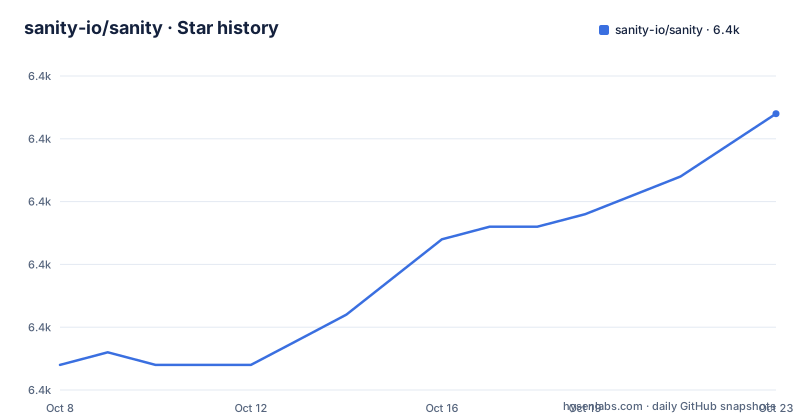
Star history
- sanity-io/sanity6,372 ★ · +20
| Repository | 2026-10-08 | 2026-10-23 |
|---|---|---|
| sanity-io/sanity | 6.4k | 6.4k |
20 Stars in the last 15 days, measured from the daily GitHub snapshot. Compare with other projects
Editorial analysis
What this repository is and what it is not
The GitHub description names the product as Sanity Studio and frames it as a way to rapidly configure content workspaces powered by structured content. That phrasing is accurate, and narrower than the repository name implies. What is published under sanity-io/sanity is the editing application: a single-page app written in TypeScript that a content team installs, configures and runs themselves.
The README frames this in terms of the Composable Content Cloud, and describes Sanity Studio as an open-source single-page application that is fast to set up and quick to configure, with a complete customization framework that lets you tailor the workspace as your needs grow. The feature list underneath breaks into three groups. Studio covers the editing surface itself, including a plug-in architecture, custom components, theming, field validations written in JavaScript, and an advanced block editor for structured content. Developer experience covers the client APIs for reading, writing, importing, exporting, going back in time and listening for updates, plus GROQ and a GraphQL API. Structured content covers the asset pipeline and Portable Text, described as rich text that can be serialized into any markup language.
The repository profile matches a project that has shipped for years rather than one in early traction. Language is TypeScript, license is MIT, default branch is main, stars sit at 6,327, forks at 553, and there are 226 open issues. The last push recorded is 2026-09-22. Topics listed are cms, headless, react, reactjs, real-time and realtime.
What is not in this repository matters as much as what is. The README states plainly that Sanity hosts your content in a real-time, hosted data store called Content Lake. Content Lake is a service operated by Sanity, not a directory in this tree. The MIT license covers the Studio application and its code. If your requirement is a content store you operate yourself, this repository does not supply one, and nothing in the README pretends otherwise.
The quickstart always resolves to the newest version
The quickstart is the entire getting-started path the README offers, and it is one command with two alternates.
npm create sanity@latest

# With other package managers:
yarn create sanity@latest
pnpm create sanity@latest
Every one of those lines ends in `latest`. There is no pinned version, no minimal template name, and no note about which Studio release the output will be locked to. The scaffolded project inherits whatever is newest at the moment you run it.
The release notes use a different command, `npm install sanity@latest`, because that is an upgrade rather than a scaffold. Two commands, different jobs, same unpinned resolution. That distinction is the one detail worth internalizing before reading anything else about upgrades.
The repository itself is pinned to a concrete version, and you can see it in the root `package.json`: `"version": "6.15.0"`. That is the private workspace root, not the package you install, and it tracks the release line the maintainers are building. The published `sanity` package is what your project depends on, and nothing in a scaffolded project records which build of it you got beyond whatever sits in the lockfile.
The data-loss window, and how to audit your own install
Three releases sit within three days of each other in this repository's history, and the middle one is the interesting one.
v6.14.0 was published on 2026-09-15. Its release body carries a note stating that this version has a potential data-loss bug when working with Portable Text fields, that the issue is resolved in 6.14.1, and that you should upgrade with `npm install sanity@latest`.
v6.14.1 was published on 2026-09-16, one day later. Its note is blunter: it fixes a data-loss bug present in 6.9.2 through 6.14.0, and those versions are now deprecated.
That range is the part most people will skim past. The bug is described as belonging to 6.14.0, but the deprecation covers everything from 6.9.2 onward. The exposure window is therefore much wider than one bad release, and it includes any Studio you created or upgraded in the weeks before 2026-09-15. The fix commit in the v6.14.1 table gives the mechanism: a change labelled never rewrite a Portable Text block removal to a whole-field unset. Deleting one block inside a field could end up unsetting the entire field.
Here is the uncomfortable part for anyone running a Studio in production. That signal only exists in GitHub release notes. The README never mentions the bug, the quickstart never mentions the bug, and a project you scaffolded during the window contains nothing in its own files telling you to care. This is the normal failure mode of a CMS that ships as a floating version rather than a pinned one.
The check is one command. Run `npm ls sanity` inside your Studio directory and read the resolved version. If it is below 6.14.1, you are on a version its own maintainers have deprecated, and the fix is the upgrade command above. Worth doing before you evaluate anything else about this project, because a data-loss defect in the structured-content editor undercuts the main argument for structured content.
Three different names for what people call one package
The repository, the workspace root and the published package all carry different names, and the mismatch confuses people who try to build from source.
The GitHub repository is `sanity`. The root `package.json` is named `sanity-root`, is marked `"private": true`, and declares `"type": "module"`. The package you install from npm is `sanity`. So the file at the root of this repository is not the package that most people arrive wanting.
What the root file actually is, is a task runner for a monorepo. Three scripts show the shape of it.
"bootstrap": "pnpm install",
"build": "turbo run build --filter='./packages/*' --filter='./packages/@sanity/*'",
"check": "npm-run-all build --parallel check:*",
pnpm is the package manager, Turbo is the build orchestrator, and the filters show the actual source layout: regular packages in `packages/` and scoped packages in `packages/@sanity/`. The `check` script fans out to a family of checks, and the ones defined in this file give you the toolchain directly. Formatting is `oxfmt`, linting is `oxlint`, dependency auditing is `knip`, and test running is pnpm-mediated Vitest configured through `vitest.config.mts`.
Two other files in the tree change how you should read the project. `ARCHITECTURE.md` is the place to start if you intend to modify the Studio rather than use it. `lefthook.yml` sits alongside `knip.jsonc` and the two oxlint and oxfmt config files, which means git hooks are managed in-repository rather than assumed from a global setup. `catalog-info.yaml` indicates the packages are registered in Backstage, and `vercel.json` is present for preview deployments.
The practical guidance is narrow. If you consume Sanity, none of this applies and `npm install sanity` is the whole story. If you clone it, read `packages/` and `ARCHITECTURE.md`, and treat every script in the root `package.json` as maintainer tooling.
The e2e environment file still points at an older domain
The repository ships a `.env.example` for running its end-to-end tests locally, and copying it is the documented first step. It is worth reading before you do, because it disagrees with the rest of the project on the domain name and it commits real identifiers.
SANITY_E2E_SESSION_TOKEN=
SANITY_E2E_PROJECT_ID=ittbm412
SANITY_E2E_DATASET=staging
SANITY_E2E_BASE_URL=http://localhost:3339
The comments above those lines point readers to `https://www.sanity.work/manage/` for generating a token, and reference a second project id, 1d4femd5, for CLI tests. The README and the docs links throughout the repository use sanity.io. Both forms of the domain exist in the project's own files.
The practical consequence is narrow but real. The file is a fixture, not a working configuration. The session token is blank by design and must be your own, and the project id and dataset refer to test resources belonging to the maintainers. If you point your own end-to-end run at the committed values you will get an authentication failure rather than a test result. Substitute your own token, project and dataset, and use the file for its variable names and its headless toggle rather than for its values.
The rest of the tree points in a more unusual direction. Alongside the usual `packages/`, `dev/`, `docs/`, `e2e/`, `perf/` and `scripts/` directories, there are `AGENTS.md`, `CLAUDE.md`, a `skills/` directory with a `skills-lock.json` manifest, and hidden directories named `.agents/`, `.claude/` and `.cursor/`. A CMS Studio repository shipping agent instruction files and a locked skill manifest as first-class tracked content is unusual, and it tells you something about how the project expects to be worked on. `zizmor.yml` at the root configures a GitHub Actions security auditor, which is a reasonable thing to see in a repository with this many workflow-adjacent integrations.
Reading a Sanity release from its commit table
The most useful part of a Sanity release body is the part most release notes leave out. Each of the three recent releases ends with a table of conventional commits, author handles, messages and full commit hashes.
The v6.15.0 table runs from `fix(validation): accept allowed object array selections` through `fix(core): read the workbench auth token through the SDK message bus`, `fix(core): restore padding bottom on scrollable dialogs` and a dependency bump of sanity-sdk to 3.2.0 from a bot account named squiggler-app. Every line carries a pull request number and a forty-character hash.
That format lets you answer a question a marketing summary cannot: what actually changed in a minor bump. A validation fix and a scroll-padding fix are not the same class of change, and the bot-authored dependency bumps in particular are the part most release notes bury. Because each hash resolves to a commit, you can read the diff before you decide whether to upgrade, rather than after.
The bot account name is also a small signal about how this repository runs. Automated dependency bumps arriving as pull requests on a six-figure monthly cadence means the release line moves often, which is the same property that produced the unpinned quickstart and the three-releases-in-three-days window described earlier. Frequent releases and quiet upgrades are the same tradeoff seen from two directions.
Editorial conclusion
The practical read on this repository is narrower than the star count suggests. Sanity Studio is the editing application, MIT licensed and self-hosted by the team that runs it, while Content Lake is a separate hosted service that the MIT license does not cover. That split is stated plainly in the README and is the first thing to settle before evaluating the project. The second is version discipline. The quickstart resolves to the newest published version on every run, and the release history shows a data-loss bug in v6.14.0 that was deprecated across 6.9.2 through 6.14.0 in a single day. Nothing inside a project you scaffolded during that window will tell you. Run `npm ls sanity` in your Studio, compare the result against 6.14.1, and upgrade if the number is lower. Third, if you are contributing rather than consuming, start reading at `packages/` and `ARCHITECTURE.md`; the root `package.json` is named `sanity-root`, is marked private, and exists to drive Turbo tasks across the workspace.
Frequently asked questions
Does the MIT license on this repository cover Sanity as a whole?
It covers the Studio application, which is the code in this repository. The README states that Sanity hosts your content in a real-time hosted data store called Content Lake, and that store is a service rather than part of this tree. Read the README's description of the hosted data store before assuming a self-hosted deployment is available.
How do I find out whether my Studio is on a deprecated version?
Run `npm ls sanity` in your Studio directory and read the resolved version. The v6.14.1 release notes deprecated every version from 6.9.2 through 6.14.0 because of a Portable Text data-loss bug. Anything below 6.14.1 is in that range.
Why does the repository's root package.json not match the package I install?
The root file is named `sanity-root` and is marked private. It is a Turbo and pnpm task runner for the monorepo, with scripts that filter across `packages/` and `packages/@sanity/`. The package published to npm as `sanity` is built from those directories, not from the root file.
Is the quickstart version safe to run without pinning?
Today it resolves to 6.15.0 or later, which is past the 6.14.1 fix. The risk is historical rather than current: a project scaffolded between the 6.9.2 and 6.14.0 range carries no marker of its own that it is deprecated, and the README will not tell you. Pin or check the installed version after scaffolding.
Official sources
Add this badge to your README
If you maintain this project, the badge below links readers to this analysis and shows its maintenance status from the daily GitHub snapshot. Paste the markdown into your README; add ?metric=license or ?metric=stars to the image URL for a different field.

[](https://hysenlabs.com/projects/sanity-io-sanity)Star history chart for your README
[](https://hysenlabs.com/projects/sanity-io-sanity)Was this useful?