Privileges: timed macOS admin grants, two macOS 13 builds, and an MDM control plane
This application gives Mac users in enterprise environments control over the administration of their machines by elevating their access level to administrator privileges on macOS. Users can set a timeframe in the application's settings to perform specific tasks, such as installing or uninstalling applications.
At a glance
- What is it?
- SAP's Privileges hands standard macOS accounts a time-boxed administrator grant, and most of what makes it usable across a fleet sits outside the app: configuration profiles, tamper protection and a command line tool.
- Who is it for?
- Privileges is the right pick for a fleet running standard accounts that wants timed elevation without handing out an admin password, and the wrong pick for anyone who needs a hard guarantee that rights end. Adoption is low risk on macOS 26.x or 27.x, but an MDM team must decide which of the two builds introduced in Privileges 2.2.0 to deploy, set the expiry interval through a configuration profile, and accept that a local admin who deletes the application keeps the grant.
- Can I use it commercially?
- Yes. Apache-2.0 is a permissive licence: you can use, modify and sell software built on it, as long as you keep its copyright and licence notices.
- Is it still maintained?
- Yes. The repository last received commits 1 day ago.
- What is it written in?
- Mainly Objective-C, according to GitHub's language statistics.
Answers come from the project's GitHub data, last synced on October 23, 2026, and from our analysis. They are not legal advice.
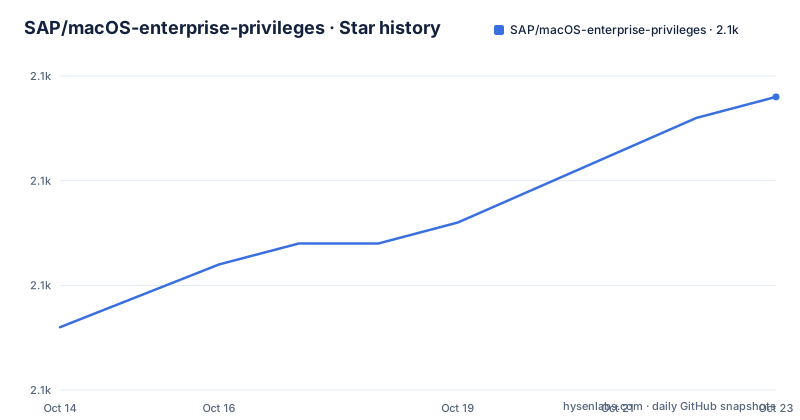
Star history
- SAP/macOS-enterprise-privileges2,099 ★ · +11
| Repository | 2026-10-14 | 2026-10-23 |
|---|---|---|
| SAP/macOS-enterprise-privileges | 2.1k | 2.1k |
11 Stars in the last 9 days, measured from the daily GitHub snapshot. Compare with other projects
Editorial analysis
Standard accounts need a grant that ends on its own
Users in enterprise environments are the stated audience: the project description calls it a way to give Mac users control over the administration of their machines by elevating their access level to administrator privileges on macOS. The security argument takes one sentence, that using a standard user account instead of an administrator account adds an extra layer of security to your Mac and is considered a security best practice.
Everything else follows from that split. Privileges gives users temporary administrator privileges when needed without granting permanent admin rights, and a user who needs to install or uninstall an application sets a timeframe in the application settings, does the work, then lets the window close. No shared administrator credential has to change hands at the desk, and the account drops back to standard status without a visit from IT.
The audience claim in the README is wider than the feature list. It says all users, including developers, can benefit from using Privileges, yet configuration profiles, tamper protection, a menu bar status item and webhooks are built for whoever administers a Mac. Treat the developer framing as a pitch; treat the profile and tamper features as the actual product.
One expiry interval, manual renewal, and rights dropped at login
Mechanically, the 2.x line replaced per-request thinking with a single interval. The feature list names a unified expiration interval for administrator privileges, the ability to renew expiring administrator privileges at any time, and revocation of admin rights at login.
A status item for the macOS menu bar shows the current state, and actions can be attached to the privilege change itself, so a script or a package runs at the moment rights arrive or leave rather than on a clock of its own. For a support team the useful part is the boundary: a grant ends at a predictable point even when the user closes the window instead of logging out, and a second click extends an expiring grant without rebooting the Mac.
What none of this explains is the internal path. The README never says how the account is moved into and out of the admin group, which helper binary performs the change, or whether that step leaves a record an auditor could read. A team with a compliance requirement for elevation logging will not find the answer in the README.
Two builds ship because macOS 13 kills the constrained one
The supported-versions list runs from macOS 12.x up to macOS 27.x, with one entry carrying an asterisk. The note attached to it says macOS 13 incorrectly reports a launch constraint violation and immediately terminates the application.
Starting with Privileges 2.2.0 the project therefore provides two versions of the application, one with launch constraints and one without, and recommends using the version with launch constraints whenever possible. That turns a bug report into a packaging decision somebody in the deployment pipeline has to answer, and nobody in the fleet should be left guessing which one is on the machine.
The list also stops at 12.x, so older hardware has no listed build at all, and a newly upgraded fleet needs the new major version added to that list before an administrator can push the tool. The last push was on 2026-09-17, so the two-build split is current packaging behaviour rather than a historical note.
macOS configuration profiles steer the app, tamper protection guards it
A macOS configuration profile is the control plane. As of Privileges 1.0.5 it has been possible to manage settings for Privileges or the PrivilegesCLI command line tool with a configuration profile, and the README links a wiki page covering that topic in detail.
Installation and Uninstallation each have their own wiki page, so the whole life cycle runs on the same channel an organisation already uses for device management. The feature list calls this extensive MDM support for broad device and policy control, and the 1.0.5 change is what turns a per-user settings screen into a fleet-wide policy value.
Tamper protection is the counterweight, and it has a floor: it requires macOS 13 or newer. That is the awkward corner of the whole project. The same major version the README calls out for falsely reporting a launch constraint violation is the minimum for the feature that stops a user from undoing the grant, so on macOS 13 the floor and the bug land on the same version.
PrivilegesCLI, AppleScript and webhooks widen the surface
Beyond the menu bar, the current line reaches into automation. The command line tool supports Touch ID, AppleScript support is listed, and webhooks can tell something outside the Mac when privileges change.
Localization covers 41 languages, and an installer package is part of the shipped feature set rather than something an administrator assembles. Combined with the CLI, that means a Mac fleet can request and observe elevation from a script, from a management tool, or from a person at the keyboard, with the same underlying interval in each case.
Connectivity is stated in the same list: the application works completely offline with no internet connection required. That claim covers the elevation path itself. Webhooks need a reachable endpoint, and the README does not say whether events queue while a Mac has no route out or are dropped, so a deployment that wires them into a ticketing system has to verify that path on a disconnected machine.
Objective-C sources sit beside REUSE compliance metadata
The repository is mostly source plus compliance metadata. The nine top-level entries are:
CODE_OF_CONDUCT.md
CONTRIBUTING.md
LICENSE
LICENSES/
README.md
REUSE.toml
application_management/
readme_images/
source/
`source/` carries the Objective-C code that matches the declared primary language, and `application_management/` holds the configuration profile payload used for MDM delivery. `REUSE.toml` implements the REUSE standard, and the sibling directory beside it holds one file per third-party component, which is what the badge at the top of the README and the licensing note point to.
Copyright runs from 2018-2026 to SAP SE or an SAP affiliate company and Privileges contributors, under the Apache-2.0 licence. There is no shell command for installation anywhere in the README: setup is handed to the Installation page of the project wiki, and the two newest builds listed are 2.6.0 and 2.5.3.
A local admin can delete the app, so revocation is not a guarantee
The Security callout in the README deserves a close read. Local administrators on macOS have extensive capabilities to make changes to a Mac, and that includes completely removing the Privileges application. The conclusion the project draws is blunt: Privileges cannot guarantee that elevated permissions will be removed from the user account at all or on any specific schedule.
Every timing control described so far describes the behaviour of a Mac that still has the tool installed. Revocation at login, the unified expiration interval and manual renewal all assume cooperation from the operating system underneath.
Tamper protection, which needs macOS 13 or newer, narrows the gap without closing it. Nothing in the README describes an out-of-band way for an administrator to end a grant early on a Mac that has already lost the application, so a fleet with a strict offboarding deadline needs something beyond this tool.
Permanent admin accounts are the alternative it argues against
The alternative in view is the setup most fleets still run: keep everyone on administrator accounts, or hand out one admin credential. Privileges rejects that model in a sentence, pointing instead at standard accounts as the security best practice, and the feature list reads as an argument against permanence rather than a list of extras.
The real difference in approach shows up in what an administrator can verify. The 1.0.5 change moved settings into a macOS configuration profile, so policy travels with the device record instead of with a person clicking through a settings pane. Privileges 2 added automation on top of that through PrivilegesCLI with Touch ID, AppleScript support, webhooks, and actions that run on privilege change.
What the README does not offer is a comparison against sudoers, Kerberos-based elevation or commercial privilege brokers, and it publishes no timing figures for how long an elevation takes. Read the wiki and the `source/` directory before deciding, because the mechanism behind the interval is the part a procurement review will ask about.
Editorial conclusion
Privileges is the right pick for a fleet running standard accounts that wants timed elevation without handing out an admin password, and the wrong pick for anyone who needs a hard guarantee that rights end. Adoption is low risk on macOS 26.x or 27.x, but an MDM team must decide which of the two builds introduced in Privileges 2.2.0 to deploy, set the expiry interval through a configuration profile, and accept that a local admin who deletes the application keeps the grant. The README publishes no elevation timings and no comparison with sudoers or commercial brokers, so measure the first month on your own hardware.
Frequently asked questions
Which macOS versions does Privileges support?
The current version covers macOS 27.x, 26.x, 15.x, 14.x, 13.x and 12.x. macOS 13.x carries a note saying that release incorrectly reports a launch constraint violation and immediately terminates the application.
Why does SAP ship two builds of Privileges?
Starting with Privileges 2.2.0 the project provides two versions, one with launch constraints and one without, because macOS 13 incorrectly reports a launch constraint violation and kills the app. The project recommends using the version with launch constraints whenever possible.
Can an administrator set the expiry time and the tool settings through MDM?
Yes. As of Privileges 1.0.5 settings for Privileges or the PrivilegesCLI command line tool can be managed with a macOS configuration profile, and the README links a wiki page with the details. Tamper protection is also available, but it requires macOS 13 or newer.
Does Privileges need an internet connection to grant admin rights?
No. The feature list states that the application works completely offline with no internet connection required. Webhooks are also offered, and the README does not explain what happens to a webhook while the Mac has no network.
Does Privileges guarantee that admin rights are removed when the timer runs out?
No. The README's security note says local administrators can completely remove the application from a Mac, so Privileges cannot guarantee that elevated permissions are removed at all or on any specific schedule.
Official sources
Add this badge to your README
If you maintain this project, the badge below links readers to this analysis and shows its maintenance status from the daily GitHub snapshot. Paste the markdown into your README; add ?metric=license or ?metric=stars to the image URL for a different field.

[](https://hysenlabs.com/projects/sap-macos-enterprise-privileges)Star history chart for your README
[](https://hysenlabs.com/projects/sap-macos-enterprise-privileges)Was this useful?