GameHub Lite: how 3,385 deletions reshape a cloud gaming launcher
GameHub Lite is a community-maintained modified version of GameHub for education purposes
At a glance
- What is it?
- GameHub Lite is a patch set, not an app: 3,385 deletions, 2,856 additions and 223 smali modifications turn one pinned GameHub 5.1.0 APK into a 52MB launcher with no telemetry and no login. Every build depends on that exact base package and on apktool 2.12.1.
- Who is it for?
- GameHub Lite is a focused patch set rather than a product with a roadmap: one base APK, one pinned apktool, and a community API, CDN and Discord standing in for the vendor it strips out. It suits an Android user who wants a launcher without analytics, without a login and without the 118MB package, and who accepts rebuilding from GameHub 5.1.0 whenever upstream moves.
- Can I use it commercially?
- Not without permission. GitHub finds no licence file in the repository, and without a licence all rights are reserved by default: you may read the code but not reuse it. Check the README, or ask the authors, before using it.
- Is it still maintained?
- Yes. The repository last received commits 112 days ago.
- What is it written in?
- Mainly Smali, according to GitHub's language statistics.
Answers come from the project's GitHub data, last synced on October 23, 2026, and from our analysis. They are not legal advice.
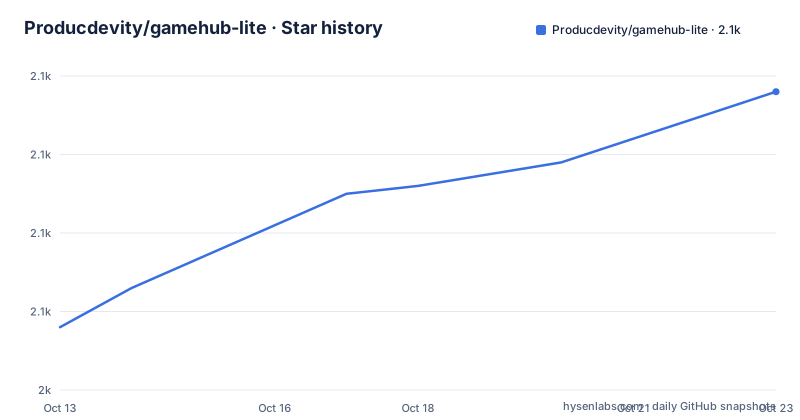
Star history
- Producdevity/gamehub-lite2,078 ★ · +30
| Repository | 2026-10-13 | 2026-10-23 |
|---|---|---|
| Producdevity/gamehub-lite | 2k | 2.1k |
30 Stars in the last 10 days, measured from the daily GitHub snapshot. Compare with other projects
Editorial analysis
GameHub Lite ships patches and scripts, not a built APK
The primary language is Smali, which is the first clue about the shape of this project: it rewrites Android bytecode rather than shipping an application. The top-level tree holds `patch.sh`, `generate-patches.sh`, a `patches/` directory and documentation files, and no binary APK sits at the root. You supply the proprietary input, GameHub 5.1.0, and the scripts do the rest.
The size of the edit appears twice in the repository, once in `stats.txt` inside `patches/` and once in the patch contents table: 3,385 deletions, 2,856 additions and 223 modifications. Deletions cover analytics and tracking code, SDKs such as Umeng Analytics, JPush, Firebase Analytics and Tencent login, plus native libraries including `libumeng-spy.so`, `libcrashsdk.so` and `libalicomphonenumberauthsdk_core.so`. Assets go as well: a splash video, auth videos and an emoji font take roughly 30MB out of a package that falls from 118MB to 52MB, a cut the README puts at -56%.
Additions are the more interesting half, because they stand in for what was taken out. A community CDN supplies a custom splash and intro video, a community API feeds a custom news page, and the build gains local game ID copy functionality and improved offline behaviour. Permissions for location, contacts, phone state and ad tracking are stripped in the same run.
Fetch apktool, supply GameHub 5.1.0, then run patch.sh
Prerequisites are few: the adb tool from Android Studio or the `platform-tools` package, a JDK, and apktool at one specific version. The pinned jar lands in a `tools/` directory:
mkdir -p tools
curl -L https://github.com/iBotPeaches/Apktool/releases/download/v2.12.1/apktool_2.12.1.jar \
  -o tools/apktool_2.12.1.jar
Distro packages work too, and all of them pull a JDK 17 toolchain:
# macOS
brew install apktool openjdk

# Ubuntu/Debian
sudo apt install apktool openjdk-17-jdk

# Arch
sudo pacman -S apktool jdk17-openjdk

# Fedora (dnf):
sudo dnf install apktool java-17-openjdk
Drop the base package at `apk/GameHub-5.1.0.apk` and run the patcher, which decompiles, deletes, patches, adds files, rebuilds and signs in that order:
./patch.shWhat lands afterwards is a directory called `output/` holding the rebuilt APK. Installing it over adb needs nothing more than:
adb install output/GameHub-Lite.apkNo version number is typed anywhere, because the one inside the filename is pulled out of the source APK.
apktool 2.12.1 is pinned because decoded XML keeps moving
Version pinning is the sharpest engineering decision in the repository, and the reason given is concrete rather than ritual. Patches are generated against apktool 2.12.1, and newer apktool versions can rewrite decoded XML enough to break patch application. Unified diffs do not forgive whitespace or attribute reordering, and `AndroidManifest.xml.patch` sits at the top of `diffs/`, which is exactly the artefact such a rewrite would disturb. `patch.sh` picks up `tools/apktool_2.12.1.jar` automatically whenever that file is present, so the pinned jar quietly overrides whichever apktool your package manager installed.
The platform notes are honest about their edges. macOS, Ubuntu, Debian, Arch and Fedora each get a named package command. The Windows entry declines to give instructions at all, points to apktool.org, asks for a JDK 17 from Oracle or AdoptOpenJDK, and adds a single line stating it was not tested but should work in WSL2. That is the entire Windows story: no native path, no tested configuration.
Because the input package has to match, version drift is the first failure a new user meets, and the build script has no way to detect a substituted APK before apktool starts decoding it.
Debug signing by default, three environment variables for your own keystore
The last of the six steps signs the output, and by default the patch generates a debug keystore so the result installs without ceremony. That default suits personal use and fits nothing you hand to anybody else. Overriding it takes three environment variables passed on one line:
KEYSTORE="./keystore/release.keystore" \
KEYSTORE_PASS="your_password" \
KEY_ALIAS="your_key_alias" \
./patch.sh
Exporting them first works the same way. Looking up the alias for a keystore you already own comes down to:
keytool -list -keystore ./keystore/release.keystoreNothing else about the build reacts to those variables, so a wrong alias surfaces at signing time rather than at decode time, after the whole patch set has already been applied.
One detail is worth stating plainly: no keystore ships with the repository, and the example path points at a file you have to create yourself and keep out of version control. Anyone reading the sample command as a working setup will be looking for something that is not there.
Five package variants, four of them named after other apps
A single pass can emit five differently named packages: `GameHub-Lite-v{VERSION}.apk`, `GameHub-Lite-v{VERSION}-antutu.apk`, `GameHub-Lite-v{VERSION}-alt-antutu.apk`, `GameHub-Lite-v{VERSION}-ludashi.apk` and `GameHub-Lite-v{VERSION}-pubg.apk`. Each carries a different package name, and the difference is not cosmetic. The base build keeps `gamehub.lite`, chosen so it installs side by side with stock GameHub. The other four borrow identifiers from elsewhere entirely: `com.antutu.ABenchMark` and `com.antutu.benchmark.full` for the AnTuTu and Alt-AnTuTu builds, `com.ludashi.aibench` for Ludashi, and `com.tencent.ig` for the PUBG build, which is the name Tencent ships PUBG Mobile under on Android.
The stated reason is performance optimizations on certain devices. How a benchmark run or a game session reacts to each of those four identifiers is not explained anywhere in the repository, and that gap matters more than the stated reason, since the identifier is the entire difference between the builds.
`RELEASE=true` builds all 5 variants in one pass, and it is the only documented use of that flag.
One inconsistency survives here. The quick start installs `output/GameHub-Lite.apk`, while the variant table names every output with a version suffix, so the unversioned filename a beginner follows is not among the five the table lists.
Removing the login moves runtime duties to a community API and CDN
GameHub Lite drops the account requirement so the app opens without logging in, and that is the feature users notice first. It also means nothing behind the build belongs to the vendor any more. The news page is rebuilt on a community API, the splash and intro video come from a community CDN, and security reports go through a private channel over the EmuReady Discord instead of a public issue tracker. The repository homepage points at emuready.com.
The dependency that deserves naming is the invisible one. No host, endpoint or fallback for that API or CDN is written down anywhere, so there is nothing to mirror, watch or point at when a lookup stops answering. Read that against the addition of offline support and improved offline behaviour, and you get a package that promises to work without constant network connectivity while carrying two features that need somebody else's server to stay intact.
Documentation is thinner still in places. A Japanese README sits beside the English one and a SECURITY.md describes the private reporting route, but neither the topics list nor the prose explains what `revanced/` or `extension/` contribute, even though both directories sit at the top level.
One pinned base APK against tags that follow the source
The patcher is written against GameHub 5.1.0 and nothing else. The troubleshooting notes are blunt about it: use 5.1.0 exactly, confirm the MD5 hash matches the expected value, and if the diffs refuse to apply, regenerate them from your own package. A mismatch between your working copy and the expected base is the documented cause of a failed patch, and no partial tolerance is offered.
The tags on the repository run v5.1.6, v5.1.7 and v5.1.8, and the version inside every output filename is extracted automatically from the source APK rather than typed into a file. Set those two facts beside each other and the picture gets murky: the numbering that labels builds follows whatever package a maintainer patched, while the instructions name one fixed input. Someone who downloads GameHub 5.1.8 and runs `./patch.sh` against it is outside anything described here, and the offered remedy is to regenerate the patch set for that version rather than wait for a matching diff.
That makes the MD5 check the cheapest step in the whole repository, and the one step nobody can skip.
Two documented ways to change a build, and files the README ignores
There are two ways to alter what ships. The quick route decompiles a Lite build, lets you edit smali by hand, then rebuilds:
apktool d apk/GameHub-Lite.apk -o work/liteapktool b work/lite -o work/test.apkThe durable route regenerates the whole patch set from two inputs:
./generate-patches.sh [path/to/original.apk] [path/to/lite.apk]The difference is where the work survives. Hand editing wins for a single experiment and discards the change unless `generate-patches.sh` runs afterwards, at which point the diffs, the `files_to_delete.txt`, `files_to_add.txt` and `files_to_patch.txt` lists and the new files are all rewritten. Reproducible patching is what the repository is built around; manual smali work exists only to produce the input that feeds it.
Then there is the surface the README never explains. `validate-patches.sh`, `revanced/`, `extension/` and a `docs/` directory all sit at the top level, and none appears in the prerequisites, patching or troubleshooting sections. A validation script is exactly what a fork owner would want before publishing, so what it checks is worth asking about in the Discord rather than guessing from the name. The same gap shows up in the prose itself, which carries two sections headed identically and a Build errors entry with nothing under it. The repository records no licence identifier, and the last push was on 2026-07-03.
Editorial conclusion
GameHub Lite is a focused patch set rather than a product with a roadmap: one base APK, one pinned apktool, and a community API, CDN and Discord standing in for the vendor it strips out. It suits an Android user who wants a launcher without analytics, without a login and without the 118MB package, and who accepts rebuilding from GameHub 5.1.0 whenever upstream moves. It does not suit anyone who needs store installation, vendor support or automatic updates. Verify two things first: that the MD5 hash of your APK matches the expected value, and that `tools/apktool_2.12.1.jar` sits in the tools directory.
Frequently asked questions
What does GameHub Lite change in the stock GameHub app?
It removes Umeng analytics, Firebase, JPush and crash reporting, strips cloud streaming, Xbox Cloud Gaming and social features, drops the login requirement, and changes the package name to `gamehub.lite` so both apps can sit on one device. The package shrinks from 118MB to 52MB.
How do I install GameHub Lite on an Android device?
Place the GameHub 5.1.0 package at `apk/GameHub-5.1.0.apk`, run `./patch.sh`, then install the rebuilt APK with `adb install output/GameHub-Lite.apk`.
Why does the build require apktool 2.12.1?
Newer apktool versions can rewrite decoded XML enough to break patch application. `patch.sh` uses `tools/apktool_2.12.1.jar` automatically whenever that file is in the tools directory.
Do I need my own keystore to build GameHub Lite?
No. The patch generates a debug keystore by default, and `KEYSTORE`, `KEYSTORE_PASS` and `KEY_ALIAS` override that default when you want your own signing key.
Can GameHub Lite be built on Windows?
The README gives no native Windows steps and states in one line that it was not tested but should work in WSL2. It points to apktool.org and a JDK 17 from Oracle or AdoptOpenJDK instead.
What should I check when the patches fail to apply?
The troubleshooting notes attribute patch failures to an APK version mismatch: use GameHub 5.1.0 exactly, check that the MD5 hash matches the expected value, or regenerate patches with your own version.
Official sources
Add this badge to your README
If you maintain this project, the badge below links readers to this analysis and shows its maintenance status from the daily GitHub snapshot. Paste the markdown into your README; add ?metric=license or ?metric=stars to the image URL for a different field.

[](https://hysenlabs.com/projects/producdevity-gamehub-lite)Star history chart for your README
[](https://hysenlabs.com/projects/producdevity-gamehub-lite)Was this useful?