Seven install routes, and a manifest that says it is not the manifest
The reference implementation of Sass, written in Dart.
At a glance
- What is it?
- dart-sass documents seven ways to install itself, from two Windows package managers to a standalone archive to the package registry, and the browser build drops three of the documented JavaScript entry points because it has no filesystem. Two details are worth a second look. The package manifest in the repository opens by saying it is not the official one and exists so GitHub can draw a dependency graph. And the browser example on a content delivery network pins a dependency to a major version the project itself no longer tests against.
- Who is it for?
- Choose the install route that matches where the compiler runs, not the one that is easiest to type. If it runs on a build machine, a package manager gives you an upgradeable executable; if it runs in a browser, you are limited to the string entry points and a custom importer, which is a different library with the same name.
- Can I use it commercially?
- Yes. MIT is a permissive licence: you can use, modify and sell software built on it, as long as you keep its copyright and licence notices.
- Is it still maintained?
- Yes. The repository last received commits 3 days ago.
- What is it written in?
- Mainly Dart, according to GitHub's language statistics.
Answers come from the project's GitHub data, last synced on November 14, 2026, and from our analysis. They are not legal advice.
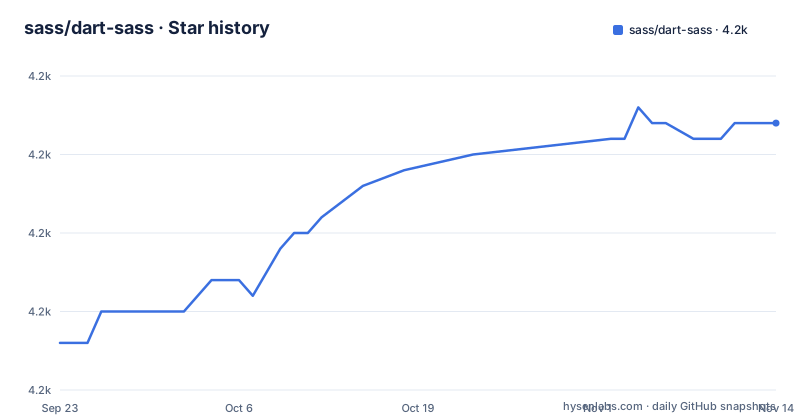
Star history
- sass/dart-sass4,237 ★ · +14
| Repository | 2026-09-23 | 2026-11-14 |
|---|---|---|
| sass/dart-sass | 4.2k | 4.2k |
14 Stars in the last 52 days, measured from the daily GitHub snapshot. Compare with other projects
Editorial analysis
Seven routes, and one formula that names its tap twice
The installation section is the longest part of the page because there are seven routes, and two of them are package managers on the same platform.
On Windows, either of two managers installs a command line executable:
choco install sassscoop install sassOn macOS and Linux the Homebrew formula is written with its tap repeated:
brew install sass/sass/sassThree segments rather than one, which is how a formula from a third-party tap is addressed, and a small example of how much an install line can depend on configuration you may not have.
Then the standalone route, which is the most manual: download an archive for your operating system, which contains the language runtime and a snapshot of the executable, extract it, add that directory to your search path, and restart the terminal.
The remaining four are the package registry globally or as a project dependency, the package published for the other language's ecosystem, building from source, and a container image.
The repository's package manifest says it is not the manifest
The first thing in the repository's package manifest is a comment field, and it explains what the file is for:
  "//": [
    "This isn't the official package.json for Dart Sass. It's just used to ",
    "install dependencies used for testing the Node API. It defines a package",
    "name to enable GitHub's dependency graph tracking."
  ],
So the file a reader would open to check what this project depends on is not the one that produces the published package. It exists to install four development dependencies for testing the Node-facing API, and to give GitHub a package name so its dependency graph has something to draw.
Four dependencies, then: two file watchers, an immutable collection library, and a helper that intercepts standard output.
What is missing from this file is as telling as what is in it: no version field, no licence field, no entry point. A reader who trusts it for any of those gets nothing, and the documentation has to send them to the language's own manifest for the real dependency set.
The browser build drops the file-based API
The same package that installs from the registry can also run in a browser, and the page is careful about what that costs.
The browser has no filesystem, so the two functions that take a file name are unavailable. To load other files you pass a custom importer to the string-based versions instead. And the legacy API is not supported in the browser at all.
So three of the documented entry points do not exist in one of the three documented environments, which is the sort of thing a bundler will discover for you as a build failure rather than a missing method.
The examples come in three forms. One uses an import map pointing at a copy of the library in the local modules directory, with a script loaded to support browsers that lack import maps, and a comment naming one browser version by number as the reason. The second is the same shape pointed at a content delivery network with version ranges. The third drops the map entirely and imports a pre-bundled build that carries its dependencies with it.
One bundler caveat is stated up front: the package is compatible with major bundlers as long as renaming is disabled, with a flag for one bundler named as the example.
The CDN example pins a major the project no longer tests
Compare the two import maps on the page. The local one points at files inside the modules directory. The content delivery network one pins two dependencies with ranges:
<script type="importmap">
  {
    "imports": {
      "immutable": "https://unpkg.com/immutable@^4.0.0",
      "sass": "https://unpkg.com/sass@^1.63.0/sass.default.js"
    }
  }
</script>
The immutable library is pinned to a version four, and the compiler itself to a range whose floor is 1.63. Meanwhile the development dependencies in this repository ask for the fifth major of that same library.
So the browser example on the delivery network documents a pairing the project is no longer testing: a collection library one major behind the one its own test suite installs.
The compiler range has a floor of 1.63, many releases behind the current 1.107 line.
A deprecation with no release date attached to it
There is an older JavaScript API in the library, described as compatible with a competing native implementation except for a list of limitations, and it supports both a callback-style and a synchronous function.
It is also described as deprecated, with removal scheduled for the next major version, and the page says it should be avoided in new projects.
The limitation list starts with the two output styles it supports and a precision option it does not, and the text explains the reason for that one: the default precision is high enough for existing browsers, so there is nothing to configure. That is a good answer, and it is also the only reason a project might keep using the deprecated API instead of moving.
The scheduling is the loose end. The current line is 1.107, and the removal is named as 2.0.0, which has not appeared. So the deprecated path has a stated destination and no date, and the number of point releases between here and a major is a matter of how the project chooses to spend them.
For planning purposes: nothing forces a migration today, and the documentation will not tell you when the pressure starts.
Two root documents are the real compatibility contract
The repository carries two Markdown files at its root that matter more to a user than most of the source tree.
One is the behavioural differences document, matching the section in the table of contents about how this implementation differs from the original Ruby implementation. The other is a performance document. Both are where you would look before upgrading a build that has been stable for years.
The table of contents also names the sections a migrating user cares about most: why the project moved to that language at all, a compatibility policy broken into browser support, Node support and invalid CSS, a section on the embedded host for running the compiler inside another language's runtime, and the differences document again.
Around those sit the ordinary pieces of a language project with more than one packaging story: configuration files for the interface definition language used by the tool's own API, an options file for static analysis, a test configuration, a documentation options file, a directory for the released packages, a separate packaging directory, a tools directory, a test directory, an authors file and a publish-ignore file.
The presence of both a publish-ignore and a package directory is the giveaway that this repository publishes more than one artefact.
Editorial conclusion
Choose the install route that matches where the compiler runs, not the one that is easiest to type. If it runs on a build machine, a package manager gives you an upgradeable executable; if it runs in a browser, you are limited to the string entry points and a custom importer, which is a different library with the same name. Before you commit to the legacy JavaScript API, note that it is deprecated with removal scheduled for the next major version while the current line is still at 1.107, so the migration has no deadline you can plan around yet. And if you are reading the repository to find out what this package depends on, read the file that says it is not the real one, and look at the language's own manifest instead.
Frequently asked questions
How do I install Dart Sass?
Seven routes are documented: two Windows package managers, Homebrew with a three-part formula, a standalone archive containing the runtime and a snapshot of the executable, the package registry either globally or as a project dependency, the package published for the other language, building from source, and a container image.
Are Sass and SCSS the same?
The repository does not discuss the relationship between the language and its file extension. What it records is that this is the Dart implementation of Sass, delivered as a command line executable and as a JavaScript API with a synchronous, an asynchronous, a string-based and a deprecated legacy interface.
Is Sass still used in 2026?
The page makes no claim about adoption. What it records is a release line at 1.107, with three releases published in October 2026 and the branch last pushed on 2026-10-30.
dart sass vs node sass
The page compares them once and indirectly. The legacy JavaScript API here is described as fully compatible with the other implementation except for a listed set of limitations, and it is marked deprecated with removal scheduled for the next major version of this project.
dart sass vs sass embedded
The documentation has its own section for the embedded host, with its own Usage subsection, listed alongside the command line interface and the JavaScript API rather than as a variant of either.
Official sources
Add this badge to your README
If you maintain this project, the badge below links readers to this analysis and shows its maintenance status from the daily GitHub snapshot. Paste the markdown into your README; add ?metric=license or ?metric=stars to the image URL for a different field.

[](https://hysenlabs.com/projects/sass-dart-sass)Star history chart for your README
[](https://hysenlabs.com/projects/sass-dart-sass)Was this useful?