Satty's config precedence is an override, and its cargo install drops the desktop file
Satty - Modern Screenshot Annotation.
At a glance
- What is it?
- A Rust screenshot annotation tool for wlroots compositors, rendered through OpenGL with a GTK and Adwaita interface. Two things shape how you should read its documentation: a set of shortcuts and tools marked for a release that has not shipped, and a config chain where naming a file on the command line disables both of your existing config files.
- Who is it for?
- This suits anyone annotating screenshots on Sway, Hyprland or River who wants a single-key tool palette and hardware accelerated drawing, and it does not suit anyone who needs the tool to behave the same on every machine without checking. Two things decide that for you.
- Can I use it commercially?
- Yes, with conditions. MPL-2.0 is a weak copyleft licence: you can use it inside commercial and closed-source software, but if you distribute changes to its own files, you must publish those changes under the same licence.
- Is it still maintained?
- Yes. The repository last received commits 1 day ago.
- What is it written in?
- Mainly Rust, according to GitHub's language statistics.
Answers come from the project's GitHub data, last synced on November 12, 2026, and from our analysis. They are not legal advice.
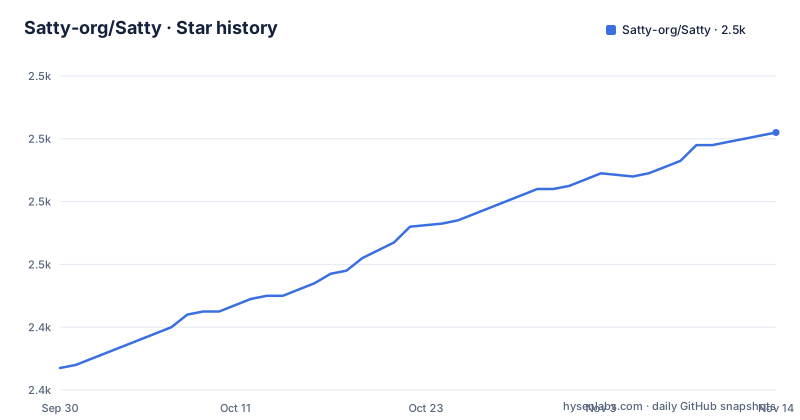
Star history
- Satty-org/Satty2,500 ★ · +73
| Repository | 2026-09-30 | 2026-11-12 |
|---|---|---|
| Satty-org/Satty | 2.4k | 2.5k |
73 Stars in the last 43 days, measured from the daily GitHub snapshot. Compare with other projects
Editorial analysis
Naming a config file on the command line switches off the other two
Configuration is applied in a fixed order: built-in values, then a system-wide file at $XDG_CONFIG_DIRS/satty/config.toml, usually /etc/xdg/satty/config.toml, then a user file at $XDG_CONFIG_HOME/satty/config.toml, usually $HOME/.config/satty/config.toml, then a file named on the command line, then command line options. The list reads like a precedence chain where each layer refines the one above it, and for the first three entries it is. The fourth is not. When a config file is given on the command line, Satty ignores the system-wide and user files entirely, and a file-not-found error on the specified path becomes fatal rather than falling back to defaults. So one flag does not add a layer, it replaces two of them and removes the project's tolerance for a bad path.
Shortcuts and tools marked NEXTRELEASE describe a release that does not exist yet
The keyboard section annotates bindings with the version that introduced them: 0.20.0 for the configurable tool shortcuts and for Ctrl+Shift+S, 0.20.1 for Ctrl+Alt+C and for Alt with the arrow keys, 0.21.0 for the out-of-range color shortcut, and 0.22.0 for the touchpad bindings and Ctrl+Wheel zoom. A second marker, NEXTRELEASE, appears on the system-wide config entry, on Shift+Delete for reset, on the image tool binding, and on the entire Pointer Tool and Image Tool sections. The newest published release is v0.22.0, dated 2026-08-03, and the workspace version in Cargo.toml is 0.22.0 to match. The last commit is dated 2026-09-29. Anything carrying NEXTRELEASE therefore describes main, not a tagged build, which matters most for the pointer tool, since selecting, moving and resizing annotations is the part of the interface those unreleased bindings govern.
The cargo install drops the desktop entry, the manpage and the license, and the include list says why
Both cargo install satty and cargo binstall satty are offered, the second needing cargo-binstall. The documentation is candid about the cost: no manpage, no LICENSE file and no .desktop file come along, with --man and --license available at runtime to print either one instead. The reason sits in Cargo.toml. The package include array holds src, Cargo.toml, Cargo.lock, LICENSE, README.md, assets and build.rs, and nothing else. satty.desktop, the AppStream metainfo file, config.toml and the changelog are not in that list, so a crate built from the published package cannot ship them. Anyone installing that way also has $HOME/.cargo/bin added to PATH by whatever toolchain setup they already use, which the project explicitly declines to reason about. The binary works; the desktop integration is the casualty.
The prebuilt download and the Gentoo wiki live under the author's own namespace
The repository is Satty-org/Satty and the workspace metadata points homepage and repository at that address. The prebuilt binary section sends you somewhere else, to the releases page of gabm/satty. The Gentoo note does the same, pointing at a wiki page under github.com/gabm/Satty. Cargo.toml lists a single author, Matthias Gabriel, with a mailbox address at gabm, which makes the older namespace a personal one rather than a mirror the project has given up. The distribution table itself is thin for a project described as available on many Linux and BSD distributions: two rows are named, with a repology link offered for the rest. The Gentoo row needs the guru overlay and waits on an unmerged pull request in the gentoo tree, and the Alpine row is Community on edge.
The Makefile watches one level under src/ and never sees the cli workspace member
The dependency list for the build targets is assembled with SOURCEDIRS set to src plus the wildcard of src/*, and source files collected from those directories only. Anything in a subdirectory two levels down is not a prerequisite, so editing it does not trigger a rebuild through make, even though cargo would recompile it. The same expression omits cli/, which Cargo.toml declares as the workspace member and as a runtime dependency, so changes there are invisible to the make targets as well. The install target writes six shell completion files, a manpage, the desktop entry, the icon and the license, and the directories holding the completions and the manpage are not in the repository, because build.rs generates them from the clap_complete and clap_mangen build-dependencies.
Every make target enables an empty cargo feature that a cargo install never sets
Cargo.toml declares a single feature, ci-release, with an empty body. All four build targets pass it anyway: force-build, force-build-release and the two file prerequisites that build and build-release depend on, which means an ordinary make build and make install both run cargo with --features ci-release, while cargo install satty from crates.io compiles without it. The manifest says the feature selects nothing today. The install target then copies the release binary with install -s, which strips it, rather than the debug artifact that make build produces, and the visible part of the uninstall section removes the binary, the desktop entry and the icon, without naming the completion files, the manpage or the license path that install created. There is no test, format or lint target here, although rustfmt.toml is in the root.
Enter, Esc and Ctrl+C are each documented as maskable by the active tool
Three of the most basic bindings carry the same caveat. Enter is as configured, defaulting to copy to clipboard, Esc is as configured, defaulting to exit, and Ctrl+C saves to clipboard. Each is annotated as possibly masked by the active tool, so the tool you picked can swallow the key that was supposed to leave or copy. The same note appears on all three, which means the default behaviour is not guaranteed in the state where you most need it. The tool palette is the other half of this. Thirteen tools are bound to single unmodified letters, from p for pointer and c for crop through u for blur, x for fringe inpaint plus pixelate and o for the image tool, and since 0.20.0 those bindings are configurable. A single-letter palette is easy to remember and easy to collide with. The image tool section is the one part of the document that stops in the middle of its list, ending after the paste binding for Ctrl+V, so what follows that line is not stated anywhere.
One wheel gesture does three different jobs, and the size range spans 0.1 to 99.99
The wheel is overloaded. Ctrl+Wheel zooms, added in 0.22.0. A plain wheel with the left button held steps the annotation size, by 0.1 with the up and down keys. On a touchpad, two finger scroll pans and Ctrl+Scroll zooms. Size can also be typed into the bottom toolbar or stepped with plus and minus buttons, with a minimum of 0.1 and a maximum of 99.99. Holding Shift while stepping drops the increment to 0.01 and holding Ctrl raises it to 1.0, the middle button with page up and page down always steps by 1.0, the right button jumps straight to the minimum or maximum, and s focuses the size field. Colors work the same way: digits 1 through 9 and 0 pick the nth palette entry, and since 0.21.0 a digit outside the palette selects a custom color instead.
Editorial conclusion
This suits anyone annotating screenshots on Sway, Hyprland or River who wants a single-key tool palette and hardware accelerated drawing, and it does not suit anyone who needs the tool to behave the same on every machine without checking. Two things decide that for you. Shortcut coverage changed in four of the last four releases, and several documented features carry a NEXTRELEASE marker rather than a version, so the README on the branch is describing a mixture of shipped and unshipped behaviour. Before trusting any binding, check it against the version you actually have, and never assume a config file is being merged with your own.
Frequently asked questions
Which compositors does Satty support?
It is built for wlroots based compositors, with Sway, Hyprland and River named as examples. The interface is GTK with Adwaita and drawing goes through OpenGL.
How do I install Satty on Gentoo or Alpine?
On Gentoo the command is emerge -av satty, which needs the guru overlay, and an upstream pull request was still pending. On Alpine it is apk add satty, available in the Community repository on edge. Other distributions are listed on repology.
What happens if I pass a config file path that does not exist?
It becomes a fatal error. Naming a config file on the command line also makes Satty ignore the system-wide and user config files, so the named path replaces both rather than adding to them.
Can Satty read a screenshot from stdin?
Yes. The usage section says to start by providing a filename or a screenshot via stdin, then annotate and save to the clipboard or to a file when finished.
Which annotation tools does Satty provide?
Thirteen, each on a single configurable letter: pointer, crop, brush, line, arrow, rectangle, ellipse, text, numbered marker, blur, fringe inpaint plus pixelate, highlight, and an image tool that carries a NEXTRELEASE marker rather than a version.
Official sources
Add this badge to your README
If you maintain this project, the badge below links readers to this analysis and shows its maintenance status from the daily GitHub snapshot. Paste the markdown into your README; add ?metric=license or ?metric=stars to the image URL for a different field.

[](https://hysenlabs.com/projects/satty-org-satty)Star history chart for your README
[](https://hysenlabs.com/projects/satty-org-satty)Was this useful?