AutoRaise: the install steps describe a menu bar app this repository does not build
AutoRaise (and focus) a window when hovering over it with the mouse
At a glance
- What is it?
- A single file Objective-C++ program that raises and focuses the window under the mouse on macOS, with about twenty command line options and three compile time escape hatches. Its quick start tells you to click a balloon icon in the menu bar, which belongs to a separate repository, and the section explaining its configuration file stops in the middle of a file name.
- Who is it for?
- AutoRaise fits a macOS user who wants focus to follow the mouse with fine grained control and is willing to read a command line, and it does not fit anyone who wants a preferences window from this repository. Four things to know before you install.
- Can I use it commercially?
- Yes, with conditions. GPL-3.0 is a copyleft licence: if you distribute software that includes it, you must release that software's source code under the same licence. Running it internally without distributing it does not trigger that obligation.
- Is it still maintained?
- Yes. The repository last received commits 4 days ago.
- What is it written in?
- Mainly Objective-C++, according to GitHub's language statistics.
Answers come from the project's GitHub data, last synced on November 22, 2026, and from our analysis. They are not legal advice.
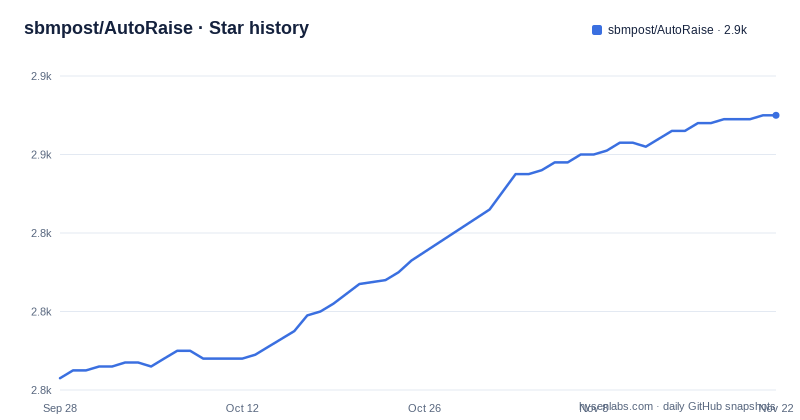
Star history
- sbmpost/AutoRaise2,870 ★ · +67
| Repository | 2026-09-28 | 2026-11-22 |
|---|---|---|
| sbmpost/AutoRaise | 2.8k | 2.9k |
67 Stars in the last 55 days, measured from the daily GitHub snapshot. Compare with other projects
Editorial analysis
The quick start describes an interface this repository does not build
Read the quick start and the running section side by side. The quick start says to download the latest release, unpack it in Finder, open the disk image, drag the application into Applications, launch it, then left click a balloon icon in the menu bar to grant Accessibility permission and right click it to open preferences. The running section says something different: after building the project you end up with two files, a command line binary and a bundle described as the version without a GUI. The README is explicit that this repository holds the part that does the raising and focusing with all the command line options, and that the menu bar app with its preferences window is a separate project called AutoRaise-UI. So the eight step quick start describes the other product, and a user who follows it here will be looking for a balloon icon that this build never draws.
AutoRaise.app is the build without an interface, and it needs a config file
The two build outputs have genuinely different operating models. The first is a binary meant to be run straight from a terminal, accepting parameters on the command line. The second, AutoRaise.app, can be used without a terminal window, runs on the background, and relies on the presence of a configuration file to know what to do. It can then only be stopped through Activity Monitor or an AppleScript that the README says is provided further down. That is a real design choice rather than a rough edge: the background variant is meant to be started at login with a fixed configuration rather than watched, and it has no interface to quit it from. The Makefile produces it by running a shell script that assembles the bundle from the compiled binary, an Info.plist and an icon file.
The configuration file section stops in the middle of a file name
AutoRaise reads its parameters from a configuration file, and the sentence explaining how ends mid-word. The text says that to make this happen you should create a dotfile in the home directory, and names one path in full, then begins a second path with the characters for a config directory and stops. So one location is documented, the other is half a word, and nothing after that point survives in the document. For the command line binary this does not matter, since the same settings are available as flags. For AutoRaise.app it matters a great deal, because that is the build said to rely on the configuration file, and a user who installs the bundle first will have to find the second path themselves. The remaining options, from ignoreApps through mouseDelta, are documented in full.
Three compile flags, one of them built on private API calls
Three macros change behaviour at build time rather than at run time, and each exists because something on the system behaves differently than the default path expects. ALTERNATIVE_TASK_SWITCHER is for people who switch applications with third party tools instead of the standard command-tab, because the mouse warp is only accurate with the default switcher, and the trade is an unexpected warp in some cases. OLD_ACTIVATION_METHOD is for applications that do not raise properly, naming GTK, SDL and wine applications as the examples, and the README notes it will introduce a deprecation warning. EXPERIMENTAL_FOCUS_FIRST focuses the hovered window before raising it, or skips raising entirely when the delay is zero, and it is labelled experimental because it relies on undocumented private API calls, with the flat statement that there is absolutely no guarantee it will be supported in future versions of the operating system.
The Makefile probes for a private framework while it is being read
The build file checks for a system location before anything is compiled. A variable is set by running a shell test for a framework inside a private system directory, and the result is passed to the compiler as a define alongside optimisation, warnings and automatic reference counting. The compile rule then branches on that value: when the framework is found the command adds a search path into that private directory and links the framework alongside AppKit, and when it is not found the same link is built without it. The conditional is written with make's own ifeq syntax inside what looks like a recipe, which means the directory test happens once while the file is being read rather than each time the rule runs. One other line is worth reading: the compiler defines the Foundation format argument macro as empty, which switches off a format string check that the project evidently trips.
One source file, and a disk image committed to the repository
The top level listing is unusually small for a project with this much documentation. There is a single Objective-C++ source file, an Info.plist, an icon file, a shell script that assembles the application bundle, the Makefile, the licence, the README and a .github directory. Everything the program does lives in that one file, and the whole build is a matter of compiling it and running the bundle script. Two binaries sit in the repository as well: an icon file and a disk image. Committing a disk image means the packaged artifact lives in version control next to the source, which means it has a history of its own and can drift from what the current source builds. The install target in the Makefile makes a related assumption: it removes the application from the Applications directory and copies the new one in, without any privilege escalation step.
Twenty options, and exactly one of them defaults to true
The option list is where AutoRaise's real behaviour lives, and the defaults are worth reading as a set rather than one at a time. Polling happens every 50 milliseconds with a stated minimum of 20, where lower values buy responsiveness at the cost of processor load. Warping is off by default on both axes, with each taking a factor between zero and one. Scaling, which enlarges the pointer briefly after a warp, defaults to 2.0 and is disabled by setting it to 1.0. The requirements flags mostly default to false, meaning raise and focus happen regardless of screens, screen changes or space changes. The exception is requireMouseStop, which defaults to true, so out of the box AutoRaise waits for the pointer to settle before it acts. A disable key defaults to control and can be set to option or disabled, and mouseDelta controls sensitivity with zero described as the most sensitive.
Windows only, so tmux and iTerm splits can never be focused
The scope limitation is stated once and it is absolute. AutoRaise works on windows. Panes drawn inside a single window, tmux splits and iTerm splits included, are not windows as far as macOS is concerned and cannot be focused separately. That is a property of the window server rather than of this implementation, which means no amount of configuration will make a split behave like a window. Two related options exist for the cases that are not about panes at all. stayFocusedBundleIds takes bundle identifiers that should not lose focus when the pointer moves elsewhere, with the example of the system screen capture interface keeping focus while a screenshot region is being selected. ignoreTitles takes window titles matched as ICU regular expressions, which is how a user excludes one dialog without excluding the whole application.
Editorial conclusion
AutoRaise fits a macOS user who wants focus to follow the mouse with fine grained control and is willing to read a command line, and it does not fit anyone who wants a preferences window from this repository. Four things to know before you install. The menu bar interface described in the quick start lives in a separate project, while the build here produces a command line binary and a GUI-less app bundle that needs a configuration file. That configuration file section is cut off mid-word, so the file name and location are half documented. The build links against a private system framework when it is present, which is why one flag relies on private API calls with an explicit no guarantee. And the option list is where the real behaviour lives, with requireMouseStop defaulting to true while most others default to false.
Frequently asked questions
How do I install AutoRaise on a Mac?
The quick start says to download the latest release, unpack it in Finder, double click AutoRaise.dmg, drag AutoRaise.app into Applications and open it. To build instead, download the master zip and run unzip -d ~ ~/Downloads/AutoRaise-master.zip, then cd ~/AutoRaise-master && make clean && make && make install.
What does AutoRaise do, and what can it not do?
Hovering a window raises it to the front after a delay of your choosing and gives it focus, with an option to warp the mouse to the center of the activated window when using cmd-tab or cmd-grave. It works on windows only, so panes inside a single window such as tmux or iTerm splits cannot be focused separately.
Why is there no preferences window in the AutoRaise repository?
The repository holds AutoRaise itself, the part that raises and focuses with all the command line options. The menu bar app with its preferences window is a separate project called AutoRaise-UI, and the build here produces a command line binary plus AutoRaise.app, described as the version without a GUI that relies on a configuration file.
Which compile flags does AutoRaise support?
ALTERNATIVE_TASK_SWITCHER for accurate mouse warping when you use a third party switcher, OLD_ACTIVATION_METHOD for applications that do not raise properly such as GTK, SDL or wine applications, which introduces a deprecation warning, and EXPERIMENTAL_FOCUS_FIRST, which relies on undocumented private API calls with no guarantee of future support.
What are the main AutoRaise command line options?
pollMillis for how often the mouse is polled, with a minimum of 20 and a default of 50, delay and focusDelay in units of pollMillis, warpX and warpY as factors between zero and one that are disabled by default, scale which enlarges the mouse after a warp with a default of 2.0, ignoreApps, ignoreTitles matched as ICU regular expressions, stayFocusedBundleIds, disableKey set to control, option or disabled, and mouseDelta.
Is there an alternative to AutoRaise?
The README names none. It points to a Stack Overflow discussion of focus follows mouse with auto-raise on macOS, and states the scope limit instead: tmux and iTerm splits are not windows to macOS and cannot be focused separately.
Official sources
Add this badge to your README
If you maintain this project, the badge below links readers to this analysis and shows its maintenance status from the daily GitHub snapshot. Paste the markdown into your README; add ?metric=license or ?metric=stars to the image URL for a different field.

[](https://hysenlabs.com/projects/sbmpost-autoraise)Star history chart for your README
[](https://hysenlabs.com/projects/sbmpost-autoraise)Was this useful?