PassWall2 installs differently on opkg and apk routers, and the difference is the package
A simple powerful OpenWrt LuCI proxy application.
At a glance
- What is it?
- PassWall2 is a LuCI application for OpenWrt that puts Xray, Sing-Box, Shadowsocks-Rust, ShadowsocksR and HAProxy behind a web interface for routing, DNS and per-device policy. Installation forks into two paths depending on whether the router runs opkg or apk, and only one of them keeps signature checking on.
- Who is it for?
- PassWall2 suits an OpenWrt router with at least 256MB of RAM where you want proxy routing, DNS control and per-device rules from LuCI instead of hand written configuration. It does not suit a router on opkg if you need the dependency feed wired into customfeeds.conf, and the apk path with --allow-untrusted turns off signature verification unless you add the signing key.
- Can I use it commercially?
- Yes, with conditions. GPL-3.0 is a copyleft licence: if you distribute software that includes it, you must release that software's source code under the same licence. Running it internally without distributing it does not trigger that obligation.
- Is it still maintained?
- Yes. The repository last received commits 3 days ago.
- What is it written in?
- Mainly Lua, according to GitHub's language statistics.
Answers come from the project's GitHub data, last synced on November 13, 2026, and from our analysis. They are not legal advice.
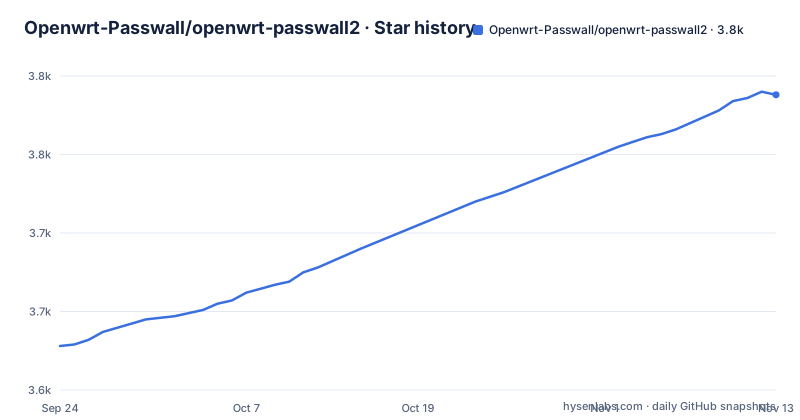
Star history
- Openwrt-Passwall/openwrt-passwall23,788 ★ · +160
| Repository | 2026-09-24 | 2026-11-13 |
|---|---|---|
| Openwrt-Passwall/openwrt-passwall2 | 3.6k | 3.8k |
160 Stars in the last 50 days, measured from the daily GitHub snapshot. Compare with other projects
Editorial analysis
The first fork is opkg against apk, and it decides the file
The package you download depends on the router, not on your preference. On a router with OPKG, the assets section of the release holds luci-app-passwall2_{VERSION}_all.ipk, and the install is:
opkg update
opkg install luci-app-passwall2_*.ipk
On a router with APK, the same version ships as luci-app-passwall2_{VERSION}_all.apk and the install command changes shape:
apk add --allow-untrusted luci-app-passwall2_*.apkThe command that settles the question is `opkg --version` or `apk --version`, and running the wrong one against the wrong package format is the first failure a new user hits. Both paths take the same three steps otherwise: download the asset, get it onto the router by SCP, the LuCI upload or wget, and install it. If you want the interface in Chinese or Persian, a matching language package is downloaded next to the main one, with names such as luci-i18n-passwall2-zh-cn and the fa variant.
The apk path disables signature checks unless you add the key
The flag in that apk command is the one to understand. --allow-untrusted bypasses package signature verification, and the installation notes say so in a security note rather than leaving it implicit. The alternative, described as recommended, is to stop installing packages by hand and register a repository instead. That path starts by fetching the signing key into the apk key directory:
wget -O passwall.pub https://sourceforge.net/projects/openwrt-passwall-build/files/apk.pub
mv passwall.pub /etc/apk/keys/
Two repository index files are then appended, one for passwall_packages and one for passwall_luci, with the path built from the router's own release and architecture variables taken from /etc/openwrt_release. After apk update, optional dependencies and luci-app-passwall2 are installed by name instead of by file, and updates arrive through the package manager.
A missing dependency such as xray-core sends you to customfeeds.conf
The opkg route has a documented failure mode. If installation fails because a dependency is missing, with xray-core given as the example, the fix is to add the PassWall packages feed to /etc/opkg/customfeeds.conf so the resolver has somewhere to look. That file is not created for you, so this is the step where a plain ipk install stops being a two-command operation. The dependencies the project expects a feed to satisfy are named as a group: coreutils, coreutils-base64, coreutils-nohup, curl, ip-full, libuci-lua, lua, luci-compat and luci-lib-jsonc for the interface side, resolveip, tcping and unzip for network work, plus geoview, v2ray-geoip and v2ray-geosite for geo routing data. The project notes that the real set varies with the features you select and with your OpenWrt build.
The proxy engine is chosen at install time, not in the menu
Protocol packages are described as selected during installation based on your needs, which is the part of the design that surprises people coming from a pure LuCI plugin. The optional set is Xray, Sing-Box, Shadowsocks-Rust, ShadowsocksR as legacy support, and HAProxy. What each engine brings is listed per engine rather than per protocol, so the two lists do not match. Xray covers HTTP, Socks, Shadowsocks, VMess, VLESS, Trojan, Hysteria2 and WireGuard. Sing-Box covers those and adds SSH, TUIC, Hysteria and AnyTLS. HAProxy is presented as a TCP and HTTP load balancer. The consequence is that the menu you see later depends on what got installed, and a node type missing from the add dialog usually means its engine package was never installed.
LuCI is restarted by hand before the menu appears
After the package lands, the web interface needs a nudge:
/etc/init.d/rpcd restartThen the path through the interface is Services, then PassWall2. Adding the first node means opening Node List, choosing Add Node, picking the protocol and filling in the server details. Basic settings follow: select the default node, set DNS options, enable transparent proxy, and finish with Save & Apply. Nothing in this path is scripted, so the configuration lives in the router rather than in a file you would check into version control. The language files sit under luci-app-passwall2/po/ in the repository, with Chinese in Simplified and Traditional forms and Persian, which matches the separate language packages offered at install time.
The floor is OpenWrt 21.02 and 256MB of RAM
Two platform numbers are given, and they are not the same thing: OpenWrt 21.02 or later, and LuCI 17.01 or later. Hardware requirements start at a minimum of 256MB RAM, with storage described only as sufficient for the packages, varying by protocol selection. Since the protocol packages are what fill the flash, the storage figure cannot be fixed here, which means the engine choice made at install time is also a storage decision. The router architecture matters too, since the pre-installation note asks you to find the right package for your router architecture in the releases, and the repository layout used by the apk path is keyed by both release and architecture. The GPL-3.0 licence applies to the whole application.
A service that will not start leaves two log files under /tmp
Troubleshooting starts with the system log, filtered by name:
logread | grep passwall2From there the stated checks are the system log itself, the node configuration, and whether the required packages are installed, which ties back to the dependency step above. A deeper mode exists: debug logging can be turned on in Other Settings, after which two runtime files matter, the main log at /tmp/log/passwall2.log and the server log at /tmp/log/passwall2_server.log. DNS problems get their own list, including disabling the browser's own secure DNS in Chrome under Settings, Privacy and Security, and clearing the resolver cache with ipconfig /flushdns on Windows or by toggling airplane mode on a phone. Connection problems are narrowed by testing node connectivity, checking firewall rules and verifying the transparent proxy settings.
Version numbers follow the OpenWrt release, not the application
The recent releases are named 26.10.1-2, 26.9.16-1 and 26.9.12-2, and the leading pair of numbers tracks the OpenWrt release the package set was built for rather than a PassWall2 version of its own. The repository instructions make that visible: the release variable is derived by stripping the last component from DISTRIB_RELEASE, and the package index path is built from that value together with the architecture. Two numbers after it distinguish the build revision and the package revision. Dates show the same cadence, with 26.10.1-2 published on 2026-10-02, 26.9.16-1 on 2026-09-16 and 26.9.12-2 on 2026-09-13, and the last push to main is dated 2026-10-03. The repository itself holds a single luci-app-passwall2 directory at the top level next to .github and .gitattributes, with Lua as the primary language.
Editorial conclusion
PassWall2 suits an OpenWrt router with at least 256MB of RAM where you want proxy routing, DNS control and per-device rules from LuCI instead of hand written configuration. It does not suit a router on opkg if you need the dependency feed wired into customfeeds.conf, and the apk path with --allow-untrusted turns off signature verification unless you add the signing key. Before installing, check which package manager your build uses, confirm your OpenWrt release is 21.02 or later, and read the passwall2 log under /tmp/log if the service will not start.
Frequently asked questions
How do I install PassWall2 on an OpenWrt router?
Check the package manager first with opkg --version or apk --version, then download the matching asset from the releases page: luci-app-passwall2_{VERSION}_all.ipk for opkg, or luci-app-passwall2_{VERSION}_all.apk for apk. Upload it to the router and run opkg install luci-app-passwall2_*.ipk or apk add --allow-untrusted luci-app-passwall2_*.apk, then restart rpcd.
What does --allow-untrusted do in the PassWall2 apk install?
It bypasses package signature verification, and the installation notes flag it as a security consideration. The alternative the project recommends is adding the PassWall2 apk repository and its signing key, placing apk.pub under /etc/apk/keys/ and appending the passwall_packages and passwall_luci index files, then installing luci-app-passwall2 by name after apk update.
Why does my PassWall2 install fail with a missing dependency?
The opkg path cannot resolve some dependencies on its own, with xray-core given as the example. The stated fix is to add the PassWall packages feed to /etc/opkg/customfeeds.conf, and to check that your OpenWrt build has the feeds configured for packages such as curl, ip-full, lua, tcping, geoview and v2ray-geoip.
Which proxy engines can PassWall2 use?
The optional protocol packages are Xray, Sing-Box, Shadowsocks-Rust, ShadowsocksR as legacy support, and HAProxy, and they are selected during installation. Xray covers HTTP, Socks, Shadowsocks, VMess, VLESS, Trojan, Hysteria2 and WireGuard, while Sing-Box adds SSH, TUIC, Hysteria and AnyTLS to that list.
Where are the PassWall2 logs when the service fails?
Turn on debug logging under Other Settings, then read /tmp/log/passwall2.log for the main log and /tmp/log/passwall2_server.log for the server log. For a service that will not start at all, the system log filtered with logread | grep passwall2 is the starting point, followed by checking the node configuration and installed packages.
What hardware and firmware does PassWall2 need?
OpenWrt 21.02 or later with LuCI 17.01 or later, and a minimum of 256MB RAM. Storage needs vary with protocol selection, since the engine packages are chosen during installation, and the package you need is the one matching your router architecture.
Official sources
Add this badge to your README
If you maintain this project, the badge below links readers to this analysis and shows its maintenance status from the daily GitHub snapshot. Paste the markdown into your README; add ?metric=license or ?metric=stars to the image URL for a different field.

[](https://hysenlabs.com/projects/openwrt-passwall-openwrt-passwall2)Star history chart for your README
[](https://hysenlabs.com/projects/openwrt-passwall-openwrt-passwall2)Was this useful?