luci-app-mosdns for OpenWrt: v5 installation and DNS processing
一个 DNS 转发器 - OpenWrt 🎁 MosDNS v5 is Ready! 🎉
At a glance
- What is it?
- luci-app-mosdns packages the MosDNS plug-in DNS forwarder for OpenWrt, with support for encrypted DNS transports and composable rule processing. The v5 branch offers prebuilt installation, local builds for OpenWrt snapshots, and an adblock_set data provider for common filtering formats.
- Who is it for?
- Adopt luci-app-mosdns if you run OpenWrt and need MosDNS installed through LuCI with explicit control over DNS processing rules. Do not choose it solely for the package name if you need an undocumented LuCI workflow, a complete migration procedure, or a rollback policy.
- Can I use it commercially?
- Yes, with conditions. GPL-3.0 is a copyleft licence: if you distribute software that includes it, you must release that software's source code under the same licence. Running it internally without distributing it does not trigger that obligation.
- Is it still maintained?
- Yes. The repository last received commits 40 days ago.
- What is it written in?
- Mainly JavaScript, according to GitHub's language statistics.
Answers come from the project's GitHub data, last synced on October 23, 2026, and from our analysis. They are not legal advice.
Star history
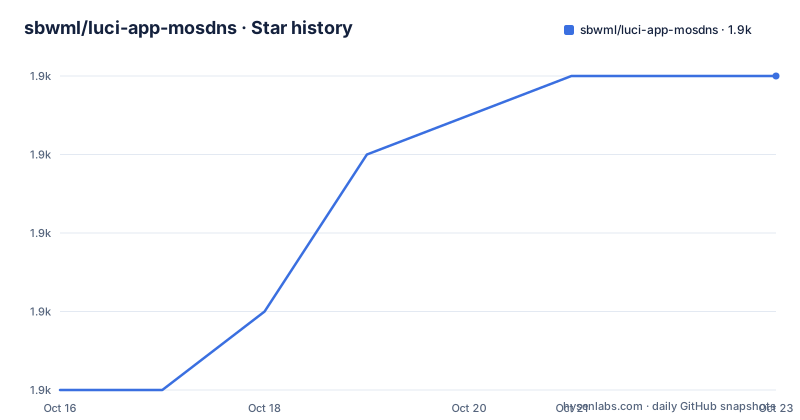
- sbwml/luci-app-mosdns1,856 ★ · +4
| Repository | 2026-10-16 | 2026-10-23 |
|---|---|---|
| sbwml/luci-app-mosdns | 1.9k | 1.9k |
4 Stars in the last 7 days, measured from the daily GitHub snapshot. Compare with other projects
Editorial analysis
What luci-app-mosdns adds to OpenWrt
luci-app-mosdns packages MosDNS for OpenWrt devices. MosDNS is described as a plug-in DNS forwarder, meaning its DNS processing logic is assembled from plugins rather than fixed behind a single built-in filtering path. That model is useful for OpenWrt administrators who need to combine domain matching, data providers, and upstream transport choices in one configuration.
The repository is not itself a general-purpose desktop DNS service. Its documented audience is OpenWrt users who build packages for their firmware or install prebuilt OpenWrt packages. The package repository includes the LuCI application directory, a MosDNS directory, an install script, and a geo2txt directory. Those entries indicate that the project combines the OpenWrt package integration with MosDNS-related build assets.
The documented protocol choices include ordinary DNS over UDP and TCP, DNS-over-TLS, DNS-over-HTTPS over HTTP/2 or an HTTPS endpoint, DNS-over-HTTPS over HTTP/3, and DNS-over-QUIC. Those schemes belong in MosDNS configuration, but the README does not document a complete first-run configuration file for this repository. It does show DNS endpoints that can serve as configuration examples, not defaults selected by luci-app-mosdns.
MosDNS v5 plugin and provider model
The clearest architectural example in the README is the relationship between an adblock_set provider and a query_matcher plugin. The provider reads files, parses their rules, and exposes the resulting rules under a provider tag. The matcher then refers to that tag while deciding which queries match.
This is a concrete data flow rather than a list of UI options. Files are assigned to the ad_rules plugin, rules are parsed by adblock_set, and query_matcher consumes provider:ad_rules. The sample does not show the final fallback or forwarding plugin, so it should not be treated as a complete working MosDNS configuration. It does show how an administrator can separate loaded rule data from query processing.
The adblock_set parser accepts several common forms. Exact domain entries include example.com and |example.com|. A leading || requests subdomain matching, /regexp/ uses a regular expression, and *keyword* performs keyword matching. The parser also recognizes @@ as a whitelisting prefix. MosDNS-specific forms include domain:, full:, keyword:, and regexp:. This breadth reduces the need to convert every external rules file before loading it, although the README does not state how duplicate rules, malformed lines, or conflicting whitelist and block rules are resolved.
Installing prebuilt packages on opkg and apk
The documented prebuilt-package route begins in an OpenWrt SSH session. The README distinguishes package managers by OpenWrt generation: opkg is listed for 24.10, while apk is listed for 25.12 or later. Install curl first, then run the repository's install script.
For an OpenWrt 24.10 system using opkg, enter the OpenWrt terminal and install curl:
opkg update
opkg install curl
The first command refreshes the package index, and the second installs the client needed by the next step. For a system using apk, the documented commands are:
apk update
apk add curl
After curl is available, the README gives this installation command:
sh -c "$(curl -ksS https://raw.githubusercontent.com/sbwml/luci-app-mosdns/v5/install.sh)"The script is fetched from the v5 branch over HTTPS. The README calls this installation multi-architecture support, but it does not enumerate the detected architectures or describe compatibility fallbacks. It also does not document what output indicates success, whether the script changes existing MosDNS configuration, or how to undo the installation. A cautious administrator should inspect the resulting device state rather than assume that installing the package also supplies a complete forwarding configuration.
Using a ghproxy for script retrieval
The repository documents a proxy variant of the same installer invocation. This is useful when the direct raw.githubusercontent.com request is inaccessible, although the README does not specify which network failures trigger the need for a proxy.
Use the documented command with the gh_proxy argument:
sh -c "$(curl -ksS https://raw.githubusercontent.com/sbwml/luci-app-mosdns/v5/install.sh)" _ gh_proxy="https://gh-proxy.com"This still retrieves install.sh from the v5 branch, but the script receives the proxy address as an argument. The README does not explain how the installer uses that value, whether package downloads also pass through it, or whether package signatures and checksums are checked. The `-k` option is present in both installer commands. It disables TLS certificate verification for curl, so the command does not provide normal certificate validation while fetching the script.
The direct command is the better documented default because it does not add a proxy. The proxy form is an explicit transport alternative, not evidence that the project recommends gh-proxy.com for every installation. Neither command is documented as a development snapshot installer.
Building luci-app-mosdns from the v5 branch
Building locally is the documented path for OpenWrt snapshots or non-official OpenWrt sources. The OpenWrt snapshots instructions first replace the feeds Golang package with a repository branch requiring Go 1.25.x or later. From the OpenWrt source directory, run:
rm -rf feeds/packages/lang/golang
git clone https://github.com/sbwml/packages_lang_golang -b 26.x feeds/packages/lang/golang
This removes the existing feed directory and installs the replacement under `feeds/packages/lang/golang`. The next commands remove the supplied v2ray-geodata package, add luci-app-mosdns at `package/mosdns`, and add v2ray-geodata as a package:
rm -rf feeds/packages/net/v2ray-geodata
git clone https://github.com/sbwml/luci-app-mosdns -b v5 package/mosdns
git clone https://github.com/sbwml/v2ray-geodata package/v2ray-geodata
The README then directs the builder to select the package in `make menuconfig` and compile it:
make menuconfig
make package/mosdns/luci-app-mosdns/compile V=s
In the menu, the documented path is `LUCI` -> `Applications` -> `luci-app-mosdns`. The compile command uses the full package target and enables verbose output through `V=s`. The README does not document the resulting package filenames or the commands for copying them onto a router.
Replacing packages in non-official OpenWrt sources
Non-official OpenWrt sources require a separate cleanup step. The README uses `find` and `grep` to locate Makefiles associated with mosdns and v2ray-geodata, then removes the matching Makefiles before cloning the intended versions. This differs from the official snapshot procedure, which directly removes the v2ray-geodata directory under `feeds/packages/net`.
Run the documented cleanup commands from the OpenWrt source tree:
find ./ | grep Makefile | grep v2ray-geodata | xargs rm -f
find ./ | grep Makefile | grep mosdns | xargs rm -f
These commands match broadly named Makefiles anywhere below the current directory. They do not remove package directories by themselves, so users should inspect the OpenWrt source before and after running them. The broad matching behavior is a genuine caution: the commands are intended for the documented source-tree migration, but they are not narrow package selectors.
After cleanup, clone the two repositories at the same paths used by the official-source instructions:
git clone https://github.com/sbwml/luci-app-mosdns -b v5 package/mosdns
git clone https://github.com/sbwml/v2ray-geodata package/v2ray-geodata
Then select `LUCI` -> `Applications` -> `luci-app-mosdns` and compile with the same `make package/mosdns/luci-app-mosdns/compile V=s` target. The source preparation and package selection are documented, but device deployment is not.
Maintenance, licensing, and first-use boundaries
The repository is not archived. Its last push was on 2026-09-13, and the listed releases include v5.3.4-r14 on 2026-09-12, v5.3.4-r13 on 2026-09-05, and v5.3.4-r12 on 2026-08-31. This history confirms recent work on the v5 package line, but the README does not provide a release-to-release migration guide, schema conversion process, or rollback command. Upgrading may therefore require checking the release changes for both this repository and the separate MosDNS project linked by the README.
The repository declares the GPL-3.0 license. That identifies the license under which the project is distributed, but it is not a substitute for examining a particular router build, packaged dependencies, geodata rules, or the separate `mosdns` project when those components have their own terms.
For a first real use, the documented configuration example begins with rule data and a query matcher. Add the rule files to the shown plugin structure, then arrange the rest of the MosDNS forwarding configuration separately. The README does not identify the installed LuCI configuration path, the first-run form fields, the service start command, or a verification command. Consequently, it supports a source-level example but not a complete guided installation from package activation to confirmed DNS resolution. This missing operational path is the main limitation for evaluators deciding whether the LuCI workflow matches their OpenWrt administration style.
Editorial conclusion
Adopt luci-app-mosdns if you run OpenWrt and need MosDNS installed through LuCI with explicit control over DNS processing rules. Do not choose it solely for the package name if you need an undocumented LuCI workflow, a complete migration procedure, or a rollback policy. Verify first that your OpenWrt release uses opkg or apk, that it can obtain the selected MosDNS packages and geodata, and that the rules loaded through adblock_set produce the intended DNS responses.
Frequently asked questions
How do I install luci-app-mosdns on OpenWrt?
Log in through SSH, install curl with either `opkg install curl` for the documented 24.10 route or `apk add curl` for 25.12 or later, and run the documented `install.sh` command. The README also documents a `gh_proxy` variant.
Which DNS protocols does the luci-app-mosdns documentation support?
The README lists general DNS over UDP and TCP, DNS-over-TLS, DNS-over-HTTPS, DNS-over-HTTPS over HTTP/3, and DNS-over-QUIC. It provides endpoint examples rather than saying that every endpoint is enabled by default.
How does adblock_set load filtering rules in MosDNS?
The `adblock_set` plugin reads files such as `./adguard_dns.txt` and `./easylist.txt`, then exposes the parsed rules under its plugin tag. The example uses `query_matcher` with `provider:ad_rules` to consume those rules.
Can I build luci-app-mosdns from source?
The README documents cloning the v5 branch into `package/mosdns`, adding v2ray-geodata, selecting `LUCI` -> `Applications` -> `luci-app-mosdns`, and running `make package/mosdns/luci-app-mosdns/compile V=s`.
Official sources
Add this badge to your README
If you maintain this project, the badge below links readers to this analysis and shows its maintenance status from the daily GitHub snapshot. Paste the markdown into your README; add ?metric=license or ?metric=stars to the image URL for a different field.

[](https://hysenlabs.com/projects/sbwml-luci-app-mosdns)Star history chart for your README
[](https://hysenlabs.com/projects/sbwml-luci-app-mosdns)Was this useful?