LocationSimulator: the newest release is three years older than the last commit
MacOS application to spoof / fake / mock your iOS / iPadOS or iPhoneSimulator device location. WatchOS and TvOS are partially supported.
At a glance
- What is it?
- This is a macOS developer tool for testing location based apps against a connected iOS device, and its most important paragraph is a scope statement that rules out game cheating. Underneath that sit eight Swift packages by the same author, a set of disk image files the app is not allowed to ship, and a release line that stopped in 2023 while the commits carried on.
- Who is it for?
- This is a tool for a narrow job, testing your own location aware application against a real device, and it does that job without a jailbreak and without installing anything on the phone. Anyone considering it should first check whether their iOS version is inside the supported range at all, because the source here stops at iOS 16 while iOS 17 and later is explicitly unsupported, and the author's own recommendation is a closed source successor.
- Can I use it commercially?
- Yes, with conditions. GPL-3.0 is a copyleft licence: if you distribute software that includes it, you must release that software's source code under the same licence. Running it internally without distributing it does not trigger that obligation.
- Is it still maintained?
- Yes. The repository last received commits 10 days ago.
- What is it written in?
- Mainly Swift, according to GitHub's language statistics.
Answers come from the project's GitHub data, last synced on November 15, 2026, and from our analysis. They are not legal advice.
Star history
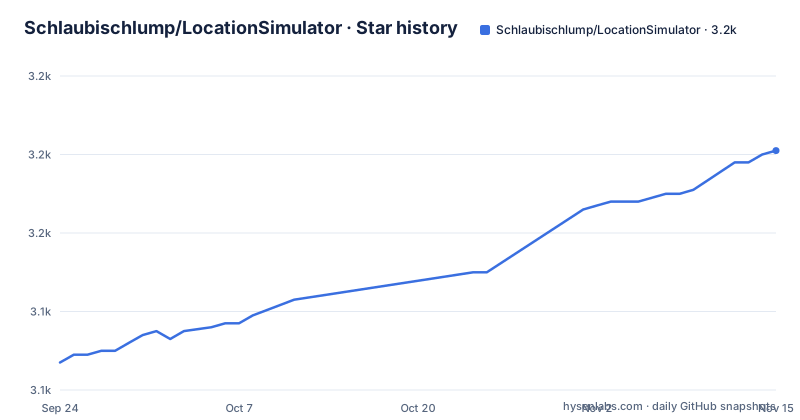
- Schlaubischlump/LocationSimulator3,181 ★ · +54
| Repository | 2026-09-24 | 2026-11-15 |
|---|---|---|
| Schlaubischlump/LocationSimulator | 3.1k | 3.2k |
54 Stars in the last 52 days, measured from the daily GitHub snapshot. Compare with other projects
Editorial analysis
The scope statement comes before the feature list
The README's own description of who this is for appears before anything else: the target audience is developers who want to test their location-service-based applications. The author then rules out the other use directly, saying the application is not encouraged for cheating in iOS games and that no support is provided for those games, and closing with the line that anyone using it outside the intended purposes is on their own. That paragraph is the whole scale of the project in three sentences, and everything else in the document is consistent with it. The feature list that follows stays inside the developer frame: spoofing the location of an iOS device without a jailbreak or an app installed on the device, the same for the iPhone simulator, a long-click on the map to set a point, predefined and custom movement speeds, keyboard control of movement, network devices, place search, and dark mode.
Two notices sit at the very top, above the title
The first thing in the file is a note inviting readers to beta test LocationSimulator2, which is described as closed source for now, with a link to its discussion board. The second is a warning: iOS 17 and later are not supported by the LocationSimulator source code in this repository, with a link to issue 171 for details. Both notices are placed above the project name, which tells you how the author ranks them. This repository is the free, licensed, source-available line of the project, and it has a version ceiling that the paid or closed successor exists to move past. Anyone who lands on this repository from a search for a current iOS version will hit those two notices first, which is the correct outcome.
The newest release is 0.2.2 from 2023, and commits continued to 2026
The release record has three entries and all three are from 2023: v0.2.0 on 2023-02-24, v0.2.1 on 2023-05-09, and v0.2.2 on 2023-05-22. The most recent commit on the default branch master is dated 2026-09-18, so the source has moved more than three years past the newest published build. That gap is the single most important fact for anyone installing this: the Homebrew cask and the GitHub release both point at a 2023 binary, while the repository contains later work that has not been packaged. It also explains the two notices at the top. A project whose published artefacts stopped at 0.2.2 while the iOS version moved on past 17 has to either stop or move the work somewhere else, and both of those are what the notices describe.
The app is a shell over eight Swift packages by the same author
The project is large enough that the author split it into eight packages, each in its own repository and all under the same account, fetched automatically by Swift at build time. LocationSimulator-Localization holds the localisation files, LocationSimulator-Hold holds the helpbook, LocationSpoofer is the backend that does the actual spoofing for iOS and simulator devices, and XCF is described as the low-level frameworks used by LocationSpoofer. CLogger is a C, Objective-C and Swift logging library used by both, SuggestionPopup is an AppKit list UI modelled on Apple Maps for searching locations, Downloader is a small file download helper, and GPXParser parses GPX files. So the app target at the root is mostly an interface, and the interesting code sits in a package called LocationSpoofer that is a separate download.
Building needs a Mac, Xcode, and a jekyll symlink
The requirements list names macOS 10.15 or later, the macOS 11.x SDK or newer, Swift 5.0 or later, Swift Tools 5.2 or later, and jekyll, which is required to build the helpbook with a symlink of jekyll expected at /usr/local/bin/jekyll. That last item is the odd one, since a static site generator is normally a documentation tool rather than an application dependency, and it appears here because the helpbook is built as part of the app. The build itself is four steps: install Xcode, clone the repository with submodules, open LocationSimulator.xcodeproj, let Xcode resolve the dependencies, and run it.
git clone --recurse-submodules https://github.com/Schlaubischlump/LocationSimulatorXcode is a build time requirement only. The app does not need Xcode installed to run, which is the point the background section makes when it notes that the requirement was removed.
The disk images are downloaded because they cannot be shipped
The mechanism rests on two files the project is not allowed to distribute: DeveloperDiskImage.dmg and its signature file, matched to the iOS version on the connected device. The app downloads the matching pair from GitHub automatically, and the stated reason is that the author cannot legally distribute them. If the download fails, the fallback is to install Xcode, take the files from there, and put them in a folder named after the platform and version, with the README using placeholders for both, showing a platform of iOS, watchOS or tvOS and a version example of 14.3. That folder has moved twice. It started under Application Support in the user's home directory, moved as of v0.1.8 into a sandboxed container path under com.schlaubi.LocationSimulator, and as of v0.1.9 the same files are managed from a DeveloperDisk preferences tab inside the app.
Rebuilt from scratch because the original had no licence
The background section explains why this exists at all. The author had planned to build on top of an earlier LocationSimulator by Watanabe Toshinori, then decided to recreate the whole project instead, because that original had no licence in August 2019. Every image and source file was made again for this repository, and third party binary dependencies were removed, with one exception: libimobiledevice, the library that talks to iOS devices over USB, is still used. That is the entire supply chain of the project in three sentences, and it is a clean one. A location spoofing tool that fetches two files from the internet and one native library from elsewhere has a small attack surface to reason about, which is more than can be said for tools that ship opaque binaries.
A directory with a space in its name sits at the root
The top level is an Xcode project laid out the way Xcode expects, with LocationSimulator.xcodeproj, the app source in LocationSimulator/, a Preview directory, Icon, Help and Localization folders, and a bridging header file for the Objective-C interop. There is a .swiftlint.yml at the root, so the Swift lint configuration is part of the repository rather than a personal setting, and a .gitmodules file to go with the eight packages. One entry will trip any script that walks the tree: the directory holding the AppleScript sources is named Apple Scripts, with a space in the middle. It is not wrong, but it is the kind of name that needs quoting in a build script, and it is the sort of detail that only shows up when you have seen the failure.
Editorial conclusion
This is a tool for a narrow job, testing your own location aware application against a real device, and it does that job without a jailbreak and without installing anything on the phone. Anyone considering it should first check whether their iOS version is inside the supported range at all, because the source here stops at iOS 16 while iOS 17 and later is explicitly unsupported, and the author's own recommendation is a closed source successor. Read the scope statement before anything else: the author rules out cheating in iOS games and offers no support for it. For everyone else, the honest limit is that this is not a device you should carry in daily life, and the disk image files it depends on are fetched from the internet rather than shipped, which is one more moving part between you and a working session.
Frequently asked questions
Does LocationSimulator work with iOS 17 and later?
Not the source in this repository. A warning above the title says iOS 17 and later are not supported here and points to issue 171, while a separate note invites readers to beta test LocationSimulator2, which is closed source for now.
Do I need a jailbroken iPhone to use LocationSimulator?
No. The feature list states that it spoofs the location of an iOS device without a jailbreak and without installing an app on the device, and that it also spoofs the iPhone simulator location. A connected device and the disk image files for your iOS version are what it needs.
Where does LocationSimulator get its DeveloperDiskImage files?
It downloads DeveloperDiskImage.dmg and DeveloperDiskImage.dmg.signature from GitHub for your iOS version, because the author states the files cannot legally be distributed with the app. If that fails, the README says to take them from an installed Xcode and place them in the app's Application Support folder.
Can LocationSimulator be built without Xcode?
No. It is an Xcode project: the build steps are to install Xcode, clone the repository with submodules, open LocationSimulator.xcodeproj and run it, and the requirements also list a macOS 11.x or newer SDK. Xcode is only needed at build time, not at runtime.
Is LocationSimulator meant for changing your location in games?
No. The README names developers testing location-based applications as the target audience, says the author does not encourage using it to cheat in iOS games and provides no support for them, and says anyone using it outside the intended purposes is on their own.
Is location spoofing illegal?
This project takes no legal position and says nothing about the law in any jurisdiction. It states its intended purpose, which is testing your own location-based applications, and disclaims game cheating. That question has to be answered outside this repository.
Official sources
Add this badge to your README
If you maintain this project, the badge below links readers to this analysis and shows its maintenance status from the daily GitHub snapshot. Paste the markdown into your README; add ?metric=license or ?metric=stars to the image URL for a different field.

[](https://hysenlabs.com/projects/schlaubischlump-locationsimulator)Star history chart for your README
[](https://hysenlabs.com/projects/schlaubischlump-locationsimulator)Was this useful?