popping: the last commit is dated 2017-07-05 and the dependencies are committed
GitHub describes it as A collection of animation examples for iOS apps.. The repository metadata lists Objective-C as its primary language. The metadata lists the MIT license. This article stays within the project description and details documented in the GitHub repository README.
At a glance
- What is it?
- A collection of iOS interface animations built mostly on top of the Facebook pop animation engine, shipped as an Xcode project you clone and run rather than as a library you depend on. Two facts frame everything else: when the source was last touched, and the fact that there is no podspec in the tree.
- Who is it for?
- popping suits someone looking for a reference for how interface transitions were built before newer animation tooling existed, where reading the source of a finished example is the point rather than installing a dependency. Two things to check first.
- Can I use it commercially?
- Yes. MIT is a permissive licence: you can use, modify and sell software built on it, as long as you keep its copyright and licence notices.
- Is it still maintained?
- Probably not. The repository last received commits 113 months ago, on July 5, 2017.
- What is it written in?
- Mainly Objective-C, according to GitHub's language statistics.
Answers come from the project's GitHub data, last synced on October 22, 2026, and from our analysis. They are not legal advice.
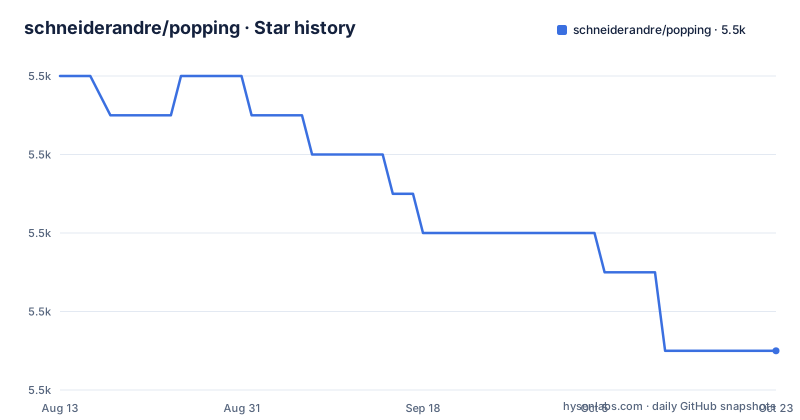
Star history
- schneiderandre/popping5,495 ★ · -7
| Repository | 2026-08-13 | 2026-10-22 |
|---|---|---|
| schneiderandre/popping | 5.5k | 5.5k |
-7 Stars in the last 70 days, measured from the daily GitHub snapshot. Compare with other projects
Editorial analysis
The most recent commit to the default branch is dated 2017-07-05
That is the date recorded for the last push to the branch this repository uses, and it is the single most consequential fact in the file for anyone considering depending on it. There are no GitHub releases either, so there is no tag, no version number and no changelog to check against, which means the commit date is the only reference point available. Nothing in the repository suggests a maintenance commitment: the readme is three short sections, there is no contributing guide, no security policy, and no continuous integration configuration among the top-level entries. That is entirely consistent with what the project says it is, a set of examples meant to be cloned and run rather than a library under semantic versioning, and it is worth separating that from any assumption that it was ever intended to be consumed as a dependency. For a repository of read-and-adapt examples, a fixed commit date is a much weaker signal than it would be for a library.
There is no podspec, because the library is offered on request
The repository contains no packaging manifest for itself. There is a pod specification file and its lock file at the root, but they describe the dependencies, not this project. What the readme offers instead is a section headed as a question about wanting the classes, and the answer is that you should say which classes you would like to use and the author will create a library and release it as a pod. So the intended distribution model is one to one and on request, rather than a published package you can add to a manifest. That is a reasonable way to run a demonstration project, and it is a poor fit for a team that wants to upgrade on a schedule, since the only supported way to get the code as a dependency depends on a conversation. It also means the project's own version, its minimum deployment target and its dependency versions are all implicit in a commit rather than recorded anywhere a tool could read.
The resolved dependency source is committed to the tree
The top-level listing includes a directory for resolved pods alongside the pod file and its lock file. Vendoring the dependency source in that arrangement means the repository carries the full source of everything it links against, and a clone is large enough to notice before you start building. The practical consequences are the usual ones. A reviewer looking at a change has to know which of the modified files belong to the project and which belong to a vendored dependency. The lock file pins versions but the committed source is what actually gets compiled, so the two have to be kept consistent by whatever tooling populated them. And for a project whose last modification predates most current iOS tooling, that committed source is also the reason the project can still build: it is not asking the machine to resolve anything current at install time, so nothing has to be fetched to reproduce the original result.
Both a project file and a workspace file are committed
There are two top-level entries that normally would not both be committed. A project file is what the build system generates for a single target, and a workspace file is what ties several of them together. Both are present, which is the expected consequence of the previous section: adding a dependency generates an additional project and makes the workspace the thing you actually open. It also means that if you open the project file instead of the workspace file on a clean checkout, the dependencies will not be found and the build will fail in a way that does not obviously point at the cause. A source directory and a test directory sit beside them, so there is a test target in the project, and there is no separate configuration in the repository for running those tests in continuous integration. Whatever verification exists is the test target and manual running of the examples.
Almost all of the animations come from one third-party engine
The description states that the project is a collection of animation examples for iOS applications and that almost all of them were created using an animation engine published by Facebook. The hedge is doing work in that sentence. It implies at least one animation was not built on that engine, so the collection is not a pure demonstration of one library, and it implies the engine is a dependency of the examples rather than part of the system, which is consistent with the vendored source in the tree. That distinction matters for anyone reading these as a pattern to copy: some of what you see is the animation engine doing the work and some of it is the author's own code, and the two are not separated in a way the readme makes obvious. The videos linked from the file are the only way to see what the examples do, and there are two of them.
The demonstrations are two links to a short-link service
Everything visual about the project is behind two links. The first points at a video showing all the animations in action, and the second points at a video of one specific animation, the folding one, which the readme notes was added later. Both are shortened links through a third-party redirect service rather than direct URLs, and neither is hosted in the repository. That is the most fragile part of the project, since a short-link service is free to expire its mappings and the repository cannot be updated when it does, and it has no control over where the links point over time. The rest of the file directs the reader to clone or download, build and run, which is the honest instruction for an example project: the animations are not demonstrated in the readme, they are demonstrated by building them.
Editorial conclusion
popping suits someone looking for a reference for how interface transitions were built before newer animation tooling existed, where reading the source of a finished example is the point rather than installing a dependency. Two things to check first. Establish that it matches your toolchain, because the source was last modified on 2017-07-05 and the animation engine it leans on was a third-party dependency at the time rather than something in the system, so the project builds against vendored source rather than a current framework. And decide whether you want the examples or a library, because there is no published package in the tree and the maintainer's stated plan is to extract the classes you want into one on request. A team shipping a product today should treat this as reference material to read rather than as code to depend on.
Frequently asked questions
What is the popping iOS repository?
It is a collection of animation examples for iOS applications, written in Objective-C and licensed under MIT. The readme says almost all of them were created using an animation engine published by Facebook, and describes the goal as inspiring better looking interfaces in your own app.
When was the popping repository last updated?
The last push to the default branch is dated 2017-07-05. The repository has no GitHub releases, so there is no tag or version to compare that against, and the commit date is the only reference point the project provides.
Is popping available as a CocoaPods library?
Not in the repository. There is no podspec for the project itself, and the readme says that if you tell the author which classes you would like to use, they will create a library and release it as a CocoaPod. The pod file and lock file at the root describe the project's dependencies rather than the project.
How do I run the popping examples?
Clone or download the repository, then build and run it. Both a project file and a workspace file are committed along with the resolved dependency source directory, so the workspace is what should be opened. A source directory and a test directory are also present.
Can I see what the popping animations look like?
Only through the videos linked from the readme: one showing all the animations in action, and one showing the folding animation that was added later. Both are shortened links through a third-party service rather than files hosted in the repository.
Official sources
Add this badge to your README
If you maintain this project, the badge below links readers to this analysis and shows its maintenance status from the daily GitHub snapshot. Paste the markdown into your README; add ?metric=license or ?metric=stars to the image URL for a different field.

[](https://hysenlabs.com/projects/schneiderandre-popping)Star history chart for your README
[](https://hysenlabs.com/projects/schneiderandre-popping)