Parsel for Python: HTML, XML, and JSON data extraction
Parsel lets you extract data from XML/HTML documents using XPath or CSS selectors
At a glance
- What is it?
- Parsel is a BSD-3-Clause Python library for extracting document data with CSS selectors, XPath, JMESPath, and regular expressions. It suits developers who already have HTML, XML, or JSON content and need a focused selector API, but it does not fetch documents itself.
- Who is it for?
- Adopt Parsel when a Python application already owns its documents and needs composable CSS, XPath, JMESPath, or regular-expression extraction. Do not choose it as a crawler, HTML browser, network client, or malformed-markup repair tool.
- Can I use it commercially?
- Yes. BSD-3-Clause is a permissive licence: you can use, modify and sell software built on it, as long as you keep its copyright and licence notices.
- Is it still maintained?
- Yes. The repository last received commits 7 days ago.
- What is it written in?
- Mainly Python, according to GitHub's language statistics.
Answers come from the project's GitHub data, last synced on November 7, 2026, and from our analysis. They are not legal advice.
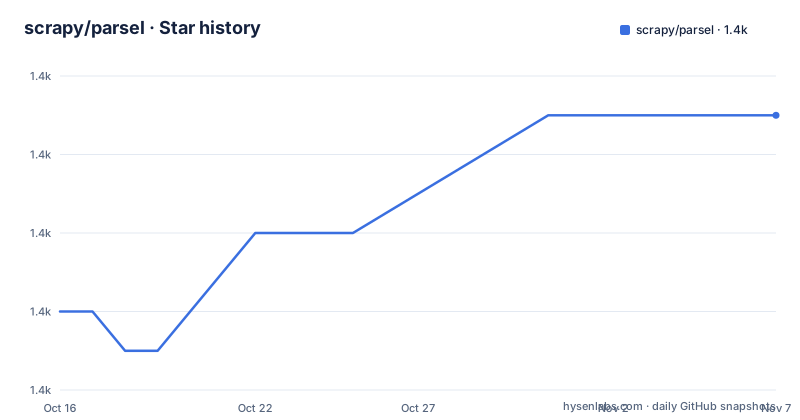
Star history
- scrapy/parsel1,367 ★ · +5
| Repository | 2026-10-16 | 2026-11-07 |
|---|---|---|
| scrapy/parsel | 1.4k | 1.4k |
5 Stars in the last 22 days, measured from the daily GitHub snapshot. Compare with other projects
Editorial analysis
Parsel targets extraction after a document has been obtained
Parsel solves a narrow but common programming problem: turning text from a structured document into Python strings or lists of strings. It is aimed at developers building scrapers, data pipelines, document processors, and Scrapy-related components. The supported input formats are HTML, XML, and JSON. For the first two, selectors can use CSS or XPath. JSON data can be queried with JMESPath, while selector output can also be processed through Python regular expressions.
The distinction between retrieval and extraction matters. Parsel does not document HTTP requests, browser automation, JavaScript rendering, crawling, scheduling, or retries. Its examples begin with a string that the caller already has. This makes Parsel appropriate for the parsing stage of an application, whether the content came from an HTTP client, a file, a queue consumer, a command-line input, or a test fixture.
It is a library rather than an end-to-end scraping platform. Code can construct `Selector(text=...)`, query it, narrow the selection, and retrieve one value with `.get()` or multiple values with `.getall()`. That narrow scope can be an advantage because the caller keeps control of fetching, storage, retry policy, and domain-specific validation. It also means Parsel does not remove those responsibilities from the surrounding application.
Selector chaining controls HTML and XML traversal
According to the README, Parsel is built around `Selector`, which accepts document text and provides separate CSS, XPath, JMESPath, and regular-expression operations. CSS and XPath target HTML and XML. A selector can return a single value, such as the text of a heading, or an iterable sequence when a document contains repeated nodes.
Selectors are composable. The README selects every list item with `selector.css("ul > li")`, then evaluates `.//@href` relative to each item. This relative expression returns the link destinations inside that particular list item. That pattern is more useful than repeatedly constructing absolute XPath expressions against the full document because it keeps each extraction step attached to its current node.
The regular-expression operation follows the same chaining model. The README applies `.re(r"\w+")` to the result of `//h1/text()` and receives the individual words from the heading text. The exact returned value depends on the selector result and the regular expression, but the documented call shows that Parsel exposes regex processing as part of the extraction chain.
For JSON, Parsel selects script text and sends it into JMESPath. The documented result includes `.get()`, which returns the first matching value, and `.getall()`, which returns all matching values. Parsel therefore supports separate query languages suited to different document structures while preserving a common selector interface.
Parsel requires Python 3.11 and four direct dependencies
The project metadata defines `requires-python = ">=3.11"`, so Python 3.11 is the earliest supported runtime stated in `pyproject.toml`. The package classifiers include CPython and PyPy and list Python versions from 3.11 through 3.15. This makes the supported-runtime range explicit, but it also excludes installations based on Python 3.10 or older unless a different Parsel version is selected.
Parsel depends on `cssselect>=1.2.0`, `jmespath>=1.0.0`, `lxml>=5.1.0`, and `w3lib>=1.19.0`. Those packages reflect its implementation boundaries.
The README points readers to the Parsel documentation at `https://parsel.readthedocs.org` and provides PyPI links for package information and supported Python versions. It does not give a package installation command. The repository build configuration uses Hatchling, with `hatchling>=1.27.0` and `hatchling.build` specified as its build requirements. Application developers should use the installation procedure in the official documentation or the packaging index entry, and dependency resolution will also need to satisfy the four runtime minimums.
A first Parsel extraction starts with an in-memory document
The following is the README's introductory Python example. It creates an HTML document in memory, extracts a heading, applies a regular expression to another result, reads link attributes from list items, and queries embedded JSON with JMESPath. No network access is involved.
from parsel import Selector

text = """
<html>
    <body>
        <h1>Hello, Parsel!</h1>
        <ul>
            <li><a href="http://example.com">Link 1</a></li>
            <li><a href="http://scrapy.org">Link 2</a></li>
        </ul>
        <script type="application/json">{"a": ["b", "c"]}</script>
    </body>
</html>"""
The heading query should return the text `Hello, Parsel!`:
selector = Selector(text=text)
selector.css("h1::text").get()
The XPath result can be split into words with a regular expression:
selector.xpath("//h1/text()").re(r"\w+")For repeated HTML nodes, iterating over list items exposes a selector scoped to each item:
for li in selector.css("ul > li"):
    print(li.xpath(".//@href").get())
The embedded JSON is queried through JMESPath. The first form returns one value, while the second returns the complete result list:
selector.css("script::text").jmespath("a").get()
selector.css("script::text").jmespath("a").getall()
JSON support depends on locating valid JSON text first
Parsel's JSON capability does not mean that every HTML document becomes a JSON document. In the README example, the caller first locates the contents of `<script type="application/json">` with a CSS selector. Parsel then applies `.jmespath("a")` to that selected text. The query language operates after the correct text node has been isolated.
This distinction matters for real extraction pipelines. A page may contain several scripts, none of which may contain the expected payload. It may place JSON in an attribute, a data block, or a separate API response. The README does not document automatic script discovery, schema validation, JSON error recovery, or conversion rules for arbitrary HTML. Those behaviors should not be assumed from the existence of the `jmespath` method.
The same caution applies to CSS and XPath. Parsel documents valid expressions for selecting nodes, text, and attributes, but selector correctness remains tied to the input. HTML and XML are not interchangeable syntaxes in every document. The source must also be valid enough for the parser to expose the nodes an expression expects. The README does not claim that Parsel repairs broken markup.
For data that arrives as a complete JSON body, the official documentation would need to establish the intended construction method. The README demonstrates JSON extraction through selected script text, so that is the confirmed path covered here. Additional JSON loading behavior should be checked in the documentation before designing an interface around it.
Parsel differs from tag-oriented parsing and crawl orchestration
Parsel presents a selector-oriented API built around CSS, XPath, JMESPath chaining, and regular expressions. Its example narrows nodes with CSS and then continues with relative XPath. This suits codebases where XPath is already part of the extraction vocabulary or where HTML and XML need one selector model.
The meaningful distinction available from the project documentation is methodological: Parsel treats selector chaining as its central interface. It does not position itself as a general HTML navigation object or a toolkit whose main abstraction is a sequence of Python tags. A team choosing between these libraries should compare query languages and result types against its actual extraction requirements.
Parsel is also not an alternative to a crawler. It does not document link discovery policies, request scheduling, robots.txt handling, retries, persistence, or concurrency. The repository identifies Parsel as a Scrapy project library. Applications needing network retrieval must keep a separate component responsible for it.
Recent commits, releases, and BSD-3-Clause implications
The repository is not archived. Its last push was on 2026-10-16, which supports describing the project as recently changed rather than inactive. The listed releases include v1.11.0 on 2026-01-29, v1.10.0 on 2026-01-28, and v1.9.1 on 2024-12-16. The `pyproject.toml` version marker reads `current_version = "1.12.1"`, although the release list does not show a corresponding release entry. That discrepancy should be checked against the release history before selecting a version for production packaging.
The project is licensed under BSD-3-Clause, and `pyproject.toml` explicitly includes the `LICENSE` file among the license files. The metadata identifies the Scrapy project as the author. Teams redistributing Parsel in an application, service image, or packaged distribution should review the repository's `LICENSE` text to determine which notices must be retained. That is a compliance check, not a conclusion that every use requires source disclosure.
Upgrade planning also requires attention to the Python floor and dependency minimums. A move across supported Python releases can interact with `lxml`, `cssselect`, `jmespath`, and `w3lib`, even though Parsel does not document a special migration tool. The repository includes `NEWS`, `release.rst`, and release notes online, which are the relevant places to inspect before changing versions.
Editorial conclusion
Adopt Parsel when a Python application already owns its documents and needs composable CSS, XPath, JMESPath, or regular-expression extraction. Do not choose it as a crawler, HTML browser, network client, or malformed-markup repair tool. Before adoption, verify selector behavior against the document types you receive, confirm Python 3.11 or later is acceptable, and review the BSD-3-Clause obligations for your distribution model.
Frequently asked questions
What document formats does Parsel support?
Parsel supports HTML, XML, and JSON. HTML and XML can be queried with CSS and XPath, while JSON can be queried with JMESPath.
How do I extract one value instead of every match with Parsel?
Use `.get()` after a selector expression, as shown for the heading text and the first embedded JSON value. Use `.getall()` when the complete result sequence is required.
Does Parsel fetch web pages or execute JavaScript?
The README does not document HTTP fetching, crawling, or JavaScript execution. Its example starts with an in-memory document and focuses on extraction.
Which Python versions does the current Parsel metadata support?
The project metadata requires Python 3.11 or later. It classifies support for CPython and PyPy and lists Python versions from 3.11 through 3.15.
Can Parsel query JSON embedded in an HTML script?
Yes, if the script text is selected first. The README selects the script text with CSS and then applies a JMESPath expression to its JSON contents.
Official sources
Add this badge to your README
If you maintain this project, the badge below links readers to this analysis and shows its maintenance status from the daily GitHub snapshot. Paste the markdown into your README; add ?metric=license or ?metric=stars to the image URL for a different field.

[](https://hysenlabs.com/projects/scrapy-parsel)Star history chart for your README
[](https://hysenlabs.com/projects/scrapy-parsel)Was this useful?