Flask's dependency list is six packages and its project layout is your problem
Flask is a small Python web framework built around Werkzeug and Jinja, with extensions available for larger applications.
At a glance
- What is it?
- A WSGI framework that started as a wrapper around Werkzeug and Jinja and still describes itself that way. What makes it usable is the small install surface and the extension ecosystem; what makes it expensive is that it enforces no layout, so the architecture decisions land on you from the first commit.
- Who is it for?
- Flask suits a small service, an internal tool, or a microservice where you want the request cycle visible and nothing between you and Werkzeug, and its six-dependency install surface is the strongest argument for it. It does not suit a team that wants the framework to settle its architecture, because the README says outright that no project layout is enforced and the extension ecosystem, not the framework, supplies the conventions.
- Can I use it commercially?
- Yes. BSD-3-Clause is a permissive licence: you can use, modify and sell software built on it, as long as you keep its copyright and licence notices.
- Is it still maintained?
- Yes. The repository last received commits 14 days ago.
- What is it written in?
- Mainly Python, according to GitHub's language statistics.
Answers come from the project's GitHub data, last synced on November 13, 2026, and from our analysis. They are not legal advice.
Star history
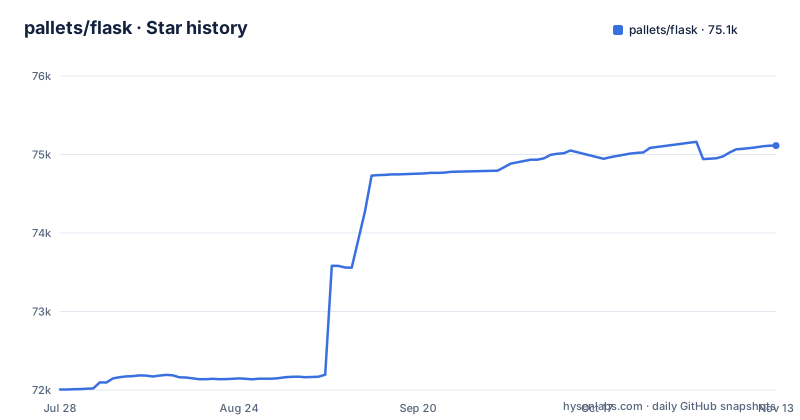
- pallets/flask75,113 ★ · +3,107
| Repository | 2026-07-28 | 2026-11-13 |
|---|---|---|
| pallets/flask | 72k | 75.1k |
3,107 Stars in the last 108 days, measured from the daily GitHub snapshot. Compare with other projects
Editorial analysis
Six runtime packages, and Python 3.10 as a hard floor
The dependency list in pyproject.toml is short enough to read in one pass, and it explains most of what Flask is. Six packages carry the runtime: blinker, click, itsdangerous, jinja2, markupsafe and werkzeug, each with a lower bound rather than an exact pin. Werkzeug and Jinja are the two the README names as the project's origin, described as having begun as a simple wrapper around them. click is the command-line layer that produces the flask command. itsdangerous and blinker are the session-signing and signal pieces. markupsafe is a Jinja dependency that arrives in the list on its own.
The version floor is explicit and modern: requires-python is set to greater than or equal to 3.11, and the project classifies itself as Typing :: Typed, with a type-checking toolchain behind that claim rather than an aspiration. The published metadata also carries Development Status :: 5 - Production/Stable and Operating System :: OS Independent, and a set of Trove classifiers that name WSGI at two levels of specificity.
One number in the repository is worth noticing. pyproject.toml declares version 3.2.0.dev, while the most recent GitHub release listed is 3.1.3 from 2026-02-19. The default branch is therefore ahead of a published version, which is normal for a maintained project and matters if you pin to a release number rather than tracking the branch.
Flask declines to enforce a project layout, and that is the central trade
The README states the position in two sentences: Flask offers suggestions, but doesn't enforce any dependencies or project layout, and it is up to the developer to choose the tools and libraries they want to use. Read favourably, that is a small install surface with an exit door. Read practically, it means every structural decision a framework could have made for you is now a decision you have to make, document and enforce yourself.
The gap shows up in the first week rather than the first year. Nothing tells you where blueprints live, where configuration is read from, how the application factory is wired, or how tests should construct an app. Two teams on the same Flask version will produce two different directory trees, and a codebase that grows past a handful of routes accumulates the kind of import cycles and circular dependencies that a fixed layout would have prevented.
The stated remedy is the community, in the form of many extensions that make adding new functionality easy. That is a real answer and it is also a decision deferred: you still have to choose which extension, and extensions differ in how they expect your project to be shaped. The honest summary is that Flask hands you a routing and templating layer and asks you to be the architect, which suits experienced developers and penalises teams without a shared convention already.
The dev server binds to 127.0.0.1 and the README names no production server
The complete example is short enough to read as the project's whole tutorial. Save the following as app.py:
# save this as app.py
from flask import Flask

app = Flask(__name__)

@app.route("/")
def hello():
    return "Hello, World!"
Then start it, and the output tells you something the code does not:
$ flask run
  * Running on http://127.0.0.1:5000/ (Press CTRL+C to quit)
That address is the loopback interface. The development server is not reachable from another machine,. Neither the README nor pyproject.toml names a production WSGI server, a process manager, or a configuration file for host and port, and there is no mention of a deployment target anywhere in the two hundred words of documentation. The command being documented is the development command.
For a reader this is the gap that matters most, because the path from the snippet above to something serving real traffic is not covered by the README and has to be assembled from the wider ecosystem. That assembly is entirely ordinary, and it is also the part of adopting Flask that nobody in the project is going to hand you.
Async and dotenv are extras, and the README does not say how to switch them on
Two optional dependency groups sit in pyproject.toml. The async extra pulls in asgiref at 3.2 or newer, and the dotenv extra pulls in python-dotenv. Neither is a runtime dependency, and neither is mentioned in the README, which never uses the words async or dotenv. The practical consequence is that a reader who wants an async view or a .env file has to know the extra exists, which means reading pyproject.toml, which is a reasonable thing to do once and an unreasonable thing to expect on every project.
The same file is more forthcoming about development. There are seven dependency groups beyond the runtime set. dev holds ruff, tox and tox-uv. docs holds pallets-sphinx-themes, sphinx below version 9, sphinx-tabs and sphinxcontrib-log-cabinet, and docs-auto adds sphinx-autobuild. pre-commit holds pre-commit and pre-commit-uv, matching the .pre-commit-config.yaml at the repository root. tests holds asgiref, pytest and python-dotenv. typing holds asgiref, cryptography, mypy, pyright, pytest, python-dotenv, types-contextvars and types-dataclasses, so both major type checkers run in the same group. gha-update is conditioned on Python 3.12 or newer, which is the one place the file admits the floor is not uniform across every workflow.
Taken together, this is a project with a disciplined contributor toolchain: two type checkers, a linter, a tox matrix driven through uv, and a lockfile. None of that is available to you from a pip install, which is the gap between how the project is worked on and how it is used.
Three example directories carry most of the practical guidance
With a README of under two hundred words, the examples directory does the teaching. It contains exactly three subdirectories: examples/celery/, examples/javascript/ and examples/tutorial/. Each one answers a question the README leaves open.
The tutorial directory is the conventional entry point and the one to read first. The JavaScript example answers the question every server-rendered framework eventually gets, which is how you ship behaviour to a browser without rebuilding the Python side, and it is the example directory named for browser-side code. The Celery example answers a different one: how a Flask application might hand work to a background task queue.
Three examples is a small sample, and the directory names suggest a tutorial, a browser-side example and a background-worker example.
A version ahead of the last release, and a maintainer email as the only contact route
The repository's default branch is named main, and its most recent push was on 2026-10-30, while the last three releases are 3.1.3 from 2026-02-19, 3.1.2 from 2025-08-19 and 3.1.1 from 2025-05-13. The gap between the declared development version, 3.2.0.dev, and the newest published release is a normal development state and a real hazard for anyone who reads version numbers as a stability signal. It also means release cadence here is measured in months rather than weeks, which is worth knowing before you plan around a fix arriving.
The project metadata gives a single maintainer entry, the Pallets organisation, with the contact address [email protected]. The README's contributing section points at a separate contributing documentation page for reporting issues, requesting features, asking or answering questions, and making pull requests, so the four routes are documented but the mail address is the only one visible inside the repository itself.
The repository root has a CHANGES.rst file, and the Changes URL in the project metadata points to the changelog page on the documentation site.
Editorial conclusion
Flask suits a small service, an internal tool, or a microservice where you want the request cycle visible and nothing between you and Werkzeug, and its six-dependency install surface is the strongest argument for it. It does not suit a team that wants the framework to settle its architecture, because the README says outright that no project layout is enforced and the extension ecosystem, not the framework, supplies the conventions. Before building on it, read the example directories rather than the README, since the README is under two hundred words and the three directories under examples/ are the worked examples, and decide your layout in writing before the first module, because retrofitting one into a running app is the expensive direction.
Frequently asked questions
What is Flask used for?
Flask is a lightweight WSGI web application framework for Python, built around Werkzeug and Jinja. The README describes it as designed to make getting started quick and easy while still scaling to complex applications, and as having begun as a simple wrapper around those two libraries.
How do I use Flask in Python?
Create an application with Flask(__name__), decorate a function with @app.route to map a URL to it, and return a string from that function. The README's example saves this as app.py and runs it with flask run, which reports the service listening on http://127.0.0.1:5000/.
How do I install Flask?
Flask requires Python 3.11 or newer and its runtime needs six packages: blinker, click, itsdangerous, jinja2, markupsafe and werkzeug, each with a lower bound. Two optional extras exist, async pulling asgiref and dotenv pulling python-dotenv, neither of which is a runtime dependency.
How do I use Flask?
The shortest documented path is a six-line app.py that creates a Flask instance and maps a route to a function returning a string, started with flask run. Beyond that the README declines to prescribe a project layout, and the three directories under examples/ (tutorial, javascript and celery) hold the worked examples.
Official sources
Add this badge to your README
If you maintain this project, the badge below links readers to this analysis and shows its maintenance status from the daily GitHub snapshot. Paste the markdown into your README; add ?metric=license or ?metric=stars to the image URL for a different field.

[](https://hysenlabs.com/projects/pallets-flask)Star history chart for your README
[](https://hysenlabs.com/projects/pallets-flask)Was this useful?