screego: a Go screen sharing server whose container is FROM scratch and whose only HTTP port is 5050
screen sharing for developers https://screego.net/
At a glance
- What is it?
- screego/server adds a WebRTC screen share stream to software you already run, with an integrated TURN server and a single binary install. Its own repository shows the shape of that binary: a gorilla websocket and mux stack, pion for TURN and NAT traversal, configuration through a config file or environment variables, and a Docker image that copies in a prebuilt executable rather than compiling one.
- Who is it for?
- Use screego when your team needs a screen share bolted onto software you already run and accepts the narrow scope, since the project describes itself as an addition that only helps to share a screen.
- Can I use it commercially?
- Yes, with conditions. GPL-3.0 is a copyleft licence: if you distribute software that includes it, you must release that software's source code under the same licence. Running it internally without distributing it does not trigger that obligation.
- Is it still maintained?
- Yes. The repository last received commits 20 days ago.
- What is it written in?
- Mainly Go, according to GitHub's language statistics.
Answers come from the project's GitHub data, last synced on November 14, 2026, and from our analysis. They are not legal advice.
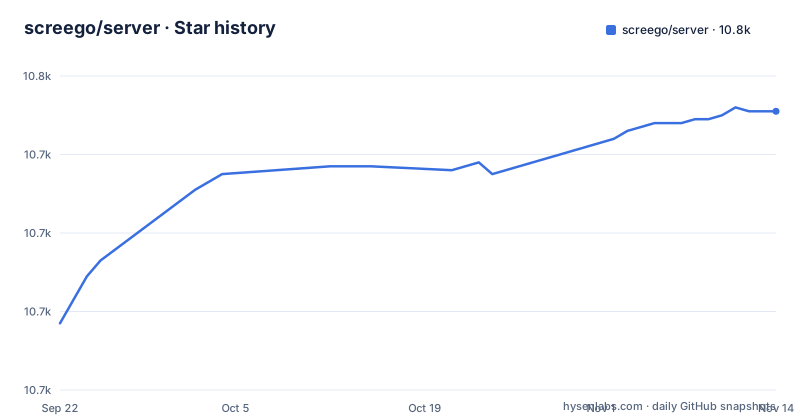
Star history
- screego/server10,751 ★ · +54
| Repository | 2026-09-22 | 2026-11-14 |
|---|---|---|
| screego/server | 10.7k | 10.8k |
54 Stars in the last 53 days, measured from the daily GitHub snapshot. Compare with other projects
Editorial analysis
FROM scratch means the executable has to exist before the image is built
The Dockerfile is nine instructions long and compiles nothing:
FROM scratch
USER 1001
COPY screego /screego
EXPOSE 3478/tcp
EXPOSE 3478/udp
EXPOSE 5050
WORKDIR "/"
ENTRYPOINT [ "/screego" ]
CMD ["serve"]
The copy is the whole story: the image expects a binary named screego sitting in the build context, which means a clean checkout cannot be built with docker build alone. You compile first, and the repository root carries a .goreleaser.yml alongside a .golangci.yml, so release artifacts are produced by that separate pipeline. A scratch base also removes every file that is not explicitly copied, including a certificate bundle and a shell. Consequence for operators: there is no shell to debug inside a running container, and any outbound TLS from the server depends on certificates you supply rather than on a system store you never installed.
3478 is published on tcp and udp, and one protocol is not enough
Three ports are exposed: 3478/tcp, 3478/udp, and 5050. The duplicated 3478 pair is the interesting part, since screego ships an integrated TURN server and the feature list points at a NAT traversal page for the details. Relay traffic is what gets peers connected when a direct path fails. The Dockerfile exposes the port on both protocols, so open both in your firewall or security group, and test from a network you do not control before you tell anyone the demo works.
Configuration arrives through a file or through the environment, and the precedence is unstated
Two configuration dependencies appear in go.mod: github.com/joho/godotenv and github.com/kelseyhightower/envconfig. The first reads a .env style file from disk, the second maps environment variables onto a Go struct. The repository root ships screego.config.example and screego.config.development and the source tree has a config directory. What none of that text settles is which one wins when a setting appears in two places, or whether the example file is a template the binary reads or documentation for the docs site. Consequence for deployment: a value you change in the environment and forget to remove from a mounted file is a value you will debug for an afternoon. Decide one source per setting, and write down which it is. The README links configuration to screego.net/#/config rather than describing keys, so the authoritative list lives outside this repository.
Running as UID 1001 with an empty base leaves nowhere to write
USER 1001 sets a numeric identity with no passwd entry behind it, and the working directory is /. That combination is deliberate and it constrains your deployment. The process does not own /tmp, does not own its working directory, and has no user database to resolve a name against, so anything it needs at runtime has to arrive from outside: a mounted config file, a mounted certificate pair, and a writable path if it keeps state. In the source tree the separation is visible too, with auth, cmd, config, logger, router, server, turn, ui, util, and ws as distinct directories, plus a top-level main.go, so the binary is the only artifact that ever ships. Plan the volume layout before the first deploy rather than discovering the permission error from a container that exits on startup.
Session handling sits on gorilla sessions and a signed cookie
The dependency list is a map of what the server does. github.com/gorilla/mux routes the HTTP surface, github.com/gorilla/handlers adds middleware, github.com/gorilla/websocket carries the signaling channel that WebRTC needs before media flows directly between peers, and github.com/gorilla/sessions holds authenticated state, with gorilla/securecookie arriving as an indirect requirement. The consequence sits in the signing key. Sessions built on signed cookies mean that rotating or losing the key invalidates every open session at once. Nothing in the repository text states the cookie flags or whether Secure is set when you terminate TLS upstream.
Prometheus and zerolog are wired in, but neither output is documented
github.com/prometheus/client_golang and github.com/rs/zerolog are direct dependencies, so instrumentation and structured logging are part of the build rather than an add-on you bolt on. The README says nothing about what you get: no metric names, labels, scrape path, log schema or sample output. That is the practical limit here. You cannot build a dashboard or an alert from the README alone. Point a scraper at the binary, enumerate what it exposes, and treat the metric list you discover as the contract. Anything your alerting depends on should have an explicit threshold set on your side, not an assumption inherited from the library.
Three patch releases on the 1.12 line, and a Go 1.26.0 floor in the manifest
Recent tags are v1.12.4 on 2026-05-13, v1.12.5 on 2026-08-20, and v1.12.6 on 2026-09-27, and the project states that it versions with SemVer. The repository is not archived and the last push was on 2026-10-25, after the newest tag (v1.12.6, 2026-09-27). That cadence has an upside and a cost: patch updates are cheap to take, and nothing in a patch promises you a breaking API change. The cost is that upgrades are undocumented at the repository level, so there is no upgrade note in the README to tell you what changed between those three tags. Meanwhile go.mod declares go 1.26.0, which sets a toolchain floor your build environment has to meet before you can even compile from source.
GPL-3.0 with a deliberately narrow feature scope
The repository ships LICENSE under GPL-3.0, which is the first thing to settle before you embed this in a product. screego runs as a separate server process that adds a stream to software you already run, which is a different legal shape from linking a library into your own codebase, and the obligations that attach to modifying and distributing the binary are yours to check rather than assume. Separately there is the scope question, and the project answers it plainly: screego is an addition to existing software and only helps to share your screen, nothing else. Read that against the feature list, which covers multi user screenshare, WebRTC transfer, resolution and latency, install, and the integrated TURN server. There is no chat, no recording, and no annotation. If your workflow needs any of those, this is the wrong tool rather than a thin one.
Editorial conclusion
Use screego when your team needs a screen share bolted onto software you already run and accepts the narrow scope, since the project describes itself as an addition that only helps to share a screen. Verify three things first: that your firewall opens 3478 on both tcp and udp, because the image publishes it on both; that you can mount a config file or set environment variables, since both routes exist and neither precedence is documented; and that the GPL-3.0 license fits your distribution plans. Do not expect chat, recording, or annotation, none of which appear in the feature list.
Frequently asked questions
How do I install the screego server?
Two routes are offered: a single binary or Docker. The image is built FROM scratch around a prebuilt executable whose entrypoint is /screego with CMD ["serve"], which means you compile the binary before you build the image. Step by step instructions live at screego.net/#/install rather than in the repository.
How do you use the screego server once it is running?
Screego is an addition to existing software and only helps to share your screen, so you embed the stream into a setup you already run rather than replacing a tool. Configuration reaches the process through a config file or environment variables, using godotenv and envconfig, and the repository ships screego.config.example and screego.config.development as starting points.
What is the screego server for on a computer?
For multi user screen sharing over WebRTC, at low latency and high resolution, with an integrated TURN server for NAT traversal. The Go module is github.com/screego/server, it uses gorilla for routing, sessions, and websocket signaling, and it exposes port 5050 plus 3478 on both tcp and udp.
What does the screego server do with a failed connection?
Screego ships an integrated TURN server, and pion/turn/v4 is a direct dependency, so peers that cannot connect directly relay through it. The container publishes 3478 on both tcp and udp.
Official sources
Add this badge to your README
If you maintain this project, the badge below links readers to this analysis and shows its maintenance status from the daily GitHub snapshot. Paste the markdown into your README; add ?metric=license or ?metric=stars to the image URL for a different field.

[](https://hysenlabs.com/projects/screego-server)Star history chart for your README
[](https://hysenlabs.com/projects/screego-server)Was this useful?