Watcharr is a self-hosted watched list whose build files quietly disagree with each other
Open source, self-hostable watched list for all your content (movies, tv series, anime, games) with user authentication, modern and clean UI and a very simple setup.
At a glance
- What is it?
- A Go and SvelteKit tracking server for movies, series, anime and games, with a three stage Dockerfile, a Makefile that accepts any typo, and a compose file that ships the floating latest tag while telling you not to.
- Who is it for?
- Watcharr fits a household or a small group that wants its own tracked list rather than an account on someone else's service, and the Docker route is short enough to try in an evening. It is a poor fit for anyone who needs an upgrade path they do not maintain themselves: the shipped compose file pins nothing, the database is a bind mount you have to back up, and the public demo runs the development branch rather than a release.
- Can I use it commercially?
- Yes, with conditions. GPL-3.0 is a copyleft licence: if you distribute software that includes it, you must release that software's source code under the same licence. Running it internally without distributing it does not trigger that obligation.
- Is it still maintained?
- Yes. The repository last received commits 14 days ago.
- What is it written in?
- Mainly Go, according to GitHub's language statistics.
Answers come from the project's GitHub data, last synced on November 14, 2026, and from our analysis. They are not legal advice.
Star history
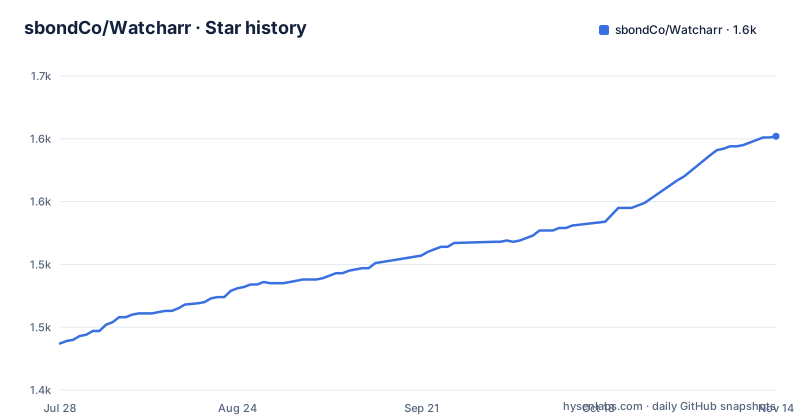
- sbondCo/Watcharr1,602 ★ · +165
| Repository | 2026-07-28 | 2026-11-14 |
|---|---|---|
| sbondCo/Watcharr | 1.4k | 1.6k |
165 Stars in the last 109 days, measured from the daily GitHub snapshot. Compare with other projects
Editorial analysis
A tracking server with accounts, ratings and status columns
Watcharr is a watched list you host yourself. You register an account, add movies, TV series, anime and games, mark each one watched, watching or planned, rate it, and follow its status over time. Authentication is part of the application, so the list is per user rather than one shared page, and the front end is a separate application from the Go service that answers it.
The stack is Go on the server and SvelteKit on the browser side, packaged as one self-hosted deployment. There is a project site at watcharr.app and a public demo at beta.watcharr.app. The repository metadata says GPL-3.0 while the front end manifest says GPL-3.0-only, which is the same license family stated two ways in two files. The default branch is `dev`, not a release branch, and that is the branch the public demo runs.
The numbers sit oddly for a project at this stage: 1518 stars and 83 forks against 158 open issues. Support traffic is roughly twice the size of the contributor surface, which tells you where the answers live, and that is the issues tracker and a Matrix room rather than the documentation.
The Makefile accepts any target name you mistype
The whole build entry point is four small targets, and the file ends with a rule that matches every name left over:
.PHONY: dev version

dev:
	./node_modules/.bin/vite dev

dev_host:
	./node_modules/.bin/vite dev --host

# Don't judge me.
version:
	@$(eval VER := $(filter-out $@,$(MAKECMDGOALS)))
	@echo "Updating version to $(VER)"
	echo -n "$(VER)" > ./server/VERSION
	npm version $(VER) --git-tag-version false
%:
	@:
That trailing `%: @:` recipe succeeds silently. Run `make buld` and make reports success having done nothing, with no error to tell you the name was wrong. The phony declaration is incomplete in the other direction: `dev` and `version` are listed, `dev_host` is not, so a file or directory called `dev_host` in the working tree would win over the recipe.
The targets also step around the package manager. The manifest's own script is `vite dev`, while the Makefile calls `./node_modules/.bin/vite dev` directly, and `dev_host` has no counterpart in package.json at all, so the binding a port needs for remote access exists only in the Makefile.
The version number lives in two files written by one target
Bumping the version is a single command, `make version 4.3.0`, and it writes two places at once. The first is a plain text file at `./server/VERSION`, written with `echo -n` so the value carries no trailing newline. The second is the front end manifest, through `npm version` with `--git-tag-version false`.
That flag is the detail worth noting. The target updates the manifest without creating a git tag, so the release tags that appear on the repository are cut somewhere else, by hand or by a workflow, while the manifest and the file on disk are updated locally. Two artifacts, two update mechanisms. The number itself comes out of the goal list through `filter-out`, which strips the target name and leaves whatever followed it on the command line. One argument produces a clean version string, and the echo line is the only confirmation the target prints before it has changed two files.
At the moment the two agree. The manifest reads 4.2.2, the released tags run v4.2.2, v4.2.1 and v4.2.0, and v4.2.2 was published on 2026-09-12. The last commit on the default branch is dated 2026-09-16, four days after that release, so the development branch has moved past the tag that exists. The author also states plainly that only the latest version of the application is supported and older ones get no fixes.
The compose file ships latest while telling you to pin a version
One service, one port, one volume:
services:
  watcharr:
    # The :latest tag is used for simplicity, it is recommended
    # to use an actual version, then when updating check the releases for changelogs.
    image: ghcr.io/sbondco/watcharr:latest
    container_name: watcharr
    ports:
      - 3080:3080
    volumes:
      # Contains all of watcharr data (database & cache)
      - ./data:/data
    restart: unless-stopped
The comment inside the file is the sharpest criticism in the repository, aimed at the repository's own default. The floating tag means a `docker compose pull` can replace the binary under a running database with no changelog review step, and the comment asks for the opposite behaviour. Nothing in the file defines a health check, an environment variable, or a second service for the database, because everything, including the cache, lives inside the single `./data` directory as a bind mount.
The setup instructions do not fix this. Instead of commands, the readme sends you to an external documentation site for an up to date installation guide and offers the compose file as the path for people who prefer Docker. A second file, docker-compose.dev.yml, sits in the repository root for local work, and the README also points at a FEATURES.md that holds the running feature list.
The production image is a Node base carrying two packages
The Dockerfile has three stages. The first is golang:1.26-alpine, which installs musl-dev, gcc and build-base so the server can be compiled with cgo, then builds one static binary:
RUN go mod download && GOOS=linux CGO_ENABLED=1 CGO_CFLAGS="-D_LARGEFILE64_SOURCE" go build -o ./watcharr`CGO_ENABLED=1` and the large file define are there for SQLite, and the comment links to a long standing issue on a well known SQLite driver. The whole `server` directory is copied in one go, with a comment saying the `.dockerignore` will strip what should not ship, which makes a file that is not in the repository root listing load-bearing for every build.
The second stage is node:24-alpine, which installs the front end dependencies and runs the build. The third is node:24-alpine again, and it is the final image. It copies the compiled server binary, the built front end, and the two package files, then runs `npm ci --omit=dev --ignore-scripts=true` with a comment explaining that the `prepare` script belongs to development and would otherwise error. So the image that runs in production is a Node runtime whose production dependencies are two packages, papaparse and blurhash, next to a Go binary started by `CMD ["/watcharr"]` on port 3080.
Games sit behind a configuration page the repository does not contain
Movies, series and anime need nothing beyond the container. Games are different. The readme attaches the third media type to a link into the server configuration section of the documentation, on the page about IGDB support, and frames it as extra configuration. The repository itself carries no game credentials file and no explanation of what the page asks you to supply, so a fresh install gives you two of the four tabs and leaves the third empty until you follow a link off the repository.
The dependency list explains the rest of what the front end does. papaparse is the only parsing library in the bundle, and it has its own type definitions among the devDependencies, which is what a CSV import or export feature would need. blurhash sits beside it for decoding blurry placeholders, so poster art can render before a full image arrives. `@vite-pwa/sveltekit` is pinned at 1.1.0, which is the piece that lets the same site be installed to a home screen rather than only visited in a tab.
The toolchain around those two packages is current to a fault: typescript 6.0.3, svelte 5.56.4, vite 8.1.4, eslint 10.7.0 and sass 1.101.0, with the SvelteKit node adapter at 5.5.7. The manifest is marked private, so the front end is built to be embedded rather than published.
Formatting covers the repository, linting covers only src
The manifest keeps four quality scripts and they do not line up. `format` is `prettier --write .`, so it rewrites everything from the root down. `lint` is `prettier --check ./src/ && eslint ./src/`, so the same tool only checks the front end source directory, and a change to a server file, a workflow or a configuration file can be formatted or not without the check ever looking. A `.prettierignore` and a `.prettierrc` sit at the root to decide what that rewrite touches.
Type checking is separate again: `check` runs `svelte-kit sync` and then `svelte-check` against the tsconfig, with a `check:watch` variant that adds the watch flag. The `prepare` script is `svelte-kit sync` on its own, which is why it fires on every install and why the production stage of the Dockerfile has to disable scripts to stop it.
The repository root shows the same mixture of eras. There is both a CHANGELOG.md and a `changelog/` directory, a `doc/` directory next to documentation hosted on the project site, and a `.vscode/` directory committed to the repository. Alongside them sit SECURITY.md, ATTRIBUTION.md, CONTRIBUTING.md, a vite config, a svelte config and an eslint flat config.
Support runs through an issue tracker, a Matrix room and a demo you sign up for
The help section offers two routes and asks for patience on both. Opening an issue is described as the best way to get help, with the note that every type of issue is accepted. The second route is a Matrix room on matrix.org, and the author signs off that reply is a best effort.
The public demo at beta.watcharr.app runs the latest `dev` build, so bugs found there may already be fixed on the branch that matters, and the readme calls it a worst case for speed because it is the shared instance everyone hits. There is no demo account: you type any username and password, then click `Not a user?` at the bottom of the form and a `Sign Up` button appears.
Community tooling is listed in the same first person voice, with one Kodi plugin credited to airdogvan for automatically tracking watched shows and movies. The author attaches the condition himself: no assurances and no staying on top of those tools, including code review, so problems belong in an issue for that tool. The same voice runs the feature board, which the author describes as disorganised and subject to surprise updates, with FEATURES.md offered as the flat list.
Editorial conclusion
Watcharr fits a household or a small group that wants its own tracked list rather than an account on someone else's service, and the Docker route is short enough to try in an evening. It is a poor fit for anyone who needs an upgrade path they do not maintain themselves: the shipped compose file pins nothing, the database is a bind mount you have to back up, and the public demo runs the development branch rather than a release. Before trusting it, pin a real tag instead of latest, read the changelog for that tag before updating, decide how `./data` gets backed up, and keep game tracking off until the IGDB page in the documentation has been read.
Frequently asked questions
What does Watcharr track out of the box?
Movies, TV series and anime are available with no extra configuration, and each entry carries a status, a rating and a watched history. Video games need the additional server configuration linked from the readme.
Does Watcharr need a separate database container?
No. The compose file defines one service, maps port 3080, and bind mounts ./data to /data, which the file describes as holding all of the database and the cache.
Why does the Watcharr compose file use the latest tag?
A comment in the file says the tag is used for simplicity and recommends an actual version instead, with the releases checked for changelogs when updating. Nothing in the file pins a version.
What languages and runtimes does Watcharr need to build?
The Dockerfile compiles the Go server with cgo enabled on golang:1.26-alpine and builds the SvelteKit front end on node:24-alpine. The final image is node:24-alpine running the Go binary, with production dependencies limited to papaparse and blurhash.
Is the Watcharr demo instance running a release?
No. The readme states the demo runs on the latest `dev` build, which is the default branch of the repository, and that new features are tested on it.
Official sources
Add this badge to your README
If you maintain this project, the badge below links readers to this analysis and shows its maintenance status from the daily GitHub snapshot. Paste the markdown into your README; add ?metric=license or ?metric=stars to the image URL for a different field.

[](https://hysenlabs.com/projects/sbondco-watcharr)Star history chart for your README
[](https://hysenlabs.com/projects/sbondco-watcharr)Was this useful?