Sculpin: PHP Static Site Generation with Twig
Sculpin — Static Site Generator
At a glance
- What is it?
- Sculpin is an MIT-licensed PHP static site generator that turns Markdown and other text sources into static HTML through Twig templates. It fits developers seeking a template-driven publishing workflow and documented blog or landing-page skeletons.
- Who is it for?
- Adopt Sculpin when the project already uses PHP, Composer, and Twig, and begin with the skeleton matching the intended site. Do not select it solely because the generator is written in PHP.
- Can I use it commercially?
- Yes. MIT is a permissive licence: you can use, modify and sell software built on it, as long as you keep its copyright and licence notices.
- Is it still maintained?
- Yes. The repository last received commits 14 days ago.
- What is it written in?
- Mainly PHP, according to GitHub's language statistics.
Answers come from the project's GitHub data, last synced on November 7, 2026, and from our analysis. They are not legal advice.
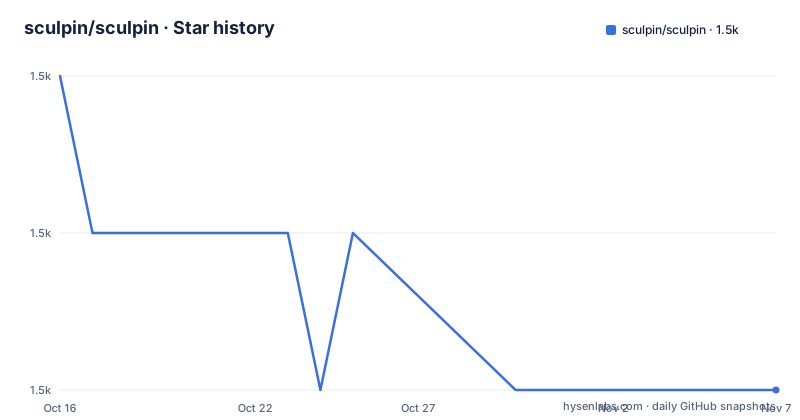
Star history
- sculpin/sculpin1,481 ★ · -2
| Repository | 2026-10-16 | 2026-11-07 |
|---|---|---|
| sculpin/sculpin | 1.5k | 1.5k |
-2 Stars in the last 22 days, measured from the daily GitHub snapshot. Compare with other projects
Editorial analysis
What Sculpin Builds and Who It Fits
Sculpin addresses the publishing problem of converting structured text into a directory of static HTML files. The README lists Markdown and Textile as example data sources and states that Sculpin transforms them using Twig templates. The output is a set of static HTML files that can be deployed to almost any hosting platform.
The main audience is developers who work in PHP or want a publishing system built around Composer and Twig. It can fit a blog, documentation site, or product site when content is compiled before publication. Sculpin is not presented as a hosted service. The developer owns the content sources, templates, site structure, and deployment target.
The generator and a complete site design are separate concerns. The README describes its skeletons as barebones starting points with minimal styling and design. Using Sculpin therefore does not decide typography, responsive layout, navigation, or branding. Those choices remain in the skeleton or in the templates and assets added to the project.
Sculpin's Text, Template, and Output Pipeline
The documented build path has three stages. Sculpin reads data sources such as Markdown or Textile files. It then transforms that content using Twig templates. Finally, it writes static HTML files for deployment.
Templates determine how pages are assembled. The README points users to Twig documentation for the template language, which places Twig between the source content and the generated page. The skeleton description also refers to layout files, pagination interfaces, and templates that list content by custom-defined categories. Sculpin therefore supports site structures, not only one-file conversion.
A metadata property such as a category or tag is called a taxonomy. Blog skeletons provide taxonomy layouts, allowing content to be grouped through more than one classification. This is useful when a site needs category archives, tag pages, or other listing pages. The README does not describe a database, a server-side request layer, or a runtime administration interface for Sculpin itself. Its documented model is build-time generation followed by static hosting.
Creating a First Sculpin Blog
The README does not provide a standalone install command for the generator. It directs users to skeletons and explains that a skeleton can be combined with `composer create-project` to clone a site and install its dependencies. For a first use, the Bootstrap Blog Skeleton provides a minimal blog structure.
Run this documented command from a directory where Composer can create `my-blog`:
composer create-project sculpin/blog-skeleton my-blogThe README says this command clones the skeleton and installs dependencies. The resulting directory is the project workspace. From there, the site owner can inspect the included Twig layouts, content, and supporting configuration before adding project-specific pages or styling. The README does not document a separate command for compiling the site or starting a preview server, so those commands should be taken from the selected skeleton's documentation rather than guessed.
Tailwind Skeletons for Blog and Product Sites
Sculpin offers more than one starting scaffold. The Bootstrap Blog Skeleton is described as minimal and based on an older version of Bootstrap CSS. It is a reasonable choice when the immediate requirement is a simple blog structure that can later receive project-specific styling.
For a Tailwind-based blog, the README documents `beryllium/sculpin-tailwind-blog-skeleton`. The corresponding Composer command creates the project in `my-blog` and installs dependencies:
composer create-project beryllium/sculpin-tailwind-blog-skeleton my-blogThe skeleton is described as a basic Sculpin blog with updated styling and configuration based on Tailwind's utility-first CSS framework.
A product or company site has a separate documented option. `beryllium/sculpin-tailwind-landing-skeleton` focuses on a single product page example and is described as responsive and mobile-friendly because of TailwindCSS:
composer create-project beryllium/sculpin-tailwind-landing-skeleton my-companyThis gives adopters a concrete choice between a blog scaffold with pagination and taxonomy support and a landing-page scaffold centered on one product. The README does not state that these skeleton repositories have identical maintenance histories. Their dependency files, configuration, and compatibility should be checked in their respective repositories before adoption.
Static Output Brings Practical Constraints
The primary constraint is that Sculpin produces static HTML. That simplifies hosting because the deployment target receives files rather than executing the generator, but it does not provide dynamic request-time features by itself. The README does not document authenticated content, forms, server-side APIs, or a content administration console. Projects that depend on those behaviors should verify them separately instead of assuming that a static generator covers them.
The skeleton approach also leaves work for the adopter. The README calls the skeletons barebones and says they contain a basic structure with minimal styling and design. A new project may still need its own CSS, content conventions, navigation templates, assets, and deployment configuration. This makes Sculpin flexible for different site shapes, but the initial speed depends on how closely the skeleton matches the intended design.
The release list includes `4.0.0-alpha3` on 2026-09-25, `4.0.0-alpha2` on 2026-07-25, and `3.3.1` on 2026-07-25. An alpha release should not be treated as a stable upgrade target without checking the changelog and dependencies. The repository contains `CHANGELOG.md`, `composer.json`, and `composer.lock`, but the README does not provide migration instructions between the 3.x and 4.x lines.
How Sculpin Differs from Other Static Generators
The README lists alternative static-site generators with different implementation languages and operating models. Jigsaw is described as a PHP and Laravel-based static site generator. It is the closest documented alternative for a team seeking a PHP- and Laravel-based generator, while Sculpin is described as a PHP generator using Twig templates.
Jekyll is the Ruby option in the README. It uses a different runtime and package ecosystem, so a Ruby-oriented team would need to evaluate its templates, dependencies, and publishing workflow rather than treating a Composer project as interchangeable. Hugo is the Go-based option, while GatsbyJS is identified as a JavaScript-based static site generator and JAMstack orchestration tool.
The selection criterion documented by the README is primarily toolchain fit. Sculpin fits PHP and Twig users, Jekyll fits Ruby-oriented users, Hugo fits Go-oriented users, and GatsbyJS fits JavaScript-oriented users. The README does not provide a feature matrix for build speed, plugins, or template compatibility. Deployment target, existing team skills, content structure, and the effort required to adapt a skeleton should be checked separately.
Maintenance, Upgrades, and MIT Terms
Sculpin is not archived. The last push recorded for the repository was on 2026-09-28, and the release list includes `3.3.1`, `4.0.0-alpha2`, and `4.0.0-alpha3`. This gives adopters recent activity to inspect, but the README does not define a support policy, compatibility matrix, or upgrade procedure.
The project uses the MIT license and includes a `LICENSE` file. The README points readers to that file for the license details. The license identifier describes the project's stated licensing model, but an adopter should also check the licenses of Composer dependencies and any skeleton selected for the site. This is a repository review task, not a substitute for reading the applicable license files.
Upgrades may affect both the generator and the site scaffold. `composer.json` and `composer.lock` define dependency context, while `CHANGELOG.md` is the documented place to inspect release changes. Because the README does not explain how to migrate a site between the 3.x and 4.x lines, a project should first decide whether it needs the stable 3.3.1 line or one of the 4.0.0 alpha releases, then check the changelog and review the selected skeleton's dependency files.
Editorial conclusion
Adopt Sculpin when the project already uses PHP, Composer, and Twig, and begin with the skeleton matching the intended site. Do not select it solely because the generator is written in PHP. Review the selected skeleton, its styling assumptions, its dependency versions, and the generated-site deployment process before production use. The repository is not archived, its last push was on 2026-09-28, and its release list includes both 3.3.1 and 4.0.0 alpha releases.
Frequently asked questions
What is Sculpin used for?
Sculpin generates static HTML sites from sources such as Markdown and Textile using Twig templates. It is intended for developers who want a PHP-based static publishing workflow.
How do I create a Sculpin blog project?
The README documents `composer create-project sculpin/blog-skeleton my-blog`. It states that the command clones the Bootstrap Blog skeleton and installs its dependencies.
Can I create a Tailwind-based Sculpin site?
Yes. The README documents `beryllium/sculpin-tailwind-blog-skeleton` for a Tailwind blog and `beryllium/sculpin-tailwind-landing-skeleton` for a product landing page. Both packages are installed with `composer create-project`.
Official sources
Add this badge to your README
If you maintain this project, the badge below links readers to this analysis and shows its maintenance status from the daily GitHub snapshot. Paste the markdown into your README; add ?metric=license or ?metric=stars to the image URL for a different field.

[](https://hysenlabs.com/projects/sculpin-sculpin)Star history chart for your README
[](https://hysenlabs.com/projects/sculpin-sculpin)Was this useful?