currency.js: the arithmetic runs on integers, and distribute puts the remainder first
A javascript library for handling currencies
At a glance
- What is it?
- currency.js is a small dependency-free JavaScript library for money values that keeps its arithmetic in integers to avoid floating point error, and its documentation is unusually precise about the limits: a stated ceiling, a rounding policy visible in a distribute example, and a version ceiling that the CDN example pins below the one npm would give you.
- Who is it for?
- currency.js fits small projects that want money arithmetic that does not surprise them, with no dependency to audit and a formatter that already knows where the delimiters go. Three things to know before you reach for it.
- Can I use it commercially?
- Yes. MIT is a permissive licence: you can use, modify and sell software built on it, as long as you keep its copyright and licence notices.
- Is it still maintained?
- Yes. The repository last received commits 4 days ago.
- What is it written in?
- Mainly JavaScript, according to GitHub's language statistics.
Answers come from the project's GitHub data, last synced on November 25, 2026, and from our analysis. They are not legal advice.
Star history
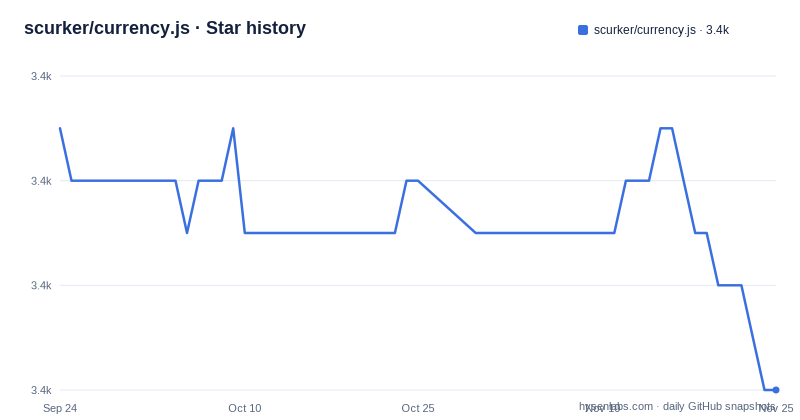
- scurker/currency.js3,372 ★ · -5
| Repository | 2026-09-24 | 2026-11-25 |
|---|---|---|
| scurker/currency.js | 3.4k | 3.4k |
-5 Stars in the last 62 days, measured from the daily GitHub snapshot. Compare with other projects
Editorial analysis
The arithmetic runs on integers, and the ceiling is stated in dollars
The reason the library exists is one line of JavaScript arithmetic behaving badly:
2.51 + .01;                   // 2.5199999999999996
currency(2.51).add(.01);      // 2.52
The fix is described plainly: values are handled as integers behind the scenes, which resolves the most basic precision problems. A talk linked from the file covers why JavaScript has these floating point issues in the first place.
What is easy to miss is that the library states its own boundary in the same breath. It should work for reasonable currency values, and you are fine as long as your values are below 2 to the 53rd power measured in cents, which the file also writes out as 90,071,992,547,409.91.
That number is the maximum exactly representable integer in JavaScript, so the limit is not arbitrary. No currency will reach it, but aggregate arithmetic that repeatedly multiplies could approach it, and knowing that the guarantee ends at a specific value rather than asymptotically is more useful than the phrase precision problems.
The other listed properties are as short: no dependencies at all, immutable instances, flexible formatting, and acceptance of numbers, strings or another currency instance as input.
distribute gives the extra unit to the earliest shares
Arithmetic methods exist to take the guesswork out of resolving floating point results, and one of them reveals the rounding policy in a single example:
currency(1.12).distribute(5); // [0.23, 0.23, 0.22, 0.22, 0.22]One unit of currency cannot be divided five ways, and this library puts the remainder into the first two shares rather than the last. That is the difference between a settlement where the first participants absorb the rounding and one where the last does, and in code that hands money back to customers it is a decision with consequences.
Input handling is where the precision option earns its keep. Decimal values are accepted with a default precision of two, and the minor unit form is opt-in, with the precision option respected while parsing:
currency(123, { fromCents: true });               // 1.23
currency(123, { fromCents: true, precision: 0 }); // 123
currency(123, { fromCents: true, precision: 3 }); // 0.123
So the same integer is a hundred and twenty-three, or one point two three, or zero point one two three, depending on the precision you declare. Getting that wrong is a factor of one hundred, not a rounding difference.
Three install routes, three different version semantics
There are three ways to install, and they do not agree about which version you get.
The package manager routes take the current release. The script tag route pins a range instead, asking for the 2.0 line rather than a specific release, which means a page using the CDN follows patch releases within that line automatically.
The third route is the one to read carefully. The file points anyone who wants the newest code at a channel where all commits on master are tagged with next on npm, and the install command for it appends that tag. That is an accurate description of a mechanism that produces an unstable version on purpose, since every commit to the branch produces a new thing to install under the same name.
So there are three states available: a released version, a range that floats within a line, and a moving tag fed by the branch. Which one you want depends on whether you are shipping something or trying something.
The manifest's own floor is worth noting next to them. The declared Node requirement is 4 or later, which dates from an era when that was a normal thing to write and is considerably older than the toolchain used to build the package.
errorOnInvalid defaults to false, while its description says it throws
The options list is where the library's defaults live, and one of them is described in a way that will make you read it twice.
`errorOnInvalid` defaults to false, and its description says that if an invalid value such as null or undefined is passed in, it will throw an error. With the default in place it does not throw, so the description describes the behaviour you get by turning the option on, not the behaviour you get by default. Anything that depends on invalid input being rejected needs to set it explicitly.
The rest of the list is in the same shape, each option with a default and a one-line purpose. `symbol` is the currency sign, `separator` divides the groups and `decimal` is the decimal mark, `precision` is the number of decimal places stored, and two pattern options control the layout with a placeholder for the symbol and another for the amount. `format` accepts a function that receives both the currency object and the options and must return a string, for cases the string options cannot express.
Two of them are for specific currencies. `increment` rounds the displayed value to the nearest multiple, so a five-cent increment turns 1.48 into 1.50. And the option that switches number grouping to the Indian numbering system, producing something like 10,00,000.00, is named `useVedic` and defaults to false.
Running the tests means running three type checkers, each with its own pre-hook
The test arrangement is unusual enough to be worth describing, because npm's pre-script convention is doing the work.
The test script runs three suites in sequence: a TypeScript check, a Flow check and a JavaScript run under the ava test runner. Each of those has a matching pre-script, and npm runs a pre-script whenever you invoke the script it belongs to. So the TypeScript definitions and the Flow definitions are copied into the distribution directory by hooks that fire before the type checks that consume them.
"test": "npm-run-all test:typescript test:flow test:js",
"test:js": "BABEL_ENV=test ava ./test/test.js",
"test:typescript": "tsc -p ./test --noEmit",
"test:flow": "flow"
The practical consequence is that a full test run needs three separate toolchains present, a TypeScript compiler, Flow and a working ava installation, even though the library itself ships one implementation file. Shipping both type definition formats is a deliberate compatibility choice, and testing both is the cost of it.
Coverage is handled separately with a coverage run through one of the JavaScript suites and a report step that writes a line-coverage file, and linting is a single pass over the whole directory.
The build emits two module formats, a minified browser file and a docs site
The build script is a chain of four steps: clean the distribution directory, transpile, then copy the TypeScript definition and the Flow definition into it. So the published artefact carries type information for two ecosystems from one source tree.
Transpilation itself fans out into two bundles through a runner configured by two separate config files, one producing an ES module and one producing a universal module definition. The manifest points at four entry fields accordingly: a common main file, a module field for bundlers, a browser field pointing at the minified build, and an additional field carrying the next-channel ES build.
The documentation has its own pipeline, separate from the library build: a clean step, a compile step that runs a script through Babel, and a minify step that collapses whitespace and minifies the CSS and the JavaScript inside the generated HTML. The prepare script runs the library build, which means installing from a git checkout builds it.
A configuration directory at the root holds the bundler configs, and a browserslist file plus a Babel config sit beside them, which is how the ES5 target for such an old Node floor is expressed.
Three alternatives are named, and one add-on rewrites your operators
The file is candid about fit. It says that maybe this library is not right for your needs, and offers three others by name: a small accounting-oriented library, a money library built around integer minor units with an API of its own, and a wallet-style library. The three are described only by name, with no comparison of size, API or rounding behaviour.
The add-on is more interesting than an alternative. There is an experimental Babel plugin that transforms currency operators into method calls, so a written expression like adding 4.56 to a currency value is rewritten into a method call on that value. The plugin is labelled experimental, and the transform is the kind of thing that changes the meaning of code at build time rather than at run time, which is worth knowing before adding it to a build that also runs type checks.
On the state of the repository: the manifest version is 2.0.4, matching the newest tag from May 2021, while the default branch was pushed on 3 October 2026. So there is unreleased work on the branch and no release to consume it through, apart from the next tag. The tree also carries a Bower manifest from the era when that mattered, a dependency update configuration, and readme and license files in lowercase.
Editorial conclusion
currency.js fits small projects that want money arithmetic that does not surprise them, with no dependency to audit and a formatter that already knows where the delimiters go. Three things to know before you reach for it. The precision guarantee is bounded and stated, since values above 2 to the 53rd power in cents stop being safe, which is far beyond ordinary amounts but is a real edge for aggregate arithmetic. The rounding policy is distribute to the earliest shares, so splitting an amount across several parties gives the first ones the extra unit rather than the last, and that choice matters in settlement code. And the versioning is unusual, with the published version last tagged in 2021 while the branch has continued, an unstable next tag fed from every commit, and a CDN example pinned to an older range, so pin the version you test against.
Frequently asked questions
How large a currency value can currency.js handle accurately?
The file states that values should be below 2 to the 53rd power measured in cents, which it also writes as 90,071,992,547,409.91. Beyond that the integer representation is no longer exact.
How does currency.js distribute a value that cannot divide evenly?
The remainder goes to the earliest shares. The example splits 1.12 into five values as 0.23, 0.23, 0.22, 0.22 and 0.22, so the extra unit is absorbed by the first two.
What is the difference between the npm and CDN installs of currency.js?
The package manager routes install the current release, while the script tag route pins the 2.0 line. There is also a next tag that is published from every commit on master, which is the unstable option.
Does currency.js throw an error on invalid input by default?
Not by default. The errorOnInvalid option defaults to false, and its description explains that passing an invalid value such as null or undefined throws once that option is enabled.
Which types does currency.js ship with?
Both TypeScript and Flow definitions. The build copies each definition file into the distribution directory, and the test script runs a TypeScript compile check and a Flow check alongside the JavaScript suite.
Official sources
Add this badge to your README
If you maintain this project, the badge below links readers to this analysis and shows its maintenance status from the daily GitHub snapshot. Paste the markdown into your README; add ?metric=license or ?metric=stars to the image URL for a different field.

[](https://hysenlabs.com/projects/scurker-currency-js)Star history chart for your README
[](https://hysenlabs.com/projects/scurker-currency-js)Was this useful?