Pynguin: Automated Unit Test Generation for Python
The PYthoN General UnIt Test geNerator is a test-generation tool for Python
At a glance
- What is it?
- Pynguin is a command-line test generator for Python modules. It is aimed at developers, researchers, and educators seeking experimental automated test generation, but the project explicitly describes itself as a research prototype rather than a production-ready tool.
- Who is it for?
- Pynguin suits developers evaluating search-based or random test generation for Python, as well as researchers studying automated testing. It is a poor fit for teams requiring a production-ready test platform with established operational guarantees.
- Can I use it commercially?
- Yes. MIT is a permissive licence: you can use, modify and sell software built on it, as long as you keep its copyright and licence notices.
- Is it still maintained?
- Yes. The repository last received commits 4 days ago.
- What is it written in?
- Mainly Python, according to GitHub's language statistics.
Answers come from the project's GitHub data, last synced on November 6, 2026, and from our analysis. They are not legal advice.
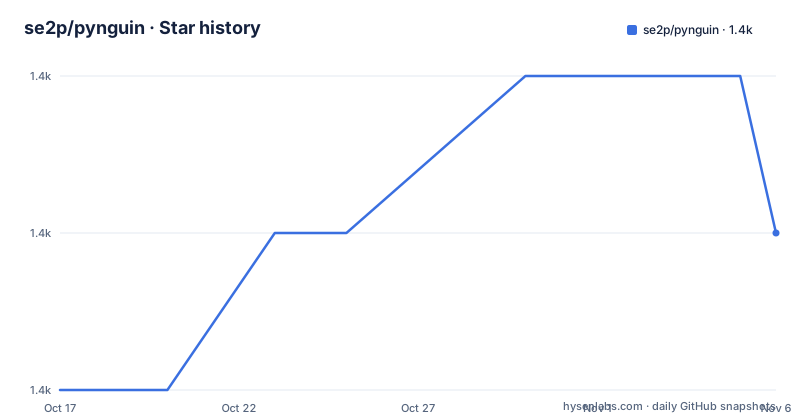
Star history
- se2p/pynguin1,394 ★ · +1
| Repository | 2026-10-17 | 2026-11-06 |
|---|---|---|
| se2p/pynguin | 1.4k | 1.4k |
1 Stars in the last 20 days, measured from the daily GitHub snapshot. Compare with other projects
Editorial analysis
Pynguin's Target Problem and Intended Users
Pynguin addresses the cost of writing unit tests manually for general-purpose Python programs. The README describes automatic test generation as the missing capability in a testing field where tools for statically typed languages such as Java already existed. That framing places Pynguin in search-based software testing, while the package metadata also identifies random testing as a relevant approach. Its users are Python developers who want generated regression tests, educators looking for a way to demonstrate automated testing, and researchers studying test-generation techniques.
The tool operates on a target module rather than acting as a conventional test runner. Its interface accepts a project path, an output directory, and a module name. This makes it suitable for projects that can be invoked through Python and whose code is safe to execute during generation. It is not presented as a replacement for every kind of testing. Property-based testing, integration testing, end-to-end testing, and manual inspection of critical assertions are outside the documented scope.
Pynguin is not a general-purpose static analyzer. It generates tests by running the module under test, so runtime behavior is part of its mechanism. That distinction matters because dynamic Python programs can contain paths and side effects that are difficult to predict without execution. The trade-off is direct: execution gives the generator material to work with, but it also introduces operational risk and dependence on the behavior of the target code.
Pynguin's CLI Inputs and Execution Boundary
Pynguin is installed as a Python package and invoked through the `pynguin` command. A complete example identifies three inputs: `--project-path`, which points at the Python project; `--output-path`, which receives generated tests; and `--module-name`, which selects the target module. This is a small interface, but the README does not explain the internal generation pipeline, search algorithm configuration, stopping criteria, or test-quality metrics.
The repository metadata adds useful context. Keywords include `random testing`, `search based`, and `test generation`, while the package targets Python `>=3.10, <3.16`. Python 3.10 is the stated baseline. Support for Python 3.11 through 3.15 is described as experimental, and the package classifiers include CPython as well as Linux, macOS, and Windows environments. The README does not state that operating systems are interchangeable in every target scenario, so the platform list should not be treated as proof that generated output has the same structure everywhere.
The output path is central to the workflow because generated tests are written beneath the selected output location. The README does not document overwrite behavior, cleanup rules, failure reports, rollback, or how an unsuccessful generation run affects existing files. Those omissions matter for repeated CI use because a command-line interface that writes files should have predictable handling around collisions and partial output. The quick start guide is the README's named source for details beyond the minimal invocation.
Installing Pynguin and Running a First Generation
Pynguin documents Python 3.10 or later and recommends using a `pip` installation associated with a supported Python version. Installing it inside an isolated virtual environment keeps its dependencies separate from the system interpreter. The documented package installation is:
pip install pynguinAfter installation, run `pynguin` inside that environment to print the available command-line parameters. This is the first useful check because the README describes Pynguin as a command-line application rather than a library interface. The exact parameter list printed by the installed version is not included in the README.
For the first real generation, suppose the project is at `/tmp/foo`, generated tests should go to `/tmp/testgen`, and the target module is `foo.bar`. The documented command is:
pynguin \
  --project-path /tmp/foo \
  --output-path /tmp/testgen \
  --module-name foo.bar
The reader should expect Pynguin to execute the `foo.bar` module and direct generated tests to `/tmp/testgen`. The README does not state the exact generated file names, console summary, or success criteria, so those should be confirmed through the linked quick start guide and the command's own output rather than assumed.
This first run belongs in a disposable or isolated environment. Do not point it at code whose import or initialization performs destructive actions, changes important files, requires unavailable external services, or contains secrets that generated artifacts might capture.
Docker Isolation for Executed Python Code
The most serious documented limitation is operational, not statistical. Pynguin warns that it executes the module under test and that generated execution can cause serious damage, giving disk erasure as an example. It therefore recommends an isolated environment such as a Docker container. This warning prevents a common misreading of Pynguin as an inert source transformation tool.
The repository includes a `docker/` directory, `pynguin-docker.sh`, and Docker-related top-level configuration, but the README does not give a Docker image name, build command, run command, or verified invocation syntax. The documented project-specific boundary remains straightforward: if the target module can cause harm when executed, run Pynguin within an isolation boundary before investigating generated test details.
Containerization reduces exposure to the host, but it is not equivalent to proving that generation is harmless. Target code may require credentials, network access, writable volumes, or service dependencies. The README does not explain Pynguin's handling of these resources. Users should consequently treat isolation, access restriction, and careful target selection as prerequisites rather than optional precautions.
The alpha classification compounds this caution. `pyproject.toml` labels Pynguin `Development Status :: 3 - Alpha`, and the README states plainly that it is only a research prototype and is not tailored toward production use. Generated tests therefore need review before inclusion in a protected test suite.
Maintenance, Compatibility, and the MIT Package License
The repository is not archived, and the last push was on 2026-10-15. Releases were published on 2026-07-21, 2026-09-16, and 2026-10-15 for versions 0.46.0, 0.47.0, and 0.48.0. The current package metadata reports `0.49.0.dev`. These facts indicate recent development, but they do not erase the project's explicit alpha and research-prototype status.
Compatibility creates a version decision. Pynguin requires Python 3.10 or newer and excludes Python 3.16 and later through the declared range. Later supported Python versions are experimental in the README. Teams pinned to a particular interpreter should check the documented compatibility status for that interpreter rather than assuming every supported classifier means stable support.
The package metadata declares `license = "MIT"`, and the repository includes `LICENSE.rst` plus a `LICENSES/` directory. MIT licensing generally provides a permissive redistribution model with preservation of its license conditions and disclaimer, but this review is not legal advice. Organizations should inspect the exact files relevant to the package, documentation, and any separately licensed assets rather than treating a badge as the complete licensing record. The README excerpt does not document compatibility migrations or upgrade procedures between the listed releases.
Development setup also has a cost. Contributors use Poetry, install with `poetry install`, and run `make check`. The Makefile also defines `make test`, which invokes `pytest` with coverage reporting over `src` and `tests`. These are repository-maintainer workflows, not requirements for someone using the PyPI package.
Pynguin Compared with Handwritten and Conventional Tests
The closest alternative is not another automatic test generator. It is the ordinary practice of writing Python unit tests by hand with `pytest` or the standard library's testing facilities. The difference is authorship: handwritten tests encode expectations selected by a developer, while Pynguin derives candidate tests through execution-based generation. That can reduce manual effort, but generated tests still require inspection, especially because the project does not claim production readiness.
Another alternative is running an existing manual suite and using coverage reporting without generating new tests. This approach is safer for behavior involving destructive side effects because test selection remains under explicit developer control. It does not create candidate tests automatically, however, and it leaves the labor of identifying relevant inputs and assertions with the developer.
For research comparison, Pynguin can serve as a subject or experimental baseline because its package metadata explicitly associates it with search-based and random testing. The README does not document comparison algorithms, budgets exposed as stable CLI options, or published outcome metrics, so it cannot support claims about which approach generates higher-quality tests. The choice should follow the evaluation question: use handwritten tests for controlled production expectations, use Pynguin to study or evaluate automated generation, and avoid treating generated output as trusted solely because it has executable Python syntax.
Editorial conclusion
Pynguin suits developers evaluating search-based or random test generation for Python, as well as researchers studying automated testing. It is a poor fit for teams requiring a production-ready test platform with established operational guarantees. Before adoption, verify its alpha status, execute it only in an isolated environment, and inspect every generated test because Pynguin runs the module under test.
Frequently asked questions
How do I install Pynguin?
Install it into a supported Python environment with `pip install pynguin`. The README requires Python 3.10 or later and describes Python 3.11 through 3.15 support as experimental.
How do I generate unit tests for a Python module with Pynguin?
Pass the project directory through `--project-path`, the destination through `--output-path`, and the target through `--module-name`. The README provides `foo.bar` at `/tmp/foo` as its example target and stores output in `/tmp/testgen`.
Is Pynguin safe to run directly on my computer?
No safety guarantee is provided. Pynguin executes the module under test, and the README warns that this can cause serious damage, so it recommends running the tool in an isolated environment such as a Docker container.
Is Pynguin ready for production test generation?
The README explicitly calls Pynguin a research prototype that is not tailored toward production use. The package metadata also classifies it as alpha software.
What license does Pynguin use?
The `pyproject.toml` package metadata declares the `pynguin` package under the MIT license. The repository also contains `LICENSE.rst` and a `LICENSES/` directory.
Official sources
Add this badge to your README
If you maintain this project, the badge below links readers to this analysis and shows its maintenance status from the daily GitHub snapshot. Paste the markdown into your README; add ?metric=license or ?metric=stars to the image URL for a different field.

[](https://hysenlabs.com/projects/se2p-pynguin)Star history chart for your README
[](https://hysenlabs.com/projects/se2p-pynguin)Was this useful?