MouseClick and the art of the themed cursor pack
🖱️ MouseClick 🖱️ 是一款功能强大的鼠标连点器和管理工具,采用 Qt Widget 开发 ,具备跨平台兼容性 。软件界面美观 ,操作直观,支持鼠标行为模拟 💻,让用户在工作和游戏中实现高效自动化 🚀。提升你的数字生活体验,一切尽在掌控之中 🌟!
At a glance
- What is it?
- MouseClick is a C++ and Qt6 desktop utility for mouse behaviour simulation and cursor theming, where the interesting engineering sits in a JSON manifest format for community cursor packs. It suits Windows users who want both an auto-clicker and a matching cursor set, and it suits nobody who wants a documented CLI.
- Who is it for?
- MouseClick fits a Windows user who wants a mouse auto-clicker and a themed cursor set in one Qt6 application, and a maintainer who wants to contribute cursor packs through the config.json format. It does not fit a team that needs headless automation, a scripting API or a documented command line, and the click behaviour itself is described only in one sentence of the project description.
- Can I use it commercially?
- Yes, with conditions. GPL-3.0 is a copyleft licence: if you distribute software that includes it, you must release that software's source code under the same licence. Running it internally without distributing it does not trigger that obligation.
- Is it still maintained?
- Yes. The repository last received commits 65 days ago.
- What is it written in?
- Mainly C++, according to GitHub's language statistics.
Answers come from the project's GitHub data, last synced on November 7, 2026, and from our analysis. They are not legal advice.
Star history
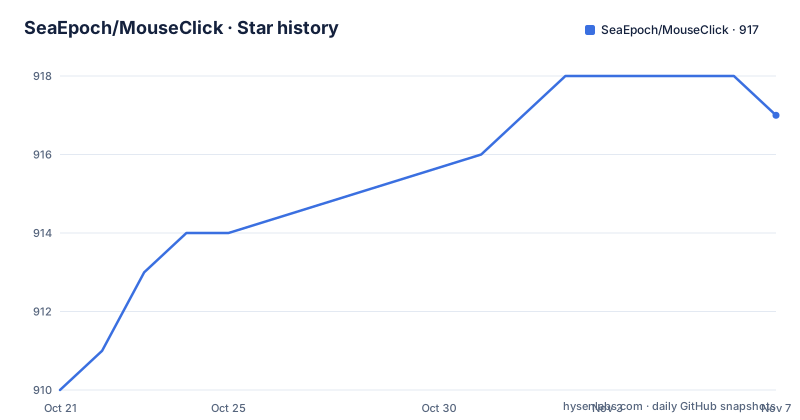
- SeaEpoch/MouseClick917 ★ · +7
| Repository | 2026-10-21 | 2026-11-07 |
|---|---|---|
| SeaEpoch/MouseClick | 910 | 917 |
7 Stars in the last 17 days, measured from the daily GitHub snapshot. Compare with other projects
Editorial analysis
A rewrite from scratch on Qt6 Widgets
MouseClick began as the author's first repository on GitHub, and the README is candid that the project is far from finished. The current version is the result of a complete rewrite, with the new codebase built on Qt6 Widgets and a QSS layer for the interface styling. The design reference is named openly: the Fluent2 Design standard from Microsoft.
The application is described as a mouse clicker and management tool, a cross platform utility that simulates mouse behaviour. Topics assigned to the repository are cursors, mouse-clicker and windows-beautifying, and the screenshots in the README show the same window in a light mode and a dark mode, which is what a QSS based theme buys you on top of the widget layer.
Two things about the audience are worth stating directly. This is a desktop application, not a library and not a service, so there is no API to integrate and no configuration file format outside the cursor theme one. And the packaging instructions reference windeployqt.exe and an InnoSetupScript.iss file, which puts the deployment target squarely on Windows even though the description claims cross platform compatibility.
The cursor side is the more developed half. A new version added the cursor beautifying feature, and the resources for it are not the author's own work. Each one is modified from something found online to fit the application's standards, and every resource states where it came from, with a double click link back to the original site.
The cursor manifest is a strict contract, not a suggestion
Cursor themes live under assets/cursors, one folder per theme, and the README spells out the expected layout. The directory sketch in the documentation shows the shape, with a config.json file at the root of each theme folder alongside the animation files:
assets
\---cursors
    +---a0x Cursors
    +---Anya Forger
    +---Deep Blue Fusion
    +---[Dark]Win11 Concept Cursor Classic
The config.json file is mandatory in every theme directory. The specification requires four fields, name, cursor, author and source, and the cursor object maps Windows cursor roles to files that live in the theme root:
{
    "name": "光标主题名称(建议与文件夹名一致)",
    "cursor": {
        "AppStarting": "working.ani(必须放在主题根目录)",
        "Arrow": "arrow.ani(不推荐使用中文文件名)",
        "Hand": "link.ani",
        "IBeam": "text.ani"
    },
    "author": "平台@作者",
    "source": "https://www.seaepoch.com/"
}
The set of roles is a fixed vocabulary taken straight from Windows: AppStarting, Arrow, Crosshair, Hand, Help, IBeam, No, NWPen, Person, Pin, SizeAll, SizeNESW, SizeNS, SizeNWSE, SizeWE, UpArrow and Wait. A theme that leaves roles unmapped will fall back to whatever the system provides, so a partial config is a theme with gaps rather than a rejected file.
The review rules are strict and stated as conditions for acceptance. Animation and cursor files must sit in the theme root and the paths in config.json must match them. The four fields must be complete and well formed. A logo.png preview is suggested at 256x256 or smaller, and file names are asked to avoid special characters and Chinese text so that the pack does not break on other platforms.
Building from source needs C++17, CMake 3.19 and Qt 6.7
There is no binary distribution path described in the documentation beyond the build and packaging steps, so the intended route is source. The requirements table names three components: a compiler of C++17 or newer, CMake 3.19 or newer, and Qt 6.7.0 or newer, with a question mark in the table next to the Qt row.
The clone is a single git command:
git clone [email protected]:SeaEpoch/MouseClick.gitAfter that, the README simply says to build the project with your usual method, naming Qt Creator or the command line as examples. There is no documented CMake invocation, so the specific build flags, the install target and the output layout are left to whatever the CMakeLists.txt in the repository root dictates. The repository also carries a deps/ directory for third party code and an i18n/ directory for translations, which tells you the application ships localization resources.
The one place the documentation is very precise is packaging for Windows. Once the build completes, the output directory named in the README holds everything needed for distribution, and the step is to open the Qt command line tools matching the compiler version you built with, change into that directory, and run the deployment tool:
windeployqt.exe ./MouseClick.exeThat single command collects the Qt runtime next to the executable so the package runs on a machine without Qt installed. The InnoSetupScript.iss file in the repository root is the installer script for the same purpose.
The click behaviour is the least documented part
Here is the honest gap. The project description is what claims the mouse simulation, and the README is almost entirely about cursors, building and packaging. There is no section describing how to configure the click rate, whether the click position follows the pointer, what happens on a double click, whether there is a hotkey to start and stop the run, or whether the interval can be changed while running.
That is a documentation gap rather than a missing feature, and the two are very different for an adopter. The build requirement of a Windows focus for the packaging step suggests a real desktop application rather than a stub, and the light and dark screenshots show a populated interface. But without documented settings, an adopter has two options, and neither is comfortable. You can read the source in src/ and derive the behaviour from the implementation, which is slow and version specific, or you can try the binary and infer the semantics from the interface, which means you are relying on a UI whose documentation does not tell you what the fields do.
There is a second, smaller gap in the same area. Nothing in the documentation states whether the mouse simulation interacts correctly with elevated windows, with a secure desktop such as a UAC prompt, or with a full screen application, and behaviour in those cases is where click tools usually surprise people. Treat those as unknowns to verify rather than as known limitations.
The topic list also includes windows-beautifying, and the cursor work is the clearest expression of that. The new version added the cursor beautifying feature and the theme contribution workflow, so if the cursor side is what interests you, the project has a visible, structured path for your contribution. If the click simulation is what interests you, expect to read the code.
Where MouseClick is the wrong tool
Three cases rule it out.
If you need scriptable automation, MouseClick has no documented interface for it. There is no command line, no scripting hook and no headless mode described anywhere in the documentation. A test harness that has to drive a mouse reliably wants an API it can call programmatically with assertions, and a GUI application driven by a person is not that.
If you are on macOS or Linux as a primary environment, the packaging story is unresolved. The description claims cross platform compatibility, and the source is portable C++ with Qt, so the code itself could build elsewhere, but the only documented deployment procedure is windeployqt.exe plus an Inno Setup script, and the requirements table does not mention a platform. A macOS user would be building from source with no instructions for it.
If your interest is the cursor themes rather than the clicker, be aware of the licensing layer. The project itself is GPL-3.0, but the cursor resources are described as modified from material found online, with the source field pointing at the original site. Each theme carries its own author and source entry, which is a good sign, but the README does not state what licence those third party resources carry. A theme with an unclear upstream licence is a legal question for the person shipping it, not for the maintainer, and the GPL-3.0 grant on the repository code does not settle it.
A reasonable alternative for pure automation is a scripting language with a mouse control library, since you get recorded steps, adjustable delays and a headless CI path in one tool. A reasonable alternative for pure theming is a dedicated cursor pack installer, which avoids the unrelated auto-clicker entirely. MouseClick is the interesting choice only when you want both halves in one window.
GPL-3.0 and a release line that skipped a year
The project states its licence plainly: MouseClick follows the GPL-3.0 licence. For a desktop application that most people run rather than redistribute, that is mostly a non-event, and for anyone who does modify and distribute the binary, the copyleft terms attach to the distributed work. No legal advice is offered here, only the shape of the obligation.
The release history has an odd gap in it. The tagged releases are MouseClick v3.1.2 from 2026-09-03, MouseClick v3.0.1 from 2026-07-11 and 2.3.1 from 2024-12-24. Between the 2.x line and the current 3.x line there is close to a year and a half with no tag, which lines up with the period the README describes as a full rewrite onto Qt6 Widgets with a QSS interface. The repository is not archived and the last push was on 2026-09-03, the same day as the newest release.
So the project is being worked on, and the 3.x line is where the current work lands. The 2.3.1 tag from December 2024 predates the rewrite, so anything you find written about that version describes a different application with a different interface, and the cursor theme format is new enough that it may not exist in that older build at all.
Editorial conclusion
MouseClick fits a Windows user who wants a mouse auto-clicker and a themed cursor set in one Qt6 application, and a maintainer who wants to contribute cursor packs through the config.json format. It does not fit a team that needs headless automation, a scripting API or a documented command line, and the click behaviour itself is described only in one sentence of the project description. Before adopting, check the compiler, CMake and Qt versions on your machine, read the config.json spec if you plan to ship a theme, and confirm from the source that the timing and hotkey behaviour matches what you need, because the README does not document those settings.
Frequently asked questions
What is MouseClick and what is it built with?
MouseClick is a desktop mouse clicker and management tool written in C++ and rebuilt on Qt6 Widgets with a QSS styled interface following the Fluent2 Design standard. It ships under the GPL-3.0 licence and the repository requires a C++17 compiler, CMake 3.19 and Qt 6.7.0 or newer.
How do I build MouseClick from source?
Clone the repository with git clone [email protected]:SeaEpoch/MouseClick.git, then build it with your usual method, the README naming Qt Creator or the command line. For a Windows package, open the Qt command line tools matching your compiler version, move into the build output dist directory and run windeployqt.exe ./MouseClick.exe to collect the Qt runtime.
How do I add my own cursor theme to MouseClick?
Put the theme folder under assets/cursors with a config.json file at its root, and keep the animation files in the same root with paths that match the config. The config must contain name, cursor, author and source, and a logo.png preview of 256x256 or smaller is suggested. Pull requests and issues are both accepted for theme contributions, and the project says every submission is reviewed.
Does MouseClick work on macOS or Linux?
The project description claims cross platform compatibility and the source is portable C++ with Qt, but the only documented deployment procedure uses windeployqt.exe and the InnoSetupScript.iss installer script, which are Windows tools. The README does not document a build or packaging procedure for macOS or Linux.
What licence is MouseClick released under?
The project states that MouseClick follows the GPL-3.0 licence, and the repository carries a LICENSE file. The cursor resources themselves are described as modified from online material with each source credited, so the licence terms for any particular third party cursor pack are a separate question from the licence of the application code.
Official sources
Add this badge to your README
If you maintain this project, the badge below links readers to this analysis and shows its maintenance status from the daily GitHub snapshot. Paste the markdown into your README; add ?metric=license or ?metric=stars to the image URL for a different field.

[](https://hysenlabs.com/projects/seaepoch-mouseclick)Star history chart for your README
[](https://hysenlabs.com/projects/seaepoch-mouseclick)Was this useful?