The compose file runs the latest tag with admin/admin
Self-hostable travel tracker and trip planner.
At a glance
- What is it?
- AdventureLog is a self-hostable travel tracker with a SvelteKit frontend and a Django backend, installed by piping a script into bash. The compose file it ships pulls a floating image tag, mounts a named volume inside the container's working directory, and publishes port 80 while the environment says the app runs on 3000.
- Who is it for?
- AdventureLog fits someone who wants a private travel log with their photos and GPX tracks in the same place as their itineraries, and the compose file is small enough to read before running. Four things to settle first.
- Can I use it commercially?
- Yes, with conditions. GPL-3.0 is a copyleft licence: if you distribute software that includes it, you must release that software's source code under the same licence. Running it internally without distributing it does not trigger that obligation.
- Is it still maintained?
- Yes. The repository last received commits 2 days ago.
- What is it written in?
- Mainly Svelte, according to GitHub's language statistics.
Answers come from the project's GitHub data, last synced on November 22, 2026, and from our analysis. They are not legal advice.
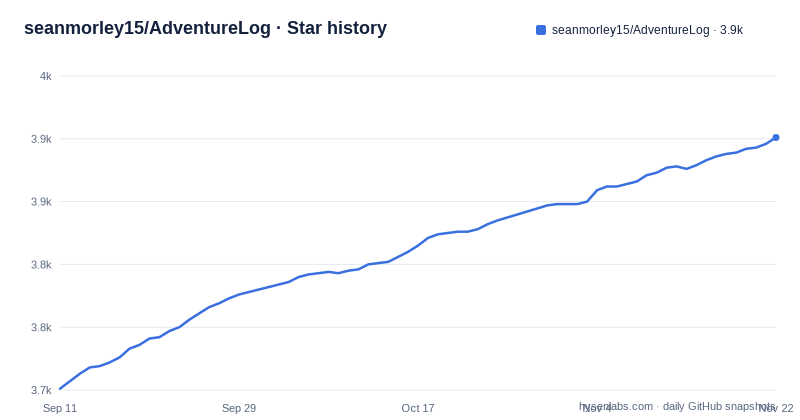
Star history
- seanmorley15/AdventureLog3,901 ★ · +200
| Repository | 2026-09-11 | 2026-11-22 |
|---|---|---|
| seanmorley15/AdventureLog | 3.7k | 3.9k |
200 Stars in the last 72 days, measured from the daily GitHub snapshot. Compare with other projects
Editorial analysis
The compose file pulls a floating tag
The fastest documented install is one line:
curl -sSL https://get.adventurelog.app | bashBehind it, the compose file in the repository is short. The app service does not build anything locally: its build block is present but commented out, and it runs the published image ghcr.io/seanmorley15/adventurelog:latest. A latest tag on a self-hosted application is the same choice as depending on a branch, which means a redeploy or a pull can change what is running without any file in your deployment changing. The requirements line is modest, Docker Engine with Compose v2 and 2 GB of RAM on first boot, with Linux, a VPS, a homelab or macOS named as the platforms, and the documentation covers Docker Compose, homelab NAS, Kubernetes with Kustomize, Proxmox, Synology, Unraid and reverse proxies.
The app is published on 80 while PORT says 3000
One inconsistency in the compose file is worth reading twice. The ports mapping is "${HOST_PORT:-8015}:80", so the container's port 80 is published on host port 8015 by default. The health check agrees with that, querying http://127.0.0.1:80/health from inside the container. But the environment block sets PORT to "3000" on the same service. Nothing in the file reconciles the two, and the health check passing is what tells you which one is real: a check that reaches /health on 80 means the application is serving 80 inside the container, whatever PORT is set to. If you are behind a reverse proxy that assumes the usual application port, that value is the thing to change, and the default SITE_URL of http://localhost:8015 confirms 8015 is the port the outside world sees.
Two volumes, one of them inside the working directory
State lives in two named volumes. postgres_data maps to /var/lib/postgresql/data/ in a postgis/postgis:16-3.5 database container, whose readiness check is pg_isready run as the adventure user against a database literally named database, with POSTGRES_USER set to adventure. The second volume, adventurelog_media, maps to /code/media/, which is inside the application's own working directory rather than a conventional media path. A bind mount would be more predictable, but a named volume means uploaded photos are invisible from the host filesystem and have to be reached with a container command, which matters when you are backing the instance up. The app service waits for the database to report healthy before starting, with a 120 second start period for the application against 10 seconds for the database, which is where a first boot is slow.
Two env files and a required password with an example value
Configuration starts from an example file, and the file is explicit about the mechanics. Its header says to copy .env.example to .env, that advanced deployments should use .env.advanced.example instead, and links the environment variable documentation. The one required entry is POSTGRES_PASSWORD, and the example value written into it is changeme123, which is a placeholder that has to be replaced before the compose file will even start, because both services reference it through a required-variable expansion that fails on an empty value. The site section sets SITE_URL and HOST_PORT, and carries the note that SECRET_KEY, CSRF and backend URLs are derived at startup, so there is no secret key for you to manage in this file. The admin section sets the first-boot Django username, password and email address to admin, admin and [email protected].
Registration is on by default and the login switches are commented out
The security surface is mostly commented out, which is a choice with consequences. DISABLE_REGISTRATION is set to False, so an instance left as shipped lets anyone who finds the URL create an account. Next to it are three lines that are not active: DISABLE_REGISTRATION_MESSAGE, SOCIALACCOUNT_ALLOW_SIGNUP, and FORCE_SOCIALACCOUNT_LOGIN, the last of which would make social login the only way in. ACCOUNT_EMAIL_VERIFICATION is present but commented, with its three documented values written as none, optional or mandatory. The documentation for disabling registration is linked from that block. The feature table meanwhile lists multi-factor authentication, API keys and social auth with Google, GitHub and Authelia among the options, so the capability exists in the application and the decision about whether an account can be created at all is left at its default.
The worker count is given as a formula
Three performance lines carry more guidance than their length suggests. GUNICORN_WORKERS is set to 2, with a comment saying the default is 2, to use 1 on small hosts, and (2 x CPU) + 1 on larger servers. ENABLE_RATE_LIMITS is True and marked recommended for production. DEBUG is True in the example file and annotated not for production, which is the one line in the file that ships a value it explicitly tells you to change. The rate limiter and the debug flag point in opposite directions: rate limiting is on while debug output is enabled, and a deployment that copies the example unchanged gets the slower and noisier of the two configurations for anything facing a network.
Media can move to S3 and two limits can both be set
By default media is local, which in the compose file means the adventurelog_media volume. The example file documents the alternative as a commented block: MEDIA_STORAGE switched to s3, then AWS_ACCESS_KEY_ID and AWS_SECRET_ACCESS_KEY, with a link to the S3 storage documentation. Two limits are documented and they interact. MEDIA_STORAGE_LIMIT_MB is set to 0 with the comment that 0 means unlimited, and MEDIA_STORAGE_LIMIT_BYTES is set to 0 with the note that it overrides the megabyte value when set above zero. So a value in bytes silently wins over the megabyte limit, which is a small trap for anyone who sets both and expects the smaller one to apply.
Releases carry codenames sometimes and the licence is stated two ways
The release titles are inconsistent in a small way. The newest is v0.13.0, titled AdventureLog v0.13.0 with the codename Acadia in quotes. The two before it, v0.12.1 from 2026-05-25 and v0.12.0 from 2026-02-23, carry no codename at all. The last push to the default branch main is dated 2026-10-03, two months after that release, so the branch and the newest tag are not the same state. Licensing is described two ways as well: the header links a LICENSE file, and the feature table calls the project open source, self-hosted, GPL-3.0, which is also the row in the comparison table against closed travel apps. The repository's licence metadata reports no assertion, so the file at the root is the authority rather than either of those statements.
Editorial conclusion
AdventureLog fits someone who wants a private travel log with their photos and GPX tracks in the same place as their itineraries, and the compose file is small enough to read before running. Four things to settle first. The image tag, which is latest, so a redeploy can change the version underneath you without any edit to your files. The first-boot credentials, which are admin and admin in both the README and the environment example. Whether registration is open, since DISABLE_REGISTRATION defaults to False and the related social-login switches are left commented out. And the licensing, which the README calls GPL-3.0 while the repository metadata reports no assertion.
Frequently asked questions
What is AdventureLog?
A self-hostable travel tracker and trip planner, described as a modern open-source travel companion. It pins places you have visited with dates, notes, photos and categories, builds multi-day itineraries with flights, lodging and checklists, marks countries and regions on an interactive world map, and shares locations and itineraries through public links or invitations.
How do you install AdventureLog?
With one line, `curl -sSL https://get.adventurelog.app | bash`, which is described as one container and one port. The stated requirements are Docker Engine with Compose v2, 2 GB of RAM on first boot, and Linux, a VPS, a homelab or macOS. Other documented paths are Docker Compose, homelab NAS, Kubernetes with Kustomize, Proxmox, Synology, Unraid and reverse proxies.
What is the default AdventureLog login?
admin / admin, and the README recommends changing it immediately after first sign-in. The same values appear in .env.example as DJANGO_ADMIN_USERNAME, DJANGO_ADMIN_PASSWORD and DJANGO_ADMIN_EMAIL under the first-boot admin section.
Which services can AdventureLog integrate with?
Immich for linking photos from a self-hosted media library, Strava and Endurain for importing activities with GPX tracks and stats, Wanderer for attaching trails with distance and elevation data, and Google Maps for geocoding and location search.
What is the AdventureLog tech stack?
SvelteKit with Tailwind CSS and DaisyUI on the front end, using Svelte MapLibre over MapLibre GL, and Django with Django REST Framework on the back end, with PostGIS on PostgreSQL and AllAuth for accounts. The compose file uses postgis/postgis:16-3.5 as the database image.
Which licence is AdventureLog released under?
The README calls the project open source, self-hosted, GPL-3.0 and links a LICENSE file from its header, while the repository's licence metadata reports no assertion. The file in the tree is therefore the authority on the terms.
Official sources
Add this badge to your README
If you maintain this project, the badge below links readers to this analysis and shows its maintenance status from the daily GitHub snapshot. Paste the markdown into your README; add ?metric=license or ?metric=stars to the image URL for a different field.

[](https://hysenlabs.com/projects/seanmorley15-adventurelog)Star history chart for your README
[](https://hysenlabs.com/projects/seanmorley15-adventurelog)Was this useful?