TabNews: running the Brazilian tech community site locally
Conteúdos para quem trabalha com Programação e Tecnologia.
At a glance
- What is it?
- TabNews is a Portuguese-language community site for programming and technology discussions, and its repository holds the full Next.js frontend, API and Postgres-backed data layer. Here is what the setup actually involves, where it stops being a good fit, and what to check before you clone it.
- Who is it for?
- Adopt TabNews if you want a working reference for a Next.js plus Postgres community platform, or if you plan to build against its public APIs under the Terms of Use. Do not adopt it as a drop-in forum for a non-Portuguese audience: the interface, the FAQ and the contribution guide are all in Portuguese.
- Can I use it commercially?
- Check first. The repository uses a licence we do not classify automatically, so read its LICENSE file before any commercial use.
- Is it still maintained?
- Yes. The repository last received commits 8 days ago.
- What is it written in?
- Mainly HTML, according to GitHub's language statistics.
Answers come from the project's GitHub data, last synced on November 15, 2026, and from our analysis. They are not legal advice.
Star history
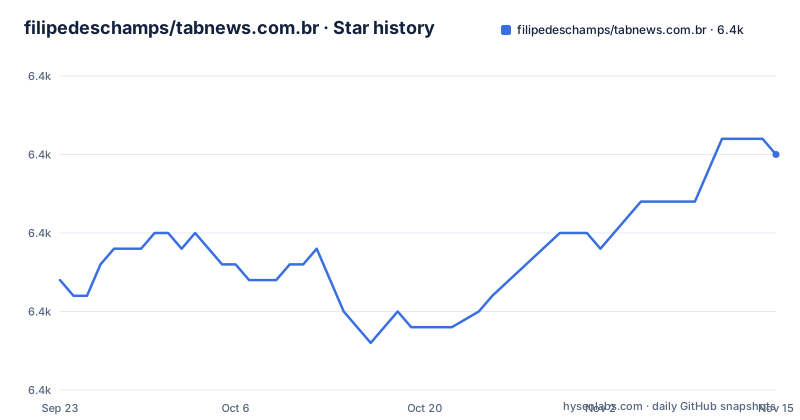
- filipedeschamps/tabnews.com.br6,390 ★ · +8
| Repository | 2026-09-23 | 2026-11-15 |
|---|---|---|
| filipedeschamps/tabnews.com.br | 6.4k | 6.4k |
8 Stars in the last 53 days, measured from the daily GitHub snapshot. Compare with other projects
Editorial analysis
What TabNews is, and the problem it addresses
TabNews is a site focused on the technology community, built for debate and knowledge exchange through posts and comments written by the users themselves. That sentence is essentially the project's own description, and it is worth taking literally: the repository contains both the website and the API that serves it, so the code you clone is the same code that produces the public site.
The problem it solves is narrower than "a forum." It is a publishing and discussion surface where the site and the public API live in one codebase. For an engineer, the more interesting framing is that TabNews is a worked example of a content platform whose data layer is open to outside projects through documented public APIs, subject to the Terms of Use. If you want to build a reader, a digest or a bot on top of a real community, the API is the entry point; if you want to understand how the site itself is assembled, the repository is.
Who it is for: developers comfortable with Node.js and Docker who read Portuguese, since the README, the contribution guide and the interface are all written in that language. Anyone expecting an English-language forum with an English admin panel will be working against the grain from the first command.
How the code is organised: Next.js pages, API routes and Postgres
The top-level layout tells most of the story. There are directories for interface, models, queries, pages, infra, errors, packages, tests and public assets, plus configuration files for Next.js, ESLint, Prettier, Vitest and Vercel. The presence of pages alongside queries and models suggests the common split in this style of application: route handlers and page components on one side, data access and domain logic on the other.
package.json confirms the stack. The runtime is Next.js 16 with React 19, the database layer is pg with node-pg-migrate for schema migrations, validation is handled by joi, and email is rendered with react-email and sent with nodemailer or resend. Authentication uses bcryptjs for password hashing and the cookie package for session handling. The repository is an npm workspace: the workspaces field points at packages/*, and the root dependencies include several internal workspace packages such as @tabnews/forms, @tabnews/helpers, @tabnews/hooks, @tabnews/infra and @tabnews/ui. That means the UI and shared logic are versioned inside this repository rather than published separately, so a change to a shared package can ripple into the site and the API at once.
Data flow, as far as the files show: a request reaches a Next.js route, validation runs through joi, the handler calls into queries and models, and Postgres returns the rows. Migrations are applied by node-pg-migrate, which the README says runs automatically as part of the development startup. There is no separate backend service to deploy; the API and the frontend share one process, which is why the README can describe a single command bringing up the database, the mail server and the web service together.
Installing TabNews and getting to a first post
The README calls running TabNews locally "extremely simple," and the prerequisites are indeed short. You need Node.js LTS v24 (v24.14.1 or any higher version) and Docker Engine v17.12.0 with Docker Compose v1.29.2 or higher. Clone the repository, then install the workspace dependencies:
npm installWith dependencies in place, one command starts everything: the database including migrations, the email server, and the web service exposing both frontend and API.
npm run devAfter that, the README says the site is reachable at http://localhost:3000/ and the status endpoint at http://localhost:3000/api/v1/status. If the status endpoint responds, your database and API are wired together correctly. Other service addresses and credentials, such as the local database and the email frontend, are listed in the .env file at the repository root.
To create a user by hand, open http://localhost:3000/cadastro, fill in the form with any syntactically valid email address ([email protected] works even though it does not exist), and the backend will send an activation email to the local mail server at http://localhost:1080/. Open that message, follow the activation link, then log in at http://localhost:3000/login. Alternatively, skip registration entirely: npm run dev seeds two activated accounts, an admin and a standard user, both with the password "password". The admin account can run migrations through the API and modify other users' content, which is convenient for testing and obviously unsuitable for anything exposed.
The test setup is the part worth copying
Many projects document how to run the app and treat tests as an afterthought. TabNews inverts that emphasis: the README devotes a long section to the test commands, and the guidance is explicit that running the general suite before making any change is the first step.
npm testThat command starts the required services, runs the tests, and tears the services down afterwards. For iterative work there is a watch mode that keeps services and tests alive and reruns on save:
npm run test:watch:servicesThe README warns that web service logs and Vitest output will interleave in that mode, and offers a two-terminal alternative: npm run dev in one terminal and npm run test:watch in the other. Test files can be filtered by path fragment rather than full path, and multiple fragments are accepted. The examples given are npm run test -- v1/users/ v1/status/ to run the users and status API tests, npm run test -- registration-flow for a single integration file, and npm run test:watch -- contents/[username]/[slug]/get for a nested path. The README also flags that path handling and special-character interpretation vary by operating system and terminal, which is a real caveat rather than boilerplate: brackets and slashes in those filters are exactly the characters shells like to reinterpret.
Where TabNews is the wrong tool
The most concrete limitation is language. The repository, the README, the FAQ and the site itself are in Portuguese. Nothing described here points to an interface translation layer or an i18n configuration, so treating TabNews as a base for an English-language community means translating the product surface yourself. That is a different project from deploying it.
Second, the local development posture assumes disposable data. The seeded admin account can run migrations through the API and edit other users' content, and the documented password is the literal string "password". That is fine on a laptop. It is a warning sign if you were considering pointing the development command at a database you care about.
Third, the repository is a monolith with internal workspace packages, not a pluggable forum engine. If your goal is to embed a comment system into an existing site, or to bolt a forum onto a product without adopting Next.js, React and Postgres together, this codebase gives you little to reuse in isolation. The public API is the realistic integration point for outside projects, and the README ties that use to the Terms of Use, which you should read before designing around it.
Finally, the documented setup is aimed at local development, which makes the repository more useful as a reference implementation and a development environment than as a turnkey deployment.
TabNews compared with a conventional forum package
The obvious alternative for a team that wants discussions is a self-hosted forum package such as Discourse, which ships as an application you install and configure rather than a codebase you extend. The difference in approach is structural. Discourse gives you an admin surface, plugins and themes, and you adapt the product to your community through configuration. TabNews gives you the source of a specific site, and you adapt the site by editing it.
That distinction decides the choice. If you want a forum running this week with minimal code changes, TabNews is the wrong starting point: there is no plugin directory, no theme marketplace and no configuration file that turns it into a generic product. If you want to study how a Next.js application handles authentication, migrations, email activation and a public API inside one repository, TabNews is a more instructive read than a packaged forum, precisely because nothing is hidden behind an abstraction layer. The trade-off is real in both directions, and the README's own framing supports it: the project presents itself as a site whose source is available, not as a platform for hosting other people's communities.
Maintenance, licensing and what a fork actually costs
The repository is not archived, and the last push was on 2026-10-19, which is recent. The repository has no published releases, so there is no version history to reason about and no changelog to check before upgrading. Upgrades therefore mean tracking the main branch and reading commits.
The upgrade cost follows from the workspace layout. Because the UI, forms, helpers, hooks and infra packages live inside this repository under packages/*, there is no independent version of them to bump. Pulling upstream changes can touch shared packages that both the site and the API import, so a merge is a code review, not a dependency update. The pinned versions in package.json (Next.js 16.4.0, React 19.3.0, pg 8.23.1, node-pg-migrate 9.0.0, and so on) reduce surprise within a checkout, but they also mean that moving forward is a deliberate act.
On licensing: the repository metadata reports the license as NOASSERTION, which means no standard license identifier was detected. The repository does contain a LICENSE file at the top level, and that file is the only authority on what you may do with the code. Read it directly before you fork, redistribute or build a commercial product on top of it. The same applies to content and API use, which the README places under the Terms of Use at tabnews.com.br. This is not legal advice; it is a pointer to the two documents that govern the answer.
Editorial conclusion
Adopt TabNews if you want a working reference for a Next.js plus Postgres community platform, or if you plan to build against its public APIs under the Terms of Use. Do not adopt it as a drop-in forum for a non-Portuguese audience: the interface, the FAQ and the contribution guide are all in Portuguese. Before committing, verify two things yourself: that Node.js LTS v24 and Docker Engine v17.12.0 with Docker Compose v1.29.2 are available on your machine, and that the two seeded accounts ([email protected] and [email protected], both with password "password") are acceptable in your environment. Those credentials exist by design in the development seed, which tells you the project expects local, disposable databases rather than shared ones.
Frequently asked questions
What is TabNews and who is it for?
TabNews is a site focused on the technology community, intended for debate and knowledge exchange through posts and comments written by users. The repository contains the source of both the website and its API, so it is aimed at developers who want to run or extend that platform rather than at end users looking for a hosted forum.
How do I install and run TabNews locally?
Install Node.js LTS v24 and Docker Engine v17.12.0 with Docker Compose v1.29.2 or higher, clone the repository, run npm install, then run npm run dev. That single command starts the database with migrations, the email server and the web service, which the README says is exposed at http://localhost:3000/ with a status endpoint at http://localhost:3000/api/v1/status.
Are there pre-registered users I can log in with on a local TabNews instance?
Yes. The README states that npm run dev seeds two activated accounts: an admin user with [email protected] and a standard user with [email protected], both using the password "password". The admin account can run migrations through the API and change other users' content.
Does TabNews expose a public API I can build on?
The README says TabNews provides public APIs that you can use to build other related projects, provided you respect the Terms of Use linked from the site. Read the Terms of Use before designing around them.
Official sources
Add this badge to your README
If you maintain this project, the badge below links readers to this analysis and shows its maintenance status from the daily GitHub snapshot. Paste the markdown into your README; add ?metric=license or ?metric=stars to the image URL for a different field.

[](https://hysenlabs.com/projects/filipedeschamps-tabnews-com-br)Star history chart for your README
[](https://hysenlabs.com/projects/filipedeschamps-tabnews-com-br)Was this useful?