Extraterm: two download lines after a toolkit switch, and a build that downloads three binaries
The swiss army chainsaw of terminal emulators
At a glance
- What is it?
- A terminal emulator written in TypeScript on top of NodeGui, with a built-in SSH client, shell integration for bash, zsh and fish, and a command palette. Since version 0.60.0 it ships as a Qt build while the pre-0.60 Electron build stays downloadable, and the build scripts fetch a launcher, a deploy tool and a separate commands tool before anything compiles.
- Who is it for?
- Judge it as an actively used project with a long release gap rather than a stalled one: the last commit on master is dated 2026-06-05 and the newest release is v0.82.0 from 2026-05-10, after patch releases that sat eight months apart in 2025. Before installing, decide which line you want, since the Qt build and the old Electron build are both still published and can coexist.
- Can I use it commercially?
- Yes. MIT is a permissive licence: you can use, modify and sell software built on it, as long as you keep its copyright and licence notices.
- Is it still maintained?
- Yes. The repository last received commits 163 days ago.
- What is it written in?
- Mainly TypeScript, according to GitHub's language statistics.
Answers come from the project's GitHub data, last synced on November 15, 2026, and from our analysis. They are not legal advice.
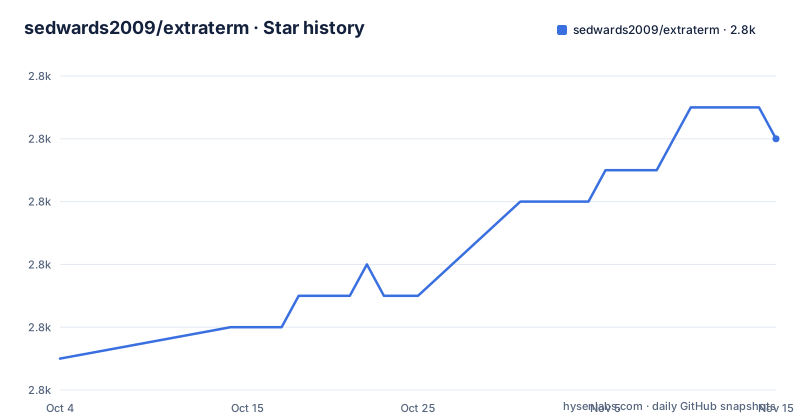
Star history
- sedwards2009/extraterm2,836 ★ · +7
| Repository | 2026-10-04 | 2026-11-15 |
|---|---|---|
| sedwards2009/extraterm | 2.8k | 2.8k |
7 Stars in the last 42 days, measured from the daily GitHub snapshot. Compare with other projects
Editorial analysis
Two download lines exist because the toolkit changed at 0.60.0
The download section is the most informative paragraph in a short README, because it splits the project in two. One line is the modern Qt based version, covering 0.60.0 and later. The other is the classic Electron based version for everything before 0.60.0, pinned to the single tag v0.59.4 and described in the project's own words as pretty old. Both can be installed at the same time without problems, which is unusual courtesy for a project that has replaced its own UI stack. A third path sits below them: nightly builds of the master branch, published not on the releases page but as a file index on Google Cloud Storage. So there are three sources of binaries in total, and the one that tracks the default branch is the least obvious to find.
Windows appears twice in the README, with different scope each time
The feature list opens with platform support and phrases it carefully: Linux and macOS, and on Windows WSL, CMD and PowerShell. That is not the same claim as native Windows support, since all three of those are shells that run on Windows rather than a statement about a Windows build of the emulator itself. Further down, the downloads line describes releases as covering Linux, Windows and OS X. Read together, the two statements are not contradictory so much as uneven, and the feature list is the more precise one. The same list also carries the platform-independent claims: 24 bit color, color emoji on all platforms, font ligatures, Unicode support, text zoom, search, images in the terminal, and support for iTerm2 themes.
Shell integration frames output, moves files and feeds commands
The feature that separates this from a plain terminal window is shell integration, and it is described in three separate bullets. It can isolate and frame command output, which is the part that makes a long build or test run legible. It provides easy uploads and downloads through that same integration rather than through a separate transfer tool. And previous command output can be reused as input for new commands, so a pipeline can be assembled from what already scrolled past. The shells named as supported are bash, zsh and fish, and nothing in the README extends that list. Around it sit the interaction features: a keyboard friendly command palette, configurable key bindings, global shortcuts, output colorizing, easily insertable emoji, multiple windows and tiling, a mini-map, and a built-in SSH client so no separate client is needed for a remote session.
The build downloads a launcher, a deploy tool and a pinned commands tool
Three scripts in the manifest exist purely to fetch things, which is worth knowing before running a build. download-launcher-executable calls a script with the argument v19 and pulls a launcher executable, which is the piece that hosts the Node runtime the application runs on. download-deploy-tool fetches a deployment tool with no version argument. download-extraterm-commands is the interesting one: it fetches a separate program called extraterm-commands at the fixed version v0.9.4. Pinning that version is the right instinct, but it still means a build reaches outside the repository for three artefacts before any compilation happens, so anyone building this in a locked-down environment has to account for those downloads. The alternative is taking a published release, where the same dependencies are already resolved.
Five scripts delegate to wsrun, and the run script sets a Qt variable
The manifest is a Yarn workspace with main, a packages/ glob and named extension folders among its workspaces, so most commands do not act on one directory. Build, clean, lint, a stricter lint variant and test all call wsrun with a concurrency number, an --exclude-missing flag and a stage name, which is how one command fans out across the workspaces. The run script is more revealing: it sets QT_SCALE_FACTOR_ROUNDING_POLICY to RoundPreferFloor before launching the application through qode, so fractional display scaling is rounded down rather than up, and it points at main/dist/main.cjs. Alongside it sit the diagnostic scripts: one runs the application under valgrind, one under strace with output to a log, one executes a theme test utility, another a 256 colour palette test utility, and a timeout test.
The packaged binary is extratermqt while the manifest calls itself extraterm
The packaging command shows how the pieces are named. It runs a NodeGui packer against a configuration file in build_scripts, sets the application name to extratermqt, and derives the version by asking git for the nearest tag and stripping the leading v. So the manifest at the root is named extraterm, is marked private, carries the one-word description A terminal, and pins its dependency versions in a resolutions block: NodeGui at 0.74.0, TypeScript at 5.2.2, node types at 24.12.0 and a pinned 7zip binary at 5.1.1. That resolutions block is the mechanism that keeps a Qt binding from drifting under a project of this size. One oddity remains: a jshintConfig block declaring esversion 6 in a TypeScript codebase, left over from an earlier tooling choice.
The release gap and where the extension work happens
The published versions show an uneven rhythm. v0.81.3 came out on 2025-07-02 and v0.81.4 on 2025-08-30, then the next tag, v0.82.0, did not appear until 2026-05-10, with the last commit on master dated 2026-06-05. That is a project with a slow release cadence rather than an abandoned one, and the nightly builds exist precisely because the branch moves faster than the tags. The extension story is documented off the repository, on a page about extending Extraterm with extensions, while the tree shows where that work lands: an extensions/ directory whose About and Autocomplete folders are declared as workspaces, beside packages/, main/, build_scripts/, docs/, test/ and tools/. The roadmap is kept as a GitHub issue rather than a file, and development updates are posted on Bluesky.
Editorial conclusion
Judge it as an actively used project with a long release gap rather than a stalled one: the last commit on master is dated 2026-06-05 and the newest release is v0.82.0 from 2026-05-10, after patch releases that sat eight months apart in 2025. Before installing, decide which line you want, since the Qt build and the old Electron build are both still published and can coexist. If you build from source, read the scripts first rather than running the build blindly, because three separate downloads are part of it, one of them an external tool pinned to a specific version. And if Windows is your target, note that the feature list names WSL, CMD and PowerShell there rather than describing a native Windows build.
Frequently asked questions
Is Extraterm available for Windows?
The feature list names Linux and macOS, and on Windows WSL, CMD and PowerShell, while the downloads line describes releases as covering Linux, Windows and OS X. What the feature list claims for Windows is those three shells, not a native Windows build.
Which Extraterm build should I download?
The Qt based version covers 0.60.0 and later, and the classic Electron based version sits at tag v0.59.4 for anything older, described on the page as pretty old. Both can be installed at the same time, and nightly builds of master are published separately as a file index.
Does Extraterm support shell integration?
Yes, for bash, zsh and fish. It can isolate and frame command output, handle uploads and downloads through that integration, and previous command output can be reused as input for new commands.
Can Extraterm be extended with extra features?
The project publishes a page on extending Extraterm with extensions, and the repository holds an extensions/ directory whose About and Autocomplete folders are declared as workspaces alongside the main package and the packages/ glob.
What is Extraterm built on?
TypeScript on NodeGui, the Qt binding for Node, pinned at version 0.74.0 in the manifest's resolutions alongside TypeScript at 5.2.2. The run script sets a Qt display scaling policy and launches the application through qode, and the packaged artifact is named extratermqt.
Official sources
Add this badge to your README
If you maintain this project, the badge below links readers to this analysis and shows its maintenance status from the daily GitHub snapshot. Paste the markdown into your README; add ?metric=license or ?metric=stars to the image URL for a different field.

[](https://hysenlabs.com/projects/sedwards2009-extraterm)Star history chart for your README
[](https://hysenlabs.com/projects/sedwards2009-extraterm)Was this useful?