Selenide 7.19.0 for Concise Java UI Tests
Concise UI Tests with Java!
At a glance
- What is it?
- Selenide is a Java UI testing framework built on Selenium WebDriver 4.0+ and intended for readable browser and mobile application tests. It favors fluent element selection and natural-language assertions, while leaving detailed build setup to linked guides.
- Who is it for?
- Java teams that prefer a compact abstraction over Selenium WebDriver can adopt Selenide after confirming their build setup, browser environment, and maintenance of any required plugin. Developers who need direct access to low-level WebDriver behavior may find plain Selenium WebDriver more transparent.
- Can I use it commercially?
- Yes. MIT is a permissive licence: you can use, modify and sell software built on it, as long as you keep its copyright and licence notices.
- Is it still maintained?
- Yes. The repository last received commits 2 days ago.
- What is it written in?
- Mainly Java, according to GitHub's language statistics.
Answers come from the project's GitHub data, last synced on October 23, 2026, and from our analysis. They are not legal advice.
Star history
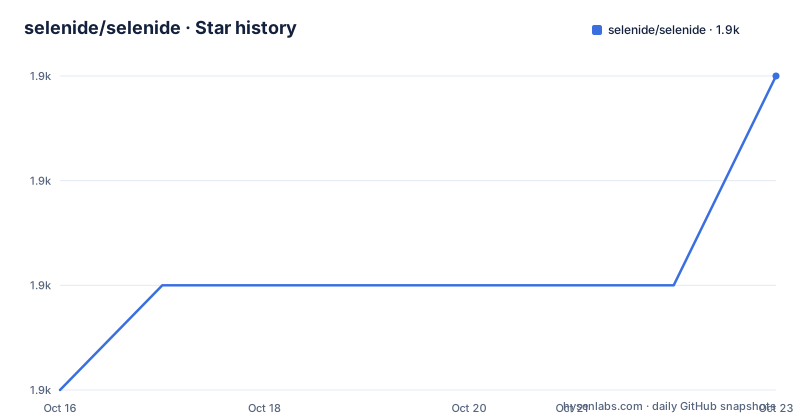
- selenide/selenide1,915 ★ · +3
| Repository | 2026-10-16 | 2026-10-23 |
|---|---|---|
| selenide/selenide | 1.9k | 1.9k |
3 Stars in the last 7 days, measured from the daily GitHub snapshot. Compare with other projects
Editorial analysis
Selenide's Java Test Abstraction
Selenide addresses the readability and maintenance problems that appear when Java UI tests consist mainly of Selenium WebDriver calls. Its stated audience is developers and QA engineers writing automated tests for browser interfaces, with additional modules for mobile applications and container-based execution. The framework remains based on Selenium WebDriver 4.0+, so it changes how tests are expressed rather than replacing the underlying browser automation model.
The central API is compact. A test opens a path, selects an element through a static method, performs an action, and checks the resulting state with a fluent assertion. In the README example, the application is opened at `/login`, the field named `user.name` receives a value, the submit control is clicked, and an element identified by `#username` is checked for visible text. This sequence exposes the intended test structure without requiring the reader to first understand every low-level command used to locate or wait for elements.
Selenide describes its API as fluent and its assertions as natural language. That choice favors test code that reads like a sequence of user intent. It does not eliminate the need for reliable selectors, controlled test data, browser setup, or application stability. It can reduce repeated WebDriver boilerplate, but ambiguous selectors and unstable pages remain application and test-design concerns.
How Selenide's Test Flow Works
The visible control flow is based on static imports from `com.codeborne.selenide.Selenide`, element lookup, interaction, and assertion. The README instructs users to import those methods with `import static com.codeborne.selenide.Selenide.*;`. A selector such as `By.name("user.name")` identifies an input, while a CSS selector such as `#submit` identifies a control. Calling `setValue` or `click` expresses the interaction, and `shouldHave` applies an assertion to an element.
For AJAX-based applications, the README says Selenide performs background work that lets tests focus on business logic. The README does not expose the internal polling, timeout, or element proxy implementation, so those details cannot be established from the project description. The observable API still follows a clear flow: the test requests an element, acts on it, then asks for a condition such as exact text. The framework handles Selenium WebDriver compatibility underneath that expression, according to its stated Selenium WebDriver 4.0+ requirement.
The model is best suited to tests whose subject is a user-visible outcome. It is less direct when browser internals are the primary subject. The README does not document a separate API for raw driver access, timeout configuration, retries, screenshots, or headless execution. The linked Selenide and Selenium WebDriver API comparison is the relevant starting point for checking whether those details fit an existing test suite.
Installing Selenide and Running a First Login Test
The README gives a short installation instruction rather than a complete Maven or Gradle dependency declaration. It says to add `selenide.jar` to the project and import the Selenide methods. For artifact coordinates, build configuration, browser-driver management, and broader project setup, the README directs users to its Quick Start guide. Although the repository contains `build.gradle`, the README does not provide a copy-ready dependency block for consumer projects.
The first test shown in the README is a login flow. Place it in an existing Java test method and add the documented static import:
import static com.codeborne.selenide.Selenide.*;The test code then follows this documented shape:
@Test
public void login() {
  open("/login");
  $(By.name("user.name")).setValue("johny");
  $("#submit").click();
  $("#username").shouldHave(text("Hello, Johny!"));
}
`open("/login")` starts the application path. The selector expressions locate the field and submit control, while `shouldHave(text("Hello, Johny!"))` states the expected result. The README does not specify the base URL, browser, driver setup, test runner configuration, or assertion imports needed to run this as a standalone project. Those prerequisites must come from the linked Quick Start and the existing test build.
Selenide Plugins for Mobile and Remote Browser Runs
The repository includes modules for execution targets beyond a local browser test. The README identifies `selenide-appium` for mobile application testing, `selenide-moon` for Moon containers, `selenide-selenoid` for Selenoid containers, `selenide-grid` for Selenium Grid, and `selenide-video-recorder` for recording test videos. These are concrete integration points, but the README gives no installation commands or configuration schemas for them.
A browser test running against a local driver and a mobile test running through Appium have different setup requirements, even when the test syntax remains similar. Selenoid and Selenium Grid require remote browser infrastructure, while the video recorder changes the artifacts produced by a run. Treating any of those modules as a simple built-in feature would ignore setup details the README does not provide.
Selenide also documents two entry points for AI agents. The CLI is installed with npm:
npm install -g @selenide/cli
selenide install --skills
The README also gives this MCP configuration:
{
  "mcpServers": {
    "selenide": {
      "command": "npx",
      "args": [
        "[email protected]"
      ]
    }
  }
}
The README does not explain which skills are installed, how the MCP server controls a browser, or which permissions and runtime settings it needs. The linked blog posts are the appropriate place to verify those points before using either component.
Selenide Compared with Direct Selenium WebDriver
The direct alternative is Selenium WebDriver. Both projects address browser automation from Java, but the README describes different abstraction levels. Selenium WebDriver is the underlying compatibility target for Selenide, while Selenide adds a concise fluent API, static convenience methods, and natural-language assertions. The linked page titled as a Selenide and Selenium WebDriver API comparison confirms that the distinction is intentional.
Selenide can reduce setup code around element lookup and post-action checks. The README's login example makes the trade-off visible: the test expresses the intended user journey directly instead of presenting every low-level WebDriver operation. That can make business behavior easier to scan during review. The corresponding cost is an abstraction between the test and Selenium. A team that depends on specialized driver operations should first verify whether Selenide preserves the access it needs.
Selenide is not the right choice merely because its examples are shorter. Direct Selenium WebDriver may fit a team with extensive driver utilities, a settled house style, or requirements for precise low-level control. The README does not claim a performance difference or document a universal migration path. The decision should follow the abstraction level required by the application and the existing suite.
Selenide's Limits, License, and Upgrade Questions
Selenide has a clear compatibility constraint: the README states support for Selenium WebDriver 4.0+. A project using an incompatible driver version may need to reconcile versions before adding tests. The example also assumes a known base URL, a usable browser-driver arrangement, stable selectors, and a compatible Java test runner. None of those setup details appears in the short README, so the linked Quick Start is necessary before estimating implementation effort.
The project is distributed under the MIT license. The README calls Selenide open source and links to the license, but it does not discuss organization-specific compliance. Any dependency review must also account for the licenses of Selenium WebDriver, Appium, or other modules added separately. This article does not interpret the MIT terms beyond reporting what the project declares.
Recent activity is visible in the release history. The last push was on 2026-10-16. Releases include `v7.19.0` on 2026-10-10, `v7.18.2` on 2026-09-19, and `v7.18.1` on 2026-08-29. The repository is not archived. The README does not describe an upgrade procedure, compatibility policy between minor versions, or migration effort for `v7.19.0`, so teams should consult `CHANGELOG.md` before changing an established dependency version.
Editorial conclusion
Java teams that prefer a compact abstraction over Selenium WebDriver can adopt Selenide after confirming their build setup, browser environment, and maintenance of any required plugin. Developers who need direct access to low-level WebDriver behavior may find plain Selenium WebDriver more transparent. The first project-specific checks should be compatibility with Selenium WebDriver 4.0+, the artifact installation process in the linked Quick Start, and the behavior of the plugin or AI integration that the test suite will actually use.
Frequently asked questions
What problem does Selenide solve for Java developers?
It is designed to make automated UI tests in Java easier to read and maintain through a concise fluent API and natural-language assertions. It remains based on Selenium WebDriver 4.0+.
How do I install Selenide in a Java project?
The README says to put `selenide.jar` in the project and statically import `com.codeborne.selenide.Selenide.*`. It points to the Quick Start guide for fuller setup details.
Can Selenide test mobile applications?
Yes. The README identifies the `selenide-appium` plugin as the integration for mobile application testing.
What license does Selenide use?
The README states that Selenide is distributed under the MIT license.
Official sources
Add this badge to your README
If you maintain this project, the badge below links readers to this analysis and shows its maintenance status from the daily GitHub snapshot. Paste the markdown into your README; add ?metric=license or ?metric=stars to the image URL for a different field.

[](https://hysenlabs.com/projects/selenide-selenide)Star history chart for your README
[](https://hysenlabs.com/projects/selenide-selenide)Was this useful?