semantic-release: the commit footer that decides a major bump, and a repo pinned at 0.0.0-development
Fully automated version management and package publishing. semantic-release Fully automated version management and package publishing semantic-release** automates the whole package release workflow including: determining the next version number, generating the release notes, and publishing the package.
At a glance
- What is it?
- semantic-release reads commit messages to pick the next semver number, generate release notes and publish to npm, driven from a CI build on a release branch. Its sharp edges live in the commit format and in the fact that only npm and GitHub are wired in by default.
- Who is it for?
- Adopt it if your releases are already CI-driven and your team can be held to one commit convention, because the payoff is removing manual version editing entirely. Do not adopt it as a local command or on a repository whose history is shallow, and do not assume a green build means the publishing path was exercised.
- Can I use it commercially?
- Yes. MIT is a permissive licence: you can use, modify and sell software built on it, as long as you keep its copyright and licence notices.
- Is it still maintained?
- Yes. The repository received new commits within the last day.
- What is it written in?
- Mainly JavaScript, according to GitHub's language statistics.
Answers come from the project's GitHub data, last synced on November 14, 2026, and from our analysis. They are not legal advice.
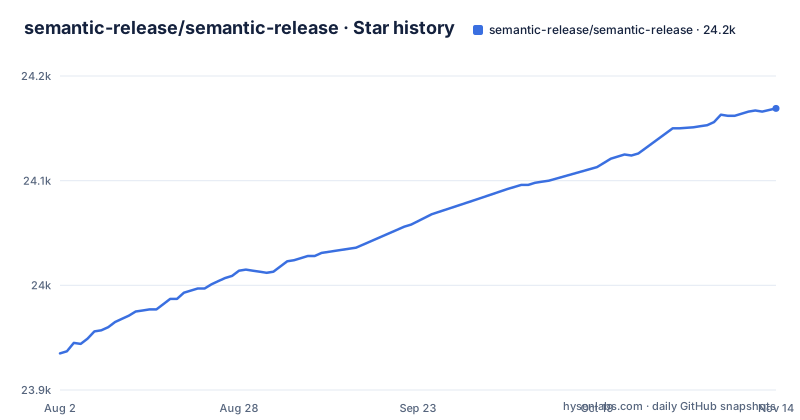
Star history
- semantic-release/semantic-release24,169 ★ · +234
| Repository | 2026-08-02 | 2026-11-14 |
|---|---|---|
| semantic-release/semantic-release | 23.9k | 24.2k |
234 Stars in the last 104 days, measured from the daily GitHub snapshot. Compare with other projects
Editorial analysis
The repository's own version field is a placeholder
Open the manifest of this project and the version reads as a placeholder, because the version that ships is written during a release rather than committed back into the tree.
{
  "name": "semantic-release",
  "description": "Automated semver compliant package publishing",
  "version": "0.0.0-development",
  "type": "module"
}
That one line explains the design: nobody types a number into a file. The package is ESM, since the manifest declares `"type": "module"`, and the executable is not the entry point. The bin mapping resolves `semantic-release` to `bin/semantic-release.js`, while `index.js`, `cli.js` and `index.d.ts` sit at the top level for programmatic use and for TypeScript consumers.
What this arrangement cannot do is tell you which release you are looking at. Nothing in the checked-in tree records a released version, so tooling, mirrors and vendored copies that inspect the manifest for a version find the placeholder instead. If you depend on this project, read the release tag rather than the manifest field. If you mirror the repository internally, expect every checkout to report 0.0.0-development and treat that as normal rather than as a broken mirror.
BREAKING CHANGE must sit in the footer or the major bump never happens
The mapping from commit text to release type is the entire mechanism, and it is stricter than it first appears. Under the default configuration the documented examples are these subjects:
fix(pencil): stop graphite breaking when too much pressure appliedfeat(pencil): add 'graphiteWidth' optionperf(pencil): remove graphiteWidth option
BREAKING CHANGE: The graphiteWidth option has been removed.The third one is the trap, because it reads like a performance commit. It only becomes a Breaking Release since the `BREAKING CHANGE: ` token appears in the commit footer, which the note attached to that table insists on explicitly.
What the mechanism cannot do is notice that you meant something else. Move that token into the subject line, drop the space after the colon, or let a squash or an editor discard the footer, and the analyzer sees an ordinary perf commit, plans no major version, and your breaking change ships as a patch or a minor with release notes that describe it as a performance improvement. Consumers on caret ranges never learn to read the notes.
The default convention is Angular Commit Message Conventions. Changing it means the `preset` or `config` options on the commit-analyzer and release-notes-generator plugins, and both plugins have to agree, because a version planner and a notes renderer reading different conventions will describe the same release two ways.
Only npm and GitHub ship wired in, and every other target is a plugin
The dependency list shows exactly what runs by default:
"@semantic-release/commit-analyzer": "^13.0.1",
"@semantic-release/npm": "^13.1.1",
"@semantic-release/github": "^12.0.0",
"@semantic-release/release-notes-generator": "^14.1.0",
Read those four as a pipeline: analyze commits, plan a version, render the notes, publish to npm, open the release on GitHub. Every other ecosystem arrives through plugins, which is how the claim of supporting any package manager or language is actually satisfied.
The consequence is that the defaults are tuned for one combination. Maven, Cargo, PyPI and private registries are not configured by installing this tool. npm package provenance through signed attestations is described as a GitHub Actions feature, so a CI system that is not GitHub Actions does not get that supply-chain signal without additional work on your side.
Distribution channels are handled by publishing under npm dist-tags according to which branch was merged. That reuses the branch layout as a release audience decision, which is elegant until you count how many branches now carry release meaning.
A release needs full history on CI, not a laptop
The documented execution point is precise: run the command in the CI environment after every successful build on the release branch, so that no human is directly involved in the release. The dependencies behind that sentence are `env-ci` for detecting the CI environment, `git-log-parser` for walking commits, `find-versions` for locating the previous release, `hosted-git-info` for repository URLs and `read-package-up` for locating the package manifest. Configuration is resolved through `cosmiconfig`, and reuse across repositories comes from shareable configurations rather than from copying files.
Those dependencies define what a working environment must contain. What the mechanism cannot do is operate on a shallow copy. With one commit available there is no history for the parser to walk and no prior version for find-versions to locate, so the earliest run in a shallow checkout has no baseline to compare against and no commits to analyze. Before trusting a pipeline, verify that the CI checkout brings full history, because a green build on a truncated clone can still produce nothing.
The second thing this design cannot do is let you fall back to a laptop for an emergency release. The release steps only begin after tests pass, with Verify Conditions as the first of them, so a release is a CI configuration problem rather than a command you can type somewhere.
Branch names carry release meaning: master, main, next, beta
Triggers are defined by branch. Each new commit added to a release branch, for example `master`, `main`, `next` or `beta`, whether pushed directly, merged from a pull request or merged from another branch, triggers a CI build that runs the command, and a release is produced only when there are codebase changes since the last release that affect package functionality.
Two controls ride on that design. Pre-releases exist as branches rather than as a flag, which is why `next` and `beta` are named alongside `master` and `main`. Distribution channels are the second control: publishing happens under npm dist-tags based on git merges, so the branch you merged into decides the channel consumers install from.
What this cannot do is contain a mistake. A merge into the wrong release branch is indistinguishable from a correct one at the git level, and the consequence lands on consumers, because the dist-tag attached to the stable channel is what an unqualified install resolves to. The change filter cuts the other way too: commits that do not affect package functionality produce no release, which is the intended quiet behavior and also the reason a version bump you expected can silently not happen. Watch the tag on the registry rather than assuming every merge published something.
Stable sits at v25.0.9 while a v26 line is still in beta
Maintenance state, dated. The last push on this repository is 2026-10-31. The release list shows v26.0.0-beta.5 and v26.0.0-beta.4 published 2026-10-24 and v26.0.0-beta.3 published 2026-10-23, so a v26 line is in beta.
What that sequence cannot tell you is whether your own workflow should move. The version numbers are also easy to misread: the v26 entries carry beta tags, so a floating tag will quietly put you on prerelease code you never exercised. Pin an explicit version range and schedule the major upgrade yourself.
The repository layout gives a second read on how much gets tested. The default test run excludes the heavy files by name:
"ava": {
  "files": [
    "test/**/*.test.js",
    "!test/integration.test.js",
    "!test/e2e.test.js"
  ],
  "nodeArguments": [
    "--no-warnings"
  ],
  "timeout": "2m"
}
A 2 minute timeout for the fast suite, a separate integration file and end-to-end file, and an `e2e.compose.yml` at the top level together say the end-to-end path runs somewhere else, against composed services. A passing default run is not evidence that the publishing path works.
The changelog cannot invent a description nobody wrote
Release notes are rendered by the release-notes-generator plugin, printed with `marked ^15.0.0` and `marked-terminal ^7.3.0`, and attached to the GitHub release by the github plugin. That is the whole writing pipeline, and every word in the published notes originates in a commit message a person typed.
What the mechanism cannot do is interpret intent. A subject like `fix: stuff`, a merge commit titled with a branch name, or a squashed pull request titled after an issue number all yield notes that are accurate and useless, and they become permanent once published, since those notes are the record consumers read when deciding whether to upgrade. Semantic versioning gives you a correct number for a change you described badly; it cannot recover the description.
Enforcing message quality is a separate concern from versioning, and the project names the tools for it: commitizen and commitlint can help contributors and enforce valid commit messages before anything reaches a release branch. The project also lists notifying maintainers and users of new releases as a highlight, and those notifications inherit the same thinness as the notes. If the notes are vague, the only accurate part of the announcement is the version number.
Editorial conclusion
Adopt it if your releases are already CI-driven and your team can be held to one commit convention, because the payoff is removing manual version editing entirely. Do not adopt it as a local command or on a repository whose history is shallow, and do not assume a green build means the publishing path was exercised. Before the first real release, verify that a breaking change in a footer actually produces a major version, that your CI checkout carries full history, and that nobody depends on the version field in the checked-in manifest.
Frequently asked questions
What does semantic release mean?
It means letting commit messages decide the version rather than a person. semantic-release reads commit messages to determine the consumer impact of changes in the codebase, picks the next semantic version number, generates a changelog and publishes the package, which the project frames as removing the direct connection between human emotions and version numbers.
How to setup semantic release?
Run it in the CI environment after every successful build on a release branch such as master, main, next or beta, where a push or a merged pull request triggers the build and the command publishes when there are codebase changes since the last release affecting package functionality. On the contributor side, commitizen and commitlint can be used to enforce valid commit messages.
What is the difference between semantic releases and Conventional Commits?
Conventional Commits is the message convention, and semantic-release is the automation that consumes it. It uses Angular Commit Message Conventions by default, where a fix subject produces a Fix Release and a feat subject produces a Feature Release, and the convention can be swapped through the preset or config options of the commit-analyzer and release-notes-generator plugins.
What is the key difference between release-please and semantic-release?
semantic-release does not depend on release-please. What semantic-release specifies is a CI-triggered flow on release branches, Angular Commit Message Conventions by default, npm publishing with dist-tag distribution channels chosen by branch, and additional package managers and languages reached through plugins.
Official sources
Add this badge to your README
If you maintain this project, the badge below links readers to this analysis and shows its maintenance status from the daily GitHub snapshot. Paste the markdown into your README; add ?metric=license or ?metric=stars to the image URL for a different field.

[](https://hysenlabs.com/projects/semantic-release-semantic-release)Star history chart for your README
[](https://hysenlabs.com/projects/semantic-release-semantic-release)Was this useful?