Gmail Processor: Automate Gmail Attachments and Logging with a JSON Config
Project brief: Gmail Processor is a Google Apps Script library that automates the processing of Gmail messages and attachments and execute actions (e.g. store attachments in a GDrive folder, log information in a spreadsheet) depending on matching criteria.
At a glance
- What is it?
- Gmail Processor is a Google Apps Script library that turns Gmail threads, messages, and attachments into automated actions like saving to Drive or logging to Sheets. This review covers its mechanism, setup, limitations, and who should adopt it.
- Who is it for?
- Adopt Gmail Processor if you manage a high volume of Gmail attachments and need a configurable, scriptable way to file them into Drive and log to Sheets, especially if you are already on Google Workspace. Avoid it if you need real-time processing, have no JavaScript or JSON comfort, or require non-Google targets.
- Can I use it commercially?
- Yes. Apache-2.0 is a permissive licence: you can use, modify and sell software built on it, as long as you keep its copyright and licence notices.
- Is it still maintained?
- Yes. The repository last received commits 7 days ago.
- What is it written in?
- Mainly TypeScript, according to GitHub's language statistics.
Answers come from the project's GitHub data, last synced on November 14, 2026, and from our analysis. They are not legal advice.
Star history
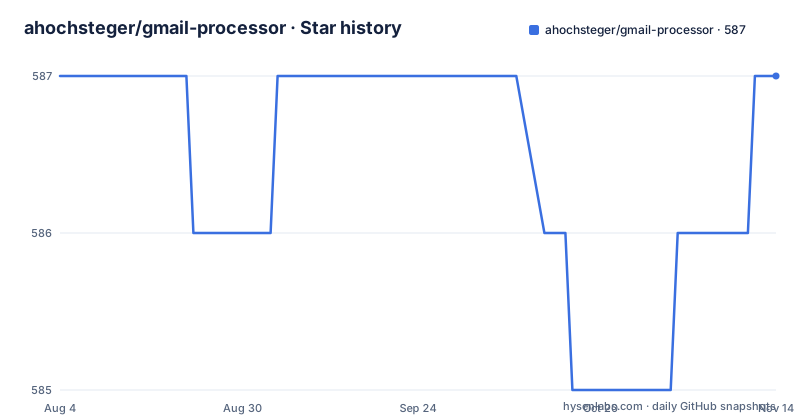
- ahochsteger/gmail-processor587 ★ · +0
| Repository | 2026-08-04 | 2026-11-14 |
|---|---|---|
| ahochsteger/gmail-processor | 587 | 587 |
0 Stars in the last 102 days, measured from the daily GitHub snapshot. Compare with other projects
Editorial analysis
What Gmail Processor Actually Solves
Gmail Processor addresses the tedious, error-prone task of manually handling email attachments and metadata. If you receive invoices, reports, or scans as email attachments, you likely spend time downloading them, renaming them, and filing them into folders. Gmail Processor replaces that manual workflow with a Google Apps Script library that runs on a schedule or trigger. It matches threads, messages, and attachments against criteria you define, then executes actions like storing attachments in a Google Drive folder, saving a PDF of the message, or writing details to a spreadsheet. The target user is someone who lives inside Google Workspace: Gmail, Drive, and Sheets. It is not a general email automation tool; it is specifically for Google's ecosystem.
How the Mechanism Works: Config-Driven Matching and Actions
The core of Gmail Processor is a JSON configuration. You define rules that specify matching criteria for threads, messages, and attachments, and you pair those rules with actions. The README gives examples: store attachments in a GDrive folder, log information into a spreadsheet. The library processes each email according to the config, and the actions are executed only when the criteria match. The architecture is extensible: you can add new actions or integrations, according to the README. This is not a point-and-click interface. You write JSON, and the library interprets it. That means the learning curve is about understanding the config schema, but the payoff is that your automation is version-controlled and repeatable. The README mentions a schema-aware online editor called the Playground, which helps you build the config with visual guidance. That is a practical entry point for non-developers.
Getting It Running: Installation and Configuration Path
To use Gmail Processor, you must set it up in Google Apps Script. The README points to a Getting Started Guide, which is the canonical path. You do not install a package via npm; you add the library to your Apps Script project. The repository is written in TypeScript, but you interact with the compiled library. The configuration is a JSON object that you define in your script. The README mentions a migration path from Gmail2GDrive, which suggests that existing users of the predecessor can convert their old config to the new format. The Playground is a browser-based tool that helps you create the config, likely with autocomplete and validation against a schema. For a quick start, you would copy an example from the docs, paste it into your script, and adjust the criteria and actions. The exact commands are not in the README, so you must follow the linked guide.
Key Features That Go Beyond Simple Attachment Saving
Gmail Processor is not just about saving attachments. It can decrypt password-protected PDFs that arrive as attachments, which is useful for encrypted invoices. It also performs OCR text extraction from images (JPEG, PNG, GIF) and PDFs, allowing you to pull out data like an invoice number and use it to organize or annotate the attachment. These features are significant because they move the library from a simple file mover to a data extraction tool. The spreadsheet logging action keeps a record of processed threads, messages, and attachments, which is valuable for audit trails. However, these features come with complexity. PDF decryption requires the password to be available in the config or the message, and OCR depends on the quality of the scan. The README does not detail failure handling, so you must test these features with your own documents.
Limitations and Cases Where It Is the Wrong Tool
Gmail Processor runs on Google Apps Script, which means it is subject to Google's quotas and execution time limits. It is not a real-time email processor; it runs on triggers that you set, so there is inherent delay. If you need immediate processing of every email, this is not the right tool. Also, the configuration is JSON, which can become unwieldy for complex rules. The README does not mention a GUI for managing rules, only the Playground for creating config. If you are not comfortable editing JSON, you will struggle. Another limitation is that it only works within Google's ecosystem. It cannot push attachments to Dropbox, Slack, or a custom API unless you write a new action, which requires coding. For a non-technical user, that is a barrier. Finally, the README does not specify how errors are handled, such as when a PDF decryption fails or an attachment is malformed. You must build your own error handling into the config or accept silent failures.
Real Alternative: Gmail2GDrive and Its Different Approach
Gmail Processor is the successor to Gmail2GDrive, which is still available in the repository's 1.x branch. Gmail2GDrive is a simpler tool that focuses primarily on saving attachments to Drive, with a less flexible configuration. The key difference is that Gmail2GDrive uses a simpler, perhaps less powerful matching mechanism, and it does not have the same extensibility or the OCR and PDF decryption features. Gmail Processor is re-written in TypeScript with a modern development setup, according to the README, which suggests better maintainability and easier contribution. If you only need to save attachments to Drive, Gmail2GDrive might be sufficient and easier to set up. But if you need logging, OCR, or custom actions, Gmail Processor is the more capable choice. The migration guide exists precisely because moving from Gmail2GDrive to Gmail Processor requires config changes.
Maintenance, Upgrade Cost, and License Implications
The repository is actively maintained, with recent releases in May 2026, including v2.17.4. The README mentions a modern development setup with automation for dependency updates, tests, documentation, releases, and deployments. That suggests a low maintenance burden for users, as the project handles its own housekeeping. However, upgrading between versions may require config changes, especially if you are migrating from Gmail2GDrive. The license is Apache-2.0, which is permissive for both personal and commercial use, but you should understand that it comes with no warranty. Since it is a library that runs in your Google account, you are responsible for the actions it takes, such as deleting or moving emails. The README does not mention any backup or rollback features, so you should test in a sandbox before applying to your primary inbox.
Editorial conclusion
Adopt Gmail Processor if you manage a high volume of Gmail attachments and need a configurable, scriptable way to file them into Drive and log to Sheets, especially if you are already on Google Workspace. Avoid it if you need real-time processing, have no JavaScript or JSON comfort, or require non-Google targets. Before deploying, verify your Gmail and Drive API quotas, test the migration from Gmail2GDrive if you have an existing config, and confirm that the PDF decryption and OCR features match your document formats.
Frequently asked questions
What is replacing Gmail, if not gmail-processor?
This repository does not replace Gmail. gmail-processor is a Google Apps Script library that processes mail which has already arrived, running actions such as writing attachments into Drive or logging into a spreadsheet.
Why is Gmail not delivering mail, and can this library help?
Delivery problems sit inside Google's mail service, not in this project. The library runs inside Google Apps Script and only touches messages that have already reached the account where it is installed.
How do I get the Gmail toolbar back, and is that a setting here?
That is a Gmail client setting and nothing in this repository controls it. gmail-processor ships no interface at all: its features are Drive storage, PDF decryption, OCR text extraction from JPEG, PNG, GIF and PDF, and spreadsheet logging.
Who is the email provider behind Gmail, and what does gmail-processor add?
Google provides Gmail and this project has no part in delivery. What it adds is an Apache-2.0 TypeScript library that automates processing of messages and attachments from a JSON configuration.
Official sources
Add this badge to your README
If you maintain this project, the badge below links readers to this analysis and shows its maintenance status from the daily GitHub snapshot. Paste the markdown into your README; add ?metric=license or ?metric=stars to the image URL for a different field.

[](https://hysenlabs.com/projects/ahochsteger-gmail-processor)Star history chart for your README
[](https://hysenlabs.com/projects/ahochsteger-gmail-processor)Was this useful?