cliphist: a Wayland clipboard history that stays out of your picker's way
Wayland clipboard manager with support for multimedia
At a glance
- What is it?
- cliphist is a small Go program that writes Wayland clipboard changes to a history file and gives them back as bytes on standard output, with no picker of its own. Everything about the design follows from that: you pipe it into dmenu, rofi, wofi, fuzzel or fzf, and the tool preserves each selection exactly, including whitespace and images.
- Who is it for?
- cliphist fits a Wayland user who wants a clipboard history that plugs into the picker they already use, and who cares that a copied selection comes back exactly as it was, whitespace and all. It does not fit a user on X11, since it depends on wl-clipboard, and it does not fit someone who wants a self-contained graphical history window, because the project has no concept of a picker at all.
- Can I use it commercially?
- Yes, with conditions. GPL-3.0 is a copyleft licence: if you distribute software that includes it, you must release that software's source code under the same licence. Running it internally without distributing it does not trigger that obligation.
- Is it still maintained?
- Yes. The repository last received commits 32 days ago.
- What is it written in?
- Mainly Go, according to GitHub's language statistics.
Answers come from the project's GitHub data, last synced on November 7, 2026, and from our analysis. They are not legal advice.
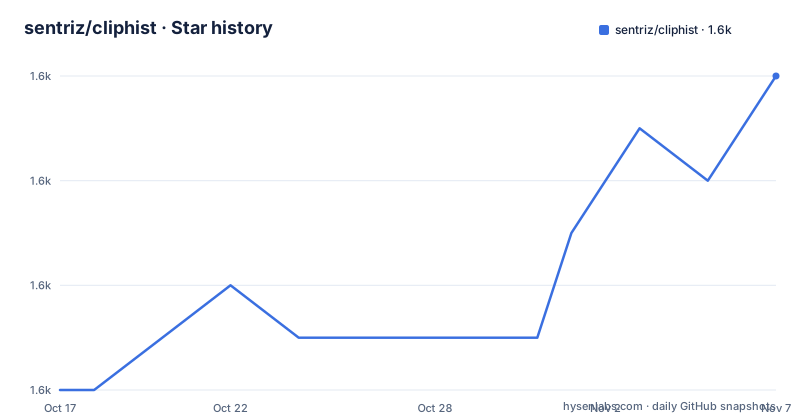
Star history
- sentriz/cliphist1,574 ★ · +6
| Repository | 2026-10-17 | 2026-11-07 |
|---|---|---|
| sentriz/cliphist | 1.6k | 1.6k |
6 Stars in the last 21 days, measured from the daily GitHub snapshot. Compare with other projects
Editorial analysis
The tool refuses to have a picker, and that is the design
The README describes cliphist as a clipboard history manager for Wayland, and the third bullet of the feature list is the one that explains the rest of the project: no concept of a picker, only pipes.
So cliphist is not a clipboard application with a window. It is a pair of commands that read and write a history file, and you connect them to a picker yourself. The canonical invocation is:
cliphist list | dmenu | cliphist decode | wl-copyThat is the entire user interface. The list command emits the history, the picker of your choice decides which line you want, the decode command turns the identifier back into the original bytes, and wl-copy puts it on the clipboard again.
The README names dmenu, rofi and wofi as the obvious partners and says or whatever other picker you like, and the picker examples section goes on to show fzf, fuzzel and cmenu, plus a few contributed wrappers. The design assumption is that you already have a menu program configured for launching applications, and that the clipboard history should be a mode of that program rather than a separate application competing for the same keybinding.
The requirement list is correspondingly small. You need Go, wl-clipboard, and xdg-utils for MIME inference by wl-copy when no type is supplied. This is a Wayland tool in the strict sense, and the repository topics name the compositors it is used with, Hyprland, Sway and Wayfire, along with wl-roots.
Preserving the selection byte for byte is the hard part
The second feature bullet says the clipboard is preserved byte-for-byte, and the details underneath it are where the engineering is. Leading and trailing whitespace, no whitespace, or newlines are preserved, and the README says this means it will not break fancy editor selections like Vim wordwise, linewise, or block mode.
That is a much stronger requirement than it sounds. A clipboard history that trims whitespace will turn a Vim block selection into a few ragged lines, and the block visual mode is exactly the case where the whitespace is meaningful. It is also the case where a user is most likely to copy and paste, and most likely to notice when it goes wrong.
The mechanism for this is the identifier in the list. The FAQ explains that it is important that a line prefixed with a number is piped into cliphist decode, and that this number is used to look up in the database the exact original selection that you made, with all leading, trailing and non-printable whitespace preserved. None of that is shown in the preview output of cliphist list.
So the pipeline is: the database holds the true bytes, the list shows a preview for humans, and the decode step resolves the identifier back to the original. A preview is a lossy rendering, and the design is careful never to treat the preview as the payload. The dependency list supports the same reading, with rivo/uniseg as a grapheme segmentation library, which is what you need to split a string into user-perceived characters rather than bytes when building a preview.
Storing the clipboard means asking wl-paste to watch it
The listening side is a shell command rather than a daemon, and the README is explicit about the lifecycle.
wl-paste --watch cliphist storeThis listens for changes on your primary clipboard and writes them to the history, and you call it once per session, for example in your Sway config. The consequence is that cliphist has no background presence of its own: if the store command is not running, nothing is recorded, and if you start it twice you are writing the same changes twice.
The store command reads CLIPBOARD_TYPE from wl-paste --watch to know what kind of data it is dealing with, and the README notes that this requires a specific change in wl-clipboard, pull request 297, which was merged after version 2.3.0. Older wl-clipboard versions leave the MIME types unknown, and that is not a cosmetic problem, because the type is what distinguishes a piece of text from an image, and the decode step needs to know which one to hand back.
You can also narrow what gets recorded by running the watch command several times, once per MIME type. The README's example in the FAQ starts one watcher for text and another for images:
wl-paste --type text --watch cliphist store
wl-paste --type image --watch cliphist store
With both running, you have text and raw image data available in your history. The same section reminds you to make sure xdg-utils is installed, which is what supplies the MIME inference for wl-copy when no type is given.
The numbers in your picker are the point, and the tabs are the annoyance
The FAQ entry about numbers in the picker is the one to read before you configure anything, because it explains a behaviour that otherwise looks like a bug.
The format of cliphist list is an id, a tab, and a 100 character preview. The id has to travel with the selection into cliphist decode, because that is how the exact original bytes are found. Since most pickers treat a tab as a column separator, the id may end up in its own column, which is why you see numbers in front of the entries.
The fix is per picker, and the README gives each one. For fzf, cliphist list piped into fzf with -d $'\t' and --with-nth 2, so only the preview is displayed. For rofi, the dmenu mode with -display-columns 2. For fuzzel, the dmenu mode with --with-nth 2. Wofi gets a different treatment entirely, a --pre-display-cmd that cuts the second field, and the README is blunt about it: it kind of works but breaks with quotes in the original selection, and the recommendation is not to try to hide the column with wofi.
That last note is the honest summary of the whole design. The id column is not decoration, and any attempt to strip it visually with a tool that also has to preserve the value is a fight the tool does not always win. The alternative to hiding the column is to make the picker aware of the tab, which is what fzf, rofi and fuzzel do well and wofi does not.
The metadata commands are the other half of the interface. The list command can emit fields in the order you ask for, with the default being id,preview, and an optional ID selects one entry, and unknown fields and missing IDs are errors rather than empty output.
Expiry, deletion and compaction are three different operations
A clipboard history is a database that grows forever unless something prunes it, and cliphist gives you three distinct tools for that.
cliphist wipe clears the database. cliphist delete removes a single entry, and the README shows it in the pipeline form, cliphist list piped into dmenu and then into cliphist delete, or a query form, cliphist delete-query with a search string.
Expiry is the third, and it is the one with a subtlety. You run cliphist wipe -older-than 720h from a timer to delete entries older than 30 days, and the duration is a Go duration, so days must be given in hours. There is then a historical wrinkle: entries stored before cliphist tracked timestamps count as older than any cutoff. That is a sensible default, since an entry with no timestamp cannot be shown to be recent, but it does mean the first run of an expiry job after upgrading wipes every entry that predates the timestamp feature.
cliphist compact is the fourth command and a different kind of operation again, the housekeeping one. A clipboard history is an append-only log of entries, and a log that is only ever appended to accumulates empty space that the database has to carry around.
The configuration story is where the tool shows its care about shell users. cliphist can be optionally configured to extend the default functionality, and global options can be provided with a CLI argument, an environment variable, or a config file key, with global CLI flags going before the command. The example given is max-items, set on the command line or through an environment variable. One restriction is stated explicitly: the command-local list -fields flag is CLI-only, and environment variables and config keys cannot change the output fields, because the field selection is a parsing instruction rather than a setting.
Images need a different picker, and the repository ships the wrappers
Text history is easy, because a text picker can show a preview. Images are not, and the README's picker examples section splits the two cases apart.
The image paths need more than a line of output. There is a fzf variant with sixel image previews, the contributed cliphist-fzf-sixel script, which requires chafa and a sixel-capable terminal and uses MIME metadata for image previews and for restoration. There is a fuzzel variant with images through the contributed cliphist-fuzzel-img script, and two rofi custom mode variants, one of them with images and the show-icons option, backed by the contrib/cliphist-rofi and contrib/cliphist-rofi-img scripts.
The pattern is consistent. The core command stays generic, emitting the list, and the image awareness lives in a wrapper that knows about the tool it is driving. The contrib directory in the repository listing is where those scripts live, and the fact that the fzf and fuzzel wrappers are separate scripts rather than flags on the main command reflects a real constraint: not every picker can display an image, and the ones that can need to be told what the data is.
The cmenu example is a different shape again. cmenu runs the script itself, so instead of a pipe you give it a script that prints the list, and it gives the selected line back, with a linked example of a menu-clipboard script in the author's dotfiles.
For a user, the practical sequence is that plain text recall works with any picker on the system today, and image recall needs one of the contributed wrappers and a terminal or picker that can show an image.
One Go module, BoltDB, and a project that still ships releases
The implementation is compact, and the dependency list explains the design.
The module is go.senan.xyz/cliphist, which is why the install instruction is $ go install go.senan.xyz/cliphist@latest rather than a GitHub path. The Go version required is 1.20, and the dependencies are go.etcd.io/bbolt for the database, go.senan.xyz/flagconf for the layered configuration, golang.org/x/image for image handling, rivo/uniseg for grapheme segmentation, and rogpeppe/go-internal.
A single embedded key value store and no server is the whole deployment story. There is no daemon to run, no port to open, and nothing to configure beyond the path of the history file, which the database path option can move, for instance with the -db-path global flag before the list command.
The installation options are the usual three for a Go program with a wide audience. You could try using your distro's repos, and the README carries a Repology badge for the packaged versions. Or stick a static binary from the releases page somewhere in your $PATH, which suits a machine where you would rather not install a Go toolchain. Or install it from source with Go and the go install command above.
The release history shows the project is still shipping. The recent tags are v0.6.0 and v0.6.1, both on 2024-10-15, and v0.7.0 on 2025-10-11, and the last push to the repository was on 2026-10-07. The repository itself is small in the way a focused utility should be, with cliphist.go and cliphist_test.go at the root, a version.txt, a testdata directory, the contrib scripts and a CHANGELOG.md.
The licence is GPL-3.0, which is worth a moment's thought for an organisation that wants to ship a clipboard manager inside a product. A tool that runs as a separate process on a developer's machine is a different proposition from one linked into distributed software, and the copyleft of the GPL reaches the latter and not the former.
Editorial conclusion
cliphist fits a Wayland user who wants a clipboard history that plugs into the picker they already use, and who cares that a copied selection comes back exactly as it was, whitespace and all. It does not fit a user on X11, since it depends on wl-clipboard, and it does not fit someone who wants a self-contained graphical history window, because the project has no concept of a picker at all. Before you wire it in, check that your wl-clipboard is new enough for the MIME type to be recorded, and run the store command once per session from your compositor configuration.
Frequently asked questions
How do I set up the cliphist clipboard history on Wayland?
Run wl-paste --watch cliphist store once per session, for example from your Sway configuration, and then recall an entry with cliphist list piped into a picker and into cliphist decode and wl-copy. You need Go, wl-clipboard and xdg-utils installed.
Why do the entries in my cliphist picker have numbers in front of them?
The list output is an id, a tab, and a 100 character preview, and the id is what cliphist decode uses to look up the exact original selection with all its whitespace preserved. To hide the column, tell the picker to split on the tab, for example fzf with -d $'\t' and --with-nth 2, or rofi with -display-columns 2.
How do I delete old entries from the cliphist database?
cliphist wipe clears the whole database, cliphist delete removes a single entry selected from the list, and cliphist wipe -older-than 720h removes entries older than 30 days, where the duration is a Go duration so days must be given in hours. Entries stored before cliphist tracked timestamps count as older than any cutoff.
Does cliphist support images as well as text?
Both text and images are supported, and the clipboard is preserved byte for byte. For images you need a picker that can display them, using the contributed cliphist-fzf-sixel script with chafa and a sixel-capable terminal, or the cliphist-fuzzel-img and cliphist-rofi-img scripts, and you can run wl-paste with a type argument to record text and images separately.
How is the cliphist configuration set?
Global options can be provided with a CLI argument, an environment variable, or a config file key, with global CLI flags going before the command. The list -fields flag is CLI-only, because environment variables and config keys cannot change the output fields.
Official sources
Add this badge to your README
If you maintain this project, the badge below links readers to this analysis and shows its maintenance status from the daily GitHub snapshot. Paste the markdown into your README; add ?metric=license or ?metric=stars to the image URL for a different field.

[](https://hysenlabs.com/projects/sentriz-cliphist)Star history chart for your README
[](https://hysenlabs.com/projects/sentriz-cliphist)Was this useful?