OpenSurge for Mac: a gateway whose IPv6 path leaves the system TUN
Surge-style whole-home gateway and control plane for macOS with IPv4/IPv6 support— mihomo TUN, dnsmasq-powered DHCP/DNS, per-device routing, and an agent-friendly validation workspace.
At a glance
- What is it?
- YTwsy/OpenSurge-for-Mac is a Go gateway for macOS that hands out DHCP and DNS with dnsmasq and proxies through mihomo, and it offers three ways onto a network that differ sharply in how much they disturb. The IPv6 path is a patched userspace data plane, and the menu bar cannot stop the gateway.
- Who is it for?
- This is a gateway for someone who already understands what turning off their main router DHCP server means, and the README is unusually honest about the cost of each mode. Start in side-router mode, where the blast radius is one device, and treat LAN DHCP takeover as a change to the house rather than to the Mac.
- Can I use it commercially?
- Yes, with conditions. GPL-3.0 is a copyleft licence: if you distribute software that includes it, you must release that software's source code under the same licence. Running it internally without distributing it does not trigger that obligation.
- Is it still maintained?
- Yes. The repository last received commits 7 days ago.
- What is it written in?
- Mainly Go, according to GitHub's language statistics.
Answers come from the project's GitHub data, last synced on November 22, 2026, and from our analysis. They are not legal advice.
Star history
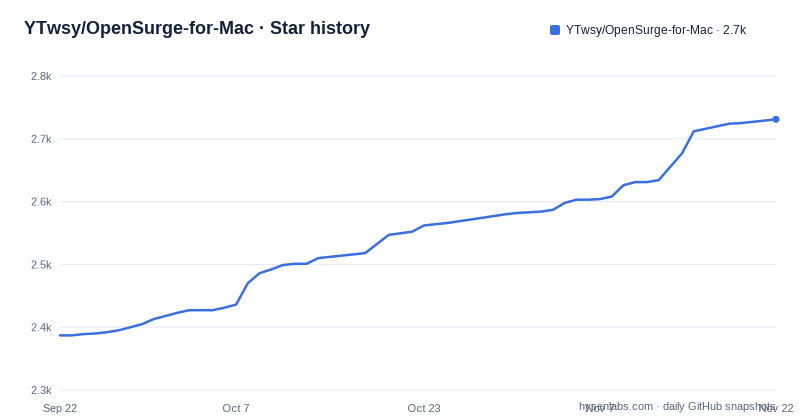
- YTwsy/OpenSurge-for-Mac2,731 ★ · +344
| Repository | 2026-09-22 | 2026-11-22 |
|---|---|---|
| YTwsy/OpenSurge-for-Mac | 2.4k | 2.7k |
344 Stars in the last 61 days, measured from the daily GitHub snapshot. Compare with other projects
Editorial analysis
Three ways in, and only one leaves the main router alone
OpenSurge for Mac is a Surge-style gateway and control plane for macOS, written in Go under the module name `open-mihomo-gateway` and released under GPL-3.0. dnsmasq supplies DHCP and DNS, mihomo does the proxying. The document sets out three ways in, and they differ in how much of your existing network they disturb. Side-router mode is the one recommended for a first run: the main router keeps its DHCP server on, and only the devices you enrol get a stable IPv4 with the gateway and DNS pointed at the Mac by hand. LAN DHCP takeover is the automatic option, and it means following a guided flow to turn the main router DHCP server off, then a separate restore flow to turn it back on when you stop. Standalone downstream LAN leaves your current LAN DHCP alone entirely and gives the Mac a downstream network of its own with DHCP, DNS and gateway, which is the shape that suits a separate AP, SSID or VLAN. That middle mode is the one to read twice. A router handing out no addresses takes the whole LAN offline until the restore flow runs, and the document says the recovery is guided without saying what happens if it is interrupted.
IPv6 traffic skips the macOS system TUN and needs a patched mihomo
For IPv4 the gateway path is native: macOS pf plus forwarding, with mihomo TUN providing transparent proxying on the Mac itself. IPv6 is built differently. The README describes dnsmasq RA, SLAAC and RDNSS handing out addresses, a macOS BPF packet broker moving the packets, and a userspace data plane assembled from a mihomo that this project patches, running on gVisor. That plane covers TCP, UDP and QUIC carried over UDP/443, and it preserves MAC identity so per-device policy still works. Traffic on this path does not pass through the macOS system TUN at all. Three consequences follow. The IPv6 mode is labelled experimental in each of the three deployment modes, so it is opt-in rather than default. It requires a mihomo built from the patches in this repository instead of a downloaded binary, which is why the tree carries `patches/`, `third_party/` and `THIRD_PARTY_NOTICES.md`, and why `go.mod` pins `quic-go v0.54.1` next to bbolt and `yaml.v3`. And because the plane is userspace and built from patches, a failure there has no fallback to the IPv4 path it is meant to mirror.
The menu bar shows status and cannot start or stop anything
Since v0.3.0 the installer ships a Wails desktop app on the system WebView, with a React main window and a menu bar panel sharing one Control API; the browser entry point still works next to them. The v0.2.4 Swift host stays in the tree as a historical maintenance reference. v0.3.0 shipped on 2026-10-02 after six release candidates on the same day. The menu bar panel draws a deliberate line. It shows status, raises recovery alerts and opens the desktop window, but apart from a temporary lid-close keep-running switch it offers no gateway start or stop and no policy switching. Quitting is split in two as well: leaving the desktop app is one action, and quitting OpenSurge is a second that proceeds only once the gateway data plane has already stopped. Most people arrive through the installer package instead, and the document points them at a separate App user guide rather than at a build. Building from source is four Makefile targets:
make web-install
make control-build
./bin/opensurge-control --config examples/config.example.yaml
make desktop-production-build
The control service listens on `127.0.0.1` and prints a one-time Web GUI link when it starts. A root Helper under system launchd stays loaded while idle, so the next launch needs no fresh authorisation. The lid-close keep-running switch is off by default, lasts only for the current run, saves no preference, and does not depend on whether the gateway is up.
A registration without a MAC keeps its slot and loses its policy
One mihomo process can hold different policy for every enrolled device, and how a device proves who it is depends on the mode. Under DHCP takeover a device with a MAC gets a fixed IPv4 lease. In side-router mode a MAC is optional, and a static IPv4 that stays stable on the main router side is enough, with the GUI helping you enrol devices it observes passing through or sitting in the ARP neighbour table. Switch to DHCP mode and the GUI asks you to confirm the MAC addresses currently observable. A registration that still has no MAC is kept rather than deleted, but its device-specific policy is suspended until you fill the address in. Devices with enough identity get their own mihomo selector group and `SRC-IP-CIDR` rules. The JSON policy file lets each device either follow the gateway rules or take its own selector ahead of the global rules, accepts `REJECT` as a device-specific action, and in dedicated mode keeps local and private targets direct. The rule library keeps rule sets, egress-free routing templates and per-device hits apart, carries a Claude Code community rule set you can read but that is applied to nobody by default, and treats an empty starter file as valid configuration.
The local Mac switch never reaches downstream devices
Two switches look adjacent and are not. The first sets the Mac's own new connections to rules, global or direct without touching downstream devices, and the README is explicit that this control leaves the downstream rules alone. The second is about system proxy settings: by default OpenSurge does not modify the macOS system proxy, and in TUN mode you can turn on HTTP and HTTPS system proxy cooperation explicitly. That option exists because Network Extensions such as SafeDNS and DNS Proxy interfere with a TUN-only local DNS setup, and the cooperation mode is what makes both survive. The same scoping discipline applies to Tailscale and Headscale used as a mihomo outbound: access from the Mac or from downstream devices can be limited by MagicDNS suffix, by Tailnet peer, or by an explicit subnet route, so a tailnet does not silently become a path into every device on the LAN.
Tailscale exit nodes join manual groups and skip the automatic ones
Tailnet access and Exit Node are treated as two different roles, and the difference shows up in group membership. A Tailnet-only outbound is selected only on an explicit MagicDNS suffix, a peer IP or CIDR, or an accepted remote subnet, and it does not fall back to `DIRECT` when the target is unreachable. An Exit Node produces a separate `open-surge/tailscale-exit` policy group, which becomes an optional member of the Mac global egress, of every per-device selector, and of all user-defined manual `type: select` groups, while staying out of the automatic speed-test, failover and load-balance groups. Remote subnet routes have to be confirmed one at a time, and a route overlapping the OpenSurge LAN is refused at save time. The sharpest edge is a conflict the project refuses to resolve for you: if the local Tailscale app has already claimed the same subnet route through its own `utun`, the interface names the route and the interface and asks you to turn off accept-subnet-routes there or disconnect. OpenSurge will not modify another app.
The first request through a Tailnet may still need a retry
mihomo starts a Tailscale node on the first request that needs the outbound, so the connection cost lands on whoever uses the network first. OpenSurge pre-warms the node at gateway start, at reload and after mihomo recovery, but the README still warns that the first business access may need a retry, and the interface keeps showing an on-demand connection state rather than pretending the node is up. The same restraint shows up in measurement: a Tailnet-only node is not judged with a public `generate_204` probe, because a node that cannot be probed that way may still be reachable inside the tailnet. Auth keys are handled the same careful way. The key is written only to a separate permission-restricted file and is not echoed back in configuration or API responses. The local `state-dir` keeps node identity, so disabling and re-enabling the outbound does not create a new device. Forgetting the local identity is a separate action that runs only when Tailscale is already stopped and the gateway is stopped, and it does not delete the node from the Tailscale or Headscale console. The current boundary is outbound-only: OpenSurge publishes no local LAN to the tailnet and offers no inbound service through the node.
A virtual lab, a rollback and doctor output sit in front of the LAN
The project treats high-risk network behaviour as something to prove before it touches a household. The README says the validation order is an isolated virtual LAN lab first, the ordinary LAN second, and calls it an agent-friendly workspace where project knowledge is versioned with the code and evidence from the lab and from real devices flows back into the next round of work. The Makefile carries that structure as target names: `lab-up`, `lab-down`, `lab-test-tun`, `lab-test-tailscale`, `lab-test-ipv6-userspace`, then `real-device-start-tun`, `same-lan-start-tun`, `same-wifi-dhcp-start-device-policy` and a matching set of check and stop targets. The plain ones are `go test ./...` and a build to `bin/omg` from `./cmd/omg`. On the running gateway there is a rollback and an explicit recovery contract around every start and stop, plus text and JSON output for status, doctor, logs and snapshot, where the JSON snapshot is allowed to fail partially so a broken component still leaves a usable diagnostic.
Editorial conclusion
This is a gateway for someone who already understands what turning off their main router DHCP server means, and the README is unusually honest about the cost of each mode. Start in side-router mode, where the blast radius is one device, and treat LAN DHCP takeover as a change to the house rather than to the Mac. Check the restore flow before you switch it on, not after. Keep the IPv6 path off until the IPv4 path has run for weeks. Read every remote subnet route before confirming it, because overlap with your own LAN is rejected only after you have entered it. And treat the menu bar as a status display, not a control panel: if the gateway data plane will not stop, quitting from there is not available to you.
Frequently asked questions
What does OpenSurge for Mac actually do?
It is a Surge-style gateway and control plane for macOS. dnsmasq provides DHCP and DNS, mihomo is the proxy engine, and IPv4 uses macOS pf with forwarding. It can run as a side router, take over LAN DHCP, or run its own downstream LAN.
How does OpenSurge for Mac handle IPv6?
IPv6 is an experimental userspace path: dnsmasq RA, SLAAC and RDNSS for addresses, a macOS BPF packet broker, and a data plane built from a mihomo patched by this project, covering TCP, UDP and QUIC over UDP/443. It does not pass through the macOS system TUN.
Can I start or stop the OpenSurge gateway from the menu bar?
No. The menu bar panel shows status, raises recovery alerts and opens the desktop window, but offers no gateway start or stop and no policy switching. Quitting OpenSurge itself only proceeds once the gateway data plane has already stopped.
Does OpenSurge for Mac share its LAN with a Tailscale tailnet?
No. The boundary is outbound-only: it does not publish the local LAN to the tailnet and does not use the node for inbound services. Tailscale and Headscale are wired in as a mihomo outbound, scoped by MagicDNS suffix, Tailnet peer or an explicit subnet route.
Where do OpenSurge for Mac's example configurations live?
Five example files sit under examples/, including config.example.yaml, config.imported-profile.example.yaml, config.same-lan.example.yaml, device-policy.example.json and mihomo-profile.example.yaml. The desktop test target builds against MACOSX_DEPLOYMENT_TARGET=13.0.
Official sources
Add this badge to your README
If you maintain this project, the badge below links readers to this analysis and shows its maintenance status from the daily GitHub snapshot. Paste the markdown into your README; add ?metric=license or ?metric=stars to the image URL for a different field.

[](https://hysenlabs.com/projects/ytwsy-opensurge-for-mac)Star history chart for your README
[](https://hysenlabs.com/projects/ytwsy-opensurge-for-mac)Was this useful?