sentrux: a treemap for the agent that just edited your code
Real-time architectural sensor that helps AI agents close the feedback loop, enabling recursive self-improvement of code quality. Pure Rust.
At a glance
- What is it?
- sentrux is a single Rust binary that scores the structure of a project and shows it as a live treemap, with a check command for CI and a gate command to compare before and after an agent session. The command surface is small and specific, while the document around it argues at length about why architecture needed a sensor.
- Who is it for?
- sentrux fits a team that lets agents edit a codebase in the terminal and has lost track of the file tree, and the gate command is the part worth trying first because it needs no display and no configuration. Two habits come with it.
- Can I use it commercially?
- Yes. MIT is a permissive licence: you can use, modify and sell software built on it, as long as you keep its copyright and licence notices.
- Is it still maintained?
- Activity is slowing. The repository last received commits 8 months ago.
- What is it written in?
- Mainly Rust, according to GitHub's language statistics.
Answers come from the project's GitHub data, last synced on November 15, 2026, and from our analysis. They are not legal advice.
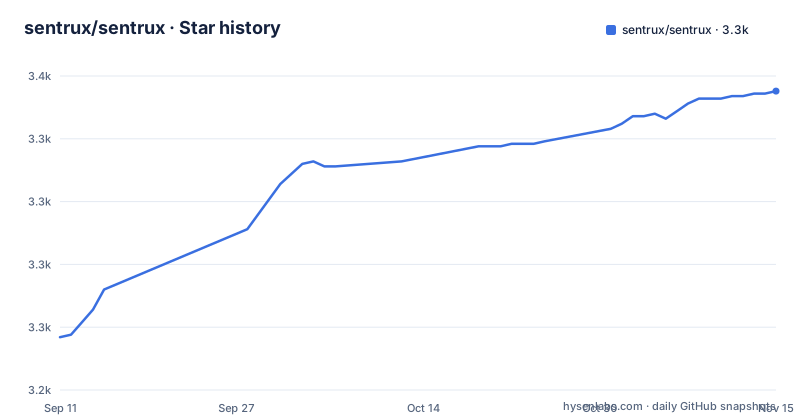
Star history
- sentrux/sentrux3,344 ★ · +98
| Repository | 2026-09-11 | 2026-11-15 |
|---|---|---|
| sentrux/sentrux | 3.2k | 3.3k |
98 Stars in the last 65 days, measured from the daily GitHub snapshot. Compare with other projects
Editorial analysis
The default command opens a window, and the window wants a GPU
Running the binary with no arguments opens the graphical interface, described as a live treemap of your project, and passing a path opens that interface scanning a specific directory instead of wherever you happen to be standing. The second command does something else entirely, and the contrast is the interesting part: this is a GUI tool first, with the automation surface added alongside.
That matters on a headless machine. The document says the application tries several GPU backends in order when it will not start, going from Vulkan to GL to a fallback, and you can pin one yourself:
WGPU_BACKEND=vulkan sentrux    # force Vulkan
WGPU_BACKEND=gl sentrux        # force OpenGL
The workspace manifest explains where the graphics dependency sits. eframe is pulled in with the wgpu and persistence features, alongside egui, so the interface is built on a WebGPU style backend rather than a native toolkit. The document does not describe a headless or server mode, which means the CI-friendly commands below are the part that works without a display.
Three commands, and two of them bracket an agent session
The command surface is five lines long, and three of them matter.
sentrux                    # open the GUI — live treemap of your project
sentrux /path/to/project   # open GUI scanning a specific directory
sentrux check .            # check rules (CI-friendly, exits 0 or 1)
sentrux gate --save .      # save baseline before agent session
sentrux gate .             # compare after — catches degradation
check is the one built for automation. It evaluates the rules and exits 0 or 1, which is the shape a pipeline step needs.
The gate command is the one with an idea behind it, and it takes two invocations to work. Saving a baseline before an agent session records the current state; running gate afterwards compares against it and reports degradation. That is the whole feedback loop in two lines, and it is also the tool's only answer to the problem it describes, which is that nobody notices architectural damage until long after the session that caused it.
The design decision worth noticing is that the baseline is explicit. Nothing is stored implicitly, so the comparison only says something about the interval you chose to bracket.
The navigation links to a How it works section with nothing in it
The header of the document carries a jump list with four entries: How it works, Quick Start, MCP Integration, and Rules Engine.
Three of those anchors land on real sections. The fourth does not, at least not in the text as published. The How it works heading is followed by an empty container element, closed immediately, and then the Quick Start heading begins. No prose, no diagram, no code.
That is worth knowing before you rely on the navigation. The argument the project wants to make about architecture drifting is made further down, in sections titled The problem nobody talks about and The solution, both of which are long. So the mechanism is argued rather than documented: the document explains why a sensor is needed for architecture the way it explains the absence of one for older layers, then leaves the how as an implied consequence of the command list.
If you are evaluating the tool by reading, the Commands and configuration material is where the substance is. The section the table of contents presents first is the one that is empty.
Three install paths, one of them piped from the branch
Installation differs per platform and the differences are not cosmetic.
On macOS it is a Homebrew tap:
brew install sentrux/tap/sentruxOn Linux it is a script fetched from the repository's main branch and piped into a shell:
curl -fsSL https://raw.githubusercontent.com/sentrux/sentrux/main/install.sh | shOn Windows the document offers a download from the releases page, and also a direct link to one file, sentrux-windows-x86_64.exe. That filename is the whole Windows story as written: one architecture is named, so an arm64 Windows machine is not covered by the command on offer.
Two things follow from the Linux line in particular. The script comes from a branch rather than from a release tag, so what it installs can change without a version bump, and the upgrade note confirms the intent by saying that re-running the curl install always pulls the latest release. On macOS the upgrade path is the two-step brew update and brew upgrade pair.
For anyone who reviews what they run, the build-from-source route is four words long: clone the repository, then cargo build --release.
The MCP surface is one argument, and there are two plugin directories
An agent talks to the tool over MCP, and the configuration is as small as an MCP configuration gets:
{
  "mcpServers": {
    "sentrux": {
      "command": "sentrux",
      "args": ["--mcp"]
    }
  }
}
One command, one argument. Any MCP client is named as acceptable, and the specific clients listed are Cursor, Windsurf, OpenCode and OpenClaw.
Claude Code gets a different door: two slash commands, one to add the repository as a plugin marketplace and one to install the plugin from it.
The tree is where this gets curious. Both a dot-prefixed claude-plugin directory and a plain one sit at the root, alongside a plugins directory and a .sentrux directory. A manifest directory and a source directory is the usual reason for a pair like that, though which is which is not stated. The .sentrux entry is the one to look at first if you clone this, because a dot directory at the root of a repository that also keeps its own state is either configuration worth reading or something that should not be in version control.
For the MCP path specifically, the open question is what --mcp exposes, since the visible document names the flag without describing the tools behind it.
52 languages arrive as plugins, and the release notes say they are versioned
The coverage claim is 52 languages, delivered through tree-sitter plugins rather than compiled in. The single binary claim and the plugin claim sit next to each other in the same paragraph, and they are in tension in a useful way: what you can measure depends on which language plugins are present, so two people running the same check on the same repository can get different answers.
The release notes confirm that plugins are first class. The newest release, v0.5.7, is described as a WCAG colour system, a universal resolver, and plugin versions. Versioning plugins is what makes the tension manageable, since a resolver that can find a plugin version means a check can be repeated rather than depending on whatever was installed.
The release before that, v0.5.6, covers a UI scale change, a font upgrade and a fix to the open source build, and v0.5.5 is titled One True Score plus Object Pascal. That last pairing is two things at once: a naming decision about the single aggregate score, and one more language added to the plugin set.
Object Pascal is also a hint about who this is for. The languages people actually maintain plugins for are not always the languages in the average web stack.
The argument is that the codebase degrades, not the model
The middle of the document is a diagnosis, and it is the part a reader will either accept or not.
The scenario is a project that started with an agent writing clean code and then drifted: hallucinated functions that do not exist, new code in the wrong place, bugs in files touched the day before. The stated cause is not that the model got worse. It is that the human lost the file tree. Working in an editor, you saw the tree, opened files and built a mental model of which module does what; working through a terminal, you see a stream of modified paths and none of the structure around them. Dependencies tangle, cycles appear, and the agent searching the project later finds twenty conflicting matches and picks the wrong one.
The competing answer is named and dismissed. Planning the architecture first, as the spec-driven approach does, is described as reinventing waterfall: documents get produced, the code gets written, and nothing checks whether the implementation drifted from the document.
The opening of the document makes the same point with a number, a live run with a named model building a FastAPI project, where quality lands at a score of 6772 and the explanation given is that without a sensor the agent does not know what to improve. Five root cause metrics feed one continuous score, computed in milliseconds. The paragraph that follows stops in the middle of a word, after which session caus, so the sentence about how quickly you notice is unfinished there.
Three releases in two days, and a translation set for four languages
The version history is compressed into a single week. v0.5.5 shipped on 2026-03-17, v0.5.6 on 2026-03-18 and v0.5.7 on 2026-03-18, three releases inside forty-eight hours. The last recorded push to main is dated 2026-03-19.
Every one of those releases is numbered below 1.0, which is consistent with a project that calls its own output experimental and describes the interface as a foundation.
Two details in the repository tell you something about how it is being worked on. The readme exists in four languages, English, German, Japanese and Simplified Chinese, which is a translation effort most projects of this size do not take on. And the manifest at the root is a workspace file rather than a package definition: it declares two members, sentrux-core and sentrux-bin, shares only eframe and egui through workspace dependencies, and sets a release profile with optimisation level 3 and thin link time optimisation. No fat LTO and no explicit setting for code generation units or panics, so the build is configured for compile speed over the last percent of runtime.
With the dates in view, an adopter's first question is not which release to install but whether there is a newer one to wait for.
Editorial conclusion
sentrux fits a team that lets agents edit a codebase in the terminal and has lost track of the file tree, and the gate command is the part worth trying first because it needs no display and no configuration. Two habits come with it. The baseline is only meaningful if it is saved before the agent session rather than after, so a gate comparison only catches what happens between those two moments. And the language coverage comes from plugins rather than the binary, so the score you get depends on which ones are installed. Weigh the timeline before adopting: three releases landed inside two days in March 2026 and the last recorded push is dated 2026-03-19, with nothing newer to install since. For a project you intend to depend on, that is a question for the author rather than for this article.
Frequently asked questions
What does sentrux actually measure?
It watches the actual structure of a project rather than the diffs or terminal output, covering every file, dependency and architectural relationship, and visualises it as a live interactive treemap. Five root cause metrics are combined into one continuous score, computed in milliseconds.
How do I run sentrux in a pipeline?
Use sentrux check ., which checks the rules and exits 0 or 1. The other two forms open the graphical interface, which needs a GPU backend and is not the CI path.
What is the sentrux gate command for?
sentrux gate --save . records a baseline before an agent session and sentrux gate . compares against it afterwards to catch degradation. Nothing is stored implicitly, so the comparison only covers the interval between those two commands.
How does an AI agent connect to sentrux?
Over MCP. Any MCP client can launch it with the command sentrux and the argument --mcp, and Claude Code installs it through two slash commands, one that adds the repository as a plugin marketplace and one that installs the plugin.
Which platforms and languages does sentrux support?
macOS, Linux and Windows, from a single Rust binary with no runtime dependencies, with 52 languages covered through tree-sitter plugins. The Windows download named in the document is the x86_64 build, and the Linux installer is a script piped from the main branch.
Official sources
Add this badge to your README
If you maintain this project, the badge below links readers to this analysis and shows its maintenance status from the daily GitHub snapshot. Paste the markdown into your README; add ?metric=license or ?metric=stars to the image URL for a different field.

[](https://hysenlabs.com/projects/sentrux-sentrux)Star history chart for your README
[](https://hysenlabs.com/projects/sentrux-sentrux)Was this useful?