Serenity's quickstart, its pnpm catalog indirection, and where the free path ends
Business Apps Made Simple with Asp.Net Core MVC / TypeScript
At a glance
- What is it?
- An ASP.NET Core and TypeScript application platform shipping as Serene.Templates under MIT, with a StartSharp tier behind a members area. The open repository is careful about what it documents and quiet about version resolution, sync of documentation, and where bug reports go.
- Who is it for?
- Serenity fits teams that build data-centric business applications on ASP.NET Core MVC and want the server and the browser widget layer to come from one vendor with one license, and that are willing to read a developer guide rather than infer the framework from tutorials.
- Can I use it commercially?
- Yes. MIT is a permissive licence: you can use, modify and sell software built on it, as long as you keep its copyright and licence notices.
- Is it still maintained?
- Yes. The repository received new commits within the last day.
- What is it written in?
- Mainly C#, according to GitHub's language statistics.
Answers come from the project's GitHub data, last synced on November 15, 2026, and from our analysis. They are not legal advice.
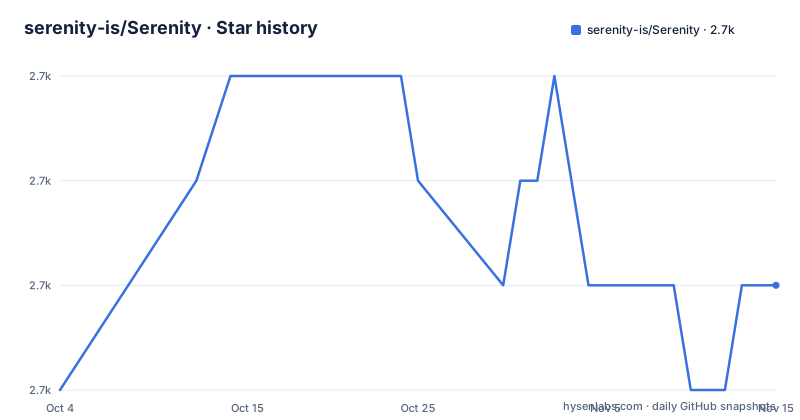
Star history
- serenity-is/Serenity2,692 ★ · +1
| Repository | 2026-10-04 | 2026-11-15 |
|---|---|---|
| serenity-is/Serenity | 2.7k | 2.7k |
1 Stars in the last 42 days, measured from the daily GitHub snapshot. Compare with other projects
Editorial analysis
Every quickstart command carries a redirection character
The quickstart is the first thing a new user runs, and its fence is labeled bash while each of the six commands begins with a `>` character. Those are shell prompt continuation markers, not part of any command. Pasted as printed into a terminal, `>` reads as a redirection operator, so the block fails before a single dotnet command executes.
The comments are the giveaway that the characters are decorative. The fence reads as a narrated session. It opens with a comment saying to install or update the Serene.Templates package, then a command, then a comment about creating a new Serene project, then another command, alternating narration and action down to `dotnet run` at the end. That alternation is what a copy-paste-ready script should not contain. Stripping the leading character from each line is all that stands between this and something runnable, and the prose treats it as ready to use, following the fence with a line telling you the site is live at `http://localhost:5000`.
# Install/Update Serene.Templates package.
> dotnet new install Serene.Templates

# Create a new Serene project.
> dotnet new serene -n MySereneApp

# Navigate into your project folder.
> cd MySereneApp/MySereneApp.Web

# Install NPM packages.
> npm i

# Build and run the project.
> dotnet run
The port note in that following line is a small piece of honesty worth crediting. It says the actual port may vary and to check the console after `dotnet run`, which covers the ordinary case where something else already holds port 5000.
The template nests the project one folder deeper than its name suggests
`dotnet new serene -n MySereneApp` names the project, and the navigation step that follows is `cd MySereneApp/MySereneApp.Web`. The solution therefore lands two directories below where the command ran, with the template name repeated along the way. That is worth knowing before the first command rather than after, because every step in the block assumes the working directory.
The shape implied by that path is a multi-project solution rather than one web app. The repository root confirms it: a `Serenity.slnx` file at the top, then `src/`, `serene/`, `tests/`, `packages/`, `common-features/`, and `build/` alongside. The `.slnx` extension is the XML solution format, which describes a solution without a project GUID per entry, and its presence is a visible sign of how recently this project has been modernized.
The path also carries the architecture in miniature, matching the project description that frames Serenity as a business application platform built on ASP.NET Core MVC with TypeScript. Both halves matter: the C# side owns the server and data access, and the TypeScript side owns the browser widget layer that the developer tools extension inspects later.
The root manifest resolves every version through a catalog it does not contain
The root package.json declares nine devDependencies and not one of them carries a version number. Eight are written as `catalog:serenity`, among them TypeScript, Vite, Vitest, esbuild, jsdom, dts-bundle-generator, @vitest/coverage-v8, and @preact/signals-core. The ninth, `@serenity-is/domwise`, uses `workspace:*`, which points inside the repository rather than at a registry.
The catalog protocol is why this manifest cannot be audited on its own. A `catalog:` entry means the version is declared once in a catalog block and every package naming it resolves through that single declaration, so the place to look is `pnpm-workspace.yaml` at the root beside `pnpm-lock.yaml`. The root file tells you what the workspace depends on, not what it depends on at. For a platform whose pitch is reducing maintenance, that indirection earns its keep by holding a multi-package tree on one toolchain, and a version bump becomes a single edit rather than twenty.
The manifest is also marked `private`, carries an MIT license, and declares `type: module`, which puts the workspace itself in ESM territory even though much of what it builds is compiled .NET output plus bundled browser assets.
One script chains the build, the type check, and the tests
The scripts object contains a single entry. `all` runs `pnpm i && pnpm -r build && pnpm -r tsc && pnpm -r test`, and that one line is the entire command surface at the root.
Four things are encoded in it. The `pnpm i` prefix means the script installs before it builds, so a fresh clone needs no separate install step. The recursive `-r` flag applies each stage to every package in the workspace rather than only to the root. And the three stages are separate commands rather than one fused build: `build` bundles, `tsc` type checks, `test` runs tests, so a type error surfaces apart from a bundling failure instead of hiding inside a single step.
A `vitest.config.ts` at the root is the JavaScript test entry, with jsdom and the v8 coverage package in the manifest to serve it, while the C# side keeps its own `tests/` directory reached through the solution file. A contributor verifying a change runs `all` and waits for four stages in order, or narrows the work by naming a single package, which the recursive form supports.
The quickstart opens by sending paying customers somewhere else
The first line of the quickstart is a redirect rather than a step. It says premium customers should use the StartSharp template, which they download from the Serenity members area at a login URL. Everything after it describes the free path.
The split matters more than it first appears, because the two artifacts are not editions of one thing. The open repository offers the Serene.Templates package installed through `dotnet new install Serene.Templates`, and the README states that Serenity, including its application template Serene, is free and open source under an MIT license which permits usage in commercial applications. StartSharp is described separately as a premium template carrying advanced samples, features, and modules, with its own documentation page and an offer of premium support packages.
So the open template is not a trial tier of the paid one. It is a separately licensed thing under a permissive license, and the advanced material sits behind the members area. Two other channels run alongside both: custom development offered by the author and a team of Serenity professionals through a sales address, and a Chrome extension for widget debugging that is free and lives in its own repository. The licensing sentence is written for commercial use specifically, which tells you which audience the open template is aimed at.
Widget debugging depends on a separate Chrome extension
The client layer is made of widgets, and the documented way to inspect them is not inside the application. Serenity Developer Tools is a Chrome extension kept in a separate repository, serenity-is/devtools, installed from the Chrome Web Store, and it works inside the browser's own DevTools.
Its six named capabilities form a loop rather than a list. The Widget Inspector browses the Serenity widgets in a running application, and the Element Picker inverts that direction so clicking a rendered element resolves to the widget behind it. The Property Viewer then exposes that widget's properties, options, and state. DOM Highlighting and Scroll Into View handle the physical mapping, marking the DOM nodes tied to a widget and moving the page to it. View Source is the step that turns a widget back into its constructor and methods.
That last capability is what makes the tool worth installing. Tracing a behavior to a widget is straightforward in a framework that names its components; recovering the source of a widget already rendered on a page is not. The cost is a browser extension plus a second repository that has to stay in step with the framework, and the README gives no indication of which framework version a given extension build targets.
The tutorial list separates itself from the official documentation
The README divides its pointers by authority, and the dividing line is explicit. Official material is the Serenity Developer Guide at serenity.is/docs with step-by-step tutorials, the project blog at serenity.is/blog, a running demo at demo.serenity.is, and a Visual Studio Toolbox presentation titled Building Web Apps with the Serenity Platform hosted on Microsoft's own documentation domain. Community material appears under a heading reading video tutorials by community members, not official, some might be out of date.
The list beneath that heading is a cross-section of the community around the platform: channels and playlists from two regular contributors, a movie tutorial, one walkthrough of continuous deployment on Azure, and a set of videos in Arabic. Marking them stale in advance is the right posture for a framework that renames and reorganizes across major versions, and it is more useful than a list implying every link is current.
The practical reading is that a 10.x platform should be learned from the developer guide and checked against the demo, with the videos treated as orientation rather than reference. It is also worth noticing where documentation lives relative to the code. The root carries a `docs/` directory and a `CHANGELOG.md` next to the README, so part of the documentation is versioned with the source while the guide itself lives on a separate site.
Three 10.x releases in sixteen days, on a branch still named master
The release numbering moves in tens and is unversioned with respect to date. The three most recent tags are 10.4.0 on 2026-09-01, 10.5.0 on 2026-09-06, and 10.5.2 on 2026-09-16, which places three releases inside sixteen days and puts a patch release ten days after the minor it follows.
The default branch is `master` rather than `main`. For a repository whose last push is dated 2026-09-24 and which carries an XML solution file at its root, the older branch name reads as a leftover rather than as a signal about how the project is run, but it is the name a clone lands on by default.
Activity numbers are lopsided in the other direction. The project counts 2691 stars and 807 forks, so forks run close to a third of stars, a ratio that suggests people take their own copies to modify rather than only bookmarking the project. It also counts zero open issues on the tracker. Either the project answers and closes quickly, or its issue traffic lives somewhere the repository does not show, such as the members area, the blog, or the forums the README asks people to post in. For a framework that sells support packages, a quiet public tracker is worth verifying against your own support path before you depend on it.
Editorial conclusion
Serenity fits teams that build data-centric business applications on ASP.NET Core MVC and want the server and the browser widget layer to come from one vendor with one license, and that are willing to read a developer guide rather than infer the framework from tutorials. Before committing, check three things: whether the generated project's extra nesting and the quickstart's prompt characters survive being scripted on your CI, what the pnpm catalog actually resolves to since the root manifest shows no versions, and whether the zero open issues on the public tracker reflects fast closure or bug traffic living somewhere the repository does not show. Teams wanting the advanced samples should price StartSharp separately, since it sits outside the MIT template.
Frequently asked questions
Which template does the Serenity quickstart install?
The free path installs the Serene.Templates package with dotnet new install Serene.Templates, then creates a project with dotnet new serene. The README directs premium customers to the StartSharp template in the members area instead.
What port does a new Serenity project listen on?
The README points to http://localhost:5000 and notes the actual port may vary, telling you to check the console output after running dotnet run.
Can Serenity be used in commercial applications?
Yes. The README states Serenity, including its application template Serene, is free and open source under an MIT license which permits usage in commercial applications. StartSharp is a separate premium template carrying advanced samples, features, and modules.
How do I debug Serenity widgets in the browser?
With the Serenity Developer Tools Chrome extension, kept in a separate repository at serenity-is/devtools and installed from the Chrome Web Store. Its Element Picker resolves a clicked element to its widget, and View Source shows the widget constructor and methods.
Which files record Serenity's license terms?
The license is MIT, recorded in the repository license field and again in the root package.json. The root carries LICENSE.md and NOTICE.md alongside CHANGELOG.md and a docs directory.
Does the Serenity workspace run tests for its TypeScript?
Yes. The root manifest includes vitest, jsdom, and the v8 coverage package, with a vitest.config.ts at the root, and the single all script runs pnpm i, then a recursive build, a recursive tsc type check, and a recursive test pass.
Official sources
Add this badge to your README
If you maintain this project, the badge below links readers to this analysis and shows its maintenance status from the daily GitHub snapshot. Paste the markdown into your README; add ?metric=license or ?metric=stars to the image URL for a different field.

[](https://hysenlabs.com/projects/serenity-is-serenity)Star history chart for your README
[](https://hysenlabs.com/projects/serenity-is-serenity)Was this useful?