LittleLink: more than 100 branded buttons, edited in index.html
A lightweight DIY Linktree alternative.
At a glance
- What is it?
- A static link page with no build step, where a fork is the normal deployment path and a brand is a hand-written HTML and CSS pair. Read as a set of files and defaults rather than a feature tour.
- Who is it for?
- LittleLink suits anyone who wants one self-hosted page of branded links and is willing to edit HTML by hand, and it costs nothing to try since the deploy buttons fork for you. Before you rely on it, check what your page actually loads: a fork with extra brands, a custom theme, or an analytics script is no longer the page the README measured.
- Can I use it commercially?
- Yes. MIT is a permissive licence: you can use, modify and sell software built on it, as long as you keep its copyright and licence notices.
- Is it still maintained?
- Yes. The repository last received commits 119 days ago.
- What is it written in?
- Mainly HTML, according to GitHub's language statistics.
Answers come from the project's GitHub data, last synced on November 24, 2026, and from our analysis. They are not legal advice.
Star history
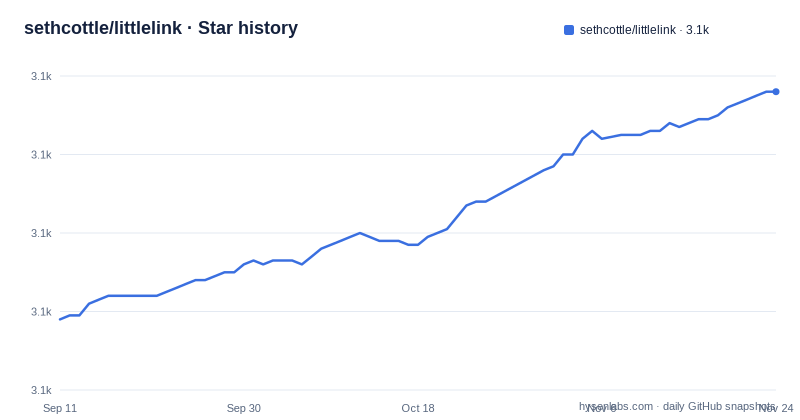
- sethcottle/littlelink3,136 ★ · +58
| Repository | 2026-09-11 | 2026-11-24 |
|---|---|---|
| sethcottle/littlelink | 3.1k | 3.1k |
58 Stars in the last 74 days, measured from the daily GitHub snapshot. Compare with other projects
Editorial analysis
More than 100 buttons live in two files you edit by hand
LittleLink has no build step, and that single fact decides how everything else about the project works. There is no gulp, no npm, and nothing to compile: the deploy section says so outright, and the whole site is index.html plus a css directory. Adding a link means basic HTML, either reusing an existing button or writing your own, and the wiki page on adding custom buttons to your own fork is the documented route. Forking is the normal first step rather than an exception, which is why every deployment option in the project points back at the GitHub repository. More than 100 branded button styles ship with the project, and the set grows through community contributions in the main repository and in LittleLink Extended, a separate repository that exists so niche services do not clutter the core.
Every deploy button encodes the upstream GitHub URL
The five one-click deploy buttons are all URLs with a repository baked into the query string, and reading them tells you exactly what the project expects. The Cloudflare entry goes to deploy.workers.cloudflare.com with the project URL as its parameter. DigitalOcean goes to cloud.digitalocean.com/apps/new with a repo parameter naming the repository and its main tree. Vercel uses /new/clone with the repository URL percent-encoded and both project-name and repository-name already set to littlelink. Netlify uses /start/deploy?repository=, and Amplify uses console.aws.amazon.com/amplify/home#/deploy?repo=. Two consequences follow. The fork is not optional in practice, since those buttons describe the upstream repository rather than yours, and two of them pin the main tree, so a fork living on another branch is not what gets deployed. Beyond the buttons, the documented hosts are GitHub Pages or a home lab server, a CDN, or any other frontend host.
Three theme keywords, one hand-edited stylesheet
Three themes ship out of the box, named auto, light, and dark, and which one applies is decided in index.html. The colours themselves are not configuration values, they are lines in a stylesheet you edit: changing a theme means updating the values in style.css. Anything outside those three is a theme you write yourself. Accessibility is handled in two passes. Buttons whose colours do not contrast enough with the background are outlined with an inverse stroke so they remain visible, and the button builder works from the same rule when it checks contrast ratios. The project is candid about the ceiling here: branded buttons keep the original essence of the brand, so some brands fall short of the contrast standard whatever the stroke does, and the auto theme only helps if the reader's system preference is what you expected.
The builder writes into css/brands.css and index.html
The Button Builder turns the design work into two copy operations. You lay out a button visually, preview the style live, then copy the generated CSS into css/brands.css and the generated HTML into index.html. Because the CSS lands in a file the page already loads and the HTML lands in the page itself, a button made this way needs no wiring anywhere else, which is the payoff of having no build step at all. The builder also checks contrast ratios and suggests strokes where they are missing, automating the visibility rule the built-in themes apply by hand. Its source sits in its own repository, littlelink-button-builder, so work on the builder does not require forking the page. Treat its output as generated code you still own: the two files it writes are the same two files every other contributor edits.
A new brand starts in the wiki, not in a pull request
The contribution path starts before any code exists. The project asks you to read the wiki page on submitting a new brand to LittleLink before opening a pull request, which reflects how a brand is really assembled: colours, an icon, and a naming decision come first, and only then a button. Design work has a parallel track, a Figma template published on Figma Community that is meant to be duplicated for planning a page before any code is written. The same instinct to keep the core small shows up in LittleLink Extended, where niche services live so the main repository stays focused on the brands most people want. Updates are announced in the Discord server the project calls Seth's Nook. Analytics are handled by recommendation rather than by code: Fathom Analytics is suggested because the project describes it as privacy focused, and there is no tracker in the repository.
VERSION.md, wrangler.toml, and a docker/ folder the README leaves alone
The repository root describes infrastructure the prose never covers. wrangler.toml sits beside index.html, which lines up with the Cloudflare Workers button being the first option offered, and a .do directory sits there too, matching the DigitalOcean button; both exist to host the same static files. Then there is a docker directory, plus .dockerignore and .assetsignore, while the README's Docker section points at two projects kept outside this repository: LittleLink-Server by Techno Tim, and a super simple Docker implementation by Drew. The in-tree docker directory is therefore not either of those, and nothing in the README says what it holds. privacy.html ships as a page, which fits the analytics note, and .pre-commit-config.yaml accounts for the project's own formatting checks. VERSION.md holds the version, and the git tags agree with it: v3.11.0 on 2026-07-29, v3.10.0 on 2026-01-28, and v3.7.0 on 2025-04-18. That is roughly a six-month gap between the last two minor releases, and the most recent push is dated 2026-07-29, the same day as the v3.11.0 tag.
The 100/100 claim comes from one sample page
The performance claim is specific, and it is worth reading precisely. The README evaluates the sample page at littlelink.io/sample/seth, which the text says mirrors a typical setup for an individual, and reports 100/100 in Performance, Accessibility, Best Practices, and SEO from Google PageSpeed Insights, linking that particular run. The stated reason is architectural: the page uses its own vanilla css, and the point of that is to avoid the weight a large framework would add to a page that needs almost nothing. Two limits are visible in the wording. The numbers describe one sample page, so they say more about the default markup than about any fork, and a page carrying extra brands, a hand-written theme, or an analytics snippet is a different document. The linked run also pins a form factor, which is the detail to remember when someone else measures your deployment and gets a different figure.
Editorial conclusion
LittleLink suits anyone who wants one self-hosted page of branded links and is willing to edit HTML by hand, and it costs nothing to try since the deploy buttons fork for you. Before you rely on it, check what your page actually loads: a fork with extra brands, a custom theme, or an analytics script is no longer the page the README measured. If you need an admin panel or per-user accounts, look at LinkStack or an admin fork instead, because this repository has neither.
Frequently asked questions
What is LittleLink mainly used for?
It is described as the DIY self-hosted LinkTree alternative: one page holding more than 100 branded button styles, edited with basic HTML in index.html and served without a build step.
What is LittleLink?
A static, self-hosted link page with auto, light, and dark themes, colour values edited in style.css, and the theme chosen in index.html. Extra niche brand buttons live in the separate LittleLink Extended repository.
How does LinkStack compare to LittleLink?
LinkStack is a fork of Khashayar's LittleLink Admin, built by Julian. LittleLink's own repository documents no admin panel: its editing path is index.html, with generated button CSS going into css/brands.css.
What are the LittleLink alternatives?
LittleLink Extended adds niche services to a copy of the project, two community Docker implementations exist (LittleLink-Server by Techno Tim and a simple Docker build by Drew), and LinkStack is the admin-oriented fork of LittleLink Admin.
Official sources
Add this badge to your README
If you maintain this project, the badge below links readers to this analysis and shows its maintenance status from the daily GitHub snapshot. Paste the markdown into your README; add ?metric=license or ?metric=stars to the image URL for a different field.

[](https://hysenlabs.com/projects/sethcottle-littlelink)Star history chart for your README
[](https://hysenlabs.com/projects/sethcottle-littlelink)Was this useful?