twitter-bootstrap-rails turns every Bootstrap docs snippet into a Rails generator
Twitter Bootstrap for Rails 8
At a glance
- What is it?
- A gem that puts Bootstrap 5.3.8 into the Rails asset pipeline and exposes 62 documented snippets as 12 commands with named variants. The friction sits in the install argument, the initializer it writes, and the icon sprite you have to render once by hand.
- Who is it for?
- Take it when you are starting a Rails 6, 7 or 8 app, want the Bootstrap examples as editable partials rather than copied HTML, and accept rendering the icon sprite inside your own layout. Skip it if you want glyphicons, a Less build or CoffeeScript, since 5.4.0 removed all three.
- Can I use it commercially?
- Not without permission. GitHub finds no licence file in the repository, and without a licence all rights are reserved by default: you may read the code but not reuse it. Check the README, or ask the authors, before using it.
- Is it still maintained?
- Yes. The repository last received commits 6 days ago.
- What is it written in?
- Mainly HTML, according to GitHub's language statistics.
Answers come from the project's GitHub data, last synced on November 15, 2026, and from our analysis. They are not legal advice.
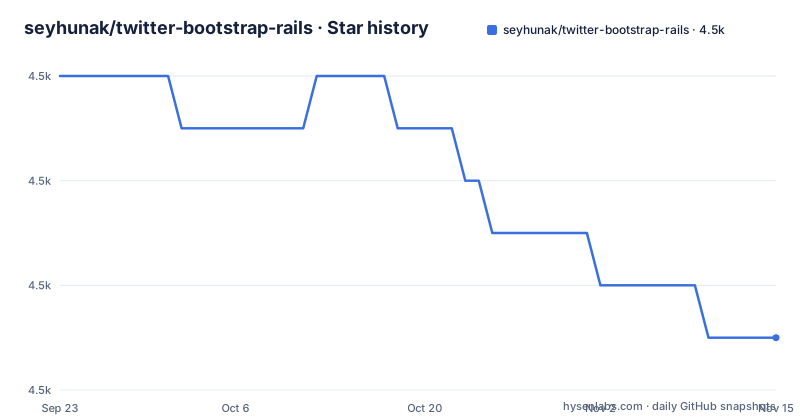
Star history
- seyhunak/twitter-bootstrap-rails4,459 ★ · -5
| Repository | 2026-09-23 | 2026-11-15 |
|---|---|---|
| seyhunak/twitter-bootstrap-rails | 4.5k | 4.5k |
-5 Stars in the last 53 days, measured from the daily GitHub snapshot. Compare with other projects
Editorial analysis
One install argument decides between your manifests and a CDN
The gem goes in the Gemfile like any other, and the first decision is the argument to `bootstrap:install`:
# Gemfile
gem "twitter-bootstrap-rails"bundle install
rails generate bootstrap:install static`static` is the vendoring path: it puts Bootstrap's own files into your asset pipeline. `cdn` loads Bootstrap from the jsDelivr CDN instead and records that choice in `config/initializers/bootstrap.rb`, so `bootstrap:layout` then emits CDN tags by default. The generator commands follow the shape of the Bootstrap 5.3 introduction page, one command per documented snippet: `rails g bootstrap:starter` for the starter template, `rails g bootstrap:cdn --css` for a CDN stylesheet link, `rails g bootstrap:cdn --js` for a CDN script bundle, and `rails g bootstrap:cdn --separate-popper` when Popper and `bootstrap.js` are wanted as two tags. Whatever install argument you pass, the layout step afterwards is what actually puts Bootstrap's CSS and JS on the page.
The install choice is written into config/initializers/bootstrap.rb
Running `bootstrap:install cdn` does not just change that one file. It records the decision in `config/initializers/bootstrap.rb`, and from then on `bootstrap:layout` emits CDN tags by default, including Subresource Integrity attributes. The per-run override is a pair of flags:
# Install Bootstrap assets into the asset pipeline
rails g bootstrap:install static
# ...or load Bootstrap from the jsDelivr CDN instead
rails g bootstrap:install cdn
# Generate a Bootstrap layout
rails g bootstrap:layout application
# ...linking Bootstrap from the CDN, with Subresource Integrity
rails g bootstrap:layout application --cdn
# ...using Popper and bootstrap.js separately rather than the bundle
rails g bootstrap:layout application --cdn --separate-popperPass `--cdn` or `--no-cdn` when a single layout needs to disagree with the initializer. The version number, the CDN URLs and the integrity hashes all live in one constant, `Twitter::Bootstrap::Rails::BOOTSTRAP_CDN`, so no generated template hardcodes a URL that would go stale.
Sprockets gets require directives, Propshaft gets none
Both asset pipelines are supported, and they are not interchangeable. On Sprockets, the `static` install adds `require` directives to your manifests, which is how the vendored files become reachable. On Propshaft, the Rails 8 default, there are no directives to add, so the generated layout links the vendored files directly instead. The instruction that follows is the part people miss: run `rails g bootstrap:layout` after `bootstrap:install static` either way. Skipping it is what leaves a fresh app with no Bootstrap on the page at all, and the layout is what references the important globals, the doctype, the `lang` attribute and the viewport setting, which are baked into every generated layout and into the starter template rather than being your job.
Sixty two snippets, each a command with named variants
Every example published on the Bootstrap docs examples pages is available as a generator, 62 of them across 12 categories, and each writes an `.html.erb` partial into `app/views/shared/`:
rails g bootstrap:header # the first variant, "centered"
rails g bootstrap:header dark_search # a specific variant
rails g bootstrap:header --list # what's available, with descriptionsVariants are listed in the order they appear on the docs page, so the first one in each row is the first example Bootstrap shows. A few rows to know by heart:
| Command | Variants | |---|---| | `rails g bootstrap:hero` | `centered`, `centered_screenshot`, `with_image`, `signup_form`, `cropped_image`, `dark` | | `rails g bootstrap:modal` | `sheet`, `confirm`, `whats_new`, `signup` | | `rails g bootstrap:sidebar` | `dark`, `light`, `icon_only`, `collapsible`, `list_group` | | `rails g bootstrap:dropdown` | `simple`, `with_search`, `with_icons`, `calendar`, `mega_menu` |
Four options work on every snippet command: `--list` prints the variants with descriptions and exits without writing anything, `--as=NAME` chooses the partial name, `--path=DIR` chooses the directory, and `--no-icons` skips installing the shared icon sprite.
rails g bootstrap:footer columns --as=site_footer --path=app/views/layouts
# -> app/views/layouts/_site_footer.html.erbRender the icon sprite once or every icon becomes an empty box
36 of the 62 snippets use Bootstrap Icons through an SVG sprite. Those commands also write `_bootstrap_icons.html.erb` next to the partial they generate, which means the sprite file exists but nothing renders it. If you forget, the icons come out as empty boxes rather than as a visible error, and the cause is one line away from the top of your layout:
<%= render "shared/bootstrap_icons" %>The phrase the docs use is render it once, near the top of `<body>`. Rendering it per partial would duplicate the sprite in the document, and the `--no-icons` flag exists for the case where you manage the sprite yourself. The related trap is the placeholder images: five snippets, `hero centered`, `hero centered_screenshot`, `hero with_image`, `hero cropped_image` and `features custom_cards`, reference images that only exist on the Bootstrap docs site, so they 404 until you point them at your own assets. The generator warns you when you pick one of those five, and then the work is still yours.
A first app in nine commands, ending with bootstrap:layout
The quick start path is a single script chain, and the ordering is the whole lesson:
rails new myapp
cd myapp
echo 'gem "twitter-bootstrap-rails"' >> Gemfile
bundle install
rails generate bootstrap:install static
rails generate scaffold Task title:string description:text completed:boolean
rails db:migrate
rails generate bootstrap:themed Tasks
rails generate bootstrap:layout application
rails server`bootstrap:themed Tasks` produces a themed version of a resource's views. The last two lines matter most: run `bootstrap:layout` even if you already have a layout, because that step is what puts Bootstrap's CSS and JS on the page. Leave it out and your server runs fine, serving pages with no Bootstrap at all, which reads as a styling bug rather than a missing generator.
The 5.4.0 upgrade deletes Less, glyphicons and CoffeeScript
The current release is a breaking one, and the removals are the reason to read the changelog before upgrading. `rails g bootstrap:install less` no longer exists; the argument is now `static` or `cdn`, because Bootstrap 5 has no Less build, and the `less-rails` and `execjs` dependencies were dropped with it. Glyphicons are gone including the `glyph` helper, since Bootstrap dropped them back in v4, and the snippet generators now ship Bootstrap Icons instead. CoffeeScript support went with them, along with the `--no-coffeescript` flag. The gem version also stopped tracking the Bootstrap version, so `Twitter::Bootstrap::Rails::BOOTSTRAP_VERSION` is what tells you which Bootstrap is actually inside the gem. One bug fix matters on Rails 8: `bootstrap:install static` previously left Propshaft apps with no Bootstrap at all, and that is fixed in this release. The repository publishes no GitHub releases, so `CHANGELOG.md` and `RELEASES.md` in the tree are the record of what changed, and the last push landed on 2026-10-18.
Editorial conclusion
Take it when you are starting a Rails 6, 7 or 8 app, want the Bootstrap examples as editable partials rather than copied HTML, and accept rendering the icon sprite inside your own layout. Skip it if you want glyphicons, a Less build or CoffeeScript, since 5.4.0 removed all three. Before you run anything, decide between `static` and `cdn` on the install command, because that argument is recorded in `config/initializers/bootstrap.rb` and every later layout inherits it.
Frequently asked questions
Is Bootstrap backend or frontend?
Frontend, and this gem is the frontend half only. What it writes is `.html.erb` partials under `app/views/shared/`, plus stylesheets and scripts in the Rails asset pipeline or CDN tags for them. Nothing in it touches controllers, models or database state.
Which Bootstrap version does twitter-bootstrap-rails ship?
Bootstrap 5.3.8, integrated into the Rails asset pipeline. Since 5.4.0 the gem version no longer tracks the Bootstrap version, so `Twitter::Bootstrap::Rails::BOOTSTRAP_VERSION` is the constant to read for the version actually bundled.
Does twitter-bootstrap-rails work with Propshaft and Sprockets?
Both. On Sprockets the `static` install adds `require` directives to your manifests; on Propshaft, the Rails 8 default, there are no directives and the generated layout links the vendored files directly. Run `rails g bootstrap:layout` after the install either way.
Why are my Bootstrap icons showing up as empty boxes?
The sprite was generated but not rendered. 36 of the 62 snippet commands write `_bootstrap_icons.html.erb` next to the partial, and you have to render it once near the top of `<body>` in your layout.
Official sources
Add this badge to your README
If you maintain this project, the badge below links readers to this analysis and shows its maintenance status from the daily GitHub snapshot. Paste the markdown into your README; add ?metric=license or ?metric=stars to the image URL for a different field.

[](https://hysenlabs.com/projects/seyhunak-twitter-bootstrap-rails)Star history chart for your README
[](https://hysenlabs.com/projects/seyhunak-twitter-bootstrap-rails)Was this useful?