input-remapper: a Linux daemon and GTK client that remaps any input
🎮 ⌨ An easy to use tool to change the behaviour of your input devices.
At a glance
- What is it?
- A Linux service paired with a GTK client that remaps buttons, triggers, wheels, keys and mouse movements on both X11 and Wayland. The strength is the range of input types it names; the catch is that installation is per distribution, the pip path is global only, and Windows is not covered.
- Who is it for?
- Use input-remapper if you have a controller, wheel or extra mouse button that Linux does not map the way you want, and you are willing to enable a systemd service to do it. Do not expect it to run on Windows or macOS, and skip the pip route if your machine already has a Python environment you care about, because the packages must be installed globally.
- Can I use it commercially?
- Yes, with conditions. GPL-3.0 is a copyleft licence: if you distribute software that includes it, you must release that software's source code under the same licence. Running it internally without distributing it does not trigger that obligation.
- Is it still maintained?
- Yes. The repository received new commits within the last day.
- What is it written in?
- Mainly Python, according to GitHub's language statistics.
Answers come from the project's GitHub data, last synced on November 14, 2026, and from our analysis. They are not legal advice.
Star history
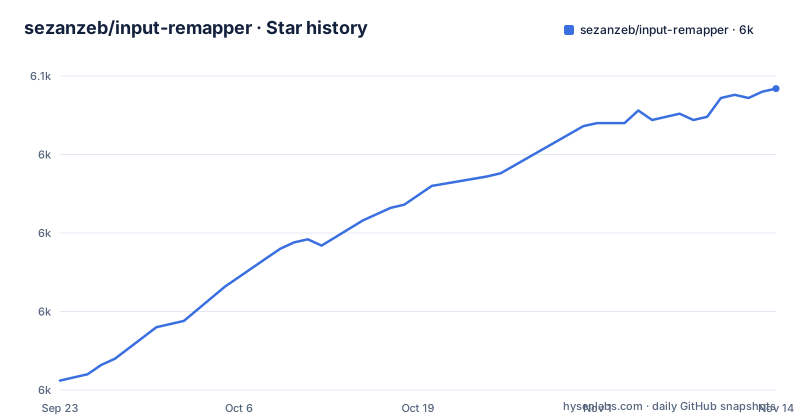
- sezanzeb/input-remapper6,046 ★ · +93
| Repository | 2026-09-23 | 2026-11-14 |
|---|---|---|
| sezanzeb/input-remapper | 6k | 6k |
93 Stars in the last 52 days, measured from the daily GitHub snapshot. Compare with other projects
Editorial analysis
The mapping runs in a service, not in the window you configure
Two programs ship under one name. The apt purge line in the README names four packages: `input-remapper`, `input-remapper-daemon`, `input-remapper-gtk` and `python3-inputremapper`. The daemon is the part that does the remapping, and the Fedora, Arch, Void and other-distro paths end by enabling a service for it. On Fedora and Arch that is `sudo systemctl enable --now input-remapper`. On Void it is the runit equivalent, linking `/etc/sv/input-remapper` into `/var/service` and starting it with `sudo sv up input-remapper`.
That split is the design decision worth understanding before installing anything. A mapping is applied by a background service, so it covers every program in your session rather than only the window that is open. The other side of that is that enabling the service changes nothing by itself. Until you define a mapping through the GTK client, your extra buttons still do whatever they did before.
Any input to any input, with a macro layer in between
The project states that it maps any input to any other input, and the categories it names are the pieces every mapping is built from: combinations, programmable macros, joysticks, wheels, triggers, keys and mouse movements. Both display servers are covered, X11 and Wayland.
Read that list as two different jobs. Pointing a controller button at a keyboard key is a straight remap with no interpretation. A macro is not: it runs something, and the syntax for that lives in `readme/macros.md`. The README links four separate documents, `readme/usage.md`, `readme/macros.md`, `readme/development.md` and `readme/examples.md`, which means the details are deliberately not in the front page.
That split is what you will want when something does not fire. The question is whether the mapping is wrong or the macro is wrong, and those are answered in different files. Mouse movements are the entry to read first, because a movement is not a button and cannot be pressed and released the way a trigger can.
Ubuntu 22.04 is the floor for 2.0, Python 3.10 in the metadata
Two version numbers decide whether this runs at all. The README states that Input Remapper 2.0 and above requires at least Ubuntu 22.04. The packaging metadata in `pyproject.toml` sets `requires-python = ">=3.11"`. Those are different constraints: the 22.04 floor is about the distribution, the 3.11 floor is about the interpreter, and a machine with a new Python on an old base still fails.
The version in the package metadata reads 2.2.1, which matches the newest release dated 2026-06-12, preceded by 2.2.0 in November 2025 and 2.1.1 in February 2025. The licence is declared as GPL-3.0-or-later with the licence file shipped alongside the code. For a program that installs a privileged service and rewrites what your keyboard sends to the system, that licence carries the usual obligation: ship a modified version under the same terms and pass on the source.
Three install channels, and they hand you different code
Debian and Ubuntu get a `.deb` from the releases page, pinned to the current version:
wget https://github.com/sezanzeb/input-remapper/releases/download/2.2.1/input-remapper-2.2.1.deb
sudo apt install -f ./input-remapper-2.2.1.deb
The same page also offers a route to changes that are not released yet: install git and gettext, clone, run the build script, purge what is already there, then install the package that landed in `dist/`. That is the sequence to copy when you are testing a fix rather than running a release.
sudo apt install git gettext
git clone https://github.com/sezanzeb/input-remapper.git
cd input-remapper
./scripts/build-deb.sh
sudo apt purge input-remapper input-remapper-daemon input-remapper-gtk python3-inputremapper
sudo apt install -f ./dist/input-remapper-2.2.1.deb
Arch is the odd one out. Its documented package is `input-remapper-git`, which is the branch rather than a tag, so an Arch user is running what is on main while a Debian user is running the 2.2.1 tag. The fact that installing from source asks for `gettext` and the tree carries a `po/` directory is the clearest sign that the project expects to be rebuilt on your machine.
Every other distro is a dependency list and a module under sudo
Outside those five, the README hands you names and tells you to find the packages yourself: `python3-evdev` at 1.3.0 or newer, `gtksourceview4`, `python3-devel`, `python3-pydantic`, `python3-dasbus`, `python3-psutil`, `python3-gi`, `python3-gi-cairo`, `python3-cairo` and `libayatana-appindicator`. The dependency list in `pyproject.toml` adds `pycairo`, `packaging` and `PyGObject`, and pins nothing further, so the versions come from your distribution.
pip is offered for whatever is missing, with one condition that is easy to miss:
sudo pip install evdev pydantic dasbus PyGObjectPackages have to go in globally, because the service is the thing importing them, so `--user` is named as the wrong choice and Conda is flagged as a source of trouble since it changes python paths and versions. That warning is the real cost of the manual route: you own the interpreter mismatch from then on.
Installation itself is a Python module inside the checkout's `install/` directory, run as root, and the service gets enabled the same way as everywhere else:
git clone https://github.com/sezanzeb/input-remapper.git
cd input-remapper
sudo python3 -m install --root /
sudo systemctl enable --now input-remapper
`python3 -m install --help` is where the remaining options live. After that it is the GTK client, and `readme/usage.md` is the document that covers working in it.
There is no Windows or macOS path in this repository
The project calls itself a tool for Linux and names X11 and Wayland as the display servers it handles. Nothing else is described anywhere in the front page, and the dependency set explains why. `evdev` reads the kernel input layer, `PyGObject` and `gtksourceview4` tie the client to GTK, and every install route given is a Linux package manager or a Python module run under sudo.
So the Windows question that keeps coming up has a short answer, and it is no. This is the Linux tool. Looking for a macOS path wastes the same time.
The same boundary limits hardware coverage in a way that is easier to miss. Anything the kernel does not expose as an input event has nothing for the daemon to remap, so the reachable set of inputs is bounded by what `evdev` lists on your machine. A controller with vendor specific extras the kernel does not describe is outside the range no matter how flexible the interface looks.
Removing it runs a module from the checkout, not a package manager
Uninstallation is one documented command, and it is not a package manager call:
sudo python3 -m install.uninstallThat is code from the `install/` directory of a checkout, run as root, so the documented removal path assumes the source is still on disk. If you arrived through a `.deb` or a distribution package instead, the names to remove are the four from the purge line: `input-remapper`, `input-remapper-daemon`, `input-remapper-gtk` and `python3-inputremapper`.
The rest of the tree shows what a contributor works with: `inputremapper/` for the program, `install/` for packaging, `data/` for the files that ship with it, `po/` for translations, `readme/` for the four documents the README links, then `tests/` and a `docker-unittest` entry. Type checking and linting are configured in `.mypy.ini` and `.pylintrc`, with `.reviewdog.yml` wiring them into review. The last push to main was on 2026-10-21, later than the 2.2.1 tag from 2026-06-12, so main carries work that no package has shipped yet.
Editorial conclusion
Use input-remapper if you have a controller, wheel or extra mouse button that Linux does not map the way you want, and you are willing to enable a systemd service to do it. Do not expect it to run on Windows or macOS, and skip the pip route if your machine already has a Python environment you care about, because the packages must be installed globally. Verify two things first: whether your distribution is on the list (Debian, Ubuntu, Fedora, Arch, Void), and whether your display server is X11 or Wayland, since both are stated as supported and nothing else is.
Frequently asked questions
How does input remapper work?
On Debian and Ubuntu it ships as four packages: input-remapper, input-remapper-daemon, input-remapper-gtk and python3-inputremapper. A service does the remapping while the GTK client is where you define mappings, and the Fedora, Arch and manual installs end with sudo systemctl enable --now input-remapper.
How do I use input remapper on Linux?
Install it, enable the service so the daemon runs in the background, then define mappings through the GTK client. Combinations, programmable macros, joysticks, wheels, triggers, keys and mouse movements are the input types it names, and both X11 and Wayland are stated as supported.
Is there an input remapper available for Windows?
No Windows or macOS route is documented. The project presents itself as a tool for Linux that handles X11 and Wayland, and every install path it gives uses a Linux package manager or a Python install module run under sudo.
How can I remap my controller to a keyboard?
Joysticks, triggers and keys are all named among the supported input types, and the project's stated aim is to map any input to any other input. The steps themselves live in readme/usage.md, which the README links next to readme/macros.md and readme/examples.md.
How do I install input remapper?
Debian and Ubuntu users can install the .deb from the latest release or use sudo apt install input-remapper from the distribution repositories. Fedora uses dnf, Arch uses the input-remapper-git package, Void uses xbps-install plus a runit service link, and everything else follows a manual dependency and python3 -m install path.
How do I use the input remapper GTK app?
The GTK client is packaged on its own as input-remapper-gtk, separate from input-remapper-daemon. Enable the daemon service first, since the background service is what applies a mapping, and the window is only where you define it.
Official sources
Add this badge to your README
If you maintain this project, the badge below links readers to this analysis and shows its maintenance status from the daily GitHub snapshot. Paste the markdown into your README; add ?metric=license or ?metric=stars to the image URL for a different field.

[](https://hysenlabs.com/projects/sezanzeb-input-remapper)Star history chart for your README
[](https://hysenlabs.com/projects/sezanzeb-input-remapper)Was this useful?