SwiftLM serves MLX models with an OpenAI-compatible API, and its own tables document a decoding bug and a removed column
⚡ Native MLX Swift LLM inference server for Apple Silicon. OpenAI-compatible API, SSD streaming for 100B+ MoE models, TurboQuant KV cache compression, MACOS + iOS iPhone app.
At a glance
- What is it?
- SwiftLM is a native Swift inference server for Apple Silicon, MIT licensed, distributed as a self contained tarball or built with one script. The performance section is the reason to read it: it names its hardware, publishes a needle check, retracts a column it measured wrong, and warns that one flag still changes the output.
- Who is it for?
- SwiftLM fits an Apple Silicon machine where a 4-bit mixture of experts model has to be served locally with an OpenAI-compatible endpoint and nobody is going to install Python to do it. The measured path is clear: MoE models on a 32 GB M6 decode at 48 to 54 tok/s, and the dense 27B sits at 9.5.
- Can I use it commercially?
- Yes. MIT is a permissive licence: you can use, modify and sell software built on it, as long as you keep its copyright and licence notices.
- Is it still maintained?
- Yes. The repository last received commits 2 days ago.
- What is it written in?
- Mainly Swift, according to GitHub's language statistics.
Answers come from the project's GitHub data, last synced on November 14, 2026, and from our analysis. They are not legal advice.
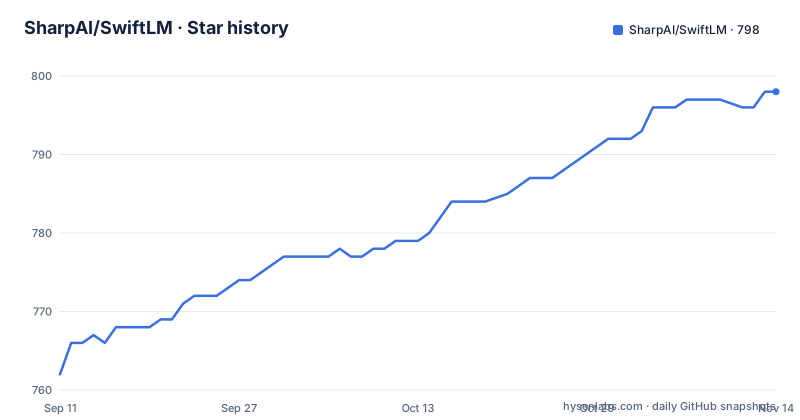
Star history
- SharpAI/SwiftLM798 ★ · +36
| Repository | 2026-09-11 | 2026-11-14 |
|---|---|---|
| SharpAI/SwiftLM | 762 | 798 |
36 Stars in the last 64 days, measured from the daily GitHub snapshot. Compare with other projects
Editorial analysis
Two install routes, and the tarball carries its own Metal library
The fast route is a release tarball from the releases page, and the page makes a point of it being self contained, with `mlx.metallib` bundled next to the binary. The model may still be downloaded on first use. Replace the example archive name below with the actual downloaded filename:
tar -xzf SwiftLM-VERSION-macos-arm64.tar.gz
./SwiftLM --model mlx-community/Qwen2.5-3B-Instruct-4bit --port 5413
The other route builds it, and the build script is written to take the whole toolchain off your hands:
git clone --recursive https://github.com/SharpAI/SwiftLM
cd SwiftLM
./build.sh
Four steps are enumerated for what that script does: initialise the git submodules, install `cmake` through Homebrew if it is missing, compile `mlx.metallib` from the Metal kernel sources, and build `SwiftLM` in release mode. The clone needs `--recursive` for those submodules, which lines up with the tree holding `mlx-swift` and `mlx-swift-lm` as directories alongside `Sources`, `Packages`, and `Package.swift`.
The started server takes the same flags, and models are downloaded on first run when they are not already cached. There is no Python runtime in either path.
The headline M6 numbers were measured on a base 32 GB Mac mini
The performance section opens by saying the numbers are the first SwiftLM results from 32 GB of memory, and that every other table in the document comes from 64 GB hardware. The stated reason for running the same context lengths on the smaller machine is that it exposed memory bugs the 64 GB machines had been hiding.
The hardware line is specific: a Mac mini identified as Mac18,5, Apple M6, 12-core GPU, 32 GB of unified memory at 170 GB/s, macOS 27.0, with a Metal working set of 26.8 GB. The method is described just as concretely. One warm-up, then the median of 3 runs, dropping to a single run at 32K tokens and above, at temperature 0. Every prompt starts with a unique nonce so the prompt cache cannot hit, and hides a code word the answer has to return. A memory guard aborts any case where swap grows by more than 2 GB. Raw results live under `docs/profiling/m6/`, and the numbers come from the release b782 binary unless a dagger marks an earlier build that was not re-run.
MoE and dense model results on the tested machine
The core result on 32 GB is that mixture of experts models are the workable case, because only the active experts are read for each token. `gemma-4-26b-a4b-it-4bit` with about 4 B active runs 15.3 GB of weights, decodes at 53.9 tok/s on short prompts, and handled a prompt of 80.7K tokens at a 19.5 GB peak. `Qwen3.6-35B-A3B-UD-MLX-4bit` with about 3 B active is 21.6 GB of weights, decodes at 48.4 tok/s, and peaks at 22.1 GB.
The dense comparison is `Qwen3.8-27B-4bit` at 11.3 GB of weights, 9.5 tok/s, and an 18.4 GB peak. For these particular models and settings, the MoE decode rates are about 5 to 6 times that of the dense 27B, and the reason given for the dense model being slow is bandwidth rather than compute: 9.5 tok/s times 11.3 GB comes to about 107 GB/s, which is roughly 63 percent of the machine's rated 170 GB/s.
Memory use depends on the model, context and runtime settings. In this benchmark the Qwen3.6 row reached a 22.1 GB peak; that result is not a general GPU-memory ceiling.
SSD streaming trades two thirds of the speed for a third of the memory
The `--stream-experts` flag exists to bypass macOS virtual memory swapping by streaming expert layers straight from the SSD, and the table quantifies both sides of that trade for the same model. `Qwen3.6-35B-A3B-UD-MLX-4bit` at a short prompt decodes 48.4 tok/s with a 20.2 GB peak in GPU mode, and 14.1 tok/s with a 5.7 GB peak with streaming on. At 9.8K tokens the two rows are 44.8 tok/s at 20.5 GB against 13.9 tok/s at 5.9 GB. At 40.8K they are 36.8 at 22.1 GB against 13.0 at 6.8 GB.
In the reported test, the 8-bit model swapped in GPU mode while streaming allowed it to run without the same observed swap. `gemma-4-26b-a4b-it-8bit` at roughly 26 GB of weights swaps in GPU mode, with 3.1 GB of swap on the first prompt and no peak recorded, and in streaming mode it decodes 9.7 tok/s with a 7.1 GB peak, but its context ceiling drops to 9.5K tokens, with 32K recorded as swapped. These are results for the tested machine and workload, not universal limits for every 26 GB model or configuration.
So the flag is not a free memory saving. It converts a GPU resident model into a disk served one at the cost of roughly two thirds of the decode rate.
The needle check is what makes the tables mean anything, and 40.8K is its limit
Each prompt hides a code word that the answer has to return, which is a retrieval check rather than a speed measurement, and the page is careful about where that check stops being reliable. Rows marked with a double dagger are throughput only. At 40.8K tokens the needle check is not reliable in either mode, and the reason given is specific: every miss carried an `OSPREY-NN` code word, and the GPU and SSD paths fail alike on the same prompt. Every run up to 9.8K passed, and for the Gemma table every needle check passed across the whole range, up to 80.7K.
That distinction is the difference between a benchmark and a speed test, and it is stated at the row rather than in a footnote. It also means the 40.8K row cannot be cited as evidence that the model read anything back correctly, only that it produced tokens at that rate.
The Gemma table shows the other half of the trade in prefill and time to first token. A short prompt prefills at 781 tok/s with a 0.7 s wait, while a 39.7K prompt prefills at 757 and waits 53.3 s, and an 80.7K prompt prefills at 622 and waits 131.3 s. Decode falls from 53.9 to 24.3 tok/s across the same range while the peak grows from 14.3 GB to 19.5 GB.
A speculative decoding flag that changes the output is documented in the table
`--mtp` with the bf16 assistant model works, and the page reports it as slower on the M6. With the flag, decode is 45.2, 35.6, and 30.4 tok/s at roughly 530, 2.3K, and 9.5K prompt tokens. Without it, the same three prompts give 53.0, 50.8, and 46.0. The explanation is that a 4-bit MoE is compute bound, so verifying the drafted tokens costs more than drafting saves, and the same finding appears in the M5 Pro tables.
The part that matters more is the warning attached to it. `--mtp` currently changes the output at temperature 0: once the context passes the model's 1,024 token sliding window, rejected drafts are not rolled back, tracked as issue 184, and the page says to avoid the flag until that is fixed.
That is a correctness bug, not a performance tradeoff, and it is written in the same table as the numbers. A reader who only skims the throughput columns would miss it, which is an argument for reading the footnotes in a document this careful about them.
A crash in two releases, and a column that was removed for being wrong
Two documented corrections give the section its credibility. The first is a crash: `--stream-experts` crashes on quantized MoE models in releases b769 and b773, with a `broadcast_shapes` fatal error on the first request, a shape mismatch shown as `(263,8,8,2048)` against `(263,8,1)` at top-k 8. It was reproduced on the M6 with both Qwen3.6-35B-A3B and Gemma 4 26B-A4B, and the cause is identified as an upstream sync in issue 167 breaking the SSD path. The fixes went into the `mlx-swift-lm` fork as issues 69 and 71, and the page says the table was re-measured with them.
The admission that goes with it is the useful part: earlier versions of that table were measured before the sync and were never re-checked afterwards. So the numbers a reader had seen in an older revision of the document were not wrong on purpose, they were simply stale.
The second correction is about a column. Earlier tables carried `--turbo-kv` results, and the page explains that those runs also passed `--ctx-size`, which on that pin gives the attention layers a `RotatingKVCache`, while `--turbo-kv` only applies to `KVCacheSimple`. They were vanilla runs with an extra label, so the columns came out.
Running the same context on 32 GB found what 64 GB had hidden
The smallest table in the section is the most telling. On an 8.5K token prompt with `Qwen3.8-27B-4bit`, prefill measured 33.4 tok/s on the old pin and roughly 264 tok/s in this release, with the dense model table showing 264 prefill at a 9.8K prompt. That is close to an eightfold difference from a memory fix rather than from a faster machine or a smaller model, on hardware the project had not been characterised on before.
The rest of the tree explains how the rest of the work is arranged. There is a `run_benchmark.sh` at the root, a `scripts/` directory holding the profiling harness, `docs/` for the raw results, and `tests/`. Two build scripts sit side by side, `build.sh` and `build_swiftbuddy.sh`, the latter matching the `SwiftBuddy` directory, so the server and the companion app are built separately from the same tree. `.nojekyll` at the root is there for GitHub Pages, and `.gitmodules` and `Package.resolved` record that the MLX pieces are pinned rather than floating.
Editorial conclusion
SwiftLM fits an Apple Silicon machine where a 4-bit mixture of experts model has to be served locally with an OpenAI-compatible endpoint and nobody is going to install Python to do it. The measured path is clear: MoE models on a 32 GB M6 decode at 48 to 54 tok/s, and the dense 27B sits at 9.5. Four things to check first. That you are on a build newer than b769 and b773, where `--stream-experts` crashed on the first request, and that the tables you read were re-measured after the fixes in the upstream sync. That you will not pass `--mtp`, which is documented as changing the output once the context leaves the model's sliding window. That the M1 Ultra comparison you may have seen was run at a different temperature and with a repeat penalty, so it is not the same measurement. And that the whole set is built on a model file from a hub, since the model is downloaded on first run and the file is the biggest thing on your disk.
Frequently asked questions
What is SwiftLM and how do I run it?
It is a native Swift inference server for MLX models on Apple Silicon with an OpenAI-compatible API and no Python runtime. The fastest route is to download a release tarball, run tar -xzf on it, and start the binary with --model and --port, for example port 5413.
What does the --stream-experts flag do in SwiftLM?
It streams expert layers directly from the SSD to bypass macOS virtual memory swapping. On Qwen3.6-35B-A3B-UD-MLX-4bit it cuts peak memory from about 20 GB to under 6 GB and decode from 48.4 tok/s to 14.1 tok/s on a short prompt.
Is the --mtp flag safe to use in SwiftLM?
Not yet. The page warns that it changes the output at temperature 0, because once the context passes the 1,024 token sliding window, rejected drafts are not rolled back, tracked as issue 184. It is also slower on the M6, with 45.2, 35.6, and 30.4 tok/s against 53.0, 50.8, and 46.0 without it.
Which hardware were the SwiftLM performance numbers measured on?
The main tables are from a Mac mini, Mac18,5, Apple M6, 12-core GPU, 32 GB unified memory at 170 GB/s, running macOS 27.0 with a 26.8 GB Metal working set. Every other table in the document comes from 64 GB hardware.
Are the 40.8K token SwiftLM numbers a correctness result?
No. Rows at 40.8K are marked throughput only, because the needle check is not reliable at that length in either mode: every miss carried an OSPREY-NN code word and the GPU and SSD paths failed on the same prompt. Every run up to 9.8K passed.
What are the SwiftLM releases tagged with?
Build numbers rather than semantic versions: b795, b787, and b782 in the recent window. The performance tables in the overview were measured with the b782 binary, and daggered rows come from an earlier build that was not re-run on it.
Official sources
Add this badge to your README
If you maintain this project, the badge below links readers to this analysis and shows its maintenance status from the daily GitHub snapshot. Paste the markdown into your README; add ?metric=license or ?metric=stars to the image URL for a different field.

[](https://hysenlabs.com/projects/sharpai-swiftlm)Star history chart for your README
[](https://hysenlabs.com/projects/sharpai-swiftlm)Was this useful?