Three of PokeWilds' five listed problems concern saves
PokeWilds - A Gen 2 Game/Engine using libGDX
At a glance
- What is it?
- A procedurally generated creature collection game and engine built on libGDX, running natively on Windows, macOS and Linux with no emulator. It is at version 0.8 with no estimate for the next, it declares no licence, it points at an asset directory the tree does not contain, and two sections of its documentation name the save backup file differently.
- Who is it for?
- PokeWilds suits someone who wants a procedurally generated monster collecting game with base building, plays on a desktop with Java, and is willing to treat it as an alpha. It does not suit anyone who needs a finished game with a dex, mobile support, or multiplayer today.
- Can I use it commercially?
- The repository metadata does not identify a licence. Check the project’s published terms and any component-specific licences before reuse.
- Is it still maintained?
- Yes. The repository last received commits 100 days ago.
- What is it written in?
- Mainly Assembly, according to GitHub's language statistics.
Answers come from the project's GitHub data, last synced on November 24, 2026, and from our analysis. They are not legal advice.
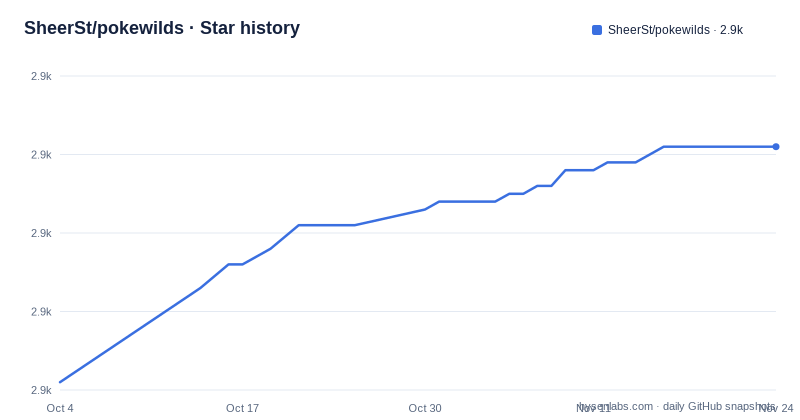
Star history
- SheerSt/pokewilds2,931 ★ · +30
| Repository | 2026-10-04 | 2026-11-24 |
|---|---|---|
| SheerSt/pokewilds | 2.9k | 2.9k |
30 Stars in the last 51 days, measured from the daily GitHub snapshot. Compare with other projects
Editorial analysis
Three of the five listed problems are about lost saves
The common issues section has five entries. Read as a list of categories rather than a list of bugs, three of them concern saves.
The first says launching the game through a Windows search result leads to a lost save, and the fix is to double click the executable instead. The third says double clicking the archive on macOS leads to save data loss, and the fix is to follow the instructions in the readme inside the game folder to create a launcher you can safely double click. The fourth describes the zip backup of your last save kept in the game folder.
The first and third entries describe launch methods that lose saves.
The remaining two entries are a compatibility executable for a black screen at night, and a Windows OneDrive folder that sometimes prevents the game from running.
Two sections name the save backup file differently
The documentation gives a save recovery procedure in two places and the two do not agree.
In the common issues list, the fourth entry says there is a backup of your last save in the game folder in zip format, and that if your save is named in the conventional way the backup carries a doubled extension, because the backup of the default save is named as a zipped version of it.
Further down, under the heading for restoring a save from backup, the same idea is described with a different name: the backup is said to be a dot-separated file with a backup suffix, containing your second to last save. The procedure there is to rename it to a zipped file with a new game name, extract it, and make sure the extracted contents form a directory of that name containing the game file and map files, then load it from the menu.
The first gives the backup name as a zip file and the second gives it as a .backup file, so the two descriptions do not use the same name.
The procedure itself is also worth reading before you need it. A save has to be renamed, unzipped, and reassembled into a directory with a specific name before the game will list it, which is a fair amount of file juggling to do under pressure after a corruption.
The asset path in the readme points at a directory the tree does not have
The about section says the game has extra capabilities compared with the console games it imitates, and points the reader at a path inside the assets for attacks to look at them.
That path does not appear in the repository. The root listing has an attacks directory and a battle directory, and no core directory at all. So the reference given in the documentation is wrong, or it refers to a layout that no longer exists.
The rest of the root is a flat wall of image files, which tells you the asset pipeline is not organised the way most projects are. There are cloud sheets, fire masks and sheets, fog layers, ground tiles, grass overlays, ledge pieces, several with a colour variant filename. There are arrow cursors in two colours, an inverse version of a symbol image, two versions of a fog layer distinguished by an alpha suffix in the name, a ghost spawn sheet, a footprints sheet, and a font file.
The run instructions ship inside the archive, and the reference documents are short links
Two things a reader needs are not in the repository, and both are one click away somewhere else.
The first is how to start the game. The readme says to follow the instructions inside the readme text file in the game folder, which means the actual run instructions are a file inside the downloaded zip rather than something you can read before downloading. Three archives are linked, one for 64-bit Windows, one for 64-bit Linux, and one for everything else, covering macOS and both 32-bit platforms.
The second is the reference material. The dex document, the full learnset list for the current version, and the document covering evolution methods and stone locations are all short links rather than files in the repository. There is no in-game dex yet either; the readme says it will be added on the next update and points to that external document in the meantime.
None of that is unusual for a game project in alpha, but it means the repository is a code and asset dump rather than a documentation site. A reader arriving from a search result has three short links and an archive to get through before they know anything concrete.
The developer instructions are in the repository, at least: they describe opening a folder, opening a shell from it, and typing a command, which is how you start the game in a development mode on one platform.
Version 0.8 with no estimate, and multiplayer promised for 0.9
The readme answers the questions people actually ask, and it answers them honestly.
The current version is 0.8, with no estimate given for the next update and the statement that the game is being actively worked on. Multiplayer is not present, and 0.9 is named as the version that will bring online multiplayer along with other features. Mobile is not supported, with plans for it mentioned. Emulators are not needed: the game runs natively on Windows, macOS and Linux, coded with Java and the libGDX framework.
Two content numbers are given. The odds for a rare-colour variant are one in 256, and the readme says that will become adjustable by the user in the next update. There are seven legendary creatures, with more added every update.
The release list tells a longer story than the readme does. The three most recent tags are from 2023 and early 2024, with the newest almost three years old, while the branch itself was last pushed on 2026-08-16. So work is landing on the branch without becoming a release, which is exactly what you would expect from a project that says it has no schedule.
That is worth internalising before you install: the download links point at the latest GitHub release, v0.8.11 from 2024-01-17, not at the branch.
No licence is declared, and the sprites were taken from a console game
Two facts sit next to each other that a reader should not have to put together themselves.
The first is about assets. The author writes that a set of techniques was used to extract sprites and animations from the console game very accurately, and that the game is intended to look and feel just like the console games, with extra capabilities layered on top. The extra capabilities are pointed at through a path that the repository does not contain, which is its own small problem.
The second is licensing. The repository declares no licence. There is no licence file in the root listing, and the licensing field is empty rather than naming a standard text.
Those two facts matter together rather than separately. A project that redistributes extracted art from a commercial game and declares no licence is not a project you can base anything commercial on, and the absence of a licence means the default position under copyright law rather than a permission you were given.
The readme does contain a disclaimer about the alpha state and about bugs. So the practical guidance is simple: treat the code and the art as not reusable until the author says otherwise in writing, and note that the extraction of console assets is the author's own description.
Game mechanics are visible in filenames, and the detected language is Assembly
The repository's metadata has one oddity that is worth a look before you judge its size.
The primary language is recorded as Assembly, on a project the readme describes as coded with Java and the libGDX framework. There is Java at the bottom of that stack, so the classification is picking up something other than the Java.
The filenames themselves are more informative than the language field. There is a ghost spawn sheet, which is a game mechanic. There are two ground tiles with a top variant, a hit effect sheet, a hyper beam sheet, a footprints sheet, an amount background, a cursor, and a sheet of emotes. There are two different arrow cursors for two colour schemes, and an icon in three sizes.
Alongside those sit an attacks directory, a battle directory, and a localisation directory with a font file at the root.
Editorial conclusion
PokeWilds suits someone who wants a procedurally generated monster collecting game with base building, plays on a desktop with Java, and is willing to treat it as an alpha. It does not suit anyone who needs a finished game with a dex, mobile support, or multiplayer today. Before you install, check three things: where you will put the game folder, because a cloud-synced folder is listed as a known cause of failure and the Windows and macOS entries each warn that launching the wrong way loses saves; how you will back up saves, because the documentation's own recovery path involves renaming and extracting a file; and what you intend to do about the absence of a licence, which matters if you ever plan to redistribute anything derived from it.
Frequently asked questions
what is pokewilds
A creature collection game and engine built on the libGDX framework, described as a generation two style game. Worlds are generated procedurally with different biomes and their own monsters, wild monster levels rise the further you explore, and new field moves let you build houses, jump ledges, and start fires. It runs natively on Windows, macOS and Linux with no emulator needed.
is pokewilds multiplayer
Not currently. The documentation says multiplayer is not present and that version 0.9, the next version, will bring online multiplayer along with other features. The current version is 0.8, the three most recent release tags are from 2023 and early 2024, and there is no stated estimate for the next release. Multiplayer is one of the capabilities libGDX is cited as making possible.
Can you play PokeWilds offline?
The README states that the game runs natively on Windows, Mac and Linux without an emulator, and that online multiplayer is not currently available; it also mentions a single player mode.
is pokewilds complete
No. The readme opens with a disclaimer that the project is in alpha, is not fully complete, and should be expected to have bugs. It lists the current version as 0.8 with no estimate for the next, says the in game dex will be added on the next update, and notes that mobile is not supported yet. Mobile support and online multiplayer are both described as planned for later versions.
Official sources
Add this badge to your README
If you maintain this project, the badge below links readers to this analysis and shows its maintenance status from the daily GitHub snapshot. Paste the markdown into your README; add ?metric=license or ?metric=stars to the image URL for a different field.

[](https://hysenlabs.com/projects/sheerst-pokewilds)Star history chart for your README
[](https://hysenlabs.com/projects/sheerst-pokewilds)Was this useful?