ShellHub: An SSH Gateway Where Devices Dial Out and Every Login Maps to a Person
:computer: Get seamless remote access to any Linux device. Centralized SSH for the edge and cloud computing
At a glance
- What is it?
- ShellHub is a self-hostable SSH gateway for Linux devices behind NAT and firewalls. This piece looks at the outbound agent, the Docker Compose deployment, the identity model and the features held back for the paid editions.
- Who is it for?
- ShellHub fits teams that manage Linux devices they cannot give a public IP, and want logins tied to named people instead of shared keys. It is a weaker fit if you need MFA, server-side recording, web endpoints or SAML SSO and do not want a paid edition, since the Community edition leaves those out.
- Can I use it commercially?
- Yes. Apache-2.0 is a permissive licence: you can use, modify and sell software built on it, as long as you keep its copyright and licence notices.
- Is it still maintained?
- Yes. The repository received new commits within the last day.
- What is it written in?
- Mainly TypeScript, according to GitHub's language statistics.
Answers come from the project's GitHub data, last synced on November 7, 2026, and from our analysis. They are not legal advice.
Star history
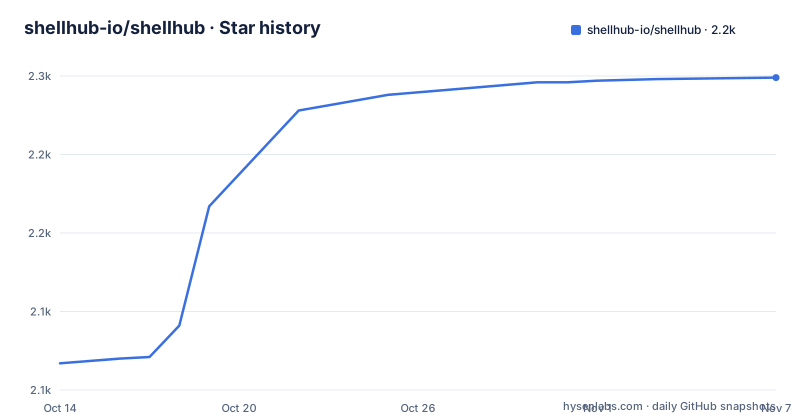
- shellhub-io/shellhub2,249 ★ · +182
| Repository | 2026-10-14 | 2026-11-07 |
|---|---|---|
| shellhub-io/shellhub | 2.1k | 2.2k |
182 Stars in the last 24 days, measured from the daily GitHub snapshot. Compare with other projects
Editorial analysis
The agent dials out, so the device needs no public IP or inbound port
ShellHub inverts the usual SSH direction. A small agent runs on each device and connects out to the ShellHub server. You then reach the device through the server with ssh, scp, sftp or the browser. A server, a cloud instance or an embedded Linux device in the field all work the same way, because nothing has to be opened on the device side.
That design is the whole reason to use it, and it also defines its cost. Every session passes through your gateway, so the gateway becomes the single place that must stay reachable. If the server is down, the devices are still running but you have no route in. The agent also has to be able to make an outbound connection to the server address you chose, so a network that blocks outbound traffic to that host leaves a device unpairable.
Self-hosting wants ports 80 and 22 free and generates its own keys
The self-hosted path needs Docker with Compose and ports 80 and 22 free on the host. Port 22 is the one that bites: if the machine already runs its own sshd on 22, you have a conflict before ShellHub starts, and you need to move one of them. The install is three commands:
git clone -b v0.27.0 https://github.com/shellhub-io/shellhub.git
cd shellhub
make start
The start target depends on a keygen target. The Makefile creates three 2048-bit RSA keys by itself: api_private_key, api_public_key and ssh_private_key. The compose file mounts them as secrets, with the SSH one used as the host key. Keep those files. Regenerating the SSH host key later would change what clients see when they connect to the gateway.
The quickstart pins v0.27.0 while releases have moved on to v0.29.0
The clone command above checks out the v0.27.0 tag. The releases list shows v0.27.4 on 2026-10-27, v0.28.0 on 2026-10-28 and v0.29.0 on 2026-10-30. So a copy of the quickstart installs a version that is behind the newest tag, and three releases landed in about four days.
What that means for you is a decision, not an error. The tag in the command is a pin you chose by copying it. If you want a later release you change the -b value yourself, and the deployment guide on docs.shellhub.io covers HTTPS and production settings. The make help target lists only build, start and stop, so there is no built-in upgrade command. Moving between tags is a matter of checking out another one and restarting.
Pairing code first, then an address built from namespace and device
After the server is up, you open http://<your-server>/setup to create the admin account and its namespace. A namespace is the group that holds your devices and the people who can reach them. A device is then added by running the installer on it:
curl -sSf http://<your-server>/install.sh | shThe agent prints a pairing code, which you enter in the console. After that, any SSH client can reach the device with this address form:
ssh <user>@<namespace>.<device>@<your-server>The middle part is namespace dot device, so the namespace name is part of every connection string you hand out. For fleets, a provisioning key created under Add Device, then Fleet, can be passed to the installer so each device does not need pairing by hand. Note the installer URL in the example is plain http, so a server without HTTPS configured serves the script unencrypted.
SSH Identities replace copied keys, and policies start from deny
ShellHub ties each SSH login to a person on the team instead of a key copied into authorized_keys. It works with the plain ssh client, with no wrapper to install. Remove someone from the team and their access ends on every device at once, which is the consequence that matters for offboarding.
Access Policies are default-deny rules for who reaches which devices and as which Linux user, managed in one place. A policy can require a fresh sign-in before each session. Sessions are logged with the user, the source IP and the device. Tags let you group devices and filter by tag. What this does not give you in Community is a recording of what happened inside a session: server-side recording is listed under Cloud and Enterprise only, so the log tells you who connected, from where and to which device, not what they typed.
Community leaves out MFA, recording, web endpoints, more namespaces and SAML SSO
There are three editions. Community runs on your servers and is this repository under Apache 2.0. Cloud is hosted and shared, free to start, and adds MFA, server-side recording, web endpoints and more namespaces. Enterprise is hosted and dedicated to you and adds the same four items plus SAML SSO.
The practical reading is that the open edition covers the gateway, identities, policies, session logging and tags, while multi-factor login and session recording sit behind the hosted offerings. If your compliance story depends on MFA or on recordings, Community alone will not supply them. The repository does contain files such as docker-compose.enterprise.yml and .env.enterprise, but the table assigns the extra features to the hosted editions, so do not read the file names as a way to switch them on yourself.
Postgres, Redis and a fast release rhythm sit behind the gateway
The compose file for the server service reads a long list of settings. Among them are POSTGRES_HOST, POSTGRES_PORT, POSTGRES_USERNAME, POSTGRES_PASSWORD and POSTGRES_DATABASE, so state lives in PostgreSQL. The go.mod pulls in go-redis and asynq, which points to Redis-backed caching and queued jobs. Two defaults are visible: ACCOUNT_LOCKOUT_BASE falls back to 1m, and SHELLHUB_SESSION_KEEPALIVE_TIMEOUT falls back to 5m. The server module declares go 1.26.10 and uses labstack echo v5.
On upkeep, the repository is not archived and the last push was on 2026-10-30. Agent packages exist for Yocto, Buildroot, FreeBSD and Snap. O.S. Systems develops ShellHub and releases it under the Apache License 2.0.
Editorial conclusion
ShellHub fits teams that manage Linux devices they cannot give a public IP, and want logins tied to named people instead of shared keys. It is a weaker fit if you need MFA, server-side recording, web endpoints or SAML SSO and do not want a paid edition, since the Community edition leaves those out. Before deploying, confirm that ports 80 and 22 are free on the host and that you are comfortable pinning a release tag yourself.
Frequently asked questions
What is ShellHub?
ShellHub is an SSH gateway for Linux devices and servers behind NAT and firewalls. A small agent on each device dials out to the ShellHub server, and you reach the device through the server with ssh, scp, sftp or the browser.
Does a ShellHub device need a public IP or an open port?
No. The agent connects out to the server, so the device needs no public IP or inbound port. The server host itself needs ports 80 and 22 free for a self-hosted install.
Which ShellHub features are not in the Community edition?
The edition table lists MFA, server-side recording, web endpoints and more namespaces under Cloud and Enterprise. SAML SSO is listed for Enterprise only.
Official sources
Add this badge to your README
If you maintain this project, the badge below links readers to this analysis and shows its maintenance status from the daily GitHub snapshot. Paste the markdown into your README; add ?metric=license or ?metric=stars to the image URL for a different field.

[](https://hysenlabs.com/projects/shellhub-io-shellhub)Star history chart for your README
[](https://hysenlabs.com/projects/shellhub-io-shellhub)Was this useful?