Shiki is a pnpm monorepo: five release branches, two regex engines, Node 20
A beautiful yet powerful syntax highlighter
At a glance
- What is it?
- The TextMate grammar highlighter is not one package but a pnpm workspace of @shikijs modules published separately, with main at v4.x and four older lines kept in tree. The short README says almost nothing, so the mechanics live in package.json, turbo.json and the branch table.
- Who is it for?
- Shiki fits a TypeScript project that wants TextMate accurate highlighting and is willing to take several packages and a Node 20 floor. Check three things first: which of the five release lines your dependency is pinned to, whether the operation you need lives in the core package or in a sibling such as langs-precompiled or twoslash, and which of the two engines your runtime targets.
- Can I use it commercially?
- Yes. MIT is a permissive licence: you can use, modify and sell software built on it, as long as you keep its copyright and licence notices.
- Is it still maintained?
- Yes. The repository last received commits 21 days ago.
- What is it written in?
- Mainly TypeScript, according to GitHub's language statistics.
Answers come from the project's GitHub data, last synced on November 23, 2026, and from our analysis. They are not legal advice.
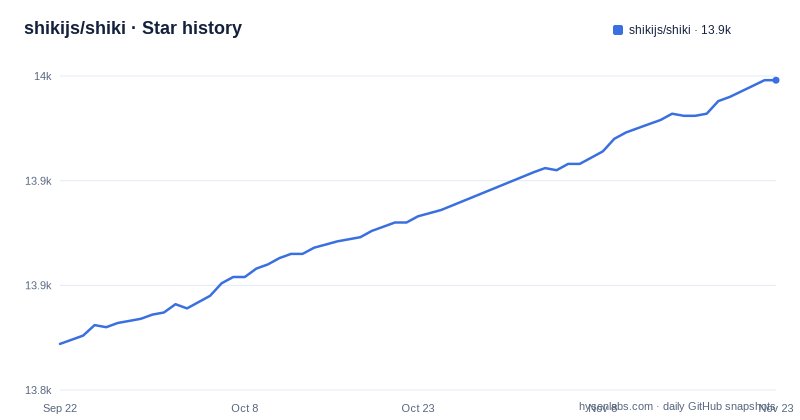
Star history
- shikijs/shiki13,948 ★ · +126
| Repository | 2026-09-22 | 2026-11-23 |
|---|---|---|
| shikijs/shiki | 13.8k | 13.9k |
126 Stars in the last 62 days, measured from the daily GitHub snapshot. Compare with other projects
Editorial analysis
The highlighter is a workspace of @shikijs packages, not one package
The root package.json is marked private and the real code sits under packages/, with pnpm-workspace.yaml, pnpm-lock.yaml and turbo.json describing how the pieces move together. The root devDependencies reference the internal modules through workspace:* rather than by version, and they are not just helpers: @shikijs/langs, @shikijs/langs-precompiled, @shikijs/themes, @shikijs/transformers and @shikijs/types are the vocabulary of the project, while @shikijs/markdown-it, @shikijs/rehype, @shikijs/monaco, @shikijs/twoslash and @shikijs/vitepress-twoslash are the edges that reach other tools. Because publish:ci runs pnpm -r publish --access public --no-git-checks, every one of those directories ships as its own npm release.
Node 20 and ESM are stated once, at the top of the manifest
Three fields settle most of what a consumer needs to know before touching the code. The manifest declares packageManager [email protected], so npm and yarn are not the toolchain the repository is written against. Engines sets node >=20, which rules out every older runtime for the packages built from this tree. The type field is module, so the entry points are ES modules rather than CommonJS, and a project still on require would need a dynamic import or a bundler to consume them. None of this is spelled out in prose anywhere; it is three lines of JSON. The practical consequence is that the runtime checklist is short and unforgiving: Node 20 or newer, an ESM-aware build, and pnpm if you intend to work inside the repository rather than only against the published packages.
Five release lines live in the same tree, and only main is v4.x
A branch table at the top of the repository states that the main branch is currently at v4.x, then names what each other branch holds: the v3 branch carries v3.23, v2 carries v2.5, v1 carries v1.29, and v0 carries v0.14 as the legacy version. Four lines are therefore frozen at a known point rather than tracked at head, and the table is the only place that states which point. For someone whose application is still on v1 or v2, that is good news in one sense and bad in the next: the code is there and installable, but nothing in the table promises further fixes on those branches. Pinning a dependency to a major line is therefore a decision about how long you accept to sit on it, and the table is where you confirm which patch level you actually received.
Two patch releases five days apart, then a minor seven weeks later
The three most recent tagged releases are v4.4.3 on 2026-08-10, v4.5.0 on 2026-10-01 and v4.6.0 on 2026-11-02, and the root package.json now carries version 4.6.0. The last push to the default branch main is 2026-11-02T06:02Z, about an hour and a half after the v4.6.0 tag at 04:32Z. The gap was close to seven weeks between v4.4.3 and v4.5.0, and about one month between v4.5.0 and v4.6.0, so a consumer waiting for the next minor has recently waited between one and two months.
Two regex engines ship as siblings, and the benchmarks are what compare them
@shikijs/engine-javascript and @shikijs/engine-oniguruma sit in the workspace as separate packages, which is the structural hint that a TextMate highlighter can run on either engine. The repository carries the comparison tooling rather than a claim: the bench script is pnpm -r run bench:prepare && vitest bench, and a second script, report-engine-js, runs tsx scripts/report-engine-js-compat.ts to produce a compatibility report. The bench/ directory and vitest.config.ts are where that lives. What the short README does not do is name which engine the core uses by default or when each one is the better choice, so a reader looking for a performance or compatibility answer has to go to the benchmark output or the compatibility report rather than to the documentation page.
turbo builds the packages, a separate pnpm project runs the docs site
The build script is turbo run build, so the task graph is delegated to turbo.json rather than to a hand written chain. Documentation has its own lifecycle: docs runs pnpm -C docs run docs:dev and docs:build runs pnpm -C docs run docs:build, with a docs/ directory at the root and netlify.toml sitting beside it as the deploy configuration for that site. Testing runs FORCE_COLOR=3 && vitest against vitest.config.ts, linting runs eslint . --cache against eslint.config.js, and type checking runs vue-tsc --noEmit, which is a Vue compiler used on a TypeScript repository that also ships the VitePress integration. The prepare hook is simple-git-hooks, so a clone installs its own git hooks on install. Every contributor step is one of these named scripts, and none of them is documented in prose outside the manifest.
Editor, markdown and type checking integrations are opt-in siblings
Reaching Shiki from other tools is deliberately split across packages rather than bundled into the core. @shikijs/markdown-it is the markdown-it plugin, @shikijs/rehype is the rehype route, @shikijs/monaco is the editor integration, and @shikijs/twoslash with @shikijs/vitepress-twoslash cover type checked code blocks in documentation. @shikijs/colorized-brackets is there as well, and @shikijs/langs-precompiled sits next to @shikijs/langs. The consequence for a user is that installing one package does not give you the others: each edge needs its own dependency, its own version to track, and its own place in your build. That arrangement keeps the core small, and it also means the feature you want may be a separate npm install that the repository manifest does not otherwise describe.
The README is one sentence, and the settings live on shiki.style
The README holds two npm and codecov badges, one line describing Shiki as a syntax highlighter based on TextMate grammar, a link to the documentation at shiki.style, the branch table, and a link to the MIT LICENSE file. Everything a new user needs beyond that sentence is off this page. No theme names, no default theme, no grammar list, no configuration keys, no API entry points and no install command appear in it. So the questions that decide whether Shiki fits a project, which theme to load, how to add a language, and how to configure the highlighter, are answered on the documentation site or not in this repository at all. For a library whose selling point is that highlighting looks right, the file a reader meets first carries none of the configuration that produces that result.
Editorial conclusion
Shiki fits a TypeScript project that wants TextMate accurate highlighting and is willing to take several packages and a Node 20 floor. Check three things first: which of the five release lines your dependency is pinned to, whether the operation you need lives in the core package or in a sibling such as langs-precompiled or twoslash, and which of the two engines your runtime targets. The README will not answer any of those, so read the package metadata and the documentation site instead.
Frequently asked questions
what is shiki
Shiki is a syntax highlighter based on TextMate grammar, written in TypeScript and published on npm as shiki under the MIT license. The repository is a pnpm workspace where the @shikijs packages are published separately.
how to use shiki
The repository gives no install command; it links to the shiki package on npm and to the documentation at shiki.style. What the manifest does state is that the tree is a pnpm workspace built with turbo, and that the packages require Node 20 or newer and are ES modules.
shiki explained
The layout explains the project: packages/ holds the @shikijs modules for languages, themes, transformers and the editor, markdown and documentation integrations, plus a separate engine package for each of two regex engines. The root package.json is private, turbo.json drives the build and vitest.config.ts drives the tests.
Official sources
Add this badge to your README
If you maintain this project, the badge below links readers to this analysis and shows its maintenance status from the daily GitHub snapshot. Paste the markdown into your README; add ?metric=license or ?metric=stars to the image URL for a different field.

[](https://hysenlabs.com/projects/shikijs-shiki)Star history chart for your README
[](https://hysenlabs.com/projects/shikijs-shiki)Was this useful?