typescript-eslint: the monorepo behind TypeScript linting
:sparkles: Monorepo for all the tooling which enables ESLint to support TypeScript
At a glance
- What is it?
- Most TypeScript projects never read this repository, they just install its packages. Here is what the monorepo actually contains, how the type-aware rules get their information, and where the README stops.
- Who is it for?
- typescript-eslint earns its position by being the layer that lets an existing ESLint setup understand a typed language, and the repository shows the cost of doing that honestly. The parser, the plugin, the scope manager and the type-aware rules all live in one pnpm and Nx workspace, and the v8 line ships roughly weekly.
- Can I use it commercially?
- Yes. MIT is a permissive licence: you can use, modify and sell software built on it, as long as you keep its copyright and licence notices.
- Is it still maintained?
- Yes. The repository received new commits within the last day.
- What is it written in?
- Mainly TypeScript, according to GitHub's language statistics.
Answers come from the project's GitHub data, last synced on November 23, 2026, and from our analysis. They are not legal advice.
Star history
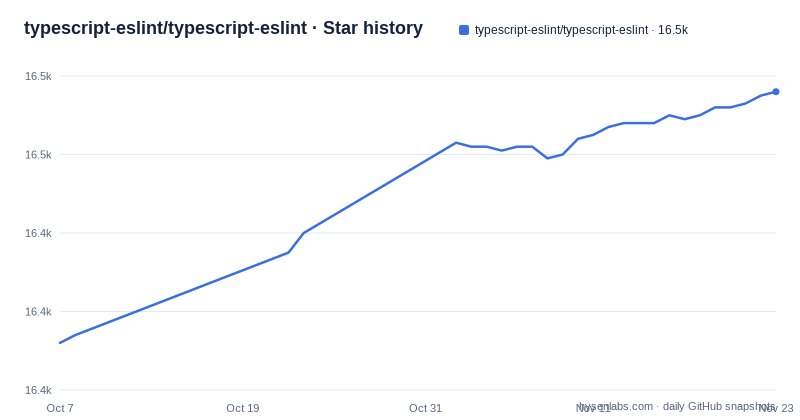
- typescript-eslint/typescript-eslint16,476 ★ · +64
| Repository | 2026-10-07 | 2026-11-23 |
|---|---|---|
| typescript-eslint/typescript-eslint | 16.4k | 16.5k |
64 Stars in the last 47 days, measured from the daily GitHub snapshot. Compare with other projects
Editorial analysis
One repository, several published packages
The starting point is that typescript-eslint is a monorepo, not a plugin. The root `package.json` is marked `"private": true` and declares workspaces covering `packages/*`, so the root project is never published. What npm consumers install are the individual packages built out of that workspace, which is why the repository's own name, `@typescript-eslint/typescript-eslint`, never appears in your lockfile.
The scripts in that root file describe the shape of the build better than any prose would. Build runs through Nx and explicitly excludes two projects by name:
"build": "nx run-many -t build --exclude website website-eslint"Clean runs in parallel with a cap of twenty, and there are separate Nx targets for lint, a stylelint pass over the website, and a website-specific build for generating type declarations used by the docs site. Two projects, `eslint-plugin` and `eslint-plugin-internal`, are treated specially throughout.
The tree is mostly configuration at the top level: `eslint.config.mjs`, five `tsconfig` files, including base, build, spec and repo config files, `nx.json`, `knip.ts`, `pnpm-workspace.yaml`, plus `tools/` and `docs/`. That is a repository where the interesting code is one directory down.
What the parser adds that plain ESLint does not have
The repository description is a monorepo for all the tooling which enables ESLint to support TypeScript, which is a compressed way of saying the work happens at three layers: parse, scope, and rule.
The parser package converts TypeScript syntax into an AST that ESLint's traversal machinery can walk, which is a prerequisite rather than the interesting part. TypeScript's grammar has constructs plain JavaScript does not have, so a parser that did not understand them would leave ESLint's scope analysis blind in exactly the places where bugs live.
The second layer is type information, and this is where the design decision that shapes everything else appears. A rule like `no-floating-promises` cannot be written without knowing that a call returns a `Promise`. Getting that knowledge requires a TypeScript program, which means reading `tsconfig.json`, loading the compiler, and paying for it on every lint run.
So there are two workable modes. Without type information you get syntax-level rules that run fast. With it you get the rules that catch real defects, at a cost in memory and startup time. The README does not discuss this tradeoff at all, which is why it is worth understanding before you enable a large rule set on a large codebase.
Reading the release notes as an engineering diary
The three most recent releases in this repository are v8.72.1 on 2026-10-26, v8.72.0 on 2026-10-19 and v8.71.2 on 2026-10-12. That is one release a week.
The split between what a rule set covers and what it does not
Anyone arriving from TSLint asks whether the tool still exists and whether it is worth switching. The migration happened years ago and the direction of travel is settled: ESLint plus these packages is the supported path for TypeScript.
Prettier is the other comparison that comes up constantly, and it is a category error worth naming precisely. Prettier formats code and makes no claims about whether code is correct. ESLint and this plugin make claims about correctness. The overlap is a small number of stylistic rules. If your CI currently fails on formatting, that problem belongs to Prettier, and turning on more lint rules will not fix it.
The practical consequence is that rule selection is a design decision per project rather than a default to accept. There are type-checked rule sets that only work with a program, recommended sets that are conservative, and strict sets that will generate a long list on an existing codebase. The `lint-prune-suppressions` script in the root package.json hints at the migration path the project itself endorses:
"lint-prune-suppressions": "nx run-many -t lint --projects=eslint-plugin-internal,eslint-plugin --prune-suppressions"The `--prune-suppressions` flag points to a strategy of recording existing violations rather than fixing them all at once, then removing those records as code is touched. That is a better answer than a blanket disable comment.
Where the README stops and the website begins
This README is unusually short, and the reason is stated plainly near the top: typescript-eslint.io holds documentation for the latest released version, and a separate Netlify preview holds docs for the canary release on `main`. Everything technical lives on those two sites. The rest of the README is badges, an OpenCollective contributor section, and an MIT license line.
That split has a practical consequence for anyone evaluating the project. You cannot learn how to configure a rule set from this repository, because the repository does not try to be that document. You can learn a great deal about how the project is built and how it is maintained: the workspace layout, the Nx targets, the tooling for spell checking and formatting, the fact that `docs/` and `website` are separate concerns from the published packages.
The numbers put the maintenance question in perspective. The repository has roughly 16,400 stars, about 3,000 forks, an MIT license, and 220 open issues, and the last push recorded on the default branch is 2026-11-02, a week after the release of v8.72.1. A weekly release cadence with named maintainers in the package metadata, ongoing sponsor funding through OpenCollective, and Netlify hosting for the docs are all signs of a project with people attached to it rather than one running on inertia.
What you will not find is a migration guide or a configuration reference, because those are deliberately hosted elsewhere.
Editorial conclusion
typescript-eslint earns its position by being the layer that lets an existing ESLint setup understand a typed language, and the repository shows the cost of doing that honestly. The parser, the plugin, the scope manager and the type-aware rules all live in one pnpm and Nx workspace, and the v8 line ships roughly weekly. The practical entry points are the `@typescript-eslint/parser` and `@typescript-eslint/eslint-plugin` packages and the generated flat configs, not the monorepo itself. The README is deliberately thin here: it points at typescript-eslint.io for the released docs and at a Netlify preview for canary docs, and everything about rule configuration lives on those two sites rather than in the repository.
Frequently asked questions
Is TSLint deprecated?
The direction of travel has been settled for years: ESLint plus the typescript-eslint packages is the supported path for linting TypeScript. New rules, fixes and releases land in the ESLint plugin, not in a TSLint successor.
What is the best linter for TypeScript code?
For most projects the answer is ESLint configured with the `@typescript-eslint/parser` and `@typescript-eslint/eslint-plugin` packages, formatted separately by Prettier. The deciding factor is whether you want type-aware rules: those that flag floating promises, unnecessary conditions and misused promises need a TypeScript program, which costs memory and startup time but catches defects that syntax alone cannot see.
What is prettier vs ESLint?
They do different jobs and the overlap is small. Prettier reformats code to a consistent style and makes no claims about whether the code is correct. ESLint with these packages reports problems, including type-aware ones.
Official sources
Add this badge to your README
If you maintain this project, the badge below links readers to this analysis and shows its maintenance status from the daily GitHub snapshot. Paste the markdown into your README; add ?metric=license or ?metric=stars to the image URL for a different field.

[](https://hysenlabs.com/projects/typescript-eslint-typescript-eslint)Star history chart for your README
[](https://hysenlabs.com/projects/typescript-eslint-typescript-eslint)Was this useful?