mpv-winbuild-cmake builds a MinGW-w64 toolchain before it builds mpv
CMake-based MinGW-w64 Cross Toolchain
At a glance
- What is it?
- This CMake project assembles a MinGW-w64 cross compilation environment from source, then uses it to produce Windows binaries of mpv. The interesting part is the layering: you configure with CMake, the build is driven by Ninja, and the toolchain itself is a build target with its own hours-long steps.
- Who is it for?
- Adopt mpv-winbuild-cmake if you need to build mpv for Windows from a Linux or macOS machine and want the toolchain pinned to a specific instruction set, since the whole point is reproducing a known-good cross environment rather than using a packaged one. Do not adopt it if you only want an mpv binary, because the project links to prebuilt downloads for that.
- Can I use it commercially?
- Not without permission. GitHub finds no licence file in the repository, and without a licence all rights are reserved by default: you may read the code but not reuse it. Check the README, or ask the authors, before using it.
- Is it still maintained?
- Yes. The repository last received commits 1 day ago.
- What is it written in?
- Mainly CMake, according to GitHub's language statistics.
Answers come from the project's GitHub data, last synced on November 7, 2026, and from our analysis. They are not legal advice.
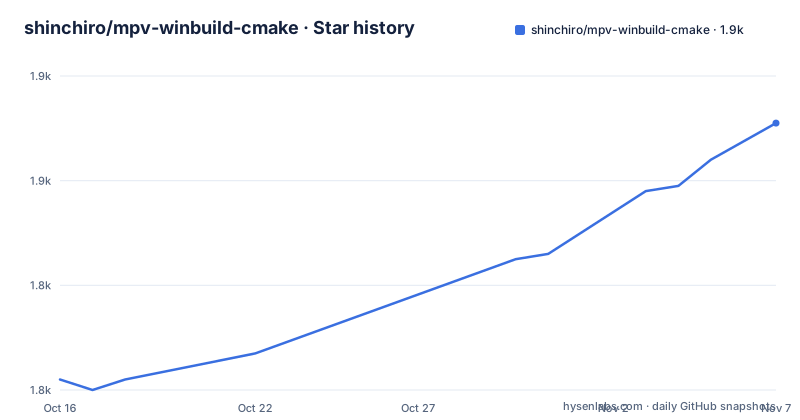
Star history
- shinchiro/mpv-winbuild-cmake1,871 ★ · +49
| Repository | 2026-10-16 | 2026-11-07 |
|---|---|---|
| shinchiro/mpv-winbuild-cmake | 1.8k | 1.9k |
49 Stars in the last 22 days, measured from the daily GitHub snapshot. Compare with other projects
Editorial analysis
The toolchain is a build target, not a prerequisite
The structure of the project is the thing to understand first, because it is unusual for a build script. The toolchain is not something you install and then point at, it is something the build produces. You configure a build directory with CMake, and then the first thing you do inside it is build the compiler itself, which the documentation says takes around 20 minutes with GCC. Only after that do you build the application. So the two stage structure is: an hour or more of building a compiler, and then a long build of mpv and every library it depends on, with the final build directory around 3GB. The download step is optional and separate, so you can fetch all the sources first, which is useful if the network is the slow part.
Configuring with CMake and the architecture variables
The configuration is a single cmake invocation, and the variables carry the decisions:
cmake -DTARGET_ARCH=x86_64-w64-mingw32 \
-DGCC_ARCH=x86-64-v3 \
-DSINGLE_SOURCE_LOCATION="/home/user/packages" \
-DRUSTUP_LOCATION="/home/user/install_rustup" \
-G Ninja -B build64 -S mpv-winbuild-cmake
`TARGET_ARCH` selects the target, and setting it to `i686-w64-mingw32` compiles 32-bit instead. `GCC_ARCH` sets the `-march` option when compiling gcc, and the documentation says other values such as `native` or `znver3` should work too. `SINGLE_SOURCE_LOCATION` and `RUSTUP_LOCATION` point at where the downloaded sources and the rust toolchain live, so they can be shared between build directories. The `-G Ninja` generator is not a stylistic choice, and the prerequisites section explains why: Ninja is much faster than GNU Make and far less error-prone, which matters for this project specifically because CMake's ExternalProject module tends to generate makefiles which confuse GNU Make's jobserver.
The ninja targets are the interface
Once configured, everything is done through named targets, and the table documents them well. `ninja package` compiles one package, `ninja download` fetches all the sources at once without compiling, and `ninja update` performs a git pull on all packages that use git. The update target is the interesting one, and the documentation is explicit about the behaviour: when a package pulls new changes all of its stamp files are deleted and it will be forced to rebuild, and if there is no change the stamp files stay and no rebuild occurs. The recommendation is to use update instead of clean when you do not want everything rebuilt on the next run. There are also per-package clean targets, `package-fullclean` removing all stamp files of a package and `package-liteclean` removing the build directory and the clean stamp files only, which is the one you want when a package's build directory is broken but you do not want to re-download the source.
The Clang path is a larger commitment
The Clang route exists and is documented, and it is a much bigger build. The supported target architectures with clang are `x86_64-w64-mingw32`, `i686-w64-mingw32` and `aarch64-w64-mingw32`, with the aarch64 ones noted as untested. The configure step adds `COMPILER_TOOLCHAIN=clang` and a `MINGW_INSTALL_PREFIX`, and the build then has four stages: `ninja llvm` builds LLVM, which takes around two hours, `ninja rustup` builds the rust toolchain, `ninja llvm-clang` builds clang for the specified target, and `ninja mpv` builds the application and its dependencies. The clang build is what produces the sysroot, and the source builds are staged separately from the build directory. If you change the `GCC_ARCH` option after configuring, you have to run `ninja rebuild_cache` to update the flags passed to gcc, g++ and the rest.
The package list is where the real complexity is
The repository holds a `packages/` directory that defines what gets fetched and built, and the size of the dependency list in the environment setup section is the honest measure of how much this involves. On Manjaro and Arch you install git, gyp, mercurial, subversion, ninja, cmake, meson, ragel, yasm, nasm, asciidoc, enca, gperf, unzip, p7zip, gcc-multilib, clang, lld, libc++, libc++abi, python-pip, curl, lib32-gcc-libs, lib32-glib2, mimalloc and ccache, plus llvm separately because it is needed for building LLVM PGO. The Ubuntu and WSL list is longer still, and it includes the 32-bit cross compilers, the multiple precision libraries libgmp, libmpfr and libmpc, and the autotools set. Cygwin and MSYS2 each have their own list, and some packages, re2c, ninja, ragel, gyp, rst2pdf and nasm, must be installed manually.
Platform quirks worth reading before you start
Several notes in the documentation are warnings rather than instructions, and they save real time. On Ubuntu and WSL it is advised to use bash over dash, with the command to make bash the default shell given and the reversal command to put dash back. On WSL, compiling 32-bit requires qemu, with a link to the WSL issue explaining it. And on WSL2 you might see the build stuck with 100% disk usage and never finish, which the documentation points at a workaround section for. The Cygwin and MSYS2 paths are supported but tend to be slower than compiling on Linux. For MSYS2 there is a specific instruction to run it through the `MSYS2 MSYS` shortcut and not the `MSYS2 MinGW 32-bit` or `MSYS2 MinGW 64-bit` shortcuts, and to avoid installing anything from the mingw32 and mingw64 repositories, disabling them in `/etc/pacman.conf` just to be safe.
A daily release cadence
The release tags are dates rather than versions, with 20261015, 20261014 and 20261013 in the recent list, and the last push to the master branch was on 2026-10-18, the day before the current date. The daily tagging reflects what the project actually is: a script that tracks upstream packages, so a new tag means new upstream versions were picked up, not that the toolchain design changed. The prebuilt alternative is linked too, with the mpv player Windows builds hosted on SourceForge, and the README is clear that the primary use of the project is to build Windows binaries of mpv, with downloading being the alternative. The repository layout follows the CMake structure, with a `CMakeLists.txt`, a `cmake/` directory, a `toolchain/` directory with a `toolchain.cmake.in` template, a `packages/` directory, `scripts/`, and template files for the cargo configuration, the ccache configuration and the meson cross file.
Editorial conclusion
Adopt mpv-winbuild-cmake if you need to build mpv for Windows from a Linux or macOS machine and want the toolchain pinned to a specific instruction set, since the whole point is reproducing a known-good cross environment rather than using a packaged one. Do not adopt it if you only want an mpv binary, because the project links to prebuilt downloads for that. Verify first that you have Ninja installed and are using the Ninja generator, since the documentation calls GNU Make error-prone with this project, and that you have several gigabytes of disk and a few hours for the compiler build alone.
Frequently asked questions
What does mpv-winbuild-cmake do?
It is a CMake-based MinGW-w64 cross toolchain whose primary use is to build Windows binaries of mpv. The toolchain itself is compiled from source as part of the build, and the application is then built with it.
Why does the documentation insist on Ninja?
Ninja is much faster than GNU Make and far less error-prone, which matters here because CMake's ExternalProject module tends to generate makefiles which confuse GNU Make's jobserver.
How do I build a 32-bit version instead of 64-bit?
Set `-DTARGET_ARCH=i686-w64-mingw32` in the cmake configure step. On WSL, compiling 32-bit additionally requires qemu, according to the documentation.
What is the difference between ninja update and ninja clean?
Update performs a git pull on all packages that use git. When a package pulls new changes its stamp files are deleted and it is forced to rebuild, and if there is nothing to pull the stamp files stay and no rebuild happens. The documentation recommends it over clean when you do not want everything rebuilt on the next run.
What does the GCC_ARCH option control?
It sets the `-march` option when compiling gcc, with `x86-64-v3` given as the example and `native` or `znver3` said to work too. If you change it after configuring, you have to run `ninja rebuild_cache` to update the flags passed to gcc, g++ and the rest.
Official sources
Add this badge to your README
If you maintain this project, the badge below links readers to this analysis and shows its maintenance status from the daily GitHub snapshot. Paste the markdown into your README; add ?metric=license or ?metric=stars to the image URL for a different field.

[](https://hysenlabs.com/projects/shinchiro-mpv-winbuild-cmake)Star history chart for your README
[](https://hysenlabs.com/projects/shinchiro-mpv-winbuild-cmake)Was this useful?