Shopify/shopify_app for Embedded Rails Apps
A Rails Engine for building Shopify Apps
At a glance
- What is it?
- Shopify/shopify_app is a Rails Engine that adds Shopify OAuth, session-token authentication, generators, and Admin embedding support to Ruby applications. It is most relevant to teams extending an existing Rails service or creating one through Shopify CLI.
- Who is it for?
- Adopt Shopify/shopify_app when the application must be embedded in Shopify Admin and built on Rails, especially when the team wants reusable authentication and generator support. Do not choose it for a non-Rails application or when Shopify CLI already supplies the complete project setup you need.
- Can I use it commercially?
- Yes. MIT is a permissive licence: you can use, modify and sell software built on it, as long as you keep its copyright and licence notices.
- Is it still maintained?
- Yes. The repository last received commits 8 days ago.
- What is it written in?
- Mainly Ruby, according to GitHub's language statistics.
Answers come from the project's GitHub data, last synced on October 23, 2026, and from our analysis. They are not legal advice.
Star history
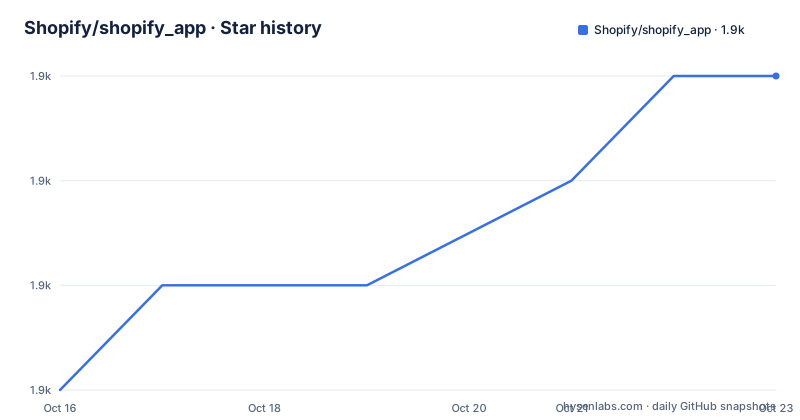
- Shopify/shopify_app1,942 ★ · +3
| Repository | 2026-10-16 | 2026-10-23 |
|---|---|---|
| Shopify/shopify_app | 1.9k | 1.9k |
3 Stars in the last 7 days, measured from the daily GitHub snapshot. Compare with other projects
Editorial analysis
Why Shopify/shopify_app targets embedded Rails applications
Shopify/shopify_app solves a specific part of building a public or custom Shopify app: connecting a Rails application to Shopify's authentication and Admin embedding model. The README says the gem builds Rails applications that can be embedded in Shopify Admin, while the Rails Engine supplies the code required to implement OAuth with Shopify. Its generators create an application structure secured with session tokens. This makes the project most relevant to Ruby developers who want Shopify authentication and integration code inside a Rails service rather than maintaining those pieces as application-specific controllers, callbacks, and configuration.
The intended users also need a Shopify Partners account and two application credentials. Shopify API credentials are created through the Partners dashboard, and the README requires both an API key and an API secret. The gem does not remove that setup responsibility. It starts after a developer has an app registered with Shopify and wants the Rails side of the integration.
The project is narrower than a general API client. Its documented focus is a Rails Engine, generators, modules, and mixins for applications that work with Shopify APIs and appear in Shopify Admin. The default generator is specifically positioned for an embedded app secured with session tokens. That makes the dependency a poor fit when the primary application is not written in Rails, even if the eventual service needs to send requests to Shopify.
Authentication flow inside the Shopify App Rails Engine
The generated application uses Shopify's OAuth 2.0 Token Exchange flow to authenticate requests made to Shopify APIs. When the application is embedded in Shopify Admin, session tokens authenticate the merchant by default. These are separate responsibilities in the documented setup: OAuth establishes authorization for Shopify API access, while session tokens identify an authenticated merchant in an embedded Admin request.
The generator also creates the application tables needed for operation, so database migration is part of initial setup. The repository layout supports more than this default path. The documentation lists separate pages for Authentication, Engine, Controller Concerns, and Generators, indicating that authentication behavior and request handling can be studied as parts of the Rails integration rather than copied from an unrelated sample.
The configuration model also accounts for development routing. `shopify.app.toml` declares the application URL, access scopes, OAuth redirect URLs, webhook settings, and whether the app is embedded. A separate `shopify.web.toml` tells Shopify CLI how to start and build the Rails application. This separation is concrete: one file describes app-level Shopify configuration, while the other defines local commands for the web process.
Creating a Rails app and generating Shopify integration
For a new Rails application, the README begins with a normal Rails generation command:
rails new my_shopify_appThis creates `my_shopify_app`; from that point, the documented workflow connects the application to Shopify CLI, generates the Shopify App files, migrates the database, and starts the development server. The README says Shopify CLI is the recommended path because it can initialize a complete Ruby app setup.
Add the gem to the generated application's `Gemfile`:
bundle add shopify_appThe README also gives this command for a new app already connected to Shopify CLI:
shopify app init --template=rubyA developer following the manual path must create `package.json`, `shopify.app.toml`, and `shopify.web.toml`, connect credentials, run the generator, migrate, and launch through Shopify CLI. The required Node engine and callback routes are explicit configuration rather than hidden defaults. The reader should confirm that the configured URLs match the local development endpoint before attempting installation.
Shopify CLI configuration for the generated Rails process
Shopify CLI needs a `package.json` in the Rails project root. The README explains that Shopify CLI uses it and that extensions such as Checkout UI extensions may also use it. The documented file requires Node 18 or later through its `engines` field.
{
  "name": "my-shopify-app",
  "version": "1.0.0",
  "description": "Shopify app built with Rails",
  "scripts": {},
  "dependencies": {},
  "engines": {
    "node": ">=18.0.0"
  }
}
The `shopify.app.toml` file defines the app's Shopify-facing identity and routes. The example requests `write_products`, enables embedding, registers four callback URLs, subscribes to `app/uninstalled`, and declares API version `2024-10`. It also contains development and production-oriented settings such as `application_url`, `[pos]`, and `[build]`.
client_id = ""
name = "My Shopify App"
handle = "my-shopify-app"
application_url = "https://localhost:3000"
embedded = true

[access_scopes]
scopes = "write_products"
The callback list must include the endpoints used by the selected authentication flow. The empty `client_id` is intentionally a placeholder for credentials linked through the CLI; it is not a ready-to-use value. The webhook subscription directs `app/uninstalled` events to `/api/webhooks`, so an application that needs uninstall handling must include a matching route.
Running Shopify CLI against Rails development commands
The separate `shopify.web.toml` file maps Shopify CLI operations to Rails commands. The development command binds Rails to `0.0.0.0`, and the build command precompiles production assets.
[commands]
dev = "bin/rails server -b 0.0.0.0 -e development"
build = "RAILS_ENV=production bin/rails assets:precompile"
After creating the app files, link an app or generate credentials with:
shopify app config linkThe README's interactive output includes the option to create a new app. Then generate the Shopify App structure:
rails generate shopify_appCreate its tables with:
rails db:migrateFinally, start the app through Shopify CLI:
shopify app devThe documentation says to open the Preview URL, install the app there, and view it in Shopify Admin. The first real check is therefore not merely whether Rails boots, but whether the generated route, credential link, token exchange flow, and embedded Admin view work together. The README also documents localhost development through Shopify CLI rather than requiring a separate tunnel arrangement.
OAuth redirects can arrive through hosts used by development tunnels. In `config/environments/development.rb`, the README shows host allowances for ngrok and Cloudflare tunnel domains. It also shows a broader option that clears the host list, but labels that option less secure. The narrower tunnel patterns are the better documented starting point when the application actually uses those services.
Scope limits, maintenance, and upgrade work in Shopify/shopify_app
The clearest limitation is platform coupling. Shopify/shopify_app is a Ruby gem and Rails Engine, so it does not serve as the integration layer for an application built in another language. It also assumes an app relationship with Shopify and requires Partners credentials. The README does not present it as a general-purpose OAuth provider or as a substitute for creating a Shopify app in Partners.
Configuration must be reviewed closely because the example combines several domains. An API version fixed in `shopify.app.toml` can become a decision point as Shopify changes supported versions. Requested scopes affect API access, redirect URLs must align with generated routes, and webhook topics require corresponding application handling. The gem can generate and secure the app, but the repository documentation does not claim that every product-specific permission, webhook implementation, or GraphQL query will be generated automatically.
Maintenance status is recent. The repository is not archived, and its last push was on 2026-10-15. The listed recent releases include v23.0.3 on 2026-06-25, v23.0.2 on 2026-05-22, and v23.0.1 on 2025-12-22. That history does not remove upgrade work. The README sends users to `CHANGELOG.md` for release notes and `/docs/Upgrading.md` for breaking changes between major versions. Reviewing those files is necessary before adopting a new major version.
The project uses the MIT license. Repository development also has JavaScript dependencies for its browser tests and Webpack-based asset tooling, even though the generated application is Ruby. Contributors and adopters therefore need to account for both the Ruby gem environment and any frontend tooling required by their own build.
Shopify CLI setup versus manual Rails Engine integration
The real alternative approach shown by the README is starting from `shopify app init --template=ruby` instead of integrating Shopify/shopify_app manually into a Rails application. Shopify CLI's Ruby template is described as producing a complete setup app. The manual path retains more control over where the Rails app came from and which files are added, but it requires the developer to create the CLI-facing files, run the generator, migrate the database, and connect credentials.
This is a difference in bootstrap scope, not a claim that the two approaches authenticate apps differently. The README says both paths are connected to Shopify CLI, and the generated Rails integration uses the same documented OAuth 2.0 Token Exchange and session-token arrangement. A team already standardized on Rails may prefer the manual route. A developer beginning a Shopify-specific app can use the Ruby template and then inspect or customize its generated structure.
The choice should account for repository ownership. The manual tutorial assumes an existing Rails codebase that will carry Shopify-specific configuration and generated code. The template route is aimed at a new application. Neither choice removes the need to define access scopes, callback URLs, webhook topics, and API behavior for the actual product.
Editorial conclusion
Adopt Shopify/shopify_app when the application must be embedded in Shopify Admin and built on Rails, especially when the team wants reusable authentication and generator support. Do not choose it for a non-Rails application or when Shopify CLI already supplies the complete project setup you need. Verify first that your target Shopify API version, configured webhook topics, callback URLs, and generated authentication flow match the product requirements. For v23.0.3, the first release-specific check is the project's Upgrading and CHANGELOG documentation.
Frequently asked questions
What is Shopify/shopify_app used for?
It is a Rails Engine, generators, modules, and mixins for building Rails applications that work with Shopify APIs and can be embedded in Shopify Admin.
How do I install Shopify/shopify_app in a Rails project?
The README documents creating a Rails app with `rails new my_shopify_app`, adding the dependency with `bundle add shopify_app`, and then generating the integration with `rails generate shopify_app`.
Does Shopify/shopify_app use OAuth and session tokens?
Yes. The generated app implements OAuth 2.0 Token Exchange for Shopify API requests and uses session tokens by default to authenticate merchants when the app is embedded in Shopify Admin.
Is Shopify/shopify_app suitable for non-Rails applications?
No suitable use case for a non-Rails application is documented. The project is specifically packaged as a Rails Engine with Rails generators and mixins.
How should developers upgrade Shopify/shopify_app?
The README directs developers to `CHANGELOG.md` for release notes and `/docs/Upgrading.md` for breaking changes when moving to a new major release.
Official sources
Add this badge to your README
If you maintain this project, the badge below links readers to this analysis and shows its maintenance status from the daily GitHub snapshot. Paste the markdown into your README; add ?metric=license or ?metric=stars to the image URL for a different field.

[](https://hysenlabs.com/projects/shopify-shopify-app)Star history chart for your README
[](https://hysenlabs.com/projects/shopify-shopify-app)Was this useful?