vue-admin-better is the Vue 2 edition of a paid product line, and its lint script edits your files
vue admin, vue3 admin, vue3.0 admin, vue backend management, vue-admin, vue3.0-admin, admin, vue-admin, vue-element-admin, ant-design, vab admin pro, vab admin plus, vue admin plus, vue admin pro
At a glance
- What is it?
- Vue Admin Better is an MIT licensed Vue admin template that is also the free edition of a commercial product line, and the repository a visitor lands on is the oldest of three, the Vue 2 line built on Element UI and Rspack. What the README and manifest make clear is the open core structure, the fact that the app depends on two of its own sibling directories through file: paths, and that the lint script is written to modify files rather than report on them.
- Who is it for?
- vue-admin-better fits a team that wants a Vue 2 admin interface with permission routing, an Axios wrapper and a mock layer already assembled, and that is willing to read the Chinese documentation and match the project's ESLint and line ending settings. It does not fit a Vue 3 project, since this repository is the Vue 2.x line and the Vue 3 editions live in separate repositories, and it does not suit a team that expects a lint command to be read-only.
- Can I use it commercially?
- Yes. MIT is a permissive licence: you can use, modify and sell software built on it, as long as you keep its copyright and licence notices.
- Is it still maintained?
- Yes. The repository last received commits 7 days ago.
- What is it written in?
- Mainly Vue, according to GitHub's language statistics.
Answers come from the project's GitHub data, last synced on November 15, 2026, and from our analysis. They are not legal advice.
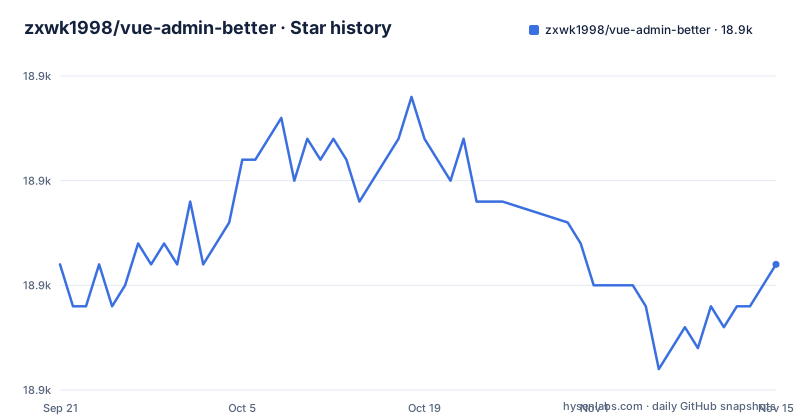
Star history
- zxwk1998/vue-admin-better18,931 ★ · +0
| Repository | 2026-09-21 | 2026-11-15 |
|---|---|---|
| zxwk1998/vue-admin-better | 18.9k | 18.9k |
0 Stars in the last 55 days, measured from the daily GitHub snapshot. Compare with other projects
Editorial analysis
One project, five free demos and three paid ones, in the same README
The demonstration section of the README is split in two, and the split is the business model.
The community edition demos are this repository on Vue 2 with Element UI, a separate Vue 3 build with Element Plus, and a third on Vue 3 with Vite 7 and Arco 2. The commercial edition demos are Admin Pro on Vue 2 with Element UI 2, Admin Plus on Vue 3 with Element Plus 2, and Shop Vite on Vue 3 with Vite 7 and Element Plus 2.
Three paid products and three free ones, listed together on the front page, is an open core arrangement rather than a single open source project with an occasional sponsorship. The commercial terms are stated at the bottom of the README: the open source version can be used for commercial purposes free of charge, and if it is convenient, leave a star. The usage notes repeat it, saying the project uses the MIT open source licence and that keeping the licence notice is sufficient for free commercial use.
One more detail worth noticing. The repository's homepage field is not the repository. It is `https://vuejs-core.cn/shop-vite/?form=github`, a product page with a tracking parameter that records the visit came from GitHub. The commercial arm is the first thing a visitor is routed toward.
This repository is the Vue 2 line, and it starts with serve:rspack
The README gives three separate clone procedures, one per repository, and the differences between them are the fastest way to tell which is which.
The one for this repository, under the heading Vue 2.x with Element UI marked as the current repository, is:
git clone -b master https://github.com/zxwk1998/vue-admin-better.git
cd vue-admin-better

# install dependencies
pnpm i --registry=http://mirrors.cloud.tencent.com/npm/

# start the project for local development
npm run serve:rspack
The two Vue 3 procedures use the same install line and then `npm run dev` instead of `npm run serve:rspack`, and they clone different repositories, `vue3-admin-better` and `vue-admin-arco`. This one is the only one that pins the branch with `-b master`.
Two consequences. A visitor who follows the first procedure has the oldest of the three, and the manifest confirms it: `element-ui` is the component library, so this is the Vue 2 line. And all three procedures install through a mirror over plain http rather than https, which is a deliberate speed choice for users in China and a configuration you may want to change before running it on a machine you care about.
The app depends on layouts and vab-icon as if they were packages
Two dependencies in the manifest point at directories in the same repository:
    "layouts": "file:layouts",
    "vab-icon": "file:vab-icon",
And both `layouts/` and `vab-icon/` are directories at the top level, beside `src/` and `mock/`. So the application resolves two of its own subdirectories as node modules through the `file:` protocol, which is a monorepo arrangement inside one repository.
There is a script that makes the arrangement concrete. `print-info` is `node -e "require('./layouts').donationConsole()"`, which reaches into the local layouts package at runtime and calls a function on it. A donation message is therefore printed by a module the app itself depends on.
The practical consequence is about what you copy. If you lift `src/` into your own repository without the two sibling directories, the imports do not resolve, and the error will point at a missing package rather than at a missing folder. Anyone forking this template needs the whole tree, not the source directory.
Both lint scripts glob a library directory that is not in the tree
Compare the two formatting scripts with the top level listing. The lint script is:
eslint {src,mock,library}/**/*.{vue,js} --fixand the prettier script globs the same three directories with a wider extension set. In the top level listing there is a `src/` and there is a `mock/`, and there is no `library/`.
So both of the project's quality commands cover a path that does not exist in this repository. The glob matches what is there and silently skips the third, which means neither command is telling you it is incomplete. The likeliest explanation is a layout that once included a shared `library` package, or a convention shared with a sibling repository, and either way the scripts were not updated when the tree changed.
The second half of that lint command matters as much as the path. It ends in `--fix`, so the project's own lint entry point rewrites your working tree rather than reporting on it. That is a deliberate developer-experience choice, and the README says so: it recommends configuring the editor to fix automatically and names VS Code as the tool to use with the strictest ESLint preset, `plugin:vue/recommended`.
clear has a doubled registry flag and push only works on Windows
Two scripts in the manifest will not do what their names suggest, and both are visible in the same file.
The `clear` script is:
rimraf node_modules&&npm install --registry=--registry=https://registry.npmmirror.comThe registry flag appears twice, and in the second occurrence the value is the literal text `--registry=https://registry.npmmirror.com`. So the install is pointed at a registry URL that begins with the word registry, which will not resolve. It is a copy and paste slip in a script whose whole purpose is to reinstall cleanly, and it fails in a way that looks like a network problem rather than a typo.
The `push` script is `start ./push.sh`, and `start` is the Windows shell builtin. On Linux or macOS there is no `start` command, so the script cannot run there at all, and `push.sh` sits at the top level as a sibling of `deploy.sh`.
Both of these are the kind of detail that a template ships with, and both are the kind you hit in the first hour rather than the first year.
The 10-15x and 20-30x claims have a plausible mechanism and no baseline
The 2026 section of the README makes three performance statements. Project runtime speed is up 10 to 15 times, bundling speed is up 20 to 30 times, and total build time is brought under five seconds.
The mechanism is visible elsewhere in the repository, which makes the claims more credible than a marketing number with nothing behind it. The bundler is Rspack rather than Webpack, with `rspack.js` and `rspack.config.js` at the top level, and the scripts are:
node --no-deprecation rspack.js servefor the dev server and the same file with `build` for a production build. Rspack is a bundler written in Rust, so a claim about build speed against a JavaScript bundler has an obvious explanation.
What the README does not provide is a baseline, a machine, or a project. A 20-fold bundling improvement is measured against something, and the something is not named, so the honest reading is that this repository switched bundlers and the author is describing the difference they saw. If build time matters to you, measure it on your own project before and after.
The pre-commit hook lints, fixes, and then re-stages
The manifest configures git hooks directly, with a `pre-commit` entry running `lint-staged`, and lint-staged configured for `*.{js,jsx,vue}` with two commands:
git addThe first is `eslint --fix` and the second is `git add`. So a commit runs the fixer and then explicitly re-stages the files it changed.
`git add` inside a lint-staged command list is a pattern from before the tool staged files itself, and having it there is harmless but redundant. The part that matters is the `--fix`. A commit hook that modifies files and stages the result means a commit can contain changes you did not write, and if the fix is wrong the correction is now part of your history rather than a working tree change you can discard.
The README's own guidance points the same direction from the other side, recommending the strictest ESLint preset and an editor that fixes on save. This project is built around automatic fixing, which is a reasonable choice for a template that thousands of people start from, and it is worth knowing before your first commit.
An empty feature map heading, and an unusually specific audience
Two small things in the README are more informative than they look.
The first is a feature map heading, positioned after the fork link and before the commercial notes, with no written list under it.
The second is the audience section, which is specific to a degree most templates are not. It describes people who are using or want to use Element UI or Element Plus with one or more years of frontend experience, people who know the Vue stack and have shipped a few real projects, and people interested in how the underlying technology works and want to get better. The first two are prerequisites stated plainly, and the third tells you the project expects to be read as much as run.
The usage notes add the operational detail: the project defaults to LF line endings and asks you to check your editor setting, it uses the strictest ESLint configuration, and it uses the MIT licence where retaining the notice is enough for free commercial use. An English README is also present, as `README.en.md` beside the main one.
Editorial conclusion
vue-admin-better fits a team that wants a Vue 2 admin interface with permission routing, an Axios wrapper and a mock layer already assembled, and that is willing to read the Chinese documentation and match the project's ESLint and line ending settings. It does not fit a Vue 3 project, since this repository is the Vue 2.x line and the Vue 3 editions live in separate repositories, and it does not suit a team that expects a lint command to be read-only. Before adopting, check three things: that you want the Vue 2 line rather than one of the Vue 3 siblings, that your environment can reach the plain-http Tencent npm mirror the documented install command points at, and whether the paid editions, Admin Pro, Admin Plus and Shop Vite, cover features you would otherwise build, since the open source repository and the three commercial ones are demonstrated side by side in the same README.
Frequently asked questions
What is Vue Admin Better?
It is an MIT licensed Vue admin template. This repository is the Vue 2 edition built on Element UI and Rspack, offering 40+ single page examples, an RBAC model with JWT permission control, and both frontend and backend route permission modes. The README also documents Vue 3 editions in sibling repositories, one on Element Plus and one on Arco Design with Vite 7.
Can I use Vue Admin Better for a commercial project?
The README states that the open source version can be used for commercial purposes free of charge, and its usage note says the project uses the MIT open source licence and that keeping the licence notice is sufficient for free commercial use. The same page links to three paid editions, Admin Pro, Admin Plus and Shop Vite, and asks you to leave a star if convenient.
How do I run Vue Admin Better locally?
Clone with `git clone -b master https://github.com/zxwk1998/vue-admin-better.git`, install with `pnpm i --registry=http://mirrors.cloud.tencent.com/npm/`, and start the development server with `npm run serve:rspack`. The production build is `npm run build`, which runs the same rspack entry point with the build argument. The two Vue 3 sibling repositories use `npm run dev` instead.
Which Vue version does vue-admin-better use?
This repository depends on `element-ui` and the README labels it the Vue 2.x (Element UI) line, so it is the Vue 2 line, and its dev command is `serve:rspack`. The README sends Vue 3 users to separate repositories, one for Element Plus and one for Arco Design, and it also documents an Arco edition on Vite 7.
Official sources
Add this badge to your README
If you maintain this project, the badge below links readers to this analysis and shows its maintenance status from the daily GitHub snapshot. Paste the markdown into your README; add ?metric=license or ?metric=stars to the image URL for a different field.

[](https://hysenlabs.com/projects/zxwk1998-vue-admin-better)Star history chart for your README
[](https://hysenlabs.com/projects/zxwk1998-vue-admin-better)Was this useful?