Shoutem UI: a themed React Native component set with a postinstall hook
Customizable set of components for React Native applications
At a glance
- What is it?
- A component library for React Native apps that treats styling as a first-class concern, but whose README still promises support for a React Native generation its own dependencies have moved far past.
- Who is it for?
- Shoutem UI is a reasonable pick when your app already speaks the Shoutem way, since the value is the theme layer rather than the individual components, and the components themselves lean on libraries you would assemble yourself anyway. What the repository settles is the dependency surface, which is large and includes a release-candidate dependency, and the fact that installing the package edits your root package.json.
- Can I use it commercially?
- Check first. The repository uses a licence we do not classify automatically, so read its LICENSE file before any commercial use.
- Is it still maintained?
- Yes. The repository last received commits 3 days ago.
- What is it written in?
- Mainly JavaScript, according to GitHub's language statistics.
Answers come from the project's GitHub data, last synced on October 22, 2026, and from our analysis. They are not legal advice.
Star history
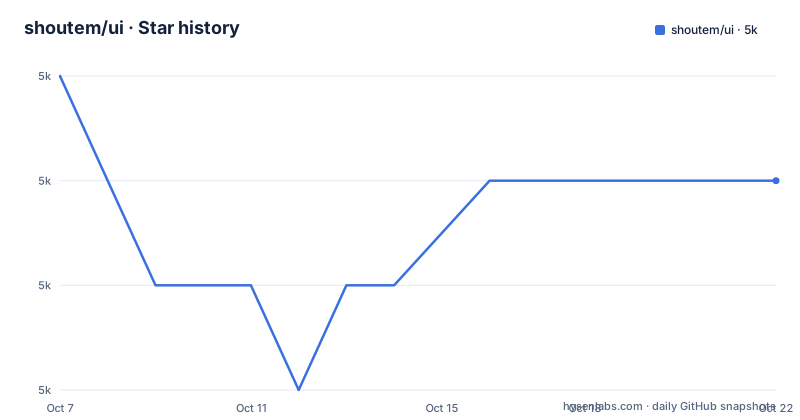
- shoutem/ui4,984 ★ · -1
| Repository | 2026-10-07 | 2026-10-22 |
|---|---|---|
| shoutem/ui | 5k | 5k |
-1 Stars in the last 15 days, measured from the daily GitHub snapshot. Compare with other projects
Editorial analysis
Theming as the reason to adopt it
The pitch is one sentence long: a set of styleable components for building React Native applications on iOS and Android, where every component is composable and customizable and ships with a predefined style that already matches the rest of the set.
That last clause is the actual product. A component library where each component is self-contained is easy to adopt one piece at a time; a library where each component's defaults are designed to look right next to every other component is a visual system, and that only pays off if you use enough of it. The README states the reasoning plainly: because the styles are compatible, complex components look good without anyone hand-writing the styles.
The styling itself lives in a sibling package, `@shoutem/theme`, which the README describes as a CSS-way of styling an entire app. Shoutem UI is one of three libraries in the Shoutem UI Toolkit, alongside `@shoutem/theme` and `@shoutem/animation`, the latter a declarative way of applying ready-made animations. So the components are the visible half of a three-package arrangement, and the theme package is where most of the real control over appearance sits.
The source layout supports that reading. Beyond `components/`, there are `theme.js`, `const.js`, `helpers/`, `hooks/`, `services/`, `fonts/`, `assets/`, an `html/` directory, a `web/` directory, `init.js` and `__tests__/`.
Installing, and the postinstall that edits your package.json
The install is a single npm command.
$ npm install --save @shoutem/uiThe catch is the line immediately after it. The package defines a `postinstall` script, `node ./scripts/add-native-deps`, which adds the package's native dependencies to your root `package.json` so that autolinking and CocoaPods installation work. This is a common pattern in React Native libraries and it is also a real trade: your project manifest is modified by installing a dependency, without you editing anything.
There is a second, optional step, and it is the one most worth not skipping. Fonts have to be linked into the iOS and Android projects with `react-native-asset`:
$ npx react-native-asset node_modules/@shoutem/ui/fontsThe README is unusually specific about the consequence of skipping it: dismissable red screen errors about unknown font names, plus the platform default fonts being used everywhere a Shoutem font was meant to appear. That is a runtime failure mode rather than a build failure, which means you can ship an app with the wrong typography and no error in CI. If you adopt this library, run this step and check it in CI.
Documentation lives on the developer portal rather than in the repository, at the ui-toolkit introduction page. Community discussion is on a Facebook group and a Stack Overflow tag.
The dependency list is thirty libraries long
Nothing about this project is minimal, and the `package.json` says so plainly. Thirty entries sit in `dependencies`, and they are not all small: `react-native-webview` at 13.16.0, `react-native-svg` at 15.11.2, `lottie-react-native` for animation playback, `react-native-linear-gradient`, `react-native-haptic-feedback`, `react-native-device-info`, and `react-native-render-html` for the HTML rendering component.
Some of those pin a narrow major version on purpose. `react-native-linear-gradient` is held at 2.8.3, well behind current releases, and `lottie-react-native` at 7.3.8 is similarly dated. That is the price of a component set that has to keep rendering identically across a wide range of React Native versions: the transitive surface gets pinned down over time rather than moved forward.
One entry deserves a flag of its own: `react-native-modal` is at `14.0.0-rc.1`, a release candidate. A library shipping a component library's modal dependency at an RC is a maintenance risk that will surface as a peer resolution warning, or worse, as an API that changes under you.
Two more entries suggest what the toolkit is for. The `@native-html/iframe-plugin` and `@native-html/table-plugin` packages, plus `react-native-youtube-iframe` and `react-native-vimeo-iframe`, mean this library is built to display web content and embedded video inside native apps. That is a clue about the intended product: a content and media app builder, not a design system for arbitrary software.
Two versions of the truth about React Native support
The README says the instructions are valid for React Native 0.60.0 and higher, and tells anyone on an older version to use the v1.x line. The `package.json` declares React 19.1.0 or newer as a peer dependency.
Those two statements describe different worlds. React Native 0.60 dates from 2019 and shipped with React 16.8; React 19 is what arrives with React Native in the 0.78 era and later. A library cannot support the 0.60 generation and simultaneously require React 19 unless the older range is served by the separate v1.x line the README points to. So the README's version guidance is stale relative to the manifest, and the manifest is the binding constraint, since a peer dependency is what your package manager will enforce.
Rather than pick a winner, the usable reading is this: treat `peerDependencies` as the supported floor and the README sentence as historical. The same pattern shows up in the release history. The newest GitHub release is v7.0.2 from 2024-07-09, which added `queue` and `wheelchair` icons to the Icon component. The version in `package.json` is 9.2.0. Two majors of development have happened without a tagged GitHub release, so if you are tracking this project by its releases page you will conclude it stopped two years ago when in fact the last push was on 2026-09-22.
That gap is worth internalising for anyone assessing maintenance: for a library published to npm, the tag list and the shipped version can diverge for a long time without anyone noticing.
Development tooling and what the tree reveals
The scripts in `package.json` are minimal and tell you the project is tested but not heavily engineered. `test` is `jest`, `lint` is `eslint .` with `@shoutem/eslint-config-react`, and there are `lint-fix` and `fmt` style variants. Publishing is handled by two npm scripts, `release` and `release-rc`, which publish to the public registry under the `latest` and `rc` tags respectively.
That dual-tag arrangement is worth noting because it is where a release candidate dependency like `react-native-modal` at 14.0.0-rc.1 gets absorbed. An RC can be pulled in and shipped under `latest` without the RC tag being used at the top level, so consumers do not get a clear signal that anything is pre-release.
The `__tests__/` directory exists at the root, so there is a test suite, and the release notes record a specific fix to `resolveFontFamily` in v6.1.2, which fell back to `Rubik-Regular` when `fontName` was not provided. That is a small, sensible defensive change and it is also a hint about the failure mode of the font step above: a missing font name used to resolve to nothing at all.
The remaining version history is short and human scale. v6.1.0 in November 2022 added an app-level Toast component, v6.1.2 in January 2023 fixed the font fallback, and v7.0.2 in July 2024 added icons. Three releases in the recorded history, none of them urgent.
How it compares to assembling your own component set
The honest comparison is not with one competing library but with the alternative of building a screen kit from the underlying primitives. If you install `react-native-svg`, `react-native-linear-gradient`, `react-native-modal` and an animation library directly, you get the same underlying capability and a fraction of the dependency count, at the cost of having to decide how everything looks.
What Shoutem UI adds is coherence and the theme layer. `@shoutem/theme` is the reason to use it: a single place where an app's colours, spacing and typography are defined, applied across every component at once. Retrofitting that onto a hand-assembled component set is not realistic, so if you are starting a new app and want a branded look without a designer, this is a cheaper path than building one.
What it costs is control. The 2.8.3 pin on `react-native-linear-gradient` and the RC modal dependency mean you are accepting someone else's upgrade decisions. The `postinstall` step means your manifest is edited by a dependency. And the README's own version guidance cannot be trusted, which is a signal about documentation maintenance generally.
There is also a licensing wrinkle worth checking before you commit. The README states the project uses the BSD License, copyright 2016 to present by Shoutem, linking to the BSD 3-Clause text. GitHub reports no assertion for the licence identifier on this repository rather than naming BSD 3-Clause. Both statements can be true, with the discrepancy being about how the identifier is recorded rather than about the terms, but for anything commercial it is worth reading `LICENSE` directly rather than inferring from either source.
Editorial conclusion
Shoutem UI is a reasonable pick when your app already speaks the Shoutem way, since the value is the theme layer rather than the individual components, and the components themselves lean on libraries you would assemble yourself anyway. What the repository settles is the dependency surface, which is large and includes a release-candidate dependency, and the fact that installing the package edits your root package.json. What it does not settle is which React Native versions actually work, because the README says 0.60.0 and higher while the package declares React 19.1.0 or newer as a peer, and those two statements cannot both describe one supported range. Read the getting started page on the developer portal for current setup steps rather than trusting the install note, and check whether the fonts step was done, since skipping it produces red screens rather than a build failure.
Frequently asked questions
What is Shoutem UI used for?
It is a set of styleable components for building React Native applications on iOS and Android, where each component ships with a predefined style designed to match the others. It is one of three libraries in the Shoutem UI Toolkit, the others being `@shoutem/theme` for app-wide styling and `@shoutem/animation` for declarative animations. The intended use is content and media apps, judging by the bundled HTML rendering and embedded video components.
Which React Native versions does Shoutem UI support?
The README says 0.60.0 and higher, and points older versions to the v1.x line, but the package declares React 19.1.0 or newer as a peer dependency, which corresponds to a much newer React Native generation. The peer dependency is the constraint your package manager enforces, so treat that as the real floor rather than the README sentence.
Why do I get red screen errors about unknown font names?
The font files have not been linked into your project. The install step runs a postinstall script that registers native dependencies for autolinking, but fonts require a separate command using `react-native-asset` against the package's `fonts` directory. Skipping it produces dismissable red screen errors and silently falls back to the platform default fonts on both iOS and Android.
Is Shoutem UI still being updated?
The last push was on 2026-09-22, but the newest tagged GitHub release is v7.0.2 from 2024-07-09 while `package.json` carries version 9.2.0. So work has continued well past the last tag, and the releases page understates how current the package is. Judge maintenance from the push date and the shipped version, not from the tag list.
Official sources
Add this badge to your README
If you maintain this project, the badge below links readers to this analysis and shows its maintenance status from the daily GitHub snapshot. Paste the markdown into your README; add ?metric=license or ?metric=stars to the image URL for a different field.

[](https://hysenlabs.com/projects/shoutem-ui)Star history chart for your README
[](https://hysenlabs.com/projects/shoutem-ui)Was this useful?