next-view-transitions wraps your root layout, and promises React 19 it is not built against
Use CSS View Transitions API in Next.js App Router.
At a glance
- What is it?
- A very small package that puts the browser's view transitions API into the Next.js App Router: a wrapper component in the layout, a replacement link, and a navigation hook. Its own disclaimer is the most useful thing on the page.
- Who is it for?
- This fits an application with simple route changes where an animated transition is wanted and nothing is streaming mid-navigation. Four things to settle first.
- Can I use it commercially?
- Yes. MIT is a permissive licence: you can use, modify and sell software built on it, as long as you keep its copyright and licence notices.
- Is it still maintained?
- Activity is slowing. The repository last received commits 8 months ago.
- What is it written in?
- Mainly TypeScript, according to GitHub's language statistics.
Answers come from the project's GitHub data, last synced on November 15, 2026, and from our analysis. They are not legal advice.
Star history
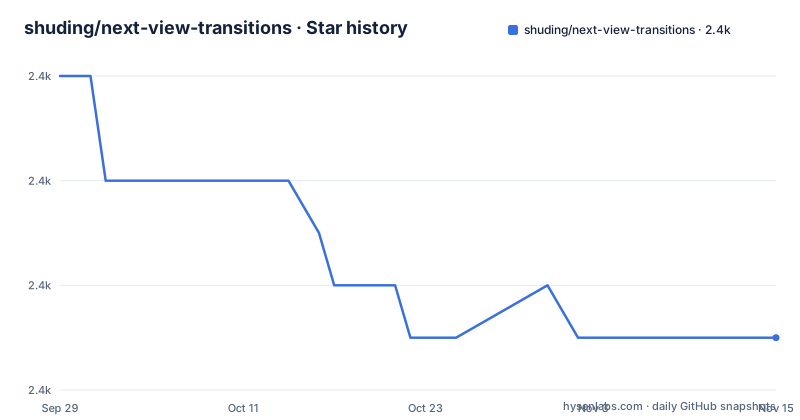
- shuding/next-view-transitions2,381 ★ · -5
| Repository | 2026-09-29 | 2026-11-15 |
|---|---|---|
| shuding/next-view-transitions | 2.4k | 2.4k |
-5 Stars in the last 47 days, measured from the daily GitHub snapshot. Compare with other projects
Editorial analysis
The disclaimer states the limit before the features do
The most valuable paragraph on the page is the second one, and it is a scope statement rather than a description.
It says the library is aimed at basic use cases of view transitions and the App Router. For more complex applications, and it names concurrent rendering, Suspense and streaming specifically, new primitives and APIs still need to be developed into the core of React and Next.js in the future. The link offered for more on that is a post on social media rather than a document.
That is an unusually clean statement of what the project is not, and it also explains why a package that only wraps navigation cannot go further on its own. A view transition needs the old page and the new page both present while the browser snapshots and crossfades them. With a synchronous route change, the library can start a transition, wait for the new tree, and hand over. With a streamed one, the tree is never finished, so there is nothing stable to snapshot. That is a framework problem, not a wrapper problem, and the page says so.
The consequence for a reader is that the question to ask is not whether the package works but whether your navigation is simple. A site with a handful of static routes is squarely inside the stated scope. An application that streams data into most of its pages is not, and no amount of configuration here will make it so.
The rest of the page is short: a link to the demo, an install line, three usage examples, and a licence line.
The wrapper goes in the root layout, above the html element
The usage section shows three things, and the first one is the one with architectural consequences.
You import a component and wrap your content with it inside the layout file, and the example puts the wrapper outside the html and body elements rather than inside them:
import { ViewTransitions } from 'next-view-transitions'

export default function Layout({ children }) {
  return (
    <ViewTransitions>
      <html lang='en'>
        <body>
          {children}
        </body>
      </html>
    </ViewTransitions>
  )
}
Wrapping the document element rather than a div inside it means the transition snapshot covers the whole page rather than a subtree, which is what you want for a route change. It also means the root layout of the application becomes part of a client side wrapper, which is a real boundary placed above everything else you render.
Then there are two navigation surfaces. A replacement link component, imported from the same package, is used for links that need to trigger a transition. And a hook for programmatic navigation, which the example shows used inside a click handler with the comment that all of the router's methods are supported.
So there are two ways in rather than one: declarative, where you swap a component and forget about it, and imperative, where you take a router-like object and call a method. The second is what you use for a transition triggered by something other than a link, such as a form submission or a button, and the claim that every router method works means back, forward and replace are covered rather than only push.
No runtime dependencies and a single string entry point
The package manifest is short and one thing about it stands out: there is no dependencies block at all.
Every requirement is a peer dependency, and there are three of them, all with lower bounds and no upper limits. A framework version with a floor and no ceiling, and two framework runtime versions that accept either of two majors.
A package whose job is to intercept navigation and wrap a layout having no runtime dependencies is a good sign about its blast radius. Nothing it installs can conflict with your router, your data layer or your styling, because there is nothing to install.
The entry points reinforce the point that this is one small surface. The manifest declares a main file, a types file, and an exports value that is a plain string rather than a map, which means there are no subpath exports. Everything is exported from one module: the wrapper, the link and the hook. If you wanted to import only the hook without pulling in the wrapper, the package does not offer a way to do it, which is the cost of the single entry point.
The published files list contains exactly one entry, the built output directory. So the package ships the compiled result and nothing else, which is the correct shape for something whose source is a handful of files.
There is also a prepare script wired to the build command, which means installing from a version control reference compiles it rather than downloading a published artefact. That is convenient for trying a branch and it means the build tool is a requirement for that path.
The peer range allows React 19 and the toolchain pins React 18
This is the discrepancy worth knowing about before you install.
The peer dependencies accept the framework at 14 or newer with no upper bound, and accept the runtime and its DOM package at either of two major versions. The declared compatibility surface therefore includes a major of the runtime that the development environment does not use.
The development dependencies are pinned a major behind: the framework at version 14, the runtime and its DOM package at 18, the type definitions for the runtime at 18, and a TypeScript compiler at 5.4.
So the package declares that it works with the newer runtime, and develops and tests against the older one. That is a common and sometimes reasonable position for a small integration package, and it is also the kind of claim that a consumer discovers the truth of at runtime rather than at install time.
There is a related choice in how the framework is ranged. The floor is 14 with no ceiling, which means a future major is inside the supported range by default, and for a package that hooks into a router's internals rather than using its public API alone, that is the assumption most likely to break.
The practical advice is narrow and unglamorous. If you are on the newer runtime major, read the source before you rely on it, and if you hit an error, expect to be the first person to hit it rather than the hundredth.
Three releases in sixteen months, and nothing since last March
The release history says three things about the project at once.
The three most recent versions are 0.3.2 in September 2024, 0.3.4 in December 2024 and 0.3.5 in December 2025. The version numbers skip one: there is no 0.3.3 among them, so that release either was never published or its tag was removed.
The gap between the two most recent is a year. Three point four and three point five are one year apart, while the two before them are three months apart. A year with one patch level in it is a project that went quiet and then shipped something small.
The last commit on the default branch is dated 6 March 2026, so there is work on the branch that has not been released, and it is about seven months old. That is worth knowing before you pin: the released package and the branch are not the same code, and neither is obviously the one you want.
One thing does agree. The version in the package manifest is 0.3.5, matching the newest tag, so the manifest and the release list are not telling different stories here.
The project is not archived, and the maintainer is the author of the framework itself, which is a reasonable thing for a package whose entire reason to exist is to fill a gap in that framework.
Nine files at the top, a bundler with a watch mode, and a demo on the same host
The repository is as small as the API surface, and the tree shows it.
Nine entries at the top: a gitignore, a licence, the readme, an example directory, the package manifest, two lock and workspace files, the source directory and a TypeScript configuration. There is no test directory, no continuous integration configuration, no issue templates and no contributing guide.
That absence of tests is the honest gap. The library's whole mechanism is intercepting a navigation and wrapping the document, both of which need a browser to verify, and there is nothing in the repository that runs one. The demonstration is a deployed site rather than an automated check, which means the thing you are evaluating is a person's judgement that it works rather than a suite that proves it does.
The example directory is itself an application, with its own manifest and its own app directory, and the workspace file makes it a member alongside the library. That is the entire reason the repository is a workspace rather than a single package: one library plus one example.
The bundler is a separate tool with a watch mode for development, and the build script is what the prepare hook calls, so the same command produces the published output and the type declarations.
Finally, the homepage field in the manifest points at the demonstration deployment, and the readme's demo link points at the same address. So the documentation's only link out is a hosted instance of the example, which is also the fastest way to see what the package actually does before you install it.
Editorial conclusion
This fits an application with simple route changes where an animated transition is wanted and nothing is streaming mid-navigation. Four things to settle first. Whether your case is the simple one, because the project's own disclaimer says it targets basic use and that concurrent rendering, Suspense and streaming need primitives the framework does not have yet. That React 19 works, since the peer range allows it while the development toolchain is pinned a major behind, so you are the first test. Where the wrapper goes, because it wraps the html element in the root layout and that is a client boundary at the top of your tree. And whether you want a dependency on someone's judgement, because the package has no code of its own beyond the wrapper and the maintenance question comes down to whether the framework grows the primitives this library is standing in for. The last commit is dated 6 March 2026 and the newest release is 0.3.5 from December 2025.
Frequently asked questions
What does next-view-transitions do?
It adds the browser's view transitions API to the Next.js App Router. You wrap the document element in a component inside the root layout, then use a replacement link component for links that should animate, or a hook for programmatic navigation. All of the router's methods are supported, so back, forward and replace are covered as well as push.
Does next-view-transitions support React 19?
The peer dependency range accepts either of two major versions of the runtime and its DOM package, so React 19 is inside the declared support surface. The development dependencies are pinned a major behind, at version 18 with matching type definitions, and the framework peer dependency has a floor of 14 with no ceiling.
What are the limitations of next-view-transitions?
The page states the library targets basic use cases of view transitions with the App Router, and that more complex applications using concurrent rendering, Suspense and streaming need new primitives developed into the core of React and Next.js first. In other words the streaming case is out of scope because it is a framework limitation rather than a wrapper one.
Does next-view-transitions have any dependencies?
No runtime dependencies at all. Everything is a peer dependency: the framework at 14 or newer, and the runtime and its DOM package at either of two major versions. The package ships only its built output directory and has a single entry point, so the wrapper, the link and the hook are all imported from one module.
Official sources
Add this badge to your README
If you maintain this project, the badge below links readers to this analysis and shows its maintenance status from the daily GitHub snapshot. Paste the markdown into your README; add ?metric=license or ?metric=stars to the image URL for a different field.

[](https://hysenlabs.com/projects/shuding-next-view-transitions)Star history chart for your README
[](https://hysenlabs.com/projects/shuding-next-view-transitions)Was this useful?