row-bot: a local-first assistant whose base install already carries every cloud SDK
Row-Bot - Personal AI Sovereignty. A local-first AI assistant with integrated tools, a personal knowledge graph, voice, vision, shell, browser automation, scheduled tasks, health tracking, and messaging channels. Run locally via Ollama or add opt-in cloud models. Your data stays on your machine.
At a glance
- What is it?
- Row-Bot is a single user desktop assistant, the Python service behind a React app, with a knowledge graph, agents, workflows and messaging channels. Reading its own dependency files instead of its feature list shows what the install costs: unconditional provider SDKs, a generated requirements export that is not a minimal install, and two capabilities that stop at the platform boundary.
- Who is it for?
- Row-Bot fits one user who wants a single desktop window, one knowledge graph and one approval flow across local models and chat subscriptions, and who accepts a Python ceiling of 3.13 plus an interface that changed shape in the 5.0.0 release. It does not fit a team that needs shared accounts or per-user authorisation, because the server it ships is described as single-owner.
- Can I use it commercially?
- Yes. Apache-2.0 is a permissive licence: you can use, modify and sell software built on it, as long as you keep its copyright and licence notices.
- Is it still maintained?
- Yes. The repository received new commits within the last day.
- What is it written in?
- Mainly Python, according to GitHub's language statistics.
Answers come from the project's GitHub data, last synced on November 15, 2026, and from our analysis. They are not legal advice.
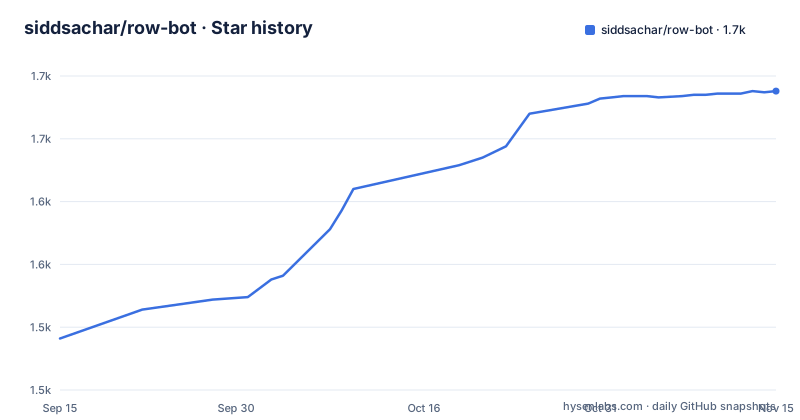
Star history
- siddsachar/row-bot1,688 ★ · +197
| Repository | 2026-09-15 | 2026-11-15 |
|---|---|---|
| siddsachar/row-bot | 1.5k | 1.7k |
197 Stars in the last 61 days, measured from the daily GitHub snapshot. Compare with other projects
Editorial analysis
The base install already carries every cloud SDK
Local-first is the pitch, and Ollama is the piece the project calls optional, for local models only. The dependency array in pyproject.toml is not optional. It pins openai, anthropic, google-genai, langchain-openai, langchain-anthropic, langchain-google-genai, langchain-openrouter, langchain-xai and langchain-ollama side by side, and it also carries langchain-google-community[gmail] for Gmail, tavily-python, wikipedia and arxiv for retrieval, and wolframalpha for calculation. Choosing a local model at first launch changes which endpoint the assistant calls; it does not change what gets installed. Two search clients sit in the same list: duckduckgo-search at 8.1 or newer under 9.0, and ddgs at 9.0 or newer under 10.0, adjacent version ranges for the same job. Neither is an extra. So the honest reading of local-first here is about where conversations, memory and files are stored on your disk, not about what your install is allowed to talk to.
requirements.txt is an export, not the list your machine imports
The header of requirements.txt says the file is generated from pyproject.toml and uv.lock, that it should not be edited by hand, and how to regenerate it: `python scripts/export_locked_requirements.py`. The export command it records uses `--all-extras` and `--no-dev`, which is why the file is far longer than the base dependency list and carries packages that only some extras or some platforms need: faiss-cpu, faster-whisper, ctranslate2, av, discord-py, aiohttp and feedparser among them. It also opens with a PyTorch CPU wheel index while the dependency array in pyproject.toml never names torch. Eight lines from it are enough to show the shape:
--extra-index-url https://download.pytorch.org/whl/cpu
audioop-lts==0.2.2 ; python_full_version >= '3.13'
brotli==1.2.0 ; platform_python_implementation == 'CPython'
brotlicffi==1.2.0.1 ; platform_python_implementation != 'CPython'
ddgs==9.14.4
duckduckgo-search==8.1.1
faiss-cpu==1.14.3
faster-whisper==1.2.1
Read it as a snapshot of a resolution across every extra and every platform, not as an inventory of what a given machine will import.
Platform markers decide who installs the Aliyun SDKs
The markers in that export are where the real platform story sits. `aliyun-python-sdk-core==2.16.0 ; platform_machine != 'x86_64' or sys_platform != 'darwin'` evaluates false only on an Intel Mac running macOS, so an Apple Silicon Mac and a Windows machine both install those two packages while an Intel Mac does not. The same marker shape covers antlr4-python3-runtime, crcmod, decorator and audioresid. Windows-only packages are gated on `sys_platform == 'win32'`, which is how clr-loader and colorama arrive there and nowhere else. On the macOS side pyproject.toml uses `sys_platform == 'darwin'` markers instead, so pyobjc-core and pyobjc-framework-Cocoa install on every Mac, Intel included, next to pystray for the tray. The interpreter split is just as explicit: brotli on CPython, brotlicffi everywhere else, and audioop-lts only where `python_full_version >= '3.13'`. That last one lines up with `requires-python = ">=3.12,<3.14"`, so only the 3.13 branch of the supported range needs the audioop backport. Two supported interpreters and four platform families therefore produce four different install sets.
One React app, four front doors and one account
A single React app serves the desktop window, browsers, phones and server mode. The desktop window is pywebview, which means the app is a local web page in a native frame, and server mode is FastAPI on uvicorn. The Docker row of the platform table calls the image an authenticated single-owner server, and the only documented way to grant access is a CLI call: `row-bot access invite --layout desktop --origin http://127.0.0.1:8080`. Two flags, a layout and an origin, decide where the invite lands. Credentials are held through keyring and tokens are signed with pyjwt and its crypto extra. Remote access to a phone or another computer is a QR code over Tailscale, your own Wi-Fi or a public link, and the security instruction in the whole install section is one sentence: read the Docker and VPS operations page before exposing it beyond loopback. Note the two different doors: Telegram, WhatsApp, Discord, Slack and SMS are channels the assistant talks through, while Tailscale and a public link bring the entire server out.
The desktop port moves, the invite origin does not
launcher.py starts the tray and opens the app at `http://localhost:8080/app-v2/`, taking the next free port if 8080 is busy, and running it a second time while it is up just shows the running app. Both entry points sit at the root of the tree next to app.py, alongside a build_linux_app.sh for the tarball and a Start Row-Bot.command for double-clicking on a Mac. Two of them are for headless work:
uv run python launcher.py serve --port 8080   # authenticated headless server
uv run python app.py                          # server only, no tray or window
Compare that with the origin in the Docker invite command, which is a fixed `http://127.0.0.1:8080`. On a machine where 8080 is already taken, the window moves to another port and the origin recorded at invite time no longer matches the address the app is served on. The path tells its own history: the launcher opens `/app-v2/`, consistent with a 5.0.0 release that removed the NiceGUI interface, and RELEASE_NOTES.md is the file a 4.x user is pointed at before upgrading. A movable port plus a hardcoded origin is the kind of contract worth reading before scripting around it.
The source path is lock checked, extras on, npm scripts off
Building from a checkout needs Python 3.12 or 3.13, uv, Git, and Node.js 24.15 or newer with npm 11 for the client:
git clone https://github.com/siddsachar/row-bot.git
cd row-bot
python -m pip install "uv>=0.7,<1.0"
uv sync --locked --all-extras --group test
cd frontend && npm ci --ignore-scripts --no-audit --no-fund && npm run build && cd ..
uv run python launcher.py
Three details in those six lines change what a developer machine becomes. `--locked` fails the sync instead of silently re-resolving, so the lockfile is enforced rather than refreshed. `--all-extras --group test` installs every optional dependency group and the test group, which a release install does not get. `--ignore-scripts` means no postinstall hook in the frontend dependency tree runs, and the build is the separate explicit `npm run build`. A checkout is a different machine from a downloaded release. The packaging itself is pinned just as tightly, with setuptools held at 80 or newer under 81 and wheel at 0.45 or newer under 0.46, while `dynamic = ["version"]` keeps the version number out of pyproject.toml entirely. The tree also carries pytest.ini alongside pyproject.toml, an osv-scanner.toml, SECURITY.md, NOTICE, and both AGENTS.md and CLAUDE.md.
Computer Use and voice stop at the platform boundary
The feature list mentions opt-in Computer Use on Windows and macOS, dictation, Talk and read-aloud with local Whisper and Kokoro, and channels from Telegram to SMS. The platform table is narrower than the feature list. Computer Use appears in the Windows row and the macOS row and nowhere else: not in the Linux tarball row, not in the Docker row. That row adds that a native window and tray need GTK or Qt and AppIndicator, and that otherwise the app opens in a browser, which is a different experience for a tool that drives a desktop. Voice is an optional dependency group whose first entry is sounddevice, so dictation and read-aloud arrive with an extra rather than with the base install. The release titles from 28 August point at the same boundary from the other side: v4.9.0 is titled Native Computer Use, Desktop Buddy & Safe Conversation Cleanup, and v4.9.1, hours later the same day, is titled Optional Computer Use Verification & Calculator Reliability. A capability that moves from native to opt-in with verification inside a patch release is worth reading the notes for.
Approvals, goals and self-fixes share one gap
Approvals are described as risky actions waiting for Approve or Deny in the conversation, on Home, in the attention indicator, in Buddy, or on a connected channel. Goals keep going until done and pause when they stop making progress. Health checks run on their own with one fix per problem, and Insights suggest improvements. So two subsystems act without a fresh decision each time: a goal that continues on your behalf, and a monitor that applies a repair. The tool surface those approvals have to cover is long and named in the same list: shell, files, a managed browser, opt-in Computer Use, Gmail, Calendar, image and video generation, skills, plugins, MCP servers and custom tools. What the documentation describes is the set of places a prompt can appear. The set of actions that raise one is not enumerated, so the useful question is what the Approve prompt is covering when the tool behind it is an MCP server or a plugin you installed, because those two are the entries on the list whose code somebody else wrote.
Editorial conclusion
Row-Bot fits one user who wants a single desktop window, one knowledge graph and one approval flow across local models and chat subscriptions, and who accepts a Python ceiling of 3.13 plus an interface that changed shape in the 5.0.0 release. It does not fit a team that needs shared accounts or per-user authorisation, because the server it ships is described as single-owner. Before installing, read requirements.txt as a generated export rather than as a list of what your machine will import, confirm that the Approve prompt covers the tools you plan to switch on, including the MCP servers and plugins whose code you did not write, and check whether Computer Use and voice work on your platform before you plan around them. Coming from 4.x or from Thoth, take the two-step migration through a release that can still perform it.
Frequently asked questions
What is Row-Bot, and do I need a cloud account to use it?
Row-Bot is a local-first desktop AI assistant, formerly called Thoth. It runs local models through Ollama, a provider API key, a ChatGPT, Claude or Grok subscription, or any OpenAI-compatible endpoint, and Ollama is optional for local models only. One React app serves the desktop window, browsers, phones and server mode.
Which Python versions does Row-Bot support?
3.12 and 3.13 only, since requires-python is >=3.12,<3.14. Building from a checkout also needs uv, Git and Node.js 24.15 or newer with npm 11 for the client, and the uv install step pins uv to >=0.7,<1.0.
Does a default Row-Bot install reach out to cloud providers?
The base dependency set is unconditional and includes openai, anthropic, google-genai, langchain-openrouter, langchain-xai, tavily-python, wikipedia and arxiv, plus langchain-google-community[gmail] for Gmail. Picking a local model at first launch changes what the assistant calls, not what gets installed.
How do I install Row-Bot on Linux?
The one-line installer pipes install-linux.sh into bash, takes the latest release by default, verifies the tarball's SHA-256, installs under ~/.local/share/row-bot and creates ~/.local/bin/row-bot. A native window and tray need GTK or Qt and AppIndicator, and without them the app opens in your browser.
Can I reach Row-Bot from my phone, and is the server authenticated?
The Docker image is described as an authenticated single-owner server, and access is granted with row-bot access invite --layout desktop --origin http://127.0.0.1:8080. A phone or another computer connects with a QR code over Tailscale, your Wi-Fi or a public link, and the install section says to read the Docker and VPS operations page before exposing it beyond loopback.
Official sources
Add this badge to your README
If you maintain this project, the badge below links readers to this analysis and shows its maintenance status from the daily GitHub snapshot. Paste the markdown into your README; add ?metric=license or ?metric=stars to the image URL for a different field.

[](https://hysenlabs.com/projects/siddsachar-row-bot)Star history chart for your README
[](https://hysenlabs.com/projects/siddsachar-row-bot)Was this useful?