Minutes records meetings on your own machine and hands them to an MCP client
Open-source, local-first Granola/Otter alternative that Claude Code, Codex, Cursor, and any MCP client can query. Meetings, calls, and voice memos transcribed on-device into markdown you own.
At a glance
- What is it?
- Minutes is a Rust desktop app, CLI and MCP server that transcribes meetings on device and writes them as Markdown with YAML frontmatter into your home folder, and the repository is unusually explicit about where that local promise stops.
- Who is it for?
- Pick Minutes if you want a meeting to end as a file you own rather than a row in someone else's workspace, and accept that the interesting surface is the CLI, the MCP server and the plugin rather than the desktop app.
- Can I use it commercially?
- Yes. MIT is a permissive licence: you can use, modify and sell software built on it, as long as you keep its copyright and licence notices.
- Is it still maintained?
- Yes. The repository last received commits 2 days ago.
- What is it written in?
- Mainly Rust, according to GitHub's language statistics.
Answers come from the project's GitHub data, last synced on November 14, 2026, and from our analysis. They are not legal advice.
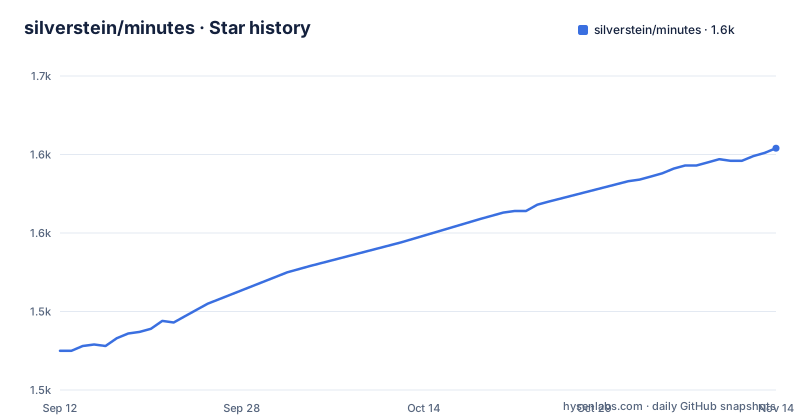
Star history
- silverstein/minutes1,604 ★ · +129
| Repository | 2026-09-12 | 2026-11-14 |
|---|---|---|
| silverstein/minutes | 1.5k | 1.6k |
129 Stars in the last 63 days, measured from the daily GitHub snapshot. Compare with other projects
Editorial analysis
Recording is local, and one sentence names where text can leave
The privacy claim is stated in two parts and the second part is the interesting one. Capture, transcription and storage run locally, and the privacy section repeats that transcription and speaker processing run on device with audio staying on the machine. Then comes the boundary: text leaves the machine only when you send authorized context to a cloud agent or summarizer, and the opening paragraph phrases the same thing as the meeting context you authorize being sent to that provider. Nothing is uploaded on a timer. The consequence for an agent-first user is that the MCP server is a local reader over local files, and the moment a cloud assistant is pointed at a meeting, that meeting's contents cross over under the user's own action rather than the app's.
Sensitive meetings take a narrower path again. They save typed markers without audio and default to restricted, so a recording marked sensitive keeps no audio file at all, only the notes typed around it, and starts in a restricted state rather than an open one. Consent reminders, acknowledgement and provenance are named as the features that help you disclose that a meeting was recorded.
Three tags in nine days, two of them about Recall on the same day
The recent release list is dense enough to read as a pattern. v0.27.0 landed on September 25, 2026 under the title Talk to your meetings, and stop being told the wrong thing. v0.27.1 followed at 00:12 on October 1 with The app stops freezing, and Recall sends what you type. v0.27.2 arrived the same day at 04:24, four hours later, under the title Recall sends the question you edited. Two of the three titles describe the same feature, and the second one changes what the first put there, which reads as a correction to input handling rather than as a new capability. The workspace manifest agrees with the newest tag: the workspace package version is 0.27.2, so the tree and the release list are not out of step. Release notes are not carried in the README, so what changed between those two October builds is visible only in the titles.
One repository, five surfaces, and three counts printed in the README
The surfaces table is where the scope of the project actually shows. There is a desktop app for menu bar capture, Recall, documents and Coach; a CLI with 58 commands for local recording, processing, search, import and automation; an MCP server exposing 34 tools and resources to any client; a Claude Code plugin with 23 skills covering prep, capture, live help, debrief and memory workflows; and an SDK giving TypeScript access to the meeting files without going through MCP at all. The client list names Claude Code, Codex, Cursor, OpenCode, Pi, Gemini CLI, Claude Desktop, Mistral Vibe, Cowork and Dispatch, then adds Obsidian and Logseq as the note destinations, closing with any MCP client. Two of the documentation links are machine-readable indexes hosted on the project site, an agent index and a full agent index, which fits a repository whose primary reader is an agent rather than a person reading docs in a browser.
The CLI arrives four ways, and Homebrew asks to be trusted once
Installation branches on which surface you want, and the README gives all of the routes rather than one preferred path.
brew install --cask silverstein/tap/minutes  # Desktop app, with bundled CLI
brew install silverstein/tap/minutes         # Standalone CLI alternative
cargo install minutes-cli                   # Standalone CLI via Cargo
The cask brings the desktop app and bundles a CLI with it; the formula and the Cargo package are the standalone CLI alternative for people who never open the app. There is a fourth route that lives inside the application: the desktop app can add its own CLI to your PATH through About Minutes, Set up CLI. Two details are easy to miss. The tap is third party, so an untrusted tap warning is expected and the README gives the one-time command for it, `brew trust silverstein/tap`. And the agent connection is a separate step from installation, added with `claude mcp add minutes -- npx -y minutes-mcp`, or by running `npx minutes-mcp` from another MCP client.
The workspace excludes sherpa-plugin on purpose, and says why
The manifest makes a deliberate exception and explains itself in a comment, which is rarer than it should be. Eleven crates are workspace members, running from crates/core and crates/cli through the archive family and both Tauri front ends. crates/sherpa-plugin is not one of them. The comment states that building it downloads the whole sherpa-onnx bundle, that this would land on every `cargo clippy --all`, and that it ships separately from the binaries by design, tracked as issue #685. The practical effect is that a speech plugin is distributed outside the normal crate build, so anything that assumes `cargo` at the workspace root reaches every component in the tree will miss it. Release output is configured in the same file with strip set to true and thin LTO, so the shipped binaries carry no symbol table.
exclude = ["crates/sherpa-plugin"]whisper-rs carries a logging feature because of one C line
The audio and transcription dependencies are pinned tightly and each choice carries a note. cpal sits at 0.18.1 with default features turned off and only pipewire and realtime kept, hound at 3.5 for the audio file side, and whisper-rs at 0.16 with a single feature named tracing_backend. The comment on that feature explains the whole story: the C level whisper.cpp and ggml logs used to arrive outside the Rust logging system, and without routing them through the tracing subscriber the `whisper_vad_detect_speech` line floods the user's terminal during a recording. The fix is paired with `whisper_rs::install_logging_hooks()` at process startup, and the symptom is tracked as issue #163. Turning off cpal's default features is the other quiet decision here, since the manifest names no audio backend for macOS or Windows at all, and the workspace dependency table shown in the repository stops at the filesystem group with cap-std at 4.0.2.
The demo path needs no microphone, and the timestamps carry no zone
There is a way to see the whole system work without recording anything. Seeding five sample meetings takes `minutes demo --full` and explicitly needs no mic, and `minutes demo --clean` removes them afterwards. The worked example is built to show that the answers cross meetings rather than summarise one: the question about monthly billing is answered from two meetings a month apart, launched on February 28 and reversed on March 25. The same search is shown as a direct MCP call, so you can see the tool interface rather than only the chat surface.
search_meetings({"query":"monthly billing decision"})The stored shape is plain Markdown with structured YAML frontmatter carrying title, type, date, duration, context, action_items and decisions. Two details in the sample are worth noticing if you plan to parse it yourself: duration is written as a string such as 42m rather than a number, and the date value has no timezone offset on it.
The comparison table carries its own review date and a license caveat
The competitive table is dated rather than implied. It says it was reviewed on September 5, 2026 against the Granola MCP documentation, Otter's privacy and security page, and the Anarlog repository, which it also notes was formerly Hyprnote. The rows are about shape rather than quality: product type, how an agent reaches the data, where the primary storage lives, and what the local AI story is. Minutes is placed as a local conversation memory app with local files, MCP, CLI and SDK access and local Markdown plus YAML storage, against hosted workspaces for Granola and Otter and local SQLite plus files for Anarlog. One caveat is carried inside the table's own footnote: Anarlog's community app is MIT while its enterprise components use a commercial license, so that column describes a project whose licensing is not uniform, and the footnote points at the Granola and Otter pages that would have to be re-read to keep the comparison current.
Editorial conclusion
Pick Minutes if you want a meeting to end as a file you own rather than a row in someone else's workspace, and accept that the interesting surface is the CLI, the MCP server and the plugin rather than the desktop app. Two things are worth settling before you record anything real: whether the cloud provider your agent points at sits on the far side of the consent line the README draws, and how long a 0.27.x cadence that shipped three tags in nine days stays that fast before you build tooling on top of 58 CLI commands. If you are moving off Granola or Otter, read the comparison table that dated itself September 5, 2026 first, and note that its Anarlog column rests on a repository whose enterprise components sit under a commercial license rather than the MIT one.
Frequently asked questions
Where does Minutes store my meetings?
As Markdown files with structured YAML frontmatter in `~/meetings/`. The files are meant to open in Obsidian and Logseq and to work with grep and any markdown tool, with a schema documented for the frontmatter fields.
Does Minutes send my meeting audio to a cloud service?
No. Capture, transcription, speaker processing and storage all run on device and audio stays on your machine. Text leaves only when you send authorized context to a cloud agent or summarizer, and sensitive meetings keep typed markers without audio and default to restricted.
How many commands and MCP tools does Minutes have?
The surfaces table gives 58 CLI commands for recording, processing, search, import and automation, 34 MCP server tools and resources, 23 skills in the Claude Code plugin, plus a TypeScript SDK for reading meeting files without MCP.
How do I install the Minutes CLI on macOS?
Three routes: the desktop cask `brew install --cask silverstein/tap/minutes` which bundles a CLI, the standalone formula `brew install silverstein/tap/minutes`, or `cargo install minutes-cli`. If Homebrew reports an untrusted tap, run `brew trust silverstein/tap` once.
Why is crates/sherpa-plugin outside the Cargo workspace?
Deliberately. Building it downloads the whole sherpa-onnx bundle, which would land on every `cargo clippy --all`, and it ships separately from the binaries by design. The manifest tracks that decision as issue #685.
Which AI tools can query meetings recorded by Minutes?
Claude Code, Codex, Cursor, OpenCode, Pi, Gemini CLI, Claude Desktop, Mistral Vibe, Cowork and Dispatch are named, along with Obsidian and Logseq as destinations and any MCP client in general. The server is added with `claude mcp add minutes -- npx -y minutes-mcp`.
Official sources
Add this badge to your README
If you maintain this project, the badge below links readers to this analysis and shows its maintenance status from the daily GitHub snapshot. Paste the markdown into your README; add ?metric=license or ?metric=stars to the image URL for a different field.

[](https://hysenlabs.com/projects/silverstein-minutes)Star history chart for your README
[](https://hysenlabs.com/projects/silverstein-minutes)Was this useful?