investment-news turns 100-plus feeds into 12 sectors of Chinese key points, with the LLM invoked as a tool-less subprocess
A global industry-chain news dashboard for A-share investors: 12 tracks mapped to A-share sectors (semiconductors, AI, robotics, EVs, etc.), covering 100+ authoritative sources, with your own LLM producing daily Chinese highlights and translations. Runs entirely locally, no API key needed.
At a glance
- What is it?
- A local dashboard for A-share investors that reads English industry feeds, asks your own model to distil each sector into three to five Chinese bullets, and links every claim back to its source. No database, no hosting, no third-party Python packages, and a proxy gotcha that bites people who export it too late.
- Who is it for?
- investment-news fits an individual investor who reads English industry press but wants the A-share angle, and who would rather run their own summariser than hand a subscription key to a hosted service. The zero-dependency design is the practical win: a pure standard library fetch and a single-file dashboard mean nothing to keep patched.
- Can I use it commercially?
- Yes. MIT is a permissive licence: you can use, modify and sell software built on it, as long as you keep its copyright and licence notices.
- Is it still maintained?
- Yes. The repository last received commits 18 days ago.
- What is it written in?
- Mainly JavaScript, according to GitHub's language statistics.
Answers come from the project's GitHub data, last synced on November 14, 2026, and from our analysis. They are not legal advice.
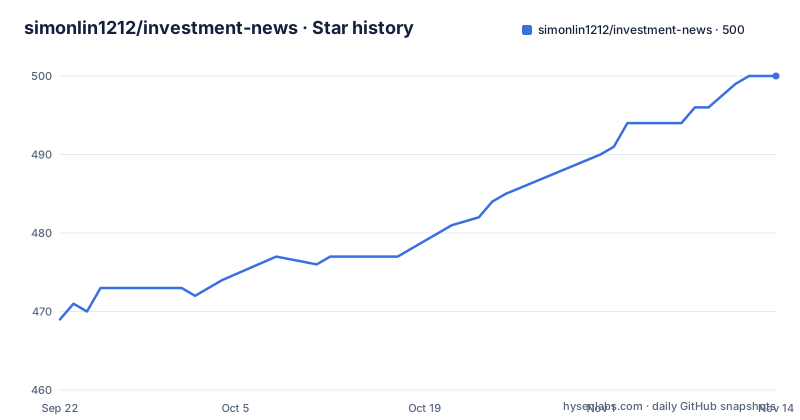
Star history
- simonlin1212/investment-news500 ★ · +31
| Repository | 2026-09-22 | 2026-11-14 |
|---|---|---|
| simonlin1212/investment-news | 469 | 500 |
31 Stars in the last 53 days, measured from the daily GitHub snapshot. Compare with other projects
Editorial analysis
The deliverable is one browser page on port 8793 with no build step
The project is explicit that its core deliverable is a browser dashboard, and that every operation ends at the same address. After starting the server you open `http://localhost:8793`, and that single page carries the sector sidebar, the daily key points, the bilingual list, and the refresh control. There is no second surface.
The quick start is four steps, of which only one is a command that does work:
git clone https://github.com/simonlin1212/investment-news.git
cd investment-news
python3 server.py
open http://localhost:8793
The fourth step is clicking the refresh control in the top-left of the page, which triggers the fetch and the summarisation and reloads the view when it finishes. No command line for the actual work.
What makes that possible is the dependency situation. The stated requirement is Python 3.7 or newer with no third-party packages at all, and the named standard library modules are urllib, json, xml.etree, http.server, and subprocess. Parsing RSS by hand and serving a page with the standard library HTTP server is old-fashioned and entirely sufficient at this scale.
The dashboard file itself is a single HTML document with zero build and zero dependencies, and it reads a generated JavaScript data file that the pipeline overwrites. The server also exposes a refresh endpoint at `/api/refresh`, which is what the button in the page calls. One caveat on the language classification: the repository lists JavaScript as its primary language, which is the inline script in that one HTML file rather than any server logic, since the pipeline is Python.
The repository also carries a `SKILL.md` and an assets directory, so the same tool is packaged for use as an agent skill.
claude-cli mode shells out to claude -p with every tool disabled
The summarisation step calls a model, and there are two ways to do that, selected by one field in a JSON config file.
The default provider is named `claude-cli` and costs nothing. In that mode the digest script invokes the local `claude` command in its print mode, using the authentication of a Claude Code subscription you have already logged into on that machine. The cost of the subscription is stated as zero for this use.
The security detail is the interesting one. The invocation disables all tools and handles text only, so the subprocess cannot read files, run shell commands, or reach the network through the agent's own capabilities. A summariser that only ever emits text is a much smaller thing to hand a shell than an agent with tools, and the configuration makes that explicit rather than leaving it to a flag you might forget.
The alternative is `api`, which accepts any OpenAI-compatible endpoint. The documented example points at DeepSeek with a base URL, a key, and a model name, and the text notes that OpenAI, SiliconFlow, and OpenRouter work the same way. That route bills per use and works from any environment, including one with no Claude subscription at all.
Both are expressed in the same file, and the config format allows comments:
{ "provider": "claude-cli" }The architecture is a single entry point in the scripts directory that normalises the two providers, so nothing downstream of it knows which one is active. That is the whole abstraction, and it is why switching is described as a single configuration item rather than a code change.
The proxy has to be exported before the server starts, not after
Most of the feeds are overseas English-language media, so the tool documents the failure mode explicitly: on a network where direct connections are poor, the fetch prints a message saying that N of the sources failed. The count in that message is 106.
There are two adjustments, and neither requires a code change. The first is a proxy, and the reason it needs no code is that urllib reads the standard environment variables natively:
export HTTPS_PROXY=http://127.0.0.1:7897
export HTTP_PROXY=http://127.0.0.1:7897
export FETCH_TIMEOUT=45
python3 server.py
The second raises the per-source timeout, which defaults to 30 seconds.
The gotcha is documented in the same section and it costs people an afternoon. When you trigger a refresh from the button in the dashboard, the work happens in a subprocess, and that subprocess inherits the environment of the shell you used to start the server. If you export the proxy after starting the server, the refresh has no proxy, and setting it in your shell profile does not help either for the same reason. The proxy has to be in the environment before `server.py` starts.
This is a consequence of a reasonable design. Keeping the pipeline in a subprocess means a hung fetch does not take the dashboard down, and inheriting the parent environment is the least surprising behaviour. It just means the configuration boundary is earlier than most people expect.
The README refuses to disable certificate verification and explains why
When many feeds fail at once with a certificate verification error, the obvious workaround is to turn verification off. The documentation says not to, and then tells you what to do instead.
The stated diagnosis is that a flood of these errors is almost always a problem with the machine's certificate chain rather than with the tool. Two specific cases are named. On macOS, a Python installed from python.org ships without the current root certificates, and running the `Install Certificates.command` that comes with the installer fixes it once. Behind a machine-in-the-middle proxy, the proxy's own root certificate has to be installed into the system trust store.
Both are one-time operations that fix the actual cause. Globally disabling verification would make the symptom go away while leaving the chain broken, and for a tool that fetches 100-plus third-party endpoints on a schedule, silently accepting any certificate is exactly the wrong trade. It is a small paragraph and it is the clearest piece of security thinking in the repository.
The same restraint shows up in the operating boundaries. The project states that it only reads public RSS feeds and interfaces, keeps request frequency low, and respects each source's terms of service. For an aggregator whose entire value is breadth of coverage, that constraint is real, since aggressive parallel fetching is the easiest way to get a feed blocked.
The data-handling claim is equally specific: everything runs on your machine, with no hosting, no upload, and no server-side component, and nothing is sent anywhere except to whichever model endpoint you configured.
The source count is stated three different ways, and adding one is a single line
The documentation cannot settle on how many sources there are. The headline says 100-plus authoritative sources. The description section says the same. The network section refers to 106 sources, and the failure message printed at the end of a fetch counts against 106. But the architecture diagram and the project structure listing both say 108 sources across 12 sectors.
So three numbers appear for one file. This is the kind of inconsistency that matters more than it looks, because a reader trying to work out how complete the coverage is has no way to tell which figure is current, and a reader trying to reproduce a failure count has no way to tell what the denominator was.
Adding a source is genuinely as cheap as the documentation claims. You append one object to the `sources` array in `sources.json`:
{ "name": "某媒体", "hint": "ai", "type": "rss", "url": "https://example.com/feed" }The `hint` field is the sector key, and there are twelve of them: ai, semi, robot, auto, energy, bio, space, security, tech, consumer, macro, and science. Those keys map onto the twelve A-share themes the project is built around, from large models and semiconductors through robotics, vehicles, energy, health, space, security, internet, consumer electronics, macro, and fundamental science.
Dead feeds are handled by a tool rather than by hand. A script in the scripts directory rebuilds and validates the source file, and its stated method is testing liveness source by source. That is the right approach for a list of this size, and it is also the answer to the count discrepancy: run the validation script and trust what it reports rather than what the prose says.
Two of the last three releases were about deduplication
The release history is short and unusually diagnostic. The three tagged versions are all 1.0.x and each one names its own problem.
The earliest of the three, 1.0.1, bundles three unrelated fixes: security hardening, Chinese Windows compatibility, and network and data fixes. The next, 1.0.2, is described as entry-level deduplication. The newest, 1.0.3, is a fix to the deduplication baseline time.
That distribution is telling. Two of the three releases are about the same underlying problem, and the second one is a bug in the first fix. The cause is structural rather than accidental. When several sectors draw on overlapping coverage, the same announcement can arrive through three feeds and land under three sector headings, and a reader comparing those bullets sees the same company announcement three times. Fixing that requires deciding which occurrence is canonical, which means comparing timestamps, which is where the 1.0.3 baseline bug came from.
It is worth reading that sequence as a warning about the output rather than about the software. Cross-source aggregation is the feature that makes the tool worth using, and deduplication is what keeps it from being noise, so the part of the pipeline most prone to subtle error is the part that decides whether two items are the same item.
The rest of the pipeline is simpler. One script fetches, filters, applies the time window, and normalises to Beijing time. Another calls the model to produce the per-sector key points, the Chinese translations, and the source links. Both write into the same data file, and the page renders it.
The repository also carries a changelog and an English README, so the project is maintained in both languages.
The filter is a keyword list and the time window defaults to seven days
The compliance filter is not a model judgement. It is a keyword list held in the source configuration alongside the time window, and it removes four categories of content automatically: gambling, prediction markets, cryptocurrency, and pornography. Politics and finance are explicitly kept, which is a deliberate choice for a tool whose stated audience tracks macro and financial signals.
A keyword filter has obvious failure modes in both directions. It will drop legitimate coverage that happens to use a flagged term, and it will pass anything the word list misses. But it is predictable, auditable, and editable in the same file as everything else, and for the stated purpose of keeping a sector board readable it is a reasonable trade against sending every headline through a model that might reformat or summarise away a disclaimer.
The time window is set by a separate field and defaults to seven days. Combined with the key-points contract, which is three to five bullets per sector, that produces the behaviour a user will notice first: a quiet sector yields a short summary rather than an empty board. That is a design choice with a cost, since a model asked to produce bullets for a sector with two stories in a week will pad or will speculate about what is missing.
The disclaimer is stated three separate times, which tells you how much the author wants it read. It appears under the description, again in the boundaries section, and inline in English as industry trends and not financial advice. The project is explicit that it presents trends and leading signals and is not market data, and that conclusions are for reference only with the consequences borne by the user.
One more detail about authorship: the README carries a note from the author looking for work in Shenzhen, Hong Kong, or remote, with a contact address. That is unusual to find in a project readme, and worth knowing before you fork one.
Editorial conclusion
investment-news fits an individual investor who reads English industry press but wants the A-share angle, and who would rather run their own summariser than hand a subscription key to a hosted service. The zero-dependency design is the practical win: a pure standard library fetch and a single-file dashboard mean nothing to keep patched. Two things to check before trusting it. The source list, which is a hand-maintained JSON file and which the documentation itself contradicts on size, so read `sources.json` rather than the headline count and expect dead feeds. And the time window, since the default is seven days and the key points are model summaries of that window rather than a ranked feed, which means a quiet sector produces a thin summary rather than an empty one. It is not market data and the README says so in three places, so treat it as a reading list to verify against primary sources rather than a signal to trade.
Frequently asked questions
What is investment-news?
It is a local dashboard for A-share investors that reads global industry feeds, maps them onto twelve sectors corresponding to A-share themes, and has your own language model distil each sector into three to five Chinese key points with a link back to the original source. The result is a single browser page served locally on port 8793.
What does investment-news need in order to run?
Python 3.7 or newer with no third-party packages at all; the pipeline uses urllib, json, xml.etree, http.server, and subprocess from the standard library. You also need one language model: either a locally logged-in Claude Code subscription or any OpenAI-compatible API key.
Can investment-news run without an API key?
Yes. The default provider is `claude-cli`, which calls the local `claude -p` using your existing Claude Code subscription at no extra cost, with all tools disabled and text only. Switching to an OpenAI-compatible endpoint is a single change in llm.config.json.
How do I reach overseas sources when the direct connection is poor?
Export HTTPS_PROXY and HTTP_PROXY, which urllib reads natively, and raise FETCH_TIMEOUT above its 30 second default. Export the proxy before starting server.py, because a refresh triggered from the dashboard runs in a subprocess that inherits the environment of the shell that started the server.
How do I add a source to investment-news?
Add one object to the `sources` array in sources.json with name, hint, type, and url. The hint is the sector key, one of ai, semi, robot, auto, energy, bio, space, security, tech, consumer, macro, or science. A separate script rebuilds and validates the file by testing liveness source by source.
Does investment-news send my data anywhere?
Fetching and presentation happen on your machine with no database, no hosting, and no upload. The only outbound calls are to the sources themselves and to whichever model endpoint you configured. The README also states it presents industry trends rather than market data and is not investment advice.
Official sources
Add this badge to your README
If you maintain this project, the badge below links readers to this analysis and shows its maintenance status from the daily GitHub snapshot. Paste the markdown into your README; add ?metric=license or ?metric=stars to the image URL for a different field.

[](https://hysenlabs.com/projects/simonlin1212-investment-news)Star history chart for your README
[](https://hysenlabs.com/projects/simonlin1212-investment-news)Was this useful?