SIPSorcery for .NET: SIP, WebRTC, RTP, and media integration
A WebRTC, SIP and VoIP library for C# and .NET. Designed for real-time communications apps.
At a glance
- What is it?
- SIPSorcery is a C# and .NET real-time communications library for developers building SIP, WebRTC, audio, and video applications. It provides protocol and signaling building blocks, while media devices and native codecs remain separate concerns.
- Who is it for?
- Adopt SIPSorcery when a .NET application needs SIP or WebRTC protocol support and you are prepared to choose a separate media backend. Do not choose it alone when you expect built-in device capture, playback, or a complete production media stack.
- Can I use it commercially?
- Check first. The repository uses a licence we do not classify automatically, so read its LICENSE file before any commercial use.
- Is it still maintained?
- Yes. The repository last received commits 1 day ago.
- What is it written in?
- Mainly C#, according to GitHub's language statistics.
Answers come from the project's GitHub data, last synced on November 7, 2026, and from our analysis. They are not legal advice.
Star history
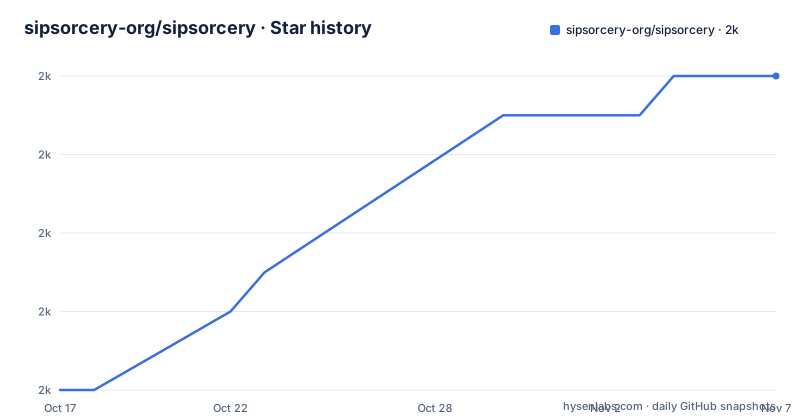
- sipsorcery-org/sipsorcery1,960 ★ · +8
| Repository | 2026-10-17 | 2026-11-07 |
|---|---|---|
| sipsorcery-org/sipsorcery | 2k | 2k |
8 Stars in the last 21 days, measured from the daily GitHub snapshot. Compare with other projects
Editorial analysis
SIPSorcery protocol coverage and intended users
SIPSorcery targets developers adding real-time communications to C# and.NET applications. Its stated scope includes VoIP and WebRTC, with support for Session Initiation Protocol (SIP), Real-time Transport Protocol (RTP), WebRTC, Interactive Connectivity Establishment (ICE), SCTP, SDP, and STUN. That makes it relevant to applications such as SIP clients, softphones, WebRTC endpoints, call-control services, and examples that connect browser or SIP peers.
The repository is organized around a main `SIPSorcery` package and separate packages for media abstractions, platform-specific device access, FFmpeg-backed media, OpenAI Realtime endpoints, and VP8. This split matters when evaluating adoption. The core package handles communications logic, but it does not by itself provide audio and video devices or native codecs. A developer can use the protocol layer without committing to a particular capture device or media implementation.
The examples cover basic calling, transfers, DTMF, registration, video streaming, data channels, signaling patterns, softphone behavior, and advanced WebRTC scenarios. The README says the repository contains 70+ example projects. These are useful references for the intended architecture, but the repository does not present them as a complete application framework or as a replacement for application-specific signaling, identity, storage, and operational design.
How SIPSorcery separates signaling, transport, and media
Based on the repository layout and README, SIPSorcery is a collection of libraries rather than one endpoint application. The core `SIPSorcery` package contains the protocol implementations and related communications types. SIP supports signaling flows such as calls, transfers, DTMF, and registration. WebRTC support sits alongside SDP, ICE, STUN, RTP, and SCTP, which are the pieces needed to negotiate and establish real-time media sessions.
Media access is intentionally separated. `SIPSorceryMedia.Abstractions` defines interfaces for encoders and device access. `SIPSorceryMedia.Windows` supplies Windows-specific audio capture and playback and video capture. `SIPSorceryMedia.FFmpeg` supplies cross-platform media support using FFmpeg and PInvoke. The repository also includes `SIPSorcery.VP8`, described as a pure C# VP8 implementation. This arrangement lets an application select a platform-specific or cross-platform media path without folding device concerns into the core protocol package.
The README also names built-in audio codecs including G711, G722, G729, and OPUS, with OPUS attributed to Concentus. It cautions that the VP8 implementation is experimental and performs poorly at 1080p and higher. The stated advantage is that the .NET VP8 port permits video streaming without native dependencies. These are different deployment trade-offs. FFmpeg can provide a cross-platform media route, Windows-specific media can simplify device integration on that operating system, and VP8 can reduce native dependencies while imposing an explicit quality and performance caveat.
SIPSorcery installation and first-use path
The README identifies NuGet as the distribution point for the packages. The documented starting points are the package pages and the example directories.
For a first use, choose the package boundary that matches the application. An application needing only the core SIP, WebRTC, RTP, ICE, STUN, or SDP functionality would inspect the `SIPSorcery` NuGet package. An application that also captures or plays audio and video on Windows would inspect `SIPSorceryMedia.Windows`. A cross-platform media implementation would inspect `SIPSorceryMedia.FFmpeg`, while a pure C# VP8 route would inspect `SIPSorcery.VP8` and account for the README's 1080p warning.
The repository's `examples/` directory contains separate collections for SIP, WebRTC, SIP scenarios, WebRTC scenarios, a softphone, OpenAI, and other examples. The relevant first-use reference should therefore be selected by scenario rather than by copying an unrelated sample. The README does not document a single universal setup procedure, signaling server configuration, or production deployment sequence.
Media backends and deployment trade-offs
The clearest architectural decision in SIPSorcery is the boundary between protocol handling and media. The core library does not expose audio and video devices or native codecs. That boundary avoids forcing every application into one operating system or codec stack, but it also means the application team must assemble the media side.
`SIPSorceryMedia.Windows` is the documented choice for Windows-specific audio capture and playback and video capture. `SIPSorceryMedia.FFmpeg` is the documented cross-platform option and relies on FFmpeg through PInvoke. This can suit deployments that need a common media approach across runtimes, although the README does not claim that every codec, device, or platform combination has identical behavior. The application still needs to account for the native dependency and the runtime environment.
`SIPSorcery.VP8` offers a different constraint. A pure C# implementation can remove native dependencies for VP8 video streaming, but the README labels it experimental and warns about poor performance at 1080p and greater. It should not be treated as a general high-resolution video answer without independent evaluation. The project documentation supports choosing among these packages, but it does not provide comparative performance data or a universal recommendation for every application.
Operational boundaries and missing production guidance
SIPSorcery is a protocol and media integration library, not a complete hosted communications service. The README focuses on package composition, protocol support, examples, and media dependencies. It does not document a bundled SIP registrar, STUN or TURN deployment, production signaling service, database schema, user management, billing, observability, retry policy, or rollback procedure. Those concerns may still be required by a real application, but their absence from the README is a concrete adoption constraint.
WebRTC also requires application-specific signaling. The repository lists signaling patterns among its examples, but it does not state that one signaling server is included in the core package. A browser-based deployment therefore needs a way to exchange the required session information outside the library. The README does not specify a default signaling port, authentication model, or production configuration.
The absence of GitHub releases is another maintenance consideration. The repository is not archived, and its last push was on 2026-10-08, which is recent relative to the repository state described here. However, there is no documented release cadence in the README. Consumers should inspect package versions, repository history, and compatibility notes for the exact dependency they intend to ship rather than treating the lack of GitHub releases as a published support policy.
SIPSorcery licensing and upgrade considerations
The repository does not use a license that GitHub can classify as a standard category. Its README describes the main license as BSD 3-Clause with an explicit prohibition on use by entities contributing to Israeli occupation or genocide. The full text is in the repository's `LICENSE` file. This is a project-specific restriction that should be reviewed directly, especially for organizations with broad ownership, customers, or distribution arrangements. This article is not legal advice.
Media licensing differs by component. `SIPSorceryMedia.FFmpeg` is licensed separately under GNU LGPL v2.1, and its license file is located under that library's source directory. The VP8 package and examples may also have separate licensing files visible in the repository layout. A dependency review therefore needs to cover the core package, the selected media package, native FFmpeg components where applicable, and the example or application code being redistributed.
Upgrades require attention to package boundaries and target runtime. The repository contains solution filters for the core library, OpenAI Realtime, VP8, media abstractions, FFmpeg, and Windows media. That organization helps engineers scope changes, but the README does not define a formal upgrade schedule. Because there are no GitHub releases, package consumers should check the relevant NuGet version and commit history before changing production dependencies.
Editorial conclusion
Adopt SIPSorcery when a .NET application needs SIP or WebRTC protocol support and you are prepared to choose a separate media backend. Do not choose it alone when you expect built-in device capture, playback, or a complete production media stack. Verify the applicable NuGet package, target runtime, media dependency, codec requirements, and license restrictions before implementation.
Frequently asked questions
What is SIPSorcery used for?
SIPSorcery is used to add VoIP and WebRTC capabilities to C# and .NET applications. The README lists SIP, RTP, WebRTC, ICE, SCTP, SDP, and STUN support.
Does the SIPSorcery core package include audio and video device access?
No. The README states that the main `SIPSorcery` library does not provide audio and video devices or native codecs. Device access and media implementations are supplied through separate packages.
Which SIPSorcery package supports cross-platform media?
The README identifies `SIPSorceryMedia.FFmpeg` as the cross-platform media package. It uses FFmpeg and PInvoke for media support.
Official sources
Add this badge to your README
If you maintain this project, the badge below links readers to this analysis and shows its maintenance status from the daily GitHub snapshot. Paste the markdown into your README; add ?metric=license or ?metric=stars to the image URL for a different field.

[](https://hysenlabs.com/projects/sipsorcery-org-sipsorcery)Star history chart for your README
[](https://hysenlabs.com/projects/sipsorcery-org-sipsorcery)Was this useful?