weixin-ClawBot-API: a personal WeChat account driven by an AI model
A WeChat personal-account bot built on Tencent's official tencent-weixin/openclaw-weixin, supporting integration with any AI model for automated WeChat conversations, with no need to deploy or log into openclaw to connect and call it directly.
At a glance
- What is it?
- weixin-ClawBot-API is a small Python client that calls Tencent's OpenClaw Weixin interface directly, so a personal WeChat account can log in by QR code and answer text messages from DeepSeek or DusAPI without deploying OpenClaw itself. It is a reference implementation rather than a product: three chat commands, a text-only pipeline, and a protocol document that records what the client was aligned against.
- Who is it for?
- This repository is worth reading if you want to see how Tencent's bot interface is actually called, because the protocol document and the login and message sequences are written out at the level of endpoint paths, header names and return codes rather than summarised, and the client is small enough to read in one sitting.
- Can I use it commercially?
- Not without permission. GitHub finds no licence file in the repository, and without a licence all rights are reserved by default: you may read the code but not reuse it. Check the README, or ask the authors, before using it.
- Is it still maintained?
- Yes. The repository last received commits 49 days ago.
- What is it written in?
- Mainly Python, according to GitHub's language statistics.
Answers come from the project's GitHub data, last synced on October 23, 2026, and from our analysis. They are not legal advice.
Star history
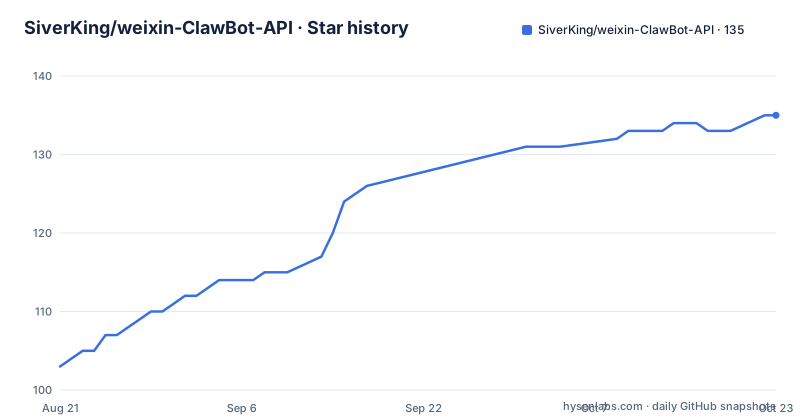
- SiverKing/weixin-ClawBot-API135 ★ · +32
| Repository | 2026-08-21 | 2026-10-23 |
|---|---|---|
| SiverKing/weixin-ClawBot-API | 103 | 135 |
32 Stars in the last 63 days, measured from the daily GitHub snapshot. Compare with other projects
Editorial analysis
It calls the interface directly, so OpenClaw is not deployed
The project's pitch is a subtraction. Instead of standing up OpenClaw and logging a bot account into it, this client speaks to Tencent's OpenClaw Weixin interface, referred to as the iLink Bot interface, over HTTP directly. That is the whole architectural claim, and it is why the file list is three Python modules rather than a service. The whole setup is two commands:
pip install -r requirements.txt
python bot.py
The dependencies behind that are three, `aiohttp` at 3.9.0 or newer, `requests` at 2.31.0 or newer, and `qrcode[pil]` at 7.4.2 or newer, with `pyinstaller` at 6.0.0 or newer listed as optional and needed only when building an executable. The consequence is that you run one process on your own machine, scan a QR code with the WeChat app on your phone, and the account becomes reachable as a bot. The documentation also names its alignment target: the running code matches the public HTTP behaviour of OpenClaw Weixin 2.4.6, with protocol details and version differences recorded in a separate document in the repository. That pairing is the honest way to treat an unofficial client, since a version number is the thing that tells you whether a recorded behaviour is still true.
The login is a QR code, a long poll and a possible pairing code
The login sequence is the part most worth reading, because it is where unofficial clients usually get vague. A fixed endpoint issues the QR code, the client polls for scan status, and that status moves through a small set of named states: waiting, scanned, needing a verification code, scanned but redirected, and confirmed. A pairing code typed into the terminal is one of those states rather than a separate flow, so the user experience is scan, then type a number if the phone asks. Redirects are handled explicitly: the QR code request always goes to one fixed host, and only after a `scaned_but_redirect` status does the client switch to whatever node the server returned. The redirect state is also where an existing local token gets reused, which is why a second login can complete without a fresh scan. On success the client stores the bot token, a base URL and the account identifier, and persists them per account so a normal restart comes back up already connected.
Every request carries an ilink bot token and a client version
The request headers are specified, which is unusual for a client project and is the most useful thing in the repository. After login, each POST carries a JSON content type, an `AuthorizationType` of `ilink_bot_token`, an `X-WECHAT-UIN` value built from a random 32-bit number encoded as base64, an `iLink-App-Id` of `bot`, a fixed `iLink-App-ClientVersion` number, and a bearer token. Content length is left to the HTTP client rather than set by hand. Every request body also carries a `base_info` object naming the channel version and a bot agent string that identifies this project and its language, so the server can tell what is calling it. The QR code status request is the exception: it sends only the public application headers, with no bearer token, because there is not one yet.
HTTP 200 is not delivery, and the client checks anyway
The message path is documented as an ordered sequence, and the ordering is the specification. The client posts to the update endpoint carrying the last successful cursor, validates both the transport and the JSON and the business return code, saves the new cursor, and adjusts the next long poll using a timeout value the server supplies. It then fetches configuration, posts a typing indicator with an active status, calls the model, sends the message, and clears the typing indicator in a finally block so a failure mid-sequence still tidies up. Three details in that sequence are the ones that matter in practice. The context token on a send has to be the token from the current inbound message. The client identifier must be unique on every send. And a 200 response does not mean the message was delivered, so the return code in the JSON body has to be checked as well as the HTTP status.
An invalid token is code -14 and it is handled, not retried
Error handling is where this client is more careful than most examples, and the specific case it handles is an expired session. The client validates the HTTP status, the JSON structure and the return fields, and it recognises the value `-14` as an invalid token. On seeing that, it stops polling tightly and goes back through the QR code login, which is the correct response rather than retrying a request that cannot succeed. The same controlled path is used when a reconnect is requested manually. Shutdown is handled in the same spirit: the long poll and the reconnect task are cancelled first, and only then is a best-effort notification stop call made with its own short timeout, so a hung connection cannot stop the process from exiting. The state file that survives all this is written per account, which is what makes a restart cheap.
Reconnect timing is a client guess, and the docs say so
A block of tunables at the top of the main module controls the client's own scheduling, and the documentation is explicit that these are client-side parameters rather than a server-guaranteed token lifetime. The session window defaults to 24 hours of seconds, the warning fires two hours ahead, a reminder repeats every thirty minutes after the user declines, a forced reconnect triggers when less than half an hour remains, and the overall QR scan wait is capped at eight minutes. Read as a set, they describe a policy of warn early, remind politely, then act. What they are not is knowledge of how long Tencent's token actually lasts, and the code only treats the server's `-14` as authoritative. The project also warns that the WeChat service may rate limit, filter content, or change the interface, and asks production deployments to add monitoring and a manual re-login plan, which is a reasonable ask given everything above.
Three commands, text only, and media deliberately refused
The command surface is three entries. A help command lists what is available, a time command reports how long the current connection has left, and a reconnect command asks for immediate reconnection and then waits for a yes or no from the user before proceeding. Anything that is not one of those commands is forwarded to the model, and the model reply goes back as a normal message. The media handling is the part with an explicit boundary: images, files, and voice messages without a provided text transcript currently receive a capability notice instead of being sent to the model, and the project states that this is deliberate so they are not mistakenly passed on. The underlying reason is technical rather than cautious, since media would require implementing AES-128-ECB encryption and CDN upload and download. Two more files matter for setup: a configuration file that is generated on first run and must not be committed, and a state file generated at first login holding sensitive connection state, also not to be committed.
Editorial conclusion
This repository is worth reading if you want to see how Tencent's bot interface is actually called, because the protocol document and the login and message sequences are written out at the level of endpoint paths, header names and return codes rather than summarised, and the client is small enough to read in one sitting. It is not a bot platform: the feature set is three commands, the media path is unimplemented, and the connection schedule is a client-side guess rather than a promise from the server. Two things to check before running it against a real account. The text that reaches the model is whatever arrives in a private text chat, so the privacy and consent implications are yours to handle, and the project's own notes say the WeChat service may rate limit, filter content or change the interface, which means you need monitoring and a manual re-login plan. The last push was on 2026-09-04.
Frequently asked questions
What is weixin-ClawBot-API and what does it do?
It is a Python client that calls Tencent's OpenClaw Weixin, or iLink Bot, interface directly so a personal WeChat account can be logged in by QR code without deploying OpenClaw. Text messages received are passed to DusAPI or DeepSeek and the reply is sent back.
How do I run the weixin-ClawBot-API client?
Install the dependencies with pip install -r requirements.txt and start it with python bot.py. On first run you choose an AI provider and enter an API key, base URL, model and system prompt, then scan the QR code shown in the terminal with WeChat on your phone, entering a pairing code if asked.
Which AI providers does weixin-ClawBot-API support?
Two, DusAPI and DeepSeek, each with its own wrapper module, default base URL and default model. The DusAPI entry defaults to https://api.dusapi.com with model gpt-5, and DeepSeek defaults to https://api.deepseek.com with model deepseek-v4-flash. The configuration file supports both, and older flat configurations are migrated automatically.
What bot commands does weixin-ClawBot-API support?
Three: a help command that lists the commands, a time command that reports the remaining time on the current connection, and a reconnect command that requests an immediate reconnection and then waits for a yes or no reply. Any other text is forwarded to the AI provider.
Can weixin-ClawBot-API handle images and voice messages?
Not yet. Images, files, and voice messages without a provided text transcript receive a capability notice rather than being sent to the model, deliberately so they are not passed on by mistake. Supporting media would require implementing AES-128-ECB encryption and CDN upload and download.
What does an expired token look like in the weixin-ClawBot-API protocol?
The server returns a return code or errcode of -14, which the client treats as an invalid token. It stops polling tightly and goes back through QR code login instead of retrying. The connection timing values in RECONNECT_CONFIG are client-side scheduling parameters, not a server-guaranteed token lifetime.
Official sources
Add this badge to your README
If you maintain this project, the badge below links readers to this analysis and shows its maintenance status from the daily GitHub snapshot. Paste the markdown into your README; add ?metric=license or ?metric=stars to the image URL for a different field.

[](https://hysenlabs.com/projects/siverking-weixin-clawbot-api)Star history chart for your README
[](https://hysenlabs.com/projects/siverking-weixin-clawbot-api)Was this useful?