A split licence, three git add-ons before you build, and PowerShell CI
A modern, cross-platform, 2D Graphics library for .NET
At a glance
- What is it?
- ImageSharp is a fully managed, cross-platform 2D graphics and image processing library for .NET 8, aimed at device, cloud and embedded workloads. It is licensed under the Six Labors Split License rather than an OSI licence, its clone instructions ask for a blame ignore setting, Git LFS and submodules, and its three CI entry points at the repository root are PowerShell scripts.
- Who is it for?
- Take ImageSharp when you need image processing in .NET without native interop, you are on .NET 8 or later, and you have read the split licence and decided it suits you. Leave it when your organisation requires an OSI approved licence or a dependency entry that resolves to a known identifier, because no SPDX identifier is recorded for the repository and the terms live in a LICENSE file the README does not summarise.
- Can I use it commercially?
- Check first. The repository uses a licence we do not classify automatically, so read its LICENSE file before any commercial use.
- Is it still maintained?
- Yes. The repository last received commits 1 day ago.
- What is it written in?
- Mainly C#, according to GitHub's language statistics.
Answers come from the project's GitHub data, last synced on November 14, 2026, and from our analysis. They are not legal advice.
Star history
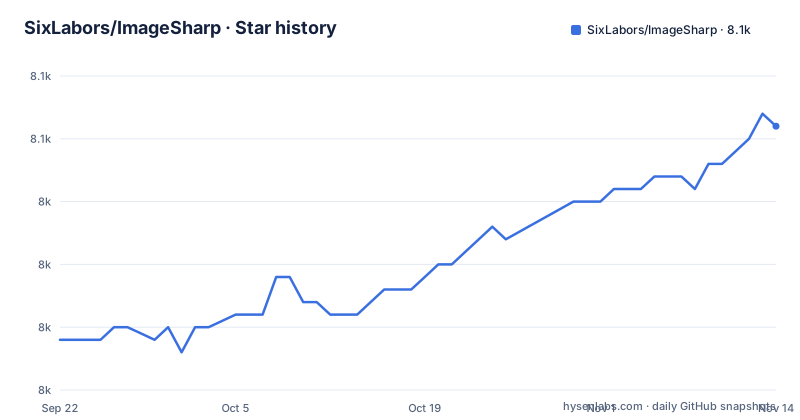
- SixLabors/ImageSharp8,051 ★ · +17
| Repository | 2026-09-22 | 2026-11-14 |
|---|---|---|
| SixLabors/ImageSharp | 8k | 8.1k |
17 Stars in the last 53 days, measured from the daily GitHub snapshot. Compare with other projects
Editorial analysis
The licence is a split licence, and the README quotes none of it
ImageSharp is licensed under the Six Labors Split License, Version 1.0. That sentence is the entire licence discussion on the landing page, followed by a link to the LICENSE file in the repository.
There is no summary of what the split allows, no statement about commercial thresholds, and no OSI identifier anywhere in the file. The README instead routes money three ways: purchase a commercial licence, become a sponsor through GitHub Sponsors, or become a sponsor through Open Collective.
For a reader making a decision, that is the whole picture and it is thin. The terms are a document you have to go and read, and the project's own framing is that paid use is a supported path rather than a fallback. If your process needs to resolve an approved licence identifier from a dependency list, the package metadata is where to look, because the repository itself does not give tools anything to match on.
Everything else about the governance is normal and worth noting for the other direction: there is a CODE_OF_CONDUCT.md following the Contributor Covenant and pointing at the .NET Foundation code of conduct, a SECURITY.md, and a contribution guide that is asked to be read before an issue or a pull request.
The prose says MyGet, the table says Feedz.io
Installation is one sentence plus a two column table. Stable releases come from NuGet, and development releases are said to be available via MyGet. The table then labels its second column Nightly (Feedz.io) and points at a Feedz index:
https://f.feedz.io/sixlabors/sixlabors/nuget/index.jsonSo the sentence and the table disagree about the feed host. Anyone who reads the prose and configures MyGet will not find what the project actually publishes, and anyone who trusts the table will be fine.
The package id is a single row in the same table:
SixLabors.ImageSharpOne package, one stable feed and one nightly feed. The README does not give an installation command, so the NuGet package page is where the actual instruction lives. For running code, the project points at two other places: the API documentation at sixlabors.github.io/docs, which also carries conceptual documentation, and a separate samples repository with buildable examples for common activities.
That samples repository is the more useful of the two for a first hour, because the landing page itself describes the library in prose and nothing else.
The clone needs submodules, Git LFS and a blame ignore file
The manual build section starts with one command:
git clone https://github.com/SixLabors/ImageSharpand then lists three further setup steps, plus a Windows-only one. The first is a configuration setting, given as its own step, so that blame ignores the mass reformatting commits the project has run:
git config blame.ignoreRevsFile .git-blame-ignore-revsThe second is Git Large File Storage, which the repository uses and which you are pointed at the GitHub instructions for. The third is submodules:
git submodule update --init --recursiveThat is three separate requirements for what looks like one clone, and the consequences differ. Miss the LFS setup and images in the tree are pointers rather than content. Miss the submodule step and a dependency directory is empty. Miss the blame setting and nothing breaks, you just get unusable blame output on files that were reformatted wholesale.
The file backing the first one is real, .git-blame-ignore-revs is in the top level entries alongside .gitattributes and .gitignore, so the reformatting history is preserved rather than squashed. Contributors who care about reviewing diffs will notice that first, long before they notice the submodule.
core.longpaths is Windows-only, so the setup instructions fork by platform
One step in the manual build section is explicitly platform specific. On Windows you are told to enable long file paths in git, running as Administrator:
git config --system core.longpaths trueThat is a system-level git setting, not a repository one, and it changes git's behaviour for every repository on the machine. Which tells you something about the repository: paths inside it get long enough that the default Windows limit is a problem, and the project has hit that limit rather than theorised about it.
The rest of the toolchain is offered two ways. The first is Visual Studio 2022 with the latest version installed and the .NET 8 SDK alongside it. The second is Visual Studio Code with the C# extension and .NET Core, and that route is explicitly said to work on both Linux or Unix and Windows.
So the contributor story is a Windows-first IDE path with a cross-platform alternative, and the only genuinely Windows-only step is the long paths setting. If you are on Linux or macOS you can skip that line and keep everything else.
Fully managed, cross-platform, built against .NET 8
The positioning sentence calls ImageSharp a high-performance, fully managed, cross-platform 2D graphics API. The next paragraph expands it into a mature, fully featured image processing and graphics library for .NET, built for workloads across device, cloud and embedded or IoT scenarios.
Two phrases in there carry weight. Fully managed means there is no native image library underneath, which is the reason the cross-platform claim is credible on .NET rather than aspirational. And the workload list is unusually broad for an imaging library: device, cloud, and embedded or IoT is three very different memory and CPU budgets in one sentence, and the same binary is meant to cover all three.
The design goal stated alongside is a balance between performance, portability and ease of use, with an approachable API for common tasks plus low-level building blocks for extending the library for specialised workflows. That two-level surface is the design decision a consumer feels first: there is a comfortable path for resizing and cropping, and a floor you can drop to when the comfortable path is not enough.
The README says it is built against .NET 8.
Build, pack and test all go through PowerShell scripts
The three CI entry points at the repository root are named for what they do: ci-build.ps1, ci-pack.ps1 and ci-test.ps1. They are PowerShell, which sits oddly next to a README that invites contributors to work from a command line on Linux or Unix as well as Windows.
PowerShell Core runs on those platforms, so this is not a wall, but it does mean the build path a contributor reproduces locally is not the path a shell-native tool expects. If you are scripting CI around this repository on a Linux runner, pwsh has to be present, and the arguments in the scripts are the reference.
Around those three files the rest of the build scaffolding is visible in the top level entries: a global.json which pins the SDK, Directory.Build.props and Directory.Build.targets which apply across every project, SixLabors.ImageSharp.props for the package's own properties, codecov.yml for coverage reporting, .runsettings for the test runner, .editorconfig for formatting, and ImageSharp.slnx as the solution file.
That .slnx extension is worth noticing. It is the newer solution format rather than a classic .sln, so an older IDE or a tool that has not been updated will not open the solution directly.
AGENTS.md, CLAUDE.md and GEMINI.md share the root with SECURITY.md
The repository has three files at its top level whose names are instructions for automated tooling rather than documentation for people: AGENTS.md, CLAUDE.md and GEMINI.md. They sit next to CODE_OF_CONDUCT.md, SECURITY.md, THIRD-PARTY-NOTICES.TXT and a shared-infrastructure directory.
Three instruction files for three different assistants is either a deliberate compatibility gesture or a slow migration, and the repository does not say which. What it does say is how to contribute: spread the word, contribute algorithms, submit performance improvements, add unit tests, with the stated view that no input is too little. The contribution guide is to be read before opening a pull request, and a wiki page called Useful-tools-and-links is offered for the tooling and the format specifications.
Questions are not issues. The Q and A category on the Discussions forum is where questions go, with an explicit instruction not to open issues for questions, and feature ideas have their own ideas category.
The people section names five maintainers, and the footer carries a note thanking JetBrains for supporting them with open-source IDE licences. The newest releases are v4.1.3 and v3.2.0, both from 2026-10-09, and v4.1.2 from 2026-09-14, and the last push to the default branch, main, was on 2026-11-02.
Editorial conclusion
Take ImageSharp when you need image processing in .NET without native interop, you are on .NET 8 or later, and you have read the split licence and decided it suits you. Leave it when your organisation requires an OSI approved licence or a dependency entry that resolves to a known identifier, because no SPDX identifier is recorded for the repository and the terms live in a LICENSE file the README does not summarise. Verify three things before you commit. Read LICENSE, because the README only names the Six Labors Split License Version 1.0 and links a paid commercial licence without repeating a single clause. Then clone properly, running git submodule update --init --recursive and installing Git LFS, because a shallow copy without them will not build. And if you intend to contribute from Linux or macOS, look at ci-build.ps1, ci-pack.ps1 and ci-test.ps1 in the root first, because PowerShell is the only entry point the repository offers for build, pack and test.
Frequently asked questions
Is Sixlabors ImageSharp free?
It is licensed under the Six Labors Split License, Version 1.0, and the project sells a separate commercial licence. It also asks for sponsorship through GitHub Sponsors or Open Collective. The README does not summarise what the split licence allows, it links the LICENSE file.
what is sixlabors imagesharp
A high-performance, fully managed, cross-platform 2D graphics API and image processing library for .NET, built against .NET 8 and aimed at device, cloud and embedded or IoT workloads. The API covers common image processing tasks and also exposes low-level building blocks for extending the library for specialised workflows.
is imagesharp free for commercial use
That turns on the split licence terms, which live in the LICENSE file and are not reproduced in the README. What the README does say is that ImageSharp is licensed under the Six Labors Split License, Version 1.0, and that a commercial licence can be purchased from Six Labors at sixlabors.com/pricing.
is imagesharp open source
The repository is public and carries LICENSE, CODE_OF_CONDUCT.md and SECURITY.md at its root, but the licence is the Six Labors Split License, Version 1.0 rather than a named OSI licence, and no licence identifier is recorded for the repository. The README links the terms instead of restating them.
imagesharp vs magick net
The README never names Magick.NET or ImageMagick and offers no comparison. What it describes is a fully managed, cross-platform 2D graphics API built against .NET 8 for device, cloud and embedded workloads, with the API documentation at sixlabors.github.io/docs and a separate samples repository of buildable examples.
imagesharp vs system drawing
System.Drawing is not named in the README and no comparison is offered. The only characterisation given is that ImageSharp is fully managed and cross-platform, built against .NET 8, with the design goal of balancing performance, portability and ease of use.
Official sources
Add this badge to your README
If you maintain this project, the badge below links readers to this analysis and shows its maintenance status from the daily GitHub snapshot. Paste the markdown into your README; add ?metric=license or ?metric=stars to the image URL for a different field.

[](https://hysenlabs.com/projects/sixlabors-imagesharp)Star history chart for your README
[](https://hysenlabs.com/projects/sixlabors-imagesharp)Was this useful?