ALS-Refactored: C++ locomotion architecture for Unreal Engine
Completely reworked and improved C++ version of Advanced Locomotion System V4.
At a glance
- What is it?
- ALS-Refactored is an MIT-licensed Unreal Engine plugin that reorganizes Advanced Locomotion System V4 around C++, animation blueprints, gameplay tags, Control Rig, and multiplayer-aware movement logic. It suits teams replacing or evaluating a monolithic character animation setup, but its Windows-first support and version-specific releases require careful adoption planning.
- Who is it for?
- ALS-Refactored is appropriate for developers who want a C++-oriented locomotion foundation for Unreal Engine 5 and accept a Windows-first, release-aligned integration process. It is a poor fit for projects that require documented support on other operating systems, need an older Unreal Engine without a matching release, or expect a small drop-in animation preset.
- Can I use it commercially?
- Yes. MIT is a permissive licence: you can use, modify and sell software built on it, as long as you keep its copyright and licence notices.
- Is it still maintained?
- Yes. The repository last received commits 87 days ago.
- What is it written in?
- Mainly C++, according to GitHub's language statistics.
Answers come from the project's GitHub data, last synced on November 7, 2026, and from our analysis. They are not legal advice.
Star history
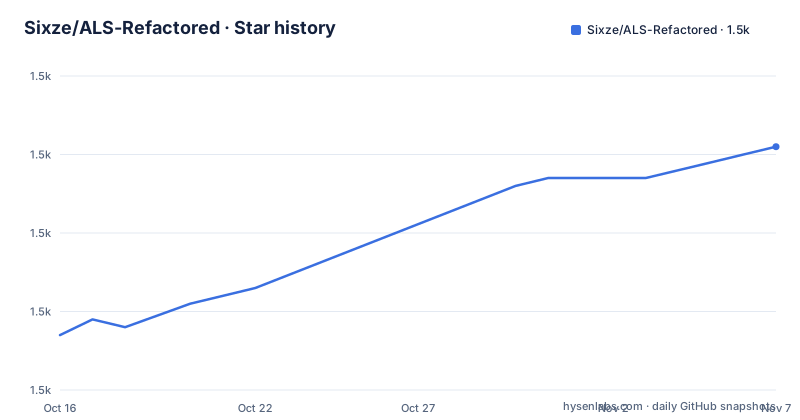
- Sixze/ALS-Refactored1,531 ★ · +24
| Repository | 2026-10-16 | 2026-11-07 |
|---|---|---|
| Sixze/ALS-Refactored | 1.5k | 1.5k |
24 Stars in the last 22 days, measured from the daily GitHub snapshot. Compare with other projects
Editorial analysis
Why ALS-Refactored replaces a monolithic locomotion setup
ALS-Refactored targets developers building animated third-person characters in Unreal Engine, particularly projects where locomotion logic, animation organization, and multiplayer synchronization are tightly connected. The project describes itself as a complete C++ rework of Advanced Locomotion System V4. Its purpose is broader than supplying a collection of walk and run animations. It changes how animation assets, movement components, camera behavior, overlays, and gameplay states fit together.
The clearest architectural change is the separation of plugin content into `ALS`, `ALSCamera`, and `ALSExtras`. This gives each area a defined boundary. Core character content remains in `ALS`, camera material has its own category, and optional material can live in `ALSExtras`. That structure can reduce accidental coupling during project work, although adopting it still requires importing and integrating the plugin rather than replacing a few animation assets.
ALS-Refactored also replaces the earlier single animation blueprint approach with multiple linked animation blueprints. Each linked blueprint can own a narrower animation concern, while animation layer interfaces select overlay states at runtime. The result is less reliance on direct references between distant animation assets. This matters for projects that add aiming, weapon, interaction, or equipment states, because overlays can be selected through the interface rather than wired directly into every relevant blueprint.
The target audience is therefore larger than someone looking for prebuilt locomotion animations. It is aimed at programmers and technical artists who want to inspect, modify, and extend the movement stack in C++ while retaining Unreal Engine animation workflows.
C++, animation layers, Control Rig, and MetaSounds
The plugin combines several Unreal Engine systems rather than placing all behavior in one character class or animation graph. Movement logic is handled through reworked C++ components, including `UAlsCharacterMovementComponent`, while animation state is distributed across linked animation blueprints and animation layer interfaces. Gameplay tags replace C++ enum types such as `EAlsOverlayMode`, so new overlay entries can be represented without modifying a C++ enum.
Bone manipulation moves to Unreal Engine's Control Rig plugin. The README also says the number of required virtual bones was reduced, and the plugin can disable IK bones when custom animations do not animate them. Virtual bones can then be used for bone manipulation in that configuration. This is useful for custom character assets, but it makes skeleton setup a real integration task rather than an automatic consequence of enabling the plugin.
A skeleton asset action is available through `Scripted Asset Actions` as `Setup Als Skeleton`. According to the README, it prepares animation curves, slots, virtual bones, and other skeleton elements. Foot sync markers can also be generated with `B_Als_AnimationModifier_FootSyncMarkers`. These utilities point to an asset-preparation workflow that should occur before character animation is evaluated.
Animation customization includes `Blend Curves`, `Blend Poses by Gameplay Tag`, and `Slot` overlay curves. `Blend Curves` avoids relying on the `VB curves` virtual bone, while `Blend Poses by Gameplay Tag` offers a gameplay-tag alternative to enum-based pose blending. The README also identifies MetaSounds and Enhanced Input as dependencies in the plugin design. Together, these choices support runtime state changes without requiring every new pose category to be represented as a C++ enum.
Multiplayer movement, foot locking, and mantling
Networked character movement is a central design concern in ALS-Refactored. The README states that `UAlsCharacterMovementComponent` was reworked to improve network synchronization, and it separately identifies mantling as a root motion source so movement synchronization can be handled more directly. These are architectural choices rather than evidence of measured multiplayer performance. No benchmark results or test conditions are documented in the project documentation.
Foot locking was also reworked for performance and reliability, particularly in multiplayer contexts. A locomotion system has to keep animation feet aligned with ground contact while movement state changes underneath it. ALS-Refactored also changed foot and pelvis offset logic for stairs and sloped surfaces. Direction-dependent movement speed is supported, adding another locomotion dimension that custom animation assets must represent correctly.
Threading is part of the implementation. The README says thread-safe animation instance logic was moved to the worker thread to reduce work on the game thread. It also lists Push Model and Iris replication support. These choices are relevant when reviewing an existing character architecture, but they do not remove the need to inspect replication settings, animation assets, and game-specific movement rules in the target project.
The multiplayer claims should therefore be treated as design descriptions from the project documentation. Before accepting the plugin for a cooperative or competitive game, developers would need to review relevant issues and validate their own character configuration. The README does not provide measured latency, packet-loss behavior, replication test results, or a list of tested multiplayer scenarios.
Camera integration and runtime debugging in ALS-Refactored
The camera is implemented as a component modeled on Unreal Engine's standard camera component. The README states that ALS-Refactored does not require custom `APlayerCameraManager` or `APlayerController` classes. This is a significant integration difference for projects whose existing camera code was built around those custom classes. Adoption may require reconciling the plugin camera component with the project's controller, camera blending, and player setup rather than adding an isolated camera asset.
Debug access is exposed through keyboard shortcuts using `Shift + [1-8]` and console commands. One documented command is `ShowDebug ALS.Curves`. The README does not provide a complete command reference or describe every debug view, so only the documented shortcut and command should be treated as confirmed entry points.
The plugin also supports Large World Coordinates and has optional Update Rate Optimization support, although Update Rate Optimization is disabled by default. These options can affect project configuration, but the README does not state which classes or assets must be edited. That omission is important for engineers evaluating upgrade effort. A project can support a feature without requiring every project to enable it immediately.
Debug tools and optional optimization settings are useful during integration because they expose curves and runtime behavior. They do not substitute for project-specific validation, especially when the plugin is combined with custom skeletons, montages, camera rules, or replicated gameplay.
Installing ALS-Refactored and preparing the first project
The documented installation process has three steps. First, clone the repository into the project's `Plugins` folder, or download the latest release and extract it there. Second, recompile the Unreal Engine project. The README does not provide an exact clone command, archive filename, package manager command, or additional configuration step, so adding such a command would risk inventing installation behavior.
Choose the plugin release before copying it. The compatibility table maps plugin 4.17 to Unreal Engine 5.7, 4.16 to Unreal Engine 5.6, 4.15 to Unreal Engine 5.5, 4.14 to Unreal Engine 5.4, 4.13 to Unreal Engine 5.3, 4.12 to Unreal Engine 5.2, 4.11 to Unreal Engine 5.1, and 4.10 through 4.9 to Unreal Engine 5.0. Releases 4.8 and below correspond to Unreal Engine 4.26, 4.27, and 5.0 Early Access. The README does not say that a branch or release should be selected automatically.
After recompilation, the first concrete asset step is to use the skeleton action `Setup Als Skeleton`. The documented route is to right-click the skeleton asset, open `Scripted Asset Actions`, and select that action. This prepares items including animation curves, slots, and virtual bones. The README does not document the subsequent character setup sequence, so there is no confirmed drag-and-drop or Blueprint procedure to add.
The repository includes `ALS.uplugin`, `Source`, `Content`, `Config`, and `BuildPlugin.bat`. Based on the repository layout, the project is distributed as an Unreal Engine plugin rather than as a standalone C++ library or command-line application. Platform choice matters because development and testing are primarily on Windows.
Where ALS-Refactored is expensive to adopt
The largest adoption cost is architectural integration. Existing projects may already have a player controller, camera component, character class, movement component, animation hierarchy, input setup, and replication rules. ALS-Refactored changes several of those boundaries at once. Its camera design, C++ movement component, linked animation blueprints, Control Rig tasks, gameplay-tag overlays, and MetaSounds usage can all touch code and assets outside a single plugin import.
Version coupling is another constraint. Each listed plugin release is tied to particular Unreal Engine versions, so upgrading one side may require selecting a different ALS-Refactored release and reviewing its changes. The repository's release history includes 4.17, 4.16, and 4.15, with dates of 2026-06-01, 2025-09-24, and 2024-11-24 respectively. The last push was on 2026-08-12. The repository is not archived, but the README does not document a long-term compatibility policy between every Unreal Engine update and every plugin release.
The documentation is also incomplete for operational decisions. It links to GitHub issues and discussions but does not enumerate known defect entries, supported console platforms, required compiler settings, or a rollback procedure. It also states that primary development and testing occur on Windows and warns against relying on other platforms without independent verification. A project whose deployment target includes macOS, Linux, or consoles cannot infer support from the repository's topic labels or plugin structure.
Finally, custom animation assets may not fit the assumptions behind foot locking, IK bones, virtual bones, slots, and curves. The plugin can operate with IK bones disabled, but that is an explicit alternative configuration rather than proof that every skeleton will work without preparation.
Comparison with the original ALS V4 and a monolithic animation approach
ALS-Refactored presents itself as a complete rework of Advanced Locomotion System V4, but the README does not provide a feature-by-feature compatibility table for the original product. That omission matters for teams already using ALS V4. They cannot assume asset compatibility, class compatibility, or upgrade behavior from this repository description alone.
The practical alternative is an animation organization built around one monolithic animation blueprint with direct references to overlay states. ALS-Refactored instead divides animation work across linked blueprints, introduces animation layer interfaces, and uses gameplay tags for overlay selection. This adds an integration structure, but it also gives each animation concern a clearer location and lets new overlay states be introduced without extending the same C++ enum.
Another possible choice is to retain a simpler locomotion setup when a project needs only basic movement and a small set of animation states. ALS-Refactored includes network-aware movement, Control Rig, MetaSounds, Iris support, Push Model, camera components, debug modes, and optional optimization features. A team that does not need those systems may incur more setup and review work than it receives in value.
The decision should be based on architecture, not on the word "optimization." The README names performance-related design choices but provides no comparative measurements. It is more defensible to compare migration surface area, supported Unreal Engine version, skeleton requirements, and multiplayer validation needs.
ALS-Refactored licensing, maintenance, and upgrade boundaries
ALS-Refactored is released under the MIT License through `LICENSE.md`. The repository description permits forking, issue submissions, and pull requests, and states that the MIT License contains the applicable terms. This report does not interpret the legal effect of that license or account for separate terms attached to Unreal Engine, MetaSounds, Control Rig, Enhanced Input, or other dependencies.
The repository is not archived. Its last push was on 2026-08-12, which places it within the six-month maintenance window relative to the project review date. That fact does not by itself establish compatibility with every Unreal Engine release or resolve every open issue. The README instead directs developers to release notes, issues, and discussions for change tracking and known problems.
Upgrade cost is tied to the compatibility table. Moving from plugin 4.16 to 4.17 also moves the documented Unreal Engine target from 5.6 to 5.7. The README does not document a migration guide, so projects should review each release's changelog before changing versions. The changelog is linked, but its individual entries are not included here and cannot be summarized without speculation.
For an existing project, the first review boundary is concrete: compare the exact Unreal Engine version, selected plugin release, target platform, and existing character architecture before modifying source files or animation assets.
Editorial conclusion
ALS-Refactored is appropriate for developers who want a C++-oriented locomotion foundation for Unreal Engine 5 and accept a Windows-first, release-aligned integration process. It is a poor fit for projects that require documented support on other operating systems, need an older Unreal Engine without a matching release, or expect a small drop-in animation preset. Before adoption, verify the plugin release against the exact Unreal Engine version, inspect the open issues for target platform and multiplayer requirements, and confirm that the MIT license and bundled dependencies fit the project.
Frequently asked questions
Which Unreal Engine versions does ALS-Refactored support?
The README maps plugin releases to Unreal Engine versions. For example, 4.17 targets Unreal Engine 5.7, 4.16 targets 5.6, and 4.15 targets 5.5. Releases 4.8 and below are listed for Unreal Engine 4.26, 4.27, and 5.0 Early Access.
How is ALS-Refactored installed in an Unreal Engine project?
Clone the repository or download a release into the project's `Plugins` folder, then recompile the project. The README does not document an additional command-line installation step.
Does ALS-Refactored support non-Windows platforms?
The README says the plugin is developed and tested primarily on Windows and advises using other platforms at your own risk. It does not provide a confirmed platform support matrix for macOS, Linux, or consoles.
What does ALS-Refactored use for animation overlays?
It uses animation layer interfaces to switch overlay states at runtime and gameplay tags instead of C++ enum types such as `EAlsOverlayMode`. It also provides `Blend Poses by Gameplay Tag` and `Slot` overlay animation curves.
How does ALS-Refactored handle foot locking and mantling?
The README describes reworked foot locking, foot and pelvis offset logic, and mantling implemented as a root motion source. These changes are intended to support smoother movement and network synchronization, but the README does not provide measured performance or multiplayer test results.
Official sources
Add this badge to your README
If you maintain this project, the badge below links readers to this analysis and shows its maintenance status from the daily GitHub snapshot. Paste the markdown into your README; add ?metric=license or ?metric=stars to the image URL for a different field.

[](https://hysenlabs.com/projects/sixze-als-refactored)Star history chart for your README
[](https://hysenlabs.com/projects/sixze-als-refactored)Was this useful?