PakePlus-Win7: an Electron tool that builds Tauri apps, with its front end closed
Turn any webpage/HTML/Vue/React project into desktop and mobile apps under 5MB in just a few minutes. https://ppofficial.netlify.app
At a glance
- What is it?
- PakePlus-Win7 wraps a URL, an HTML page or a compiled Vue or React build into a small desktop or mobile app using Rust Tauri, and its own builder is an Electron application from the version 22 era. The readme also states that the front-end code is no longer open source, while the manifest still declares an MIT licence.
- Who is it for?
- Use PakePlus-Win7 if you want a working desktop or mobile shell around something you already have, a URL or a static build, and you would rather not set up a Rust toolchain. The tool handles both paths, cloud packaging through GitHub Actions with a token and local packaging without one.
- Can I use it commercially?
- Not without permission. GitHub finds no licence file in the repository, and without a licence all rights are reserved by default: you may read the code but not reuse it. Check the README, or ask the authors, before using it.
- Is it still maintained?
- Yes. The repository last received commits 30 days ago.
- What is it written in?
- Mainly JavaScript, according to GitHub's language statistics.
Answers come from the project's GitHub data, last synced on November 14, 2026, and from our analysis. They are not legal advice.
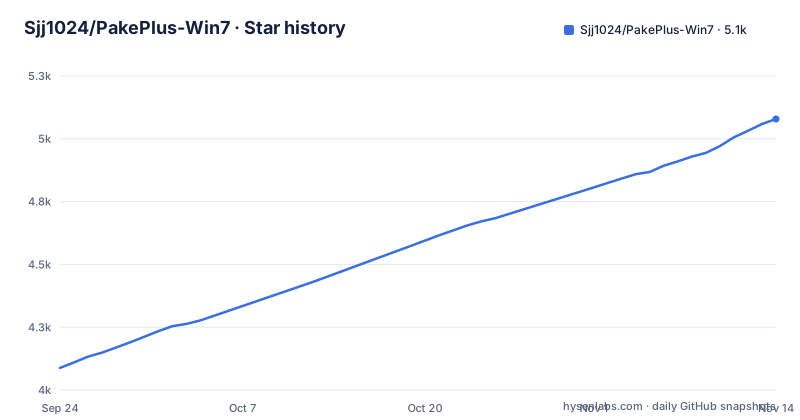
Star history
- Sjj1024/PakePlus-Win75,079 ★ · +991
| Repository | 2026-09-24 | 2026-11-14 |
|---|---|---|
| Sjj1024/PakePlus-Win7 | 4.1k | 5.1k |
991 Stars in the last 51 days, measured from the daily GitHub snapshot. Compare with other projects
Editorial analysis
The front-end code is no longer open source
There is a notice in the readme, and it changes what this repository is.
It says that because individuals have used the project to package illegal software, which violates its intended purpose, the front-end code will no longer be open source. And that if such behaviour is found again, all code in the project will cease to be open source.
That sits awkwardly beside the rest of the page. The sponsorship section calls it an MIT licensed open source project, and the manifest still declares that licence, and there is a licence file linked from the badges.
So the licence claim and the source availability claim are now different things. The terms under which the code was released have not changed; what the project distributes has.
For a user, nothing changes: you download a binary and it works. For anyone who wants to read the tool, patch it, or contribute to it, the front end is where the work stops, and the readme gives no substitute repository.
The warning also names a category of use the author cannot control, which is a blunt instrument and an honest one at the same time.
Two size claims, on the same page
The page states two sizes, and they describe different things.
The feature list claims roughly twenty times smaller than Electron, less than five megabytes, and ten times faster.
The introduction above it says the tool is only about ten megabytes in size.
So the under-five-megabyte figure is attached to the packaged apps, while the ten-megabyte figure is the size of PacBao itself.
The related claim is the ratio: twenty times smaller and ten times faster than an Electron application. Both figures are attached to the smaller output rather than to the builder, which is a different program entirely.
The builder is an Electron app, the products are Tauri
The tool you install and the applications it produces are built with different frameworks, and the manifest makes that explicit.
"main": "src-electron/main.js",
"start": "electron ."
The builder is an Electron application, and the build scripts call a packaging tool for Electron. Its pinned runtime is version 22 of Electron.
What it produces is described as built with Rust Tauri, with the Tauri command line interface as a development dependency and an icon script that shells out to the Tauri icon generator.
So the size advantage is a property of the output, not of the tool. You install an Electron application in order to generate a Rust application that is much smaller than an Electron one.
The same pattern appears in the mobile claim. Mobile packaging is described as using native frameworks, smaller and faster than the Rust Tauri version, which means there are at least three toolchains in play: Electron for the builder, Tauri for desktop, and something native for phones.
An image processing library and two icon conversion libraries are also development dependencies, because generating icons for five platforms is part of the job.
The name carries a 32-bit Windows constraint
Everything about this repository is named for a version of Windows.
The package is called PakePlusWin7, the application identifier ends in win7, and the product name in the build configuration repeats it.
The build scripts show what that means in practice, because they enumerate architectures explicitly: a 32-bit Windows build alongside 64-bit and ARM64 Windows builds, an Apple build alongside an ARM64 Apple build, and a Linux build alongside an ARM64 Linux build.
The 32-bit target is the interesting one. It is not a build most modern tooling offers by default, and it exists because a 32-bit binary is what runs on the older Windows releases the project is named after.
That also explains why the project exists at all, in the readme's own framing. The use cases list includes wanting to use the Rust Tauri framework but finding the environment too heavy, and one entry is specifically about running a game engine project as a cross-platform client.
So the name is a feature statement. The price is that the tool carries a build target almost no current project needs.
Two packaging paths, and only one needs a token
The getting started section offers two routes, and they differ in what they require from you.
The first is cloud packaging: configure a GitHub token, create a project, and the build runs as a workflow, so no complex dependencies are installed locally. The feature list names the automation service explicitly.
The second is local packaging, which needs no token and no dependent environments, and which the page claims takes about thirty seconds.
One of those claims is a security claim. The token is stored only locally, and the project stays in your own repository rather than being uploaded anywhere.
That is the reason the token option exists at all. If the build happens on someone else's infrastructure, that infrastructure needs a way to reach your repository, and a token is that mechanism. Choosing local packaging removes the question.
The rest of the configuration is a UI: a debug mode for previewing and releasing, a system language following setting, and a name field that accepts Chinese characters for the packaged application.
Two lockfiles and a script that throws away your work
The repository root has both a package lock file and a pnpm lock file, for the same project.
That is what happens when a project is built with one package manager and then used with another, and it means a contributor has no way to tell from the repository which manager the maintainer actually runs, since both resolutions are committed.
There is also a script whose entire purpose is to discard local changes.
"restore": "git restore ."Run in a repository, that restores every tracked file to its committed state. It is convenient when a generated file or an edited configuration has gone wrong and you want a clean start.
It is also the kind of script people run reflexively when something is broken, in a repository where the source you are working on may be the only copy of someone's changes.
The rest of the tree is small and conventional: a source directory for the tool's own front end, a directory for the Electron main process, a scripts directory with a worker entry point, a Tauri configuration file, a documentation directory, an icon source image and a generated icons directory.
The three language versions live in three different places
The readme has a language switcher with three entries, and none of them is another file in this repository.
English is one file in the repository. Simplified Chinese is a page hosted on a Netlify address. Japanese is a link to a discussion thread, and the discussion is in a different repository with a similar but not identical name.
So a reader of the Chinese version is reading a page whose build is somewhere else, and a reader of the Japanese version is being sent into a forum post in a neighbouring project.
The same pattern appears in the rest of the links. The guide lives on its own domain, the web version of the tool is on a pages address, and the latest version is announced on the release page of a differently named repository.
The build badges tell the same story: one workflow for the build, and a deploy link pointing at a hosting provider's dashboard for this project.
None of this is broken. It is a distributed project whose documentation, translations and releases each live in whichever place suited the content, and the practical cost is that a reader following the switcher leaves the repository.
Editorial conclusion
Use PakePlus-Win7 if you want a working desktop or mobile shell around something you already have, a URL or a static build, and you would rather not set up a Rust toolchain. The tool handles both paths, cloud packaging through GitHub Actions with a token and local packaging without one. Check three things before you commit. The licence position has changed, since the readme says the front-end code is closed while the manifest still says MIT, so read that notice before you contribute or redistribute. The builder runs on Electron, so the tool you install is not the lightweight thing it produces. And the packaged app is a web view with script injection, which is a capability rather than a limitation, but it means the app is only as trustworthy as the site it points at.
Frequently asked questions
What is PakePlus-Win7?
It turns a webpage, an HTML page, or a compiled Vue or React project into a desktop or mobile application using Rust Tauri. It supports macOS, Windows, Linux, Android and iOS, and the page claims the output is far smaller and faster than an Electron application.
Is PakePlus-Win7 still open source?
Partly. The readme says the front-end code is no longer open source because individuals used the project to package illegal software, and warns that all code will stop being open source if that recurs. The manifest still declares the MIT licence and the readme still calls it an MIT licensed open source project.
Do I need a GitHub token to use PakePlus-Win7?
Only for cloud packaging. Local packaging needs no token and no dependent environments and is described as taking about thirty seconds. When you do use a token it is stored locally, and the project stays in your own repository.
Which platforms can PakePlus-Win7 build for?
The readme says it supports Mac, Windows, Linux, Android and iOS, with Android and iOS packaged through native frameworks. Mobile output is described as smaller and faster than the desktop Tauri build.
What can I inject into a page I package with PakePlus-Win7?
Custom JavaScript, and the readme says scripts can call system level APIs, with downloading files, executing commands and opening new windows given as examples. Debug mode is available during preview and release.
Where are the translations of the PakePlus-Win7 documentation?
English is a file in the repository, Simplified Chinese is hosted on a Netlify address, and the Japanese version is a link to a discussion in a different repository. The guide itself lives on a separate domain.
Official sources
Add this badge to your README
If you maintain this project, the badge below links readers to this analysis and shows its maintenance status from the daily GitHub snapshot. Paste the markdown into your README; add ?metric=license or ?metric=stars to the image URL for a different field.

[](https://hysenlabs.com/projects/sjj1024-pakeplus-win7)Star history chart for your README
[](https://hysenlabs.com/projects/sjj1024-pakeplus-win7)Was this useful?